
1. Pengenalan
Thank you for choosing the johgee 3-Zone Watering Timer. This device is designed to automate your garden, lawn, or greenhouse irrigation, providing precise and efficient watering. With three independent outlets, you can customize watering schedules for different areas without interference. This manual provides detailed instructions for installation, programming, operation, and maintenance to ensure optimal performance and longevity of your watering timer.
The johgee 3-Zone Watering Timer is ideal for various applications including drip irrigation systems, sprinkler controllers, and pond filling. Its robust design features a brass material interface and IPX5 waterproofing for durability and reliability in outdoor environments.
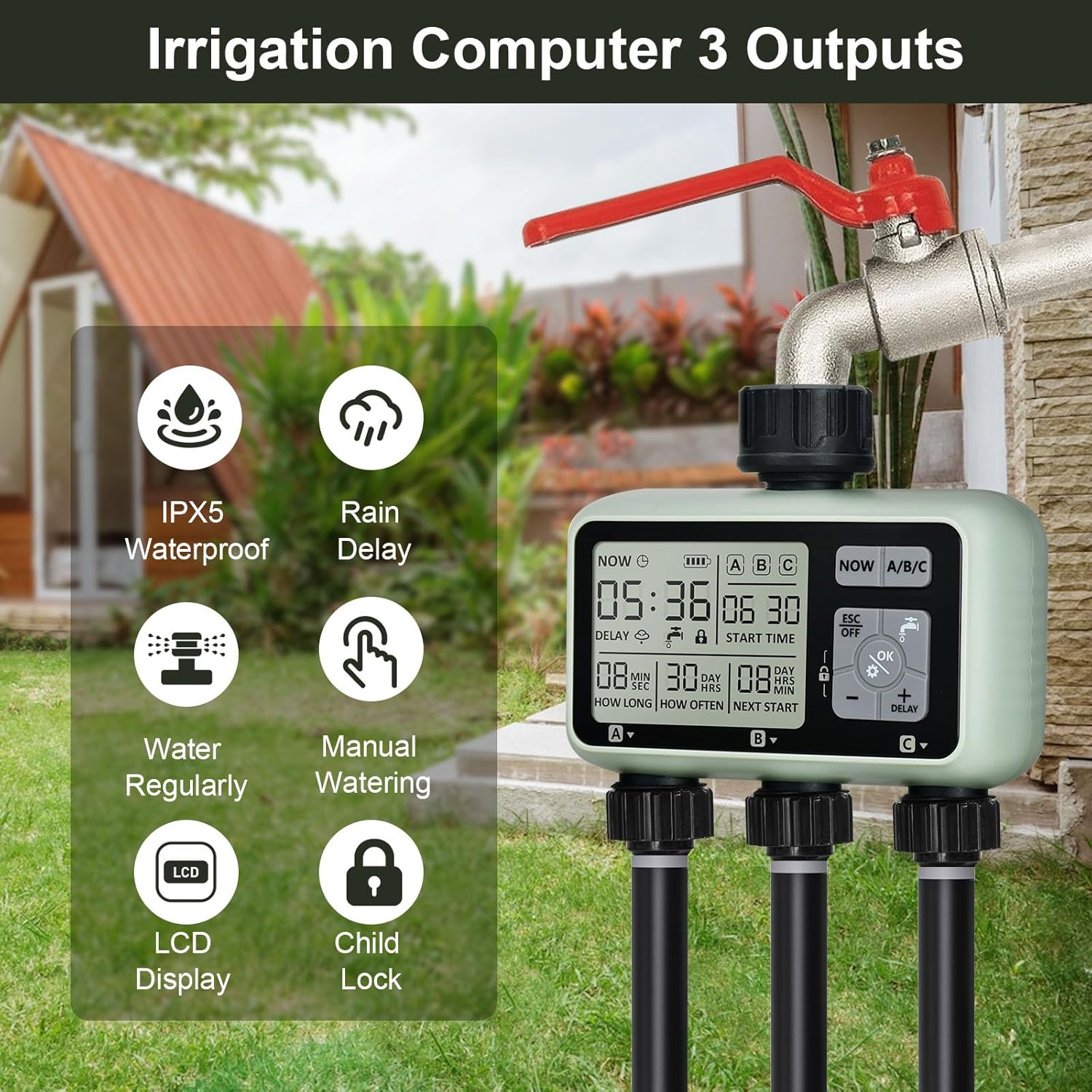
Imej: Selesaiview of the johgee 3-Zone Watering Timer highlighting its key features such as IPX5 waterproofing, rain delay, regular watering, manual watering, LCD display, and child lock function.
2. Maklumat Keselamatan
- Keselamatan Bateri: Use only two 1.5V alkaline batteries (AA size). Do not use lithium batteries. Ensure correct polarity when inserting batteries. Remove batteries if the timer will not be used for an extended period.
- Tekanan Air: The timer is designed to withstand water pressure between 0.05-0.8 Mpa. Do not exceed recommended pressure.
- Suhu: Do not expose the timer to freezing temperatures. Drain water and store indoors during winter months to prevent damage.
- Keselamatan Kanak-kanak: The timer includes a child-lock mode to prevent accidental operation. Keep the device out of reach of small children when not in use.
- Pemasangan: Ensure all connections are secure to prevent leaks. Do not overtighten connections.
3. Kandungan Pakej
Sila semak kandungan pakej untuk memastikan semua item ada:
- johgee 3-Zone Watering Timer (1 unit)
- Manual Pengguna (dokumen ini)
Note: 1.5V AA alkaline batteries are not included and must be purchased separately.
4. Produk Lebihview
The johgee 3-Zone Watering Timer features a clear LCD display and intuitive controls for easy programming. Below is a diagram illustrating the main components and display elements.

Image: Labeled diagram of the timer's display, indicating the positions of Current Time, Irrigation Start Time, Irrigation Duration, Irrigation Frequency, Duration to Next Irrigation, and the three independent zones (Zone 1, Zone 2, Zone 3).
Elemen Paparan:
- SEKARANG: Memaparkan masa semasa.
- Penunjuk Bateri: Shows remaining battery power.
- A/B/C: Indicates the currently selected watering zone.
- MASA MULA: The programmed time for irrigation to begin.
- BERAPA LAMA: The duration of each watering cycle (1 second to 360 minutes).
- BERAPA KERAP: The frequency of watering (1 hour to 15 days).
- NEXT START: Countdown to the next scheduled watering cycle.
- KELEWATAN: Indicates rain delay is active.
- Ikon Kunci Kanak-kanak: Indicates child lock mode is active.
Butang Kawalan:
- SEKARANG: Digunakan untuk menetapkan masa semasa.
- A/B/C: Selects the watering zone (Zone 1, Zone 2, or Zone 3) for programming.
- ESC/OFF: Exits current setting mode or turns off the timer.
- OK/Gear Icon: Confirms settings or enters programming mode.
- Water Faucet Icon: Activates or deactivates manual watering.
- Tolak (-): Decreases values or navigates backward.
- Plus (+)/DELAY: Increases values or activates rain delay.
- Ikon Kunci: Activates or deactivates child lock.
5. Pemasangan
Follow these steps to install your johgee 3-Zone Watering Timer:
- Masukkan Bateri: Open the battery compartment cover on the back of the timer. Insert two new 1.5V AA alkaline batteries, ensuring correct polarity. Close the cover securely to maintain the IPX5 waterproof rating.
- Connect to Faucet: Screw the timer's inlet connector onto your outdoor hose faucet. The brass material interface ensures a secure and leak-proof connection. The 360-degree rotatable connector allows for flexible positioning.
- Sambungkan Hos: Attach your garden hoses or irrigation lines to the three independent outlets at the bottom of the timer. Ensure all connections are tight to prevent leaks.

Image: The battery compartment with two AA batteries inserted, demonstrating the correct battery placement.

Imej: A terperinci view of the 360-degree rotatable brass connection, emphasizing its durability and ease of installation.

Image: A visual guide showing the three main steps for setting up the watering timer: battery insertion, timer programming, and connecting to the water source and irrigation lines.
6. Persediaan dan Pengaturcaraan
The timer allows for individual programming of each of its three zones (A, B, C).
6.1. Menetapkan Masa Semasa
- Tekan ke SEKARANG butang. Paparan masa akan berkelip.
- Gunakan + dan - butang untuk melaraskan jam.
- Tekan OK to confirm the hour and move to minutes.
- Gunakan + dan - butang untuk melaraskan minit.
- Tekan OK untuk menjimatkan masa semasa.
6.2. Programming Watering Schedules (for each Zone A, B, C)
Each zone can be programmed independently. Repeat these steps for Zone A, Zone B, and Zone C.
- Pilih Zon: Tekan ke A / B / C button to cycle through and select the desired zone (A, B, or C) you wish to program. The selected zone will be highlighted on the display.
- Masukkan Mod Pengaturcaraan: Tekan ke OK button (with the gear icon). The 'START TIME' will begin to flash.
- Tetapkan Masa Mula: Gunakan + dan - buttons to set the desired start time for watering. Press OK to confirm and move to 'HOW LONG'.
- Tetapkan Tempoh Penyiraman: Gunakan + dan - buttons to set the duration of watering (from 1 second to 360 minutes). Press OK to confirm and move to 'HOW OFTEN'.
- Tetapkan Kekerapan Penyiraman: Gunakan + dan - buttons to set how often the watering occurs (from 1 hour to 15 days). Press OK untuk mengesahkan.
- Simpan Tetapan: Tekan ESC to exit the programming mode and save the settings for the selected zone.

Image: The timer's display illustrating how different watering durations and frequencies can be set for each of the three zones independently.
7. Mod Operasi
7.1. Automatic Watering
Once programmed, the timer will automatically activate the selected zones according to their set start times, durations, and frequencies. Ensure the faucet is open for water flow.
7.2. Penyiraman Manual
Manual mode allows for immediate watering without affecting the programmed schedule. This is useful for quick tasks like filling a bucket or spot watering.
- Tekan ke Ikon Keran Air butang.
- The display will show 'ON' and water will begin to flow from the currently selected zone.
- To stop manual watering, press the Ikon Keran Air button again. The display will show 'OFF'.

Image: A hand interacting with the timer's control panel, specifically pressing the manual watering button, while a hose sprays water, demonstrating the manual watering feature.
7.3. Rain Delay Mode
The rain delay function temporarily suspends the watering schedule to prevent overwatering during rainy periods, conserving water and protecting plants.
- Tekan ke + DELAY butang.
- The 'DELAY' icon will appear on the screen, and the next start time will be updated to reflect the delay.
- To cancel the rain delay, press the + DELAY button again until the 'DELAY' icon disappears.
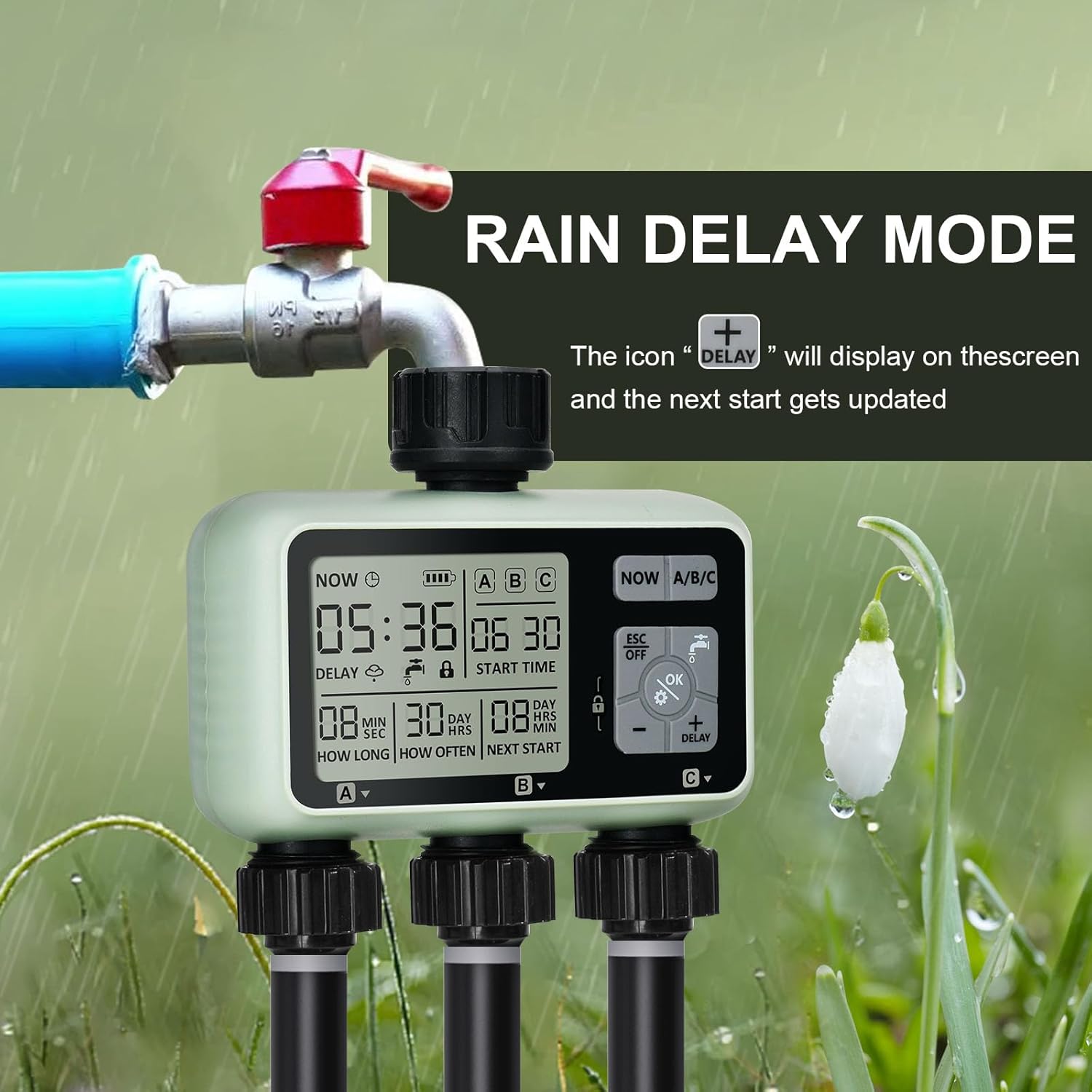
Image: The watering timer connected to a faucet, with the display showing the 'DELAY' icon, signifying that the rain delay function is active and the next watering cycle is postponed.
7.4. Child-Lock Mode
The child-lock mode prevents accidental changes to programming or activation by children or pets.
- Untuk mengaktifkan, tekan dan tahan butang Ikon Kunci button for 3 seconds. The lock icon will appear on the display.
- Untuk menyahaktifkan, tekan dan tahan butang Ikon Kunci button for 3 seconds again. The lock icon will disappear.
8. Penyelenggaraan
- Penggantian Bateri: The intelligent power supply system will detect low battery and turn off the timer before the battery is completely empty. Replace batteries when the battery indicator on the display shows low power. Always use two new 1.5V AA alkaline batteries.
- Pembersihan: Bersihkan bahagian luar pemasa dengan kain lembutamp kain. Jangan gunakan pembersih atau pelarut yang melelas.
- Pembersihan Penapis: Periodically check the aluminum filter inside the inlet connection for debris. Clean if necessary to ensure proper water flow and prevent blockages.
- Penyimpanan Musim Sejuk: Before the first frost, disconnect the timer from the faucet. Drain all water from the timer and store it indoors in a dry, frost-free location. Removing batteries during storage is recommended.

Image: A composite image highlighting the durable construction of the timer, including the brass hose connection, the clear and easy-to-use control panel, and the sealed battery cover designed to isolate moisture.
9. Penyelesaian masalah
| Masalah | Kemungkinan Punca | Penyelesaian |
|---|---|---|
| Pemasa tidak menyiram pada waktu yang dijadualkan. |
|
|
| Air bocor dari sambungan. |
|
|
| Paparan kosong atau malap. |
|
|
| Manual watering not working. |
|
|
10. Spesifikasi
| Jenama | johgee |
| Nombor Model | 378 |
| warna | 3 Zon |
| Dimensi Produk | 13 x 13.5 x 6.4 cm |
| Berat Barang | 640 g |
| bahan | Brass (interface), Reinforced Nylon (connector) |
| Penilaian Kalis Air | IPX5 |
| Julat Tekanan Air | 0.05-0.8 Mpa |
| Sumber Kuasa | 2 x Bateri Alkali AA 1.5V (tidak termasuk) |
| Tempoh Penyiraman | 1 saat hingga 360 minit |
| Kekerapan Penyiraman | 1 jam hingga 15 hari |
| Bilangan Tetapan | 9 |
11. Waranti dan Sokongan
For warranty information and customer support, please refer to the purchase platform or contact johgee customer service directly. Keep your purchase receipt as proof of purchase for any warranty claims.
Pengeluar: johgee
Tempat Perniagaan: johgee
For further assistance, please visit the official johgee store on Amazon or contact their support channels.