
KUIDAMOS T80
KUIDAMOS T80 Intelligent Pressure Controller User Manual
Model: T80
1. Pengenalan
This manual provides comprehensive instructions for the installation, operation, and maintenance of the KUIDAMOS T80 Intelligent Pressure Controller. The T80 is a 4-20mA level transmitter with a light column display, designed for accurate liquid level measurement in various applications such as urban water supply, high-rise pools, and sewage treatment facilities.
Sila baca manual ini dengan teliti sebelum menggunakan peranti ini untuk memastikan fungsi dan keselamatan yang betul.
2. Spesifikasi
| Ciri | Spesifikasi |
|---|---|
| Model | T80 |
| Input Voltage | AC220V |
| Isyarat Output | 4-20mA |
| Measuring Medium | Liquid (water, oil, sewage) |
| Dimensi Produk | 6.69 x 4.72 x 3.54 inci |
| Berat badan | Approx. 1.14 Pounds (521g) |
| Teknologi Sensor | Diffusion Silicon Sensor |
| Reka Bentuk Probe | Stainless steel sealing structure, silicone oil filling |
| Pampasan Suhu | Effective up to 200 meters depth |
| Nombor Model Item | KUIDAMOS9xgd14vr6o |
3. Product Components and Display Overview
The KUIDAMOS T80 Intelligent Pressure Controller features a clear display and intuitive controls. Familiarize yourself with the components before installation and operation.

Gambar 3.1: Susun atur Panel Depan
This image displays the front panel of the T80 controller. Key elements include the light column display indicating measurement levels, the digital PV display for precise readings, and control buttons: SET (confirm), UP (increase), DOWN (decrease), and MOBILE (shift/move).
- Measuring Light Column Display: Visual representation of the liquid level, ranging from 0 to 100.
- Measuring Display (PV): Digital readout of the current measured value.
- Penunjuk Penggera:
- AHH: Ultimate Upper Limit Alarm Switch
- AH: Upper Limit Alarm Switch
- AL: Lower Limit Alarm Switch
- SEMUA: Ultimate Lower Limit Alarm Switch
- Butang Kawalan:
- SET: Digunakan untuk memasuki mod tetapan dan mengesahkan pilihan.
- ATAS (▲): Meningkatkan nilai atau menavigasi ke atas dalam menu.
- TURUN (▼): Mengurangkan nilai atau menavigasi ke bawah dalam menu.
- MOBILE (◄): Shifts cursor or moves between digits during setting.
4. Pemasangan dan Pendawaian
Proper installation and wiring are crucial for the safe and accurate operation of the T80 controller. Ensure all power is disconnected before proceeding with any wiring.
4.1. General Wiring Diagram
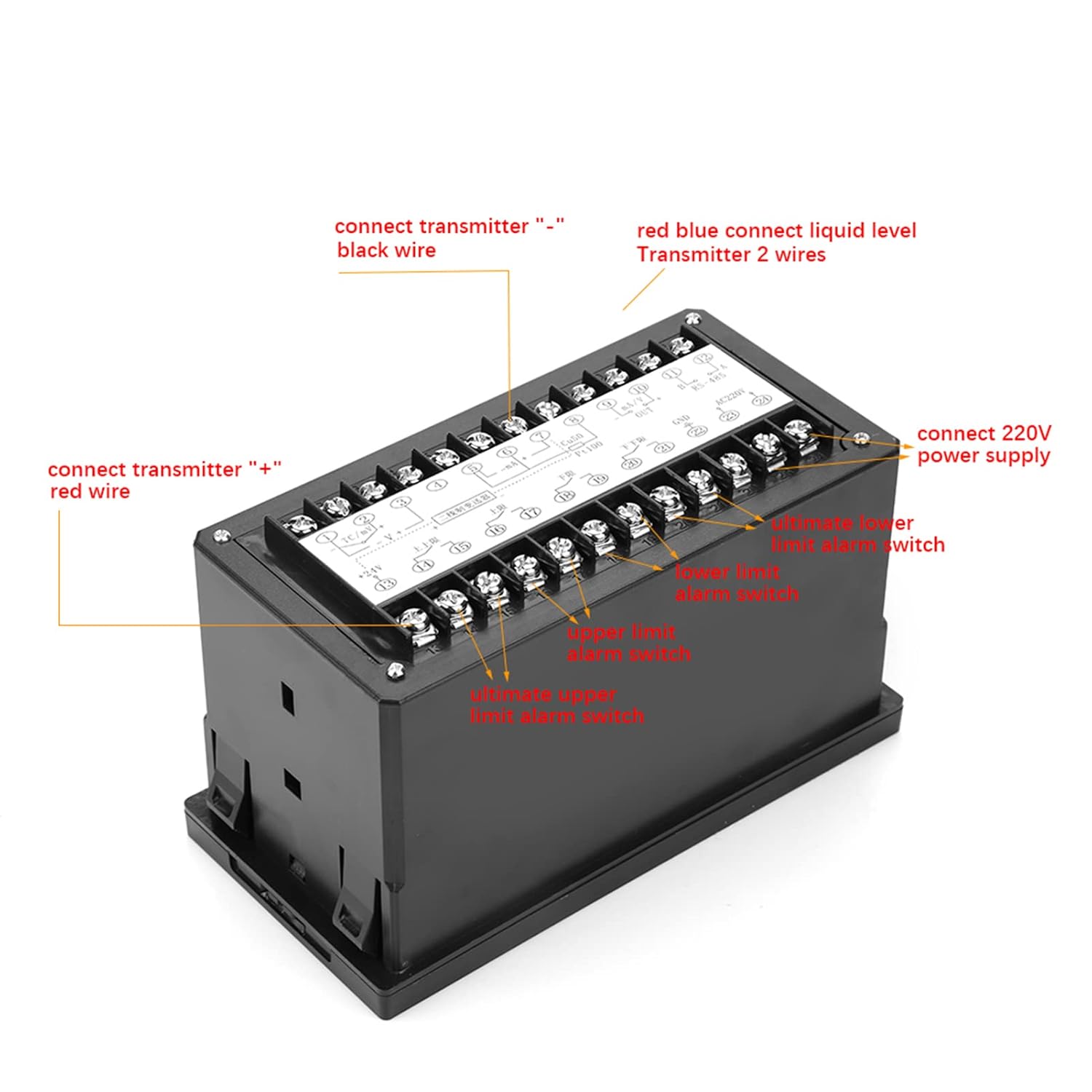
Figure 4.1: General Wiring Connections
This diagram illustrates the general wiring for the T80 controller. Connect the transmitter's black wire to the "-" terminal and the red wire to the "+" terminal. The liquid level transmitter's two wires connect to the red and blue terminals. The AC220V power supply connects to the designated terminals. Additional terminals are available for ultimate upper/lower limit alarm switches and current loop output.
- Sambungan Pemancar:
- Connect the transmitter's negative (-) terminal to the black wire terminal on the controller.
- Connect the transmitter's positive (+) terminal to the red wire terminal on the controller.
- Liquid Level Transmitter: Connect the two wires from the liquid level transmitter to the red and blue terminals as indicated.
- Bekalan Kuasa: Connect the AC220V power supply to the terminals labeled for AC220V.
- Alarm Switches: Connect ultimate upper/lower limit alarm switches to their respective terminals.
- Current Loop Output: Connect current loop output to the designated terminals.
4.2. Drain Wiring Diagram

Figure 4.2: Drain Wiring Configuration
This diagram illustrates a specific wiring configuration for drain applications. Water level probe 'A' (positive) and probe 'B' (negative) are connected to their respective terminals. Terminals 'C' and 'D' are for connecting a pump and electromagnetic valve (if current exceeds 3A, use a contactor) for upper limit alarm cooperation. Terminals 'E' and 'F' are for connecting the 220V power supply.
- Water Level Probes: Connect Water Level Probe "A" (+) and Probe "B" (-) to the indicated terminals. Refer to the label for exact polarity.
- Pump and Electromagnetic Valve: Connect the pump and electromagnetic valve to terminals C and D. If the current exceeds 3A, a contactor must be used in conjunction with the upper limit alarm.
- Bekalan Kuasa: Connect the 220V power supply to terminals E and F.
Penting: Always ensure correct polarity and voltage connections to prevent damage to the device and ensure safe operation.
5. Operasi
The T80 controller provides real-time liquid level measurement and control. Follow these steps for basic operation.
5.1. Power On and Initial Display
Upon powering on the device, the light column display will illuminate, indicating the current liquid level. The PV display will show the precise numerical value.

Figure 5.1: Controller in Operation
This image shows the T80 controller's front panel during operation, with the light column indicating a level and the digital display showing a numerical value. This is the primary interface for monitoring liquid levels.
5.2. Setting Alarm Limits
The T80 allows for setting various alarm limits (AHH, AH, AL, ALL) to trigger external actions or alerts. Refer to the detailed programming guide (if available separately) for specific parameter settings. Generally, the SET button is used to enter and confirm settings, while UP/DOWN buttons adjust values, and the MOBILE button shifts the cursor.
5.3. Liquid Level Measurement Application Example

Figure 5.2: Liquid Level Measurement Setup
This diagram illustrates a typical application where the T80 controller monitors the liquid level in a tank. When the level drops, the controller activates an AC contactor, which in turn starts a pump to fill the tank, demonstrating automatic liquid level control.
In a typical liquid level control scenario, the T80 monitors the tank's liquid level. When the level falls below a preset threshold (e.g., AL or ALL), the controller can activate an external device, such as an AC contactor, to start a pump. The pump then fills the tank until the liquid reaches an upper threshold (e.g., AH or AHH), at which point the controller deactivates the pump.
6. Penyelenggaraan
To ensure the longevity and accurate performance of your KUIDAMOS T80 Intelligent Pressure Controller, follow these maintenance guidelines:
- Pembersihan tetap: Keep the display and housing clean using a soft, dry cloth. Avoid abrasive cleaners or solvents.
- Pemeriksaan Siasatan: Periodically inspect the transmitter probe for any buildup of sediment or foreign material, especially in applications involving sewage or viscous liquids. Clean the probe gently if necessary, ensuring not to damage the sensor.
- Pemeriksaan pendawaian: Annually, or as needed, inspect all wiring connections for tightness and signs of corrosion or damage. Loose connections can lead to intermittent operation or device failure.
- Keadaan Persekitaran: Ensure the controller is operating within its specified environmental conditions (temperature, humidity) to prevent premature wear.
- Penentukuran: If you suspect inaccurate readings, consult a qualified technician for recalibration. The T80 utilizes diffusion silicon sensor technology for stable measurements, but environmental factors or prolonged use may necessitate calibration checks.
7. Penyelesaian masalah
This section addresses common issues you might encounter with the T80 Intelligent Pressure Controller. If the problem persists after attempting these solutions, contact customer support.
| Masalah | Kemungkinan Punca | Penyelesaian |
|---|---|---|
| Tiada paparan/Matikan kuasa | No power supply; Loose power connection; Blown fuse. | Check AC220V power supply. Ensure connections are secure. Check and replace fuse if necessary. |
| Bacaan tidak tepat | Sensor probe fouled; Incorrect calibration; Wiring issues. | Clean the sensor probe. Verify calibration settings. Check transmitter wiring for correct polarity and secure connections. |
| Penggera tidak berfungsi | Alarm limits set incorrectly; External device (pump/valve) not connected or faulty; Wiring issues. | Review alarm limit settings (AHH, AH, AL, ALL). Check connections to external devices. Test external devices independently. |
| Operasi sekejap-sekejap | Loose wiring connections; Electrical interference; Faulty component. | Inspect all wiring for secure connections. Ensure proper grounding. If problem persists, contact support. |
8. Waranti dan Sokongan
For warranty information or technical support, please refer to the product packaging or contact KUIDAMOS customer service directly. Ensure you have your product model (T80) and purchase details available when contacting support.
Pengeluar: KUIDAMOS
model: T80
Tarikh Mula-mula Tersedia: 16 Mei 2024
Untuk bantuan lanjut, sila layari KUIDAMOS Store on Amazon.
Ask a question about this manual
Ask about setup, troubleshooting, compatibility, parts, safety, or missing instructions. Manuals+ will review the question and use this page’s manual context to help answer it.