
1. Arahan Keselamatan Penting
When using electrical appliances, basic safety precautions should always be followed to reduce the risk of fire, electric shock, and personal injury. Read all instructions carefully before using the Milex Digital Steam Iron.
- Sentiasa pastikan voltage pada label penarafan sepadan dengan volum utama andatage.
- Jangan rendam seterika, kord kuasa, atau palamkan ke dalam air atau cecair lain.
- Cabut plag seterika dari salur keluar elektrik apabila mengisi dengan air, mengosongkan atau apabila tidak digunakan.
- Jangan kendalikan sebarang perkakas dengan kord atau palam yang rosak, atau selepas perkakas tidak berfungsi atau terjatuh atau rosak dalam apa jua cara.
- Jauhkan seterika dan kordnya daripada kanak-kanak dan haiwan peliharaan apabila ia dihidupkan atau disejukkan.
- Never leave the iron unattended while it is connected to the power supply or on an ironing board.
- Gunakan seterika hanya untuk kegunaan isi rumah yang dimaksudkan.
- The soleplate of the iron can become extremely hot. Avoid direct contact with the hot soleplate.
- Sentiasa letakkan seterika pada permukaan yang stabil dan tahan panas semasa berehat.
2. Produk Lebihview
The Milex Digital Steam Iron MSI004 is designed for efficient garment care. Familiarize yourself with its components before use.
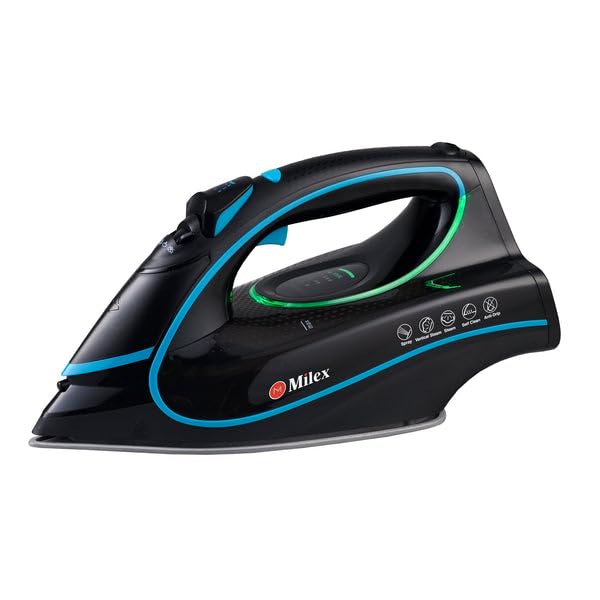
Figure 1: Milex Digital Steam Iron (3/4 view)
This image displays the Milex Digital Steam Iron from a three-quarter angle, highlighting its sleek black design with blue and green accents. Key features visible include the handle, water tank, and the general shape of the soleplate.
Komponen:
- Water Spray Nozzle: For moistening fabrics.
- Saluran Masuk Pengisian Air: Where water is added to the tank.
- Steam Control Dial/Buttons: To adjust steam output.
- Temperature Control Dial/Buttons: To select desired heat setting.
- Paparan led: Shows current settings.
- pemegang: For gripping the iron.
- Tangki Air: Reservoir for water.
- Tapak tapak: The heated surface that glides over fabric.
- Kord Kuasa: Menyambungkan seterika ke salur keluar elektrik.

Figure 2: Ceramic Soleplate
Imej ini menyediakan jarak dekat view of the ceramic soleplate, showing its textured surface and steam vents designed for even heat distribution and smooth gliding.
3. Persediaan dan Penggunaan Pertama
3.1 Membongkar
- Remove the iron from its packaging.
- Remove any protective film or stickers from the soleplate.
- Inspect the iron for any signs of damage. If damaged, do not use and contact customer support.
3.2 Mengisi Tangki Air
- Pastikan seterika dicabut dari salur keluar kuasa.
- Set the steam control to the "Dry Ironing" position (if applicable).
- Buka penutup salur masuk pengisian air.
- Using a measuring cup, carefully pour clean tap water into the water tank up to the "MAX" fill line. Do not overfill.
- Tutup penutup salur masuk pengisian air dengan selamat.
Nota: For areas with hard water, it is recommended to use a mixture of 50% tap water and 50% distilled water to prevent mineral buildup. Never use perfumed water, vinegar, starch, or descaling agents in the water tank.
4. Arahan Operasi
4.1 Bersedia untuk Menyeterika
- Sort garments according to fabric type (e.g., linen, cotton, wool, silk, synthetics).
- Semak label penjagaan pakaian untuk mengetahui suhu menyeterika yang disyorkan.
- Plug the iron into a suitable electrical outlet. The LED display will illuminate.
4.2 Menetapkan Suhu dan Wap
- Use the temperature control buttons to select the appropriate heat setting for your fabric. The LED display will show the selected temperature.
- Allow the iron to heat up until the indicator light (if present) or LED display confirms it has reached the desired temperature.
- For steam ironing, ensure the water tank is filled. Adjust the steam control to the desired steam level. Steam is typically available at higher temperature settings.
- For dry ironing, ensure the water tank is empty or the steam control is set to "Dry Ironing".
4.3 Using Steam Functions
- Stim Berterusan: Select a steam setting on the control. Steam will be continuously emitted from the soleplate.
- Pecah wap: Press the "Burst" button for an extra shot of steam to remove stubborn wrinkles. Wait a few seconds between bursts.
- Semburan Air: Press the "Spray" button to lightly moisten fabric before ironing.
4.4 Auto-Shutoff Feature
The iron is equipped with an auto-shutoff safety feature. If left unattended horizontally for a certain period (e.g., 30 seconds) or vertically (e.g., 8 minutes), the heating element will automatically turn off. To reactivate, simply move the iron.
4.5 Sistem Anti Titisan
The anti-drip system prevents water from dripping from the soleplate when the iron is not hot enough to produce steam. This helps prevent water stains on delicate fabrics.
5. Penyelenggaraan dan Pembersihan
Regular maintenance ensures optimal performance and extends the life of your Milex Digital Steam Iron.
5.1 Selepas Setiap Penggunaan
- Cabut plag seterika dan biarkan ia sejuk sepenuhnya.
- Kosongkan baki air dari tangki air.
5.2 Membersihkan Tapak Tapak
- When the soleplate is cool, wipe it with a damp kain dan pembersih tidak kasar jika perlu.
- Do not use abrasive scouring pads or harsh chemicals, as these can damage the ceramic coating.
5.3 Fungsi Pembersihan Kendiri
The iron features a self-cleaning function to remove mineral deposits from the steam vents.
- Isikan tangki air ke garisan MAX.
- Pasangkan seterika dan tetapkan suhu maksimum.
- Setelah seterika mencapai suhu maksimum, cabut plagnya.
- Pegang seterika secara mendatar di atas singki.
- Press and hold the self-clean button (refer to product diagram for location). Hot water and steam will be expelled from the soleplate, flushing out mineral deposits.
- Goncangkan seterika perlahan-lahan ke hadapan dan ke belakang sehingga tangki air kosong.
- Plug the iron back in and allow it to heat up again to dry the soleplate.
- Cabut plag dan simpan setelah sejuk.
5.4 Penyimpanan
Always store the iron upright on its heel rest, with the cord neatly wrapped, once it has completely cooled down and the water tank is empty.
6. Penyelesaian masalah
| Masalah | Kemungkinan Punca | Penyelesaian |
|---|---|---|
| Besi tidak panas. | Tidak dipasang; kuasa outage; auto-shutoff activated; faulty outlet. | Check power connection; check circuit breaker; move iron to reactivate; try a different outlet. |
| Tiada wap atau wap yang tidak mencukupi. | Water tank empty; temperature too low for steam; steam vents clogged; steam control set to "Dry". | Fill water tank; increase temperature setting; perform self-clean; adjust steam control. |
| Air menitis dari tapak tapak. | Temperature too low for steam (anti-drip system working); water tank overfilled. | Meningkatkan suhu; jangan penuhkan tangki air. |
| White flakes or residue on garments. | Mineral buildup in water tank/steam vents. | Perform self-clean function; use distilled water or a mix with tap water. |
7. Spesifikasi
| Nombor Model | MSI004 |
| Jenama | Milex |
| kuasa | 2400W |
| Voltage | 220-240V, 50Hz |
| Fungsi | Dry, Spray, Steam, Burst |
| Bahan Tapak Tapak | Seramik |
| Jenis Paparan | LED |
| Kapasiti Tangki Air | 450ml |
| Ciri Khas | Anti-drip, Auto-shutoff, Lightweight |
| Dimensi Produk (L x W) | 32L x 16W sentimeter |
8. Waranti dan Sokongan Pelanggan
For information regarding warranty coverage, please refer to the warranty card included with your product or contact the retailer where the product was purchased.
If you experience any issues or have questions about your Milex Digital Steam Iron, please contact Milex customer support. You can find more information and contact details on the official Milex webtapak atau melalui Milex Store on Amazon.