
1. Produk Lebihview
The WOOPKER AK35 is a compact 2.0 channel stereo audio amplifier designed for home use. It features Bluetooth 5.0 connectivity, USB and SD card inputs, AUX input, and controls for bass, treble, and master volume. This amplifier delivers clear and powerful sound for various audio setups.
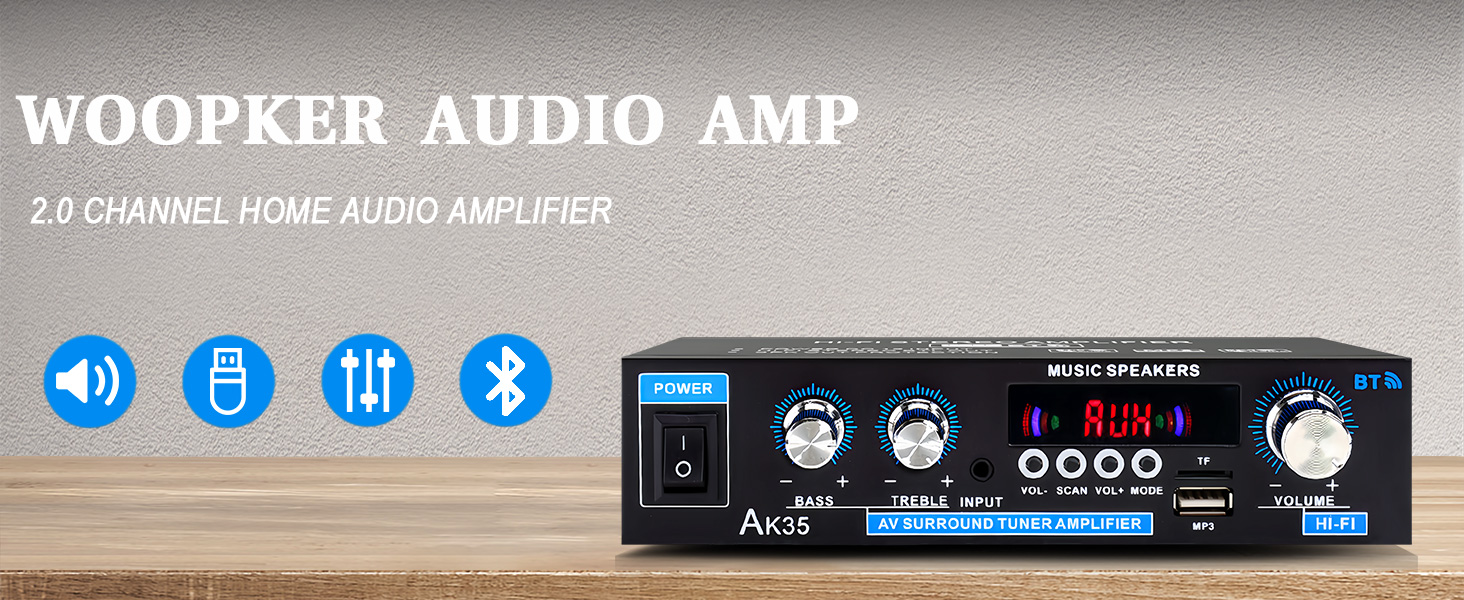
Imej 1.1: Depan view of the AK35 Stereo Audio Amplebih hidup.
2. Kandungan Pakej
Sahkan bahawa semua item terdapat dalam pakej:
- 1x AK35 Audio Amplebih hidup
- 1x Kabel Kuasa
- 1x Manual Pengguna (dokumen ini)
- 1x Alat Kawalan Jauh
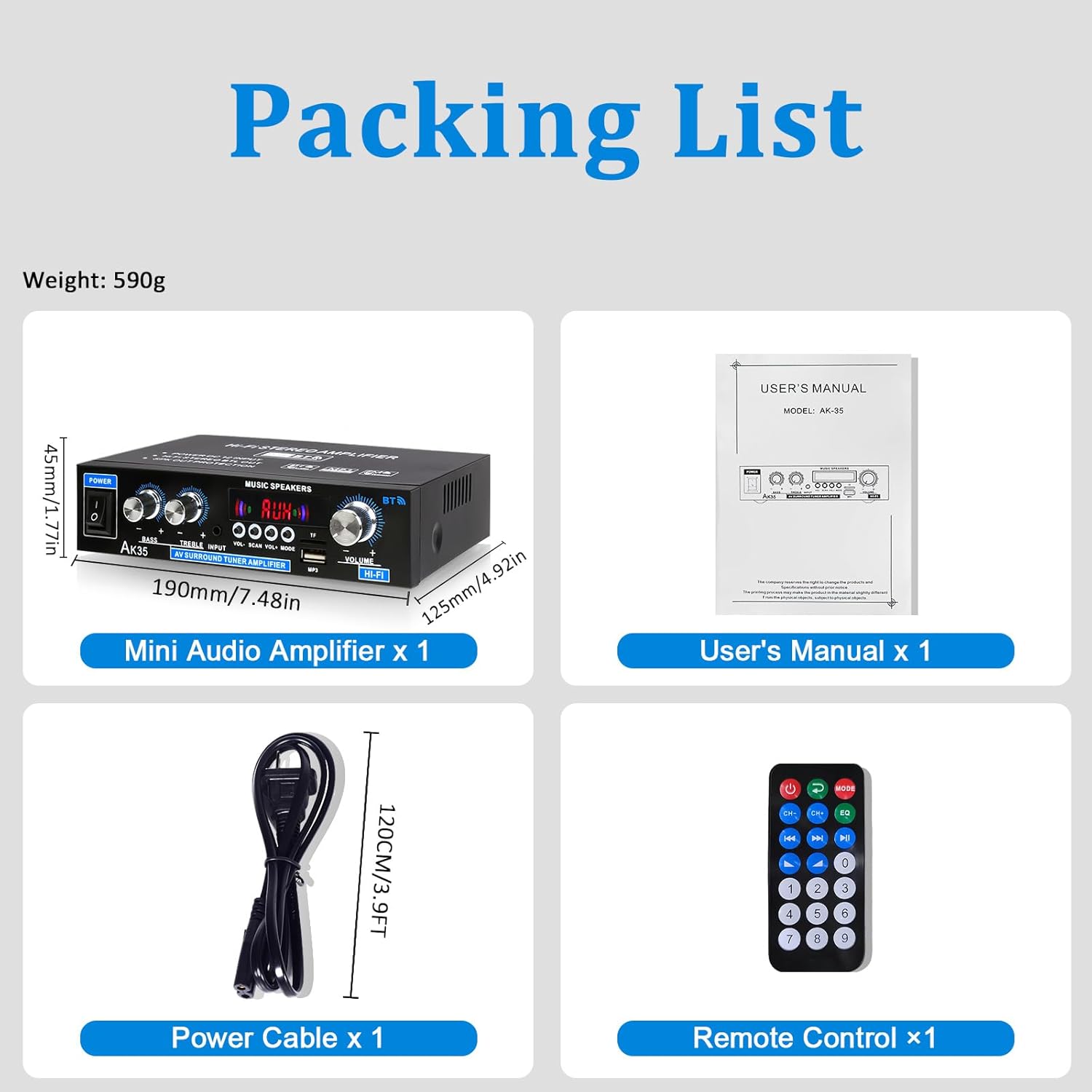
Image 2.1: Contents of the AK35 amppakej penghidrat.
3. Arahan Persediaan
3.1 Kawalan Panel Hadapan
Familiarize yourself with the front panel controls and indicators:

Image 3.1: Front Panel Layout of the AK35 Amplebih hidup.
- Suis kuasa: Berpusing ampLifier HIDUP/MATI.
- Tombol Bes: Melaraskan output audio frekuensi rendah.
- Tombol Treble: Melaraskan output audio frekuensi tinggi.
- Input Audio: Selects the audio source (AUX, USB, SD, Bluetooth, FM).
- Paparan led: Shows current mode, track information, or frequency.
- Jumlah Induk: Mengawal volum keluaran keseluruhan.
- Butang Fungsi: Includes VOL-, SCAN, VOL+, MODE for navigation and control.
- Port TF/USB: For connecting USB flash drives or SD cards (via adapter).
3.2 Sambungan Panel Belakang
Understand the rear panel for proper connectivity:

Image 3.2: Rear Panel Layout of the AK35 Amplebih hidup.
- Audio Input Jack (RCA): Connect external audio sources via RCA cables.
- Speaker Output Jack (L/R): Connect passive speakers.
- Input Kuasa DC 12V/5A: Untuk bekalan kuasa DC.
- AC 110-240V Power Input: For AC power supply.
- Antena Radio FM: Connect the included FM antenna for radio reception.
3.3 Sambungan Pembesar suara
Follow these steps to connect your speakers:

Image 3.3: Speaker Connection Diagram.
- Before connecting speakers, distinguish the positive (+) and negative (-) terminals. The positive terminal is usually red, and the negative terminal is black.
- Tekan pengapit di bahagian belakang AK35 amplifier and insert bare speaker wires into the speaker clasp corresponding to the positive and negative terminals.
- Ensure proper polarity (+ to + and - to -) for both left and right channels.
- Elakkan memasang dan mencabut pemacu USB, kad SD, kabel audio RCA atau kabel pembesar suara semasa amppenyambung dihidupkan.
3.4 Sambungan Kuasa
Connect the power cable to the AC power input on the rear panel and then to a suitable power outlet.
Video 3.4: Demonstrates connecting speaker wires and powering on the AK35 amplebih hidup.
4. Arahan Operasi
4.1 Hidupkan/Mati Kuasa
Flip the Power Switch on the front panel to turn the ampLifier HIDUP atau MATI.
4.2 Pemilihan Mod Input
Press the 'MODE' button on the front panel or remote control to cycle through available input sources: Bluetooth (BT), AUX, USB, SD, and FM Radio.
4.3 Berpasangan Bluetooth
Untuk menyambungkan peranti Bluetooth:
- Tukar amplifier to Bluetooth mode (the LED display will show "BLUE").
- Dayakan Bluetooth pada peranti mudah alih atau komputer anda.
- Cari untuk "AK35" in the list of available devices and select it to pair.
- Setelah dipasangkan, amplifier will confirm the connection, and you can stream audio wirelessly.

Image 4.3: Bluetooth 5.0 connectivity for wireless music streaming.
Video 4.3: Demonstrates Bluetooth pairing and music playback with the AK35 amplebih hidup.
4.4 Main Semula USB/Kad SD
Insert a USB flash drive or an SD card (with an adapter) into the TF/USB port. The amplifier akan bertukar secara automatik ke mod USB/SD dan mula memainkan audio files. Use the Function Buttons (VOL-, SCAN, VOL+) to control playback.
4.5 Penggunaan Input AUX
Connect an external audio source (e.g., CD player, DVD player, computer) to the RCA Audio Input Jacks on the rear panel using an RCA cable. Switch the amplifier to AUX mode to play audio from the connected device.
4.6 Radio FM
Ensure the FM antenna is connected to the rear panel. Switch the amplifier to FM mode. Use the 'SCAN' button to auto-scan and save available radio stations. Use VOL- and VOL+ to navigate through saved stations.
4.7 Volume, Bass, and Treble Adjustment
Adjust the Master Volume knob for overall sound level. Use the Bass and Treble knobs to fine-tune the low and high frequencies according to your preference.

Image 4.7: Remote control for easy adjustment of amptetapan penguat.
5. Penyelenggaraan
5.1 Pembersihan
Lapkan amplifier's exterior with a soft, dry cloth. Do not use liquid cleaners or solvents, as they may damage the finish or internal components.
5.2 Penyimpanan
Apabila tidak digunakan untuk tempoh yang lama, simpan amppenyangga di tempat yang sejuk dan kering jauh dari cahaya matahari langsung dan suhu yang melampau.
6. Penyelesaian masalah
| Masalah | Kemungkinan Punca | Penyelesaian |
|---|---|---|
| Tiada kuasa | Kabel kuasa tidak disambungkan; Suis kuasa dimatikan; Soket kuasa rosak. | Ensure power cable is securely connected. Turn the power switch ON. Test the power outlet with another device. |
| Tiada keluaran bunyi | Incorrect input mode; Speaker wires loose; Volume too low; Audio source issue. | Select the correct input mode. Check speaker wire connections. Increase master volume. Verify audio source is playing and connected correctly. |
| Bluetooth tidak bersambung | Amplifier not in BT mode; Device not in pairing mode; Interference. | Tukar amplifier to BT mode. Ensure your device's Bluetooth is on and searching. Move closer to the amplebih hidup. |
| Kad USB/SD tidak dimainkan | tak betul file format; Card/drive not inserted correctly; Corrupted files. | Pastikan audio files are in supported formats (e.g., MP3). Reinsert the USB drive/SD card. Try a different USB drive/SD card. |
7. Spesifikasi
- model: AK35
- Output Kuasa Puncak: 100W + 100W
- Kuasa Dinilai (RMS): 30W x 2
- Saluran: 2.0
- Versi Bluetooth: 5.0
- Input: AUX (RCA), USB, SD Card, Bluetooth, FM Radio
- Kawalan: Bass, Treble, Master Volume
- Input Kuasa: DC 12V/5A, AC 110-240V
- Berat Barang: 1.28 paun (lebih kurang 580g)
- Dimensi Pakej: 8.03 x 6.93 x 2.13 inci (lebih kurang 20.4 x 17.6 x 5.4 cm)
8. Waranti dan Sokongan
WOOPKER products are designed for reliability and performance. For warranty information or technical support, please refer to the contact details provided with your purchase or visit the official WOOPKER webtapak. Simpan resit pembelian anda untuk tuntutan waranti.