
NXGKET 2AYV7YG-811
NXGKET FRS 2-Way Radio Walkie Talkies User Manual
Model: 2AYV7YG-811
pengenalan
This manual provides detailed instructions for the operation and maintenance of your NXGKET FRS 2-Way Radio Walkie Talkies. Please read this manual thoroughly before using the product to ensure proper function and safety. These walkie talkies are designed for reliable communication in various environments, featuring long-range transmission, durable batteries, and NOAA weather alerts.

Penerangan Imej: This image displays the four NXGKET walkie talkie units included in the pack, showcasing their distinct color options: purple, blue, orange, and yellow.
Produk Selesaiview
Kandungan Pakej
- 4 x NXGKET FRS 2-Way Radio Walkie Talkies
- 4 x Alat Telinga
- 2 x Kabel Pengecas USB-C 2-dalam-1
Ciri-ciri Utama
- Intelligent Control System: Includes auto squelch, auto memory, auto scan, auto power saving, and low battery alarm.
- iVOX Hands-Free Operation: Allows for voice-activated transmission without pressing buttons.
- Reka bentuk tahan lasak: Drop-proof construction.
- Channels and Privacy Codes: 22 FRS channels with 122 privacy codes (2684 combinations).
- NOAA Emergency Weather Alert: Provides alerts for unpredictable weather conditions.
- Bateri boleh dicas semula: Built-in 1200mAh Li-ion battery with overcharge, overvoltage, dan perlindungan litar pintas.
- Pengecasan USB-C: Convenient charging with included 2-in-1 USB-C cables.
- Penghantaran Jarak Jauh: Upgraded custom gain antenna and lossless transmission technology for clear communication.
Pengenalan Komponen
Refer to the diagram below for identification of the walkie talkie components.

Penerangan Imej: A detailed diagram of the NXGKET walkie talkie, highlighting key components such as the antenna, LCD display, PTT button, Power button, Up/Down buttons, Menu/Lock button, Speaker/Mic, Charge Jack (USB-C), and Earphone Jack.
Persediaan
Mengecas Bateri
- Locate the USB-C charging port on the walkie talkie.
- Connect one end of the provided 2-in-1 USB-C charging cable to the walkie talkie's charging port.
- Connect the other end of the USB-C charging cable to a compatible USB power source (e.g., wall adapter, power bank, computer USB port).
- The charging indicator light on the walkie talkie will illuminate to show it is charging.
- A full charge typically provides 3-4 days of use.
- The walkie talkie automatically shuts down after 3-4 hours of non-use to conserve power. Restart it when needed.

Penerangan Imej: Two NXGKET walkie talkies (orange and yellow) connected to USB-C charging cables, illustrating the convenient charging method. The image also compares the built-in 1200mAh Li-ion battery to AAA batteries, highlighting its durability.
Menghidupkan/Mematikan
- Untuk menghidupkan, tekan dan tahan Butang kuasa sehingga skrin LCD menyala.
- Untuk mematikan, tekan dan tahan Butang kuasa sehingga skrin LCD dimatikan.
Arahan Operasi
Selecting Channels and Privacy Codes
- Tekan ke MENU button once to enter channel selection mode. The channel number will flash on the LCD screen.
- Gunakan "+" (Naik) atau "-" (Down) buttons to select your desired channel (1-22).
- Tekan ke MENU button again to enter privacy code selection mode. The privacy code will flash.
- Gunakan "+" (Naik) atau "-" (Down) buttons to select your desired privacy code (1-122).
- Tekan ke MENU button a third time or wait a few seconds for the settings to be saved.
- Penting: For successful communication, all walkie talkies must be set to the same channel and privacy code.
Menghantar dan Menerima
- Untuk menghantar, tekan dan tahan butang PTT (Push-to-Talk) butang dan bercakap dengan jelas ke dalam mikrofon.
- Lepaskan PTT butang untuk berhenti menghantar dan mendengar jawapan.
- The walkie talkie will automatically receive transmissions when not transmitting.
iVOX (Hands-Free Operation)
- The iVOX feature allows for voice-activated transmission without needing to press the PTT button.
- To activate/deactivate iVOX, consult the full user manual for specific button sequences, as this feature often has adjustable sensitivity levels.
Makluman Cuaca Kecemasan NOAA
- To enter the NOAA channel mode, long press the "+" (Up) key. The radio will automatically jump to one of the 11 NOAA channels.
- Tekan ke MENU key to lock the selected NOAA channel.
- Gunakan "+" (Naik) atau "-" (Down) keys to adjust to a different NOAA channel if desired.
- To exit the NOAA channel mode, long press the "+" (Up) key again.

Penerangan Imej: A family hiking through a forest, each carrying an NXGKET walkie talkie. Icons at the bottom represent various weather phenomena like tornadoes, snowstorms, rainstorms, fires, tsunamis, and earthquakes, indicating the NOAA emergency weather alert capability for outdoor safety.
Penyelenggaraan
Penjagaan Bateri
- To maximize battery life, fully charge the walkie talkies before first use.
- Elakkan daripada menghabiskan bateri sepenuhnya secara berkala.
- Store the walkie talkies in a cool, dry place when not in use for extended periods.
- The built-in Li-ion battery includes protection against overcharge, overvoltage, dan litar pintas.
Pembersihan
- Wipe the exterior of the walkie talkie with a soft, damp kain.
- Jangan gunakan bahan kimia atau pembersih kasar.
- Pastikan penutup port pengecas ditutup rapat untuk mengelakkan habuk dan kelembapan daripada masuk.
Menyelesaikan masalah
- Tiada Kuasa: Ensure the battery is charged. Connect the walkie talkie to the charger and verify the charging indicator.
- Tidak Boleh Berkomunikasi: Verify that all walkie talkies are on the same channel and privacy code. Check that the PTT button is being pressed fully during transmission.
- Kualiti Audio/Statik Lemah: Move to an open area with fewer obstructions. Ensure you are within the effective communication range. Check for any interference from other electronic devices.
- Julat Terhad: Range is affected by terrain, weather, and obstructions (buildings, dense foliage). Optimal range is achieved in open areas.
- Bateri Habis Cepat: Ensure the walkie talkie is fully charged. Reduce usage of power-intensive features like continuous transmission.
Spesifikasi
| Jenama | NXGKET |
| Nombor Model | 2AYV7YG-811 |
| Bilangan Saluran | 22 Saluran FRS |
| Kod Privasi | 122 |
| Julat Kekerapan | 462.5500-462.7250MHz, 467.5625-467.7125MHz |
| Julat Percakapan (Maksimum) | Sehingga 3 batu (kawasan terbuka) |
| Jenis Bateri | Bateri Boleh Dicas Semula Li-ion 1200mAh terbina dalam |
| Voltage | 3.6 Volt |
| Ciri Khas | Keypad Lock, Lightweight, Long Range, Rechargeable, Weather Alert (NOAA), VOX |
| Tahap Ketahanan Air | Bukan Tahan Air |
| Berat Barang | 1.37 paun (untuk pek) |
| Dimensi Pakej | 6.65 x 4.72 x 3.15 inci |
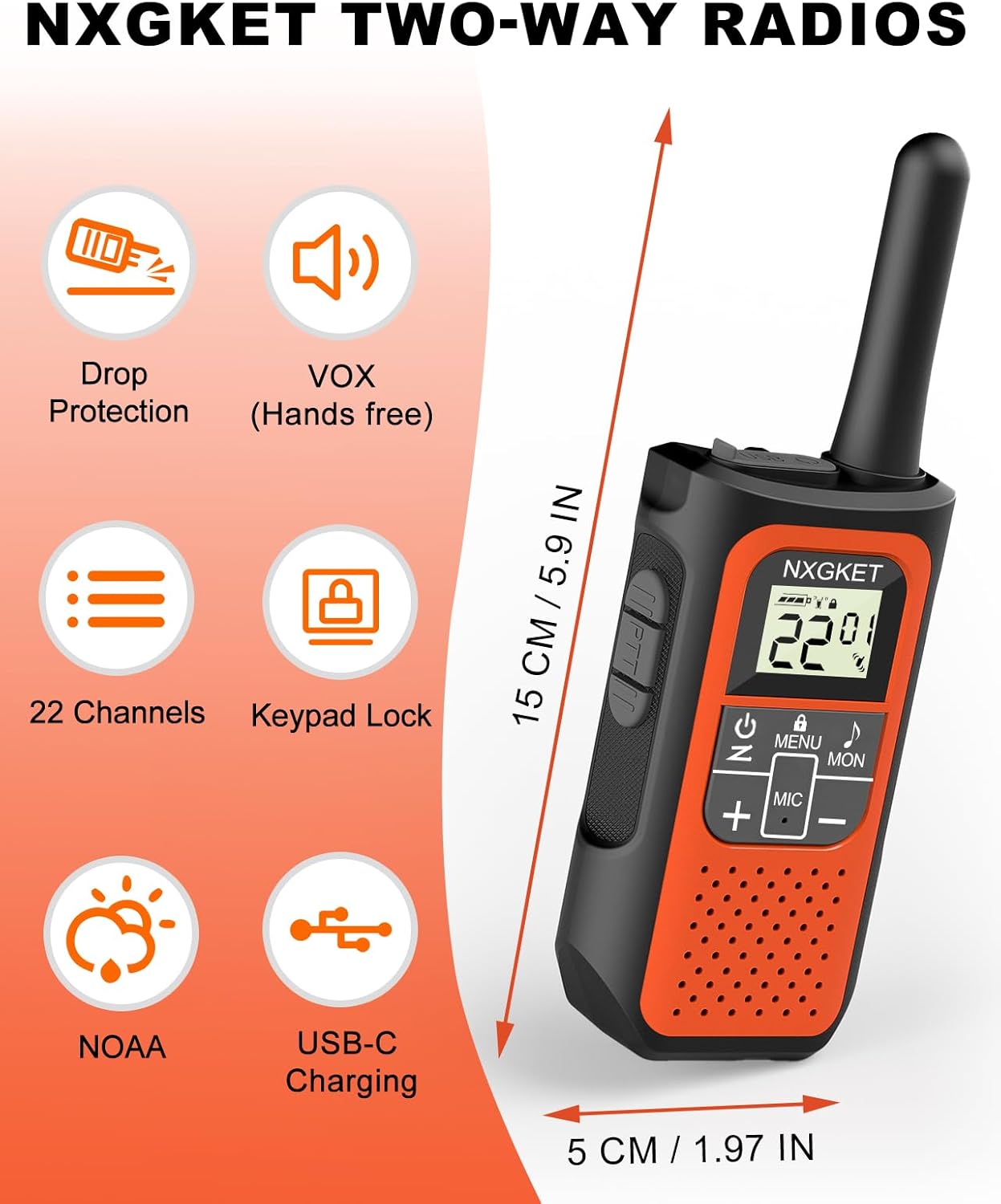
Penerangan Imej: An orange NXGKET two-way radio displayed alongside icons representing its features: Drop Protection, VOX (Hands-free), 22 Channels, Keypad Lock, NOAA, and USB-C Charging. Dimensions of the radio (15 cm / 5.9 inches height, 5 cm / 1.97 inches width) are also indicated.

Penerangan Imej: A graphic titled "Long Range Walkie-Talkies" showing a person on a mountain path using a walkie talkie, with signal waves extending. Text indicates communication ranges: up to 1.5 miles in city and town, up to 3 miles in open water area, and up to 5 miles in mountain or valley.
Waranti dan Sokongan
Maklumat Waranti
This product comes with a 2-year manufacturer's warranty. Please retain your proof of purchase for warranty claims.
Sokongan Pelanggan
For technical assistance, troubleshooting, or warranty inquiries, please contact NXGKET customer support. Refer to the product packaging or the official NXGKET webtapak untuk maklumat hubungan semasa.
Ask a question about this manual
Ask about setup, troubleshooting, compatibility, parts, safety, or missing instructions. Manuals+ will review the question and use this page’s manual context to help answer it.