pengenalan
This manual provides comprehensive instructions for the W26 Pro Max Smart Watch with Bluetooth Earphones. It covers setup, operation, maintenance, and troubleshooting to ensure optimal use of your device. The W26 Pro Max is a versatile 2-in-1 device, combining a smartwatch with integrated wireless Bluetooth earphones, designed to keep you connected and active.
Kandungan Pakej
Selepas membuka pakej, sila sahkan bahawa semua komponen ada:
- W26 Pro Max Smart Watch
- Integrated Wireless Bluetooth Earphones
- Kabel Pengecasan
- Manual Pengguna (dokumen ini)
- Additional Watch Strap (if included as a free gift)

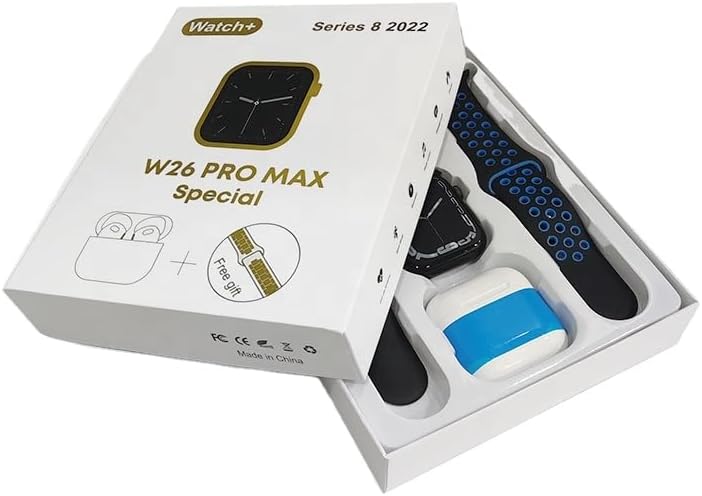
Image: The W26 Pro Max Smart Watch and its accompanying Bluetooth earphones, along with an extra watch strap, are neatly arranged within their retail packaging. The watch face is visible, and the earphones are housed in their charging case.

Imej: Atas ke bawah view of the W26 Pro Max Smart Watch and Bluetooth Earphones within their packaging. The watch, earphones, and an additional strap are clearly visible, indicating the complete product set.
Panduan Persediaan
1. Pengecasan Awal
Before first use, fully charge both the smartwatch and the integrated earphones. Connect the provided charging cable to the watch and a compatible USB power source. The watch display will indicate charging status. Ensure the earphones are properly seated in their charging case within the watch.
2. Menghidupkan/Mematikan
- Hidupkan kuasa: Press and hold the side button on the smartwatch until the screen illuminates.
- Matikan: Press and hold the side button, then select the "Power Off" option on the screen.
3. Berpasangan dengan Telefon Pintar Anda
To unlock full functionality, pair your W26 Pro Max with your smartphone via Bluetooth.
- Pastikan Bluetooth didayakan pada telefon pintar anda.
- On the W26 Pro Max, navigate to the Bluetooth settings.
- On your smartphone, search for available Bluetooth devices and select "W26 Pro Max" from the list.
- Sahkan permintaan berpasangan pada kedua-dua peranti jika digesa.
- For optimal performance, download and install the recommended companion application (e.g., "FitPro app" as mentioned in product description) from your smartphone's app store.
4. Earphone Pairing
The integrated earphones automatically pair with the smartwatch when removed from their charging slots. To pair them with another device (e.g., directly with your phone):
- Remove the earphones from the smartwatch.
- Dayakan Bluetooth pada peranti yang ingin anda pasangkan.
- Cari untuk "W26 Pro Max Earphones" (or similar name) in the Bluetooth device list and select to connect.
Arahan Operasi
Navigating the Smartwatch
- Skrin sentuh: Leret ke kiri/kanan, ke atas/bawah untuk menavigasi menu dan mengakses ciri. Ketik untuk memilih.
- Butang Sisi: Press to return to the home screen or wake the device. Long press for power options or voice assistant.
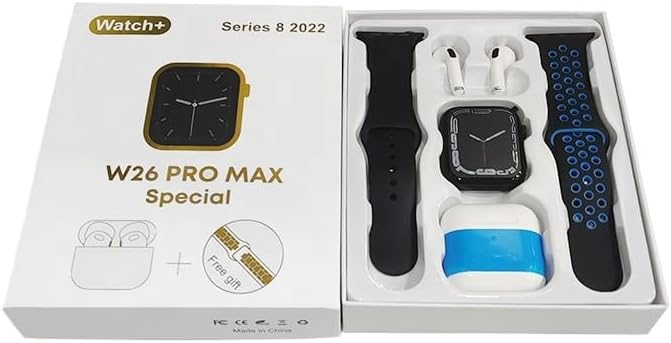
Image: The W26 Pro Max Smart Watch screen shows a voice assistant interface, with text bubbles indicating "Call Linda!" and "What's the weather like today?". This illustrates the voice command functionality.
Ciri-ciri Utama
Penjejakan Kecergasan dan Kesihatan
The W26 Pro Max is equipped with sensors to monitor various health metrics.
- Pemantauan Denyut Jantung: The optical heart rate sensor continuously tracks your heart rate. View real-time data on the watch or in the companion app.
- Pedometer: Menjejaki langkah harian, jarak dan kalori yang dibakar.
- Penjejakan Tidur: Memantau corak tidur anda, termasuk tidur nyenyak, tidur ringan dan waktu bangun.

Image: The W26 Pro Max Smart Watch screen displays heart rate information, showing a graph of heart rate over time, current beats per minute (bpm), and blood pressure readings. This demonstrates the health monitoring capabilities.
Imej: A terperinci view of the W26 Pro Max Smart Watch screen showing heart rate and blood pressure monitoring. The text explains that an optical heart rate sensor is used for precise calculation and data can be viewed on the watch or via the FitPro app.
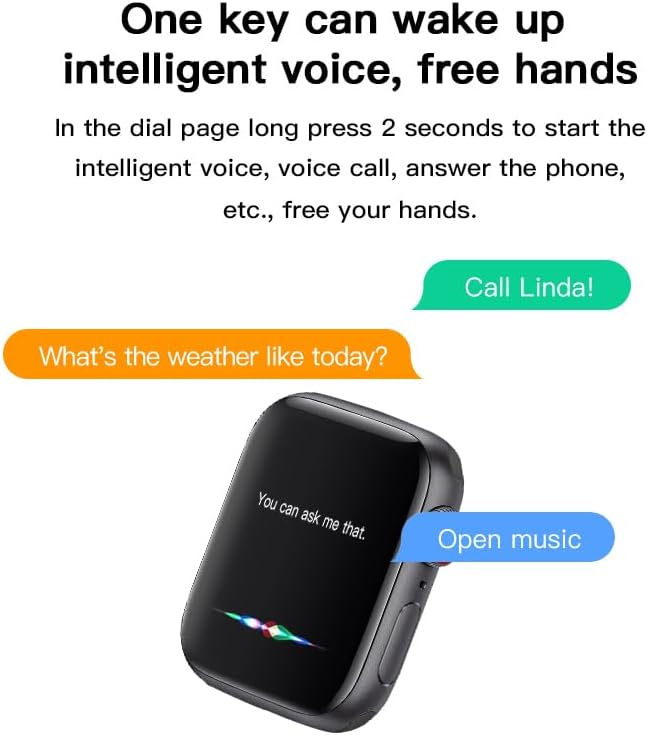
Image: The W26 Pro Max Smart Watch screen displays sleep monitoring data, showing sleep quality (Excellent), percentages of deep sleep, light sleep, and awake time, along with total sleep duration. This highlights the sleep tracking feature.
Komunikasi dan Media
- Panggilan Bluetooth: Make and receive calls directly from your smartwatch using the integrated microphone and speaker.
- Pemberitahuan: Terima makluman untuk panggilan, mesej dan pemberitahuan aplikasi daripada telefon pintar anda yang dipasangkan.
- Main Balik Muzik: Control music playing on your smartphone or listen directly via the integrated earphones.

Image: The W26 Pro Max Smart Watch screen shows music playback controls, including play/pause and skip track buttons, along with a visualizer. This indicates the watch's capability to control audio.
Pembantu Suara
Long press the side button to activate the intelligent voice assistant. Use voice commands for calls, weather inquiries, music control, and more, providing hands-free operation.
Penyelenggaraan dan Penjagaan
- Pembersihan: Wipe the watch and earphones with a soft, dry, lint-free cloth. For stubborn dirt, slightly dampen kain dengan air. Elakkan bahan kimia yang keras atau bahan yang melelas.
- Tahan Air: The W26 Pro Max has an IP68 rating, meaning it is resistant to dust and can withstand immersion in water up to 1.5 meters for 30 minutes. However, it is not suitable for diving, hot showers, or saunas. Always dry the device thoroughly after exposure to water.
- Penjagaan Bateri: To prolong battery life, avoid fully discharging the device frequently. Charge it regularly and store it in a cool, dry place when not in use for extended periods.
- Storan: Simpan peranti dalam persekitaran yang sejuk dan kering dari cahaya matahari langsung dan suhu yang melampau.
Menyelesaikan masalah
| Masalah | Kemungkinan Punca | Penyelesaian |
|---|---|---|
| Peranti tidak dihidupkan. | Bateri lemah. | Cas peranti selama sekurang-kurangnya 30 minit sebelum cuba menghidupkannya semula. |
| Tidak boleh berpasangan dengan telefon pintar. | Bluetooth is off on phone/watch; device not in pairing mode; interference. | Ensure Bluetooth is enabled on both devices. Restart both devices. Move closer to the phone. Forget previous pairings and try again. |
| Earphones not connecting. | Earphones not properly seated; low earphone battery. | Ensure earphones are fully seated in their charging slots within the watch. Charge the watch to ensure earphones are charging. |
| Data kesihatan yang tidak tepat. | Padanan yang tidak betul; halangan sensor. | Pastikan jam tangan dipakai dengan kemas pada pergelangan tangan anda, tidak terlalu ketat atau terlalu longgar. Bersihkan penderia di belakang jam tangan. |
| Hayat bateri pendek. | Frequent use of power-intensive features; old battery. | Reduce screen brightness, limit notifications, disable unnecessary features. Ensure full charge cycles. |
Spesifikasi
| Ciri | Perincian |
|---|---|
| Nombor Model | W26 Pro Max |
| Paparan | 1.78" AMOLED Touchscreen |
| Sistem Operasi | Pakai OS |
| Ketersambungan | Bluetooth |
| Kapasiti Bateri | 280mAh (watch) |
| Hayat Bateri | Sehingga 3 hari (penggunaan biasa) |
| Tahan Air | IP68 |
| Ciri Khas | Integrated Bluetooth Earphones, Heart Rate Sensor, Pedometer, Sleep Tracker, Microphone, Speaker, Voice Assistant |
| Kapasiti Penyimpanan Memori | 16 MB |
| Dimensi Pakej | 16.8 x 12.8 x 3 cm |
| Berat badan | 170 g |
Waranti dan Sokongan
For information regarding warranty coverage and customer support, please refer to the documentation provided with your purchase or contact the retailer where the product was acquired. As this product is manufactured by "Generic", specific warranty details may vary by region and seller.
For technical assistance or further inquiries, please reach out to the customer service channels provided by your point of purchase.


