
AXNEN HQ3
AXNEN HQ3 3-Axis Cell Phone Stabilizer User Manual
Model: HQ3 | Brand: AXNEN
pengenalan
This manual provides comprehensive instructions for the safe and effective use of your AXNEN HQ3 3-Axis Cell Phone Stabilizer. Please read this manual thoroughly before operating the device to ensure optimal performance and to prevent damage.
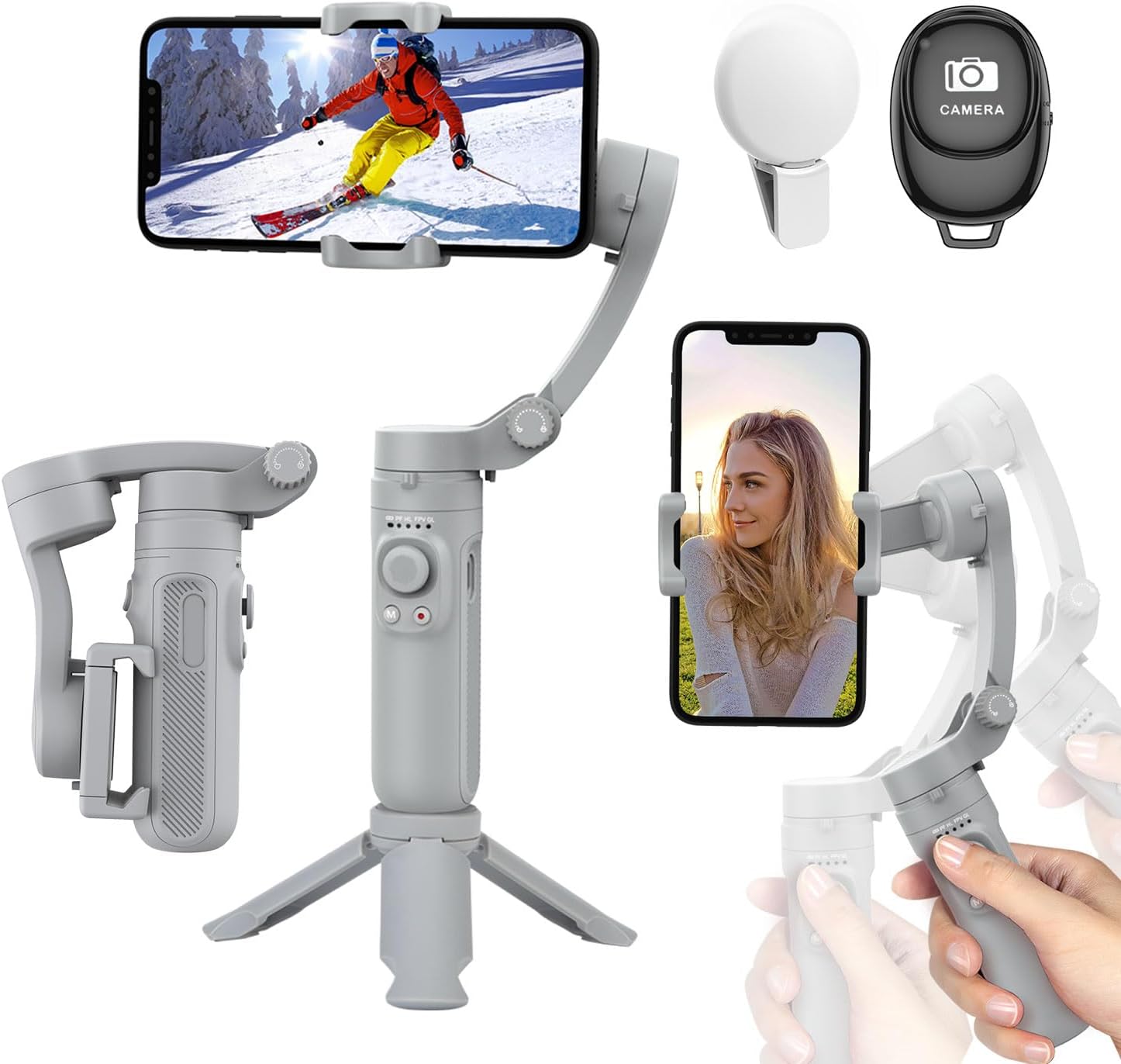
Figure 1: AXNEN HQ3 3-Axis Cell Phone Stabilizer with included accessories.
Produk Selesaiview
The AXNEN HQ3 is a portable and foldable 3-axis cell phone stabilizer designed to provide smooth and stable video footage and photos. It features multiple stabilization modes, a built-in fill light, and a detachable Bluetooth remote control.

Figure 2: Key features of the AXNEN HQ3 Gimbal.
Komponen:
- Gimbal Body with Integrated Handle and Controls
- Telefon Clamp
- Mini Tripod (integrated/detachable base)
- Detachable Bluetooth Remote Control
- Lampu Isi Bersepadu
- Kabel Pengecas USB
Persediaan
1. Mengecas Gimbal:
Before first use, fully charge the gimbal. Connect the USB charging cable to the gimbal's charging port and a power source. The battery indicator lights will show charging status. A full charge provides up to 8 hours of continuous use.
2. Unfolding the Gimbal:
Gently unfold the gimbal from its compact, folded state. Ensure all axes are unlocked and can move freely before powering on.

Figure 3: The compact and foldable design of the gimbal, along with phone compatibility guidelines.
3. Mounting Your Smartphone:
- Panjangkan jarak telefonamp and carefully insert your smartphone.
- Ensure the phone is centered and balanced within the clamp. The gimbal supports phones between 5.5 cm and 8.5 cm wide, with a maximum weight of 280 g.
- For optimal performance, balance your phone before powering on the gimbal. If the phone is significantly off-center, the gimbal may vibrate or not stabilize correctly.
4. Menghidupkan dan Berpasangan Bluetooth:
- Press and hold the power button on the gimbal until the indicator lights illuminate. The gimbal will automatically perform self-calibration.
- Aktifkan Bluetooth pada telefon pintar anda.
- Cari untuk "HQ3" or a similar device name in your phone's Bluetooth settings and pair with it.
- Once paired, you can control your phone's camera functions (shutter, video recording) using the gimbal's buttons and the detachable remote.
Mengendalikan Gimbal
Stabilization Technology:
The AXNEN HQ3 utilizes a high-precision 3-axis stabilization system to keep your footage smooth and steady, even during movement. This significantly reduces camera shake and blur.

Figure 4: Visual demonstration of stabilization effect.

Figure 5: Understanding the 3-axis movement.
Mod Pengendalian:
The gimbal features four distinct operating modes to suit various shooting scenarios:
- Mod Mengikuti Pan (PF): The tilt and roll axes are locked, and the pan axis follows the direction of the handle. Ideal for smooth horizontal tracking shots.
- Horizontal Lock Mode (HL): The roll axis remains horizontal, and the pan axis follows the direction of the handle.
- Orang Pertama View (FPV): All three axes follow the direction of the handle, allowing for dynamic, immersive shots that simulate the user's perspective.
- Global Lock (GL): All three axes are locked, keeping the camera pointed in a fixed direction regardless of gimbal movement. To enter Global Lock, press and hold the trigger button.
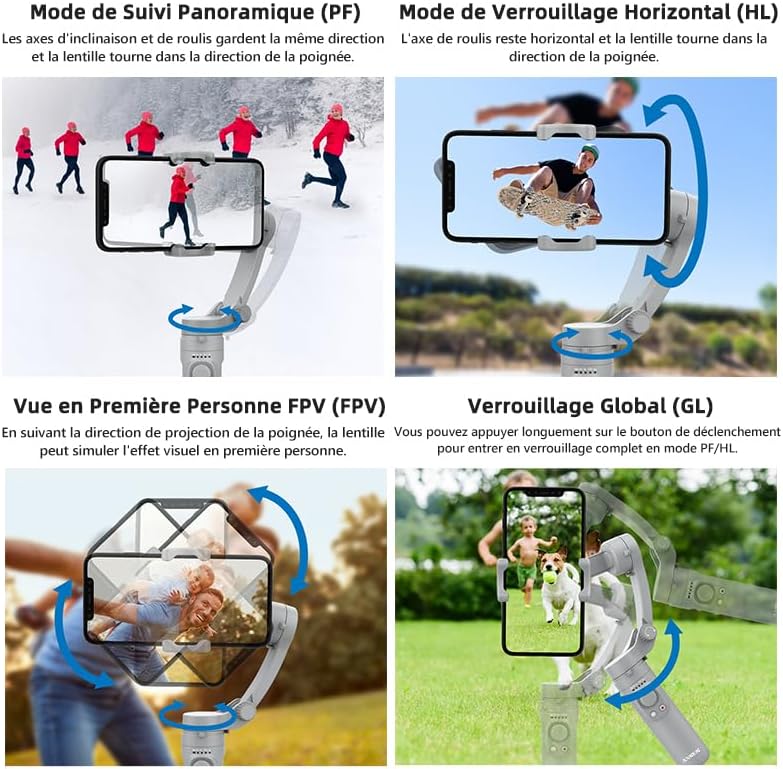
Figure 6: Visual representation of gimbal operating modes.
Switching Between Horizontal and Vertical Shooting:
The gimbal allows for easy switching between horizontal (landscape) and vertical (portrait) shooting orientations, catering to different video platforms and content needs.

Figure 7: Horizontal and Vertical Shooting, and Manual Lock feature.
Using the Fill Light:
The integrated fill light can be activated to provide additional illumination for your subjects, especially in low-light conditions. Refer to the gimbal's controls for light activation and brightness adjustment.
Penyelenggaraan
- Pembersihan: Gunakan kain lembut dan kering untuk membersihkan gimbal. Jangan gunakan pembersih cecair atau pelarut.
- Storan: When not in use, fold the gimbal into its compact form and store it in a cool, dry place, away from direct sunlight and extreme temperatures.
- Penjagaan Bateri: To prolong battery life, avoid fully discharging the battery frequently. Charge the gimbal regularly, even if not in use for extended periods.
- Elakkan beban berlebihan: Do not mount phones heavier than the specified maximum weight (280g) to prevent damage to the motors.
Menyelesaikan masalah
| Masalah | Kemungkinan Punca | Penyelesaian |
|---|---|---|
| Gimbal vibrates or does not stabilize. | Phone is not balanced or too heavy. Gimbal not powered on correctly. | Ensure phone is centered and within weight limits (max 280g). Power off and restart the gimbal. |
| Tidak dapat menyambung melalui Bluetooth. | Bluetooth not enabled on phone. Gimbal not in pairing mode. Interference. | Ensure phone Bluetooth is on. Restart gimbal and phone. Move closer to the gimbal. |
| Gimbal tidak boleh dihidupkan. | Bateri lemah. | Cas gimbal sepenuhnya. |
| Alat kawalan jauh tidak berfungsi. | Remote battery low. Not paired. | Check remote battery (if replaceable, otherwise assume integrated). Re-pair the remote with the gimbal. |
Spesifikasi
- model: HQ3
- Jenama: AXNEN
- Penstabilan: 3-Paksi
- Lebar Telefon Serasi: 5.5 sm - 8.5 sm (2.17 inci - 3.35 inci)
- Maximum Phone Weight: 280 g (0.62 paun)
- Gimbal Weight: 295 g (0.65 paun)
- Dimensi dilipat: 21.9 x 4.2 x 9.9 cm (8.62 x 1.65 x 3.9 in)
- Kapasiti Bateri: 2200mAh
- Masa Operasi: Sehingga 8 jam
- Ketersambungan: Bluetooth
- ciri-ciri: Integrated Fill Light, Detachable Bluetooth Remote, Foldable Design
Waranti dan Sokongan
For any issues or inquiries regarding your AXNEN HQ3 stabilizer, please contact AXNEN customer service. As per product information, if you encounter any problems after receiving this phone stabilizer, please contact us immediately. We will reply and solve any problems within 12 hours.
Petua Berguna: Scan the QR code on the manual (physical manual) to watch instruction videos, which will make your use more convenient. For digital support, please visit the official AXNEN webtapak atau hubungi saluran sokongan mereka.
Sila simpan bukti pembelian anda untuk tuntutan waranti.
Ask a question about this manual
Ask about setup, troubleshooting, compatibility, parts, safety, or missing instructions. Manuals+ will review the question and use this page’s manual context to help answer it.