
1. Pengenalan
Thank you for choosing the JIGUUN PRO2000W-12 Pure Sine Wave Power Inverter. This manual provides essential information for the safe and efficient operation of your inverter. Please read it thoroughly before use and retain it for future reference.
This inverter converts 12V DC power from your battery into 120V AC power, suitable for powering various household appliances, electronics, and tools. Its pure sine wave output ensures compatibility with sensitive electronics, providing stable and clean power.

Image 1.1: JIGUUN 2000 Watt Pure Sine Wave Power Inverter with included battery cables.
2. Maklumat Keselamatan
AMARAN: Kegagalan mematuhi arahan keselamatan ini boleh mengakibatkan kecederaan, kerosakan pada inverter atau kerosakan pada peranti yang disambungkan.
- Pengudaraan: Ensure adequate ventilation around the inverter. Do not block cooling vents.
- Persekitaran: Operate the inverter in a dry, well-ventilventilated area, away from direct sunlight, heat sources, flammable materials, and moisture.
- Sambungan: Always connect the inverter to a 12V DC battery. Ensure all connections are tight and secure to prevent arcing and overheating.
- Pembumian: The inverter must be properly grounded. Connect the grounding terminal to a suitable ground point.
- Kapasiti Muatan: Do not exceed the inverter's continuous power rating (2000W) or peak surge rating (4000W). Overloading can cause damage and trigger safety protections.
- Ciri-ciri perlindungan: The inverter includes protection against undervoltage, kelebihantage, overheating, overload, and short circuit. If a protection mode is activated, disconnect the load and troubleshoot the issue.
- Kanak-kanak: Jauhkan penyongsang daripada capaian kanak-kanak.
- Penyelenggaraan: Do not attempt to open or modify the inverter. Refer all servicing to qualified personnel.
3. Produk Lebihview dan Komponen
Familiarize yourself with the various parts of your JIGUUN Power Inverter.

Image 3.1: Front and rear panel components of the JIGUUN Power Inverter.
Panel Depan:
- Paparan LCD: Shows battery level, DC input voltage, keluaran AC voltage, output frequency, and load power.
- Penunjuk Kuasa: Illuminates when the inverter is operational.
- Suis ON / OFF: Controls the main power to the inverter.
- USB Ports (2.1A): Untuk mengecas peranti berkuasa USB.
- AC Receptacles (x4): Soket AC 120V standard untuk menyambungkan peralatan.
- AC Ground Terminal: For proper grounding of the inverter.
Panel belakang:
- Negative DC Terminal (Black): Menyambung ke terminal negatif bateri 12V.
- Positive DC Terminal (Red): Menyambung ke terminal positif bateri 12V.
- Cooling Fans (x2): Aktif secara automatik untuk menghilangkan haba dan mengekalkan suhu operasi optimum.
4. Apa yang ada di dalam Kotak
Sahkan bahawa semua item terdapat dalam pakej anda:
- 1x JIGUUN 2000W Pure Sine Wave Inverter
- 1x Alat Kawalan Jauh
- 1x Set of Battery Cables (1x Red, 1x Black)
- 4x Spare Fuses (30A)
- 1x Alligator Clip Safety Ground
- 1x Manual Pengguna

Image 4.1: All items included in the JIGUUN Power Inverter package.
5. Persediaan
5.1 Sambungan Bateri
- Ensure the inverter's ON/OFF switch is in the 'OFF' position.
- Sambungkan MERAH kabel bateri ke Positif (+) terminal bateri 12V anda.
- Sambungkan hujung yang satu lagi MERAH kabel ke Positif (+) DC input terminal on the inverter.
- Sambungkan HITAM kabel bateri ke Negatif (-) terminal bateri 12V anda.
- Sambungkan hujung yang satu lagi HITAM kabel ke Negatif (-) DC input terminal on the inverter.
- Ensure all connections are tight and secure. Loose connections can cause overheating and damage.

Image 5.1: DC input terminals for battery connection.

Image 5.2: Included battery cables for connection.
5.2 Membumikan Inverter
For safety, the inverter must be properly grounded. Connect the alligator clip safety ground cable from the inverter's ground terminal to a suitable ground point, such as the chassis of a vehicle or a dedicated earth ground.
5.3 Persediaan Kawalan Jauh
The remote control allows for convenient power management from a distance. No wire connection is required for the remote control to function.
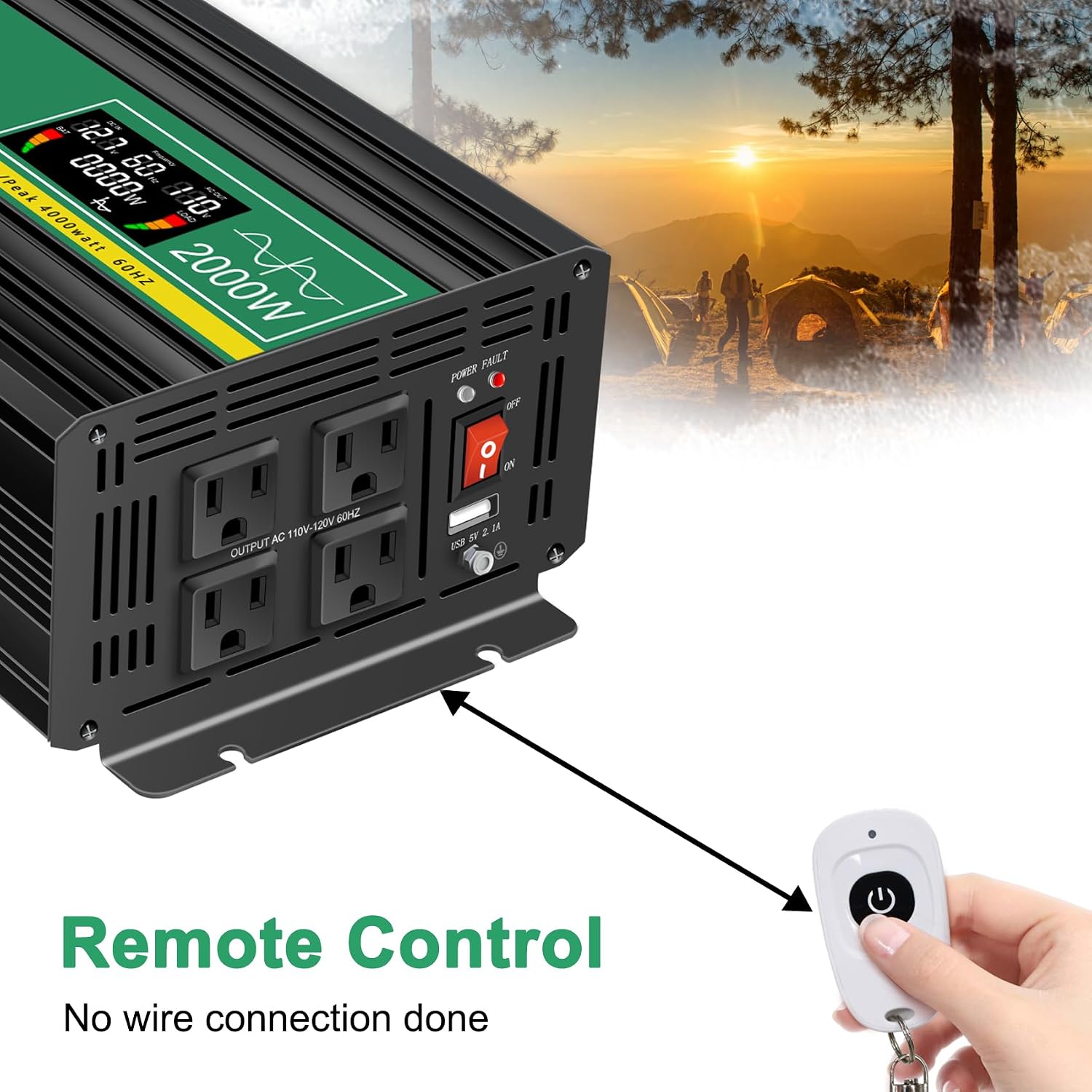
Image 5.3: Remote control for the JIGUUN Power Inverter.
6. Arahan Operasi
6.1 Menghidupkan/Mematikan
- After ensuring all connections are secure, flip the ON/OFF switch on the inverter to the 'ON' position. The LCD display will illuminate, and the power indicator will light up.
- To power off, flip the ON/OFF switch to the 'OFF' position.
- Alternatively, use the remote control to power the inverter on or off.
6.2 Menggunakan Paparan LCD
The intelligent LCD display provides real-time information about the inverter's status:
- Bar Aras Bateri: Menunjukkan tahap cas bateri yang disambungkan.
- Loads Level Bar: Shows the current power draw from connected AC devices.
- Input DC Voltage: Memaparkan voltage daripada bateri 12V.
- Keluaran AC Voltage: Shows the 120V AC output voltage.
- Kekerapan Output: Displays the AC output frequency (60Hz).
- Kuasa Beban: Indicates the total wattage dilukis oleh peranti yang disambungkan.
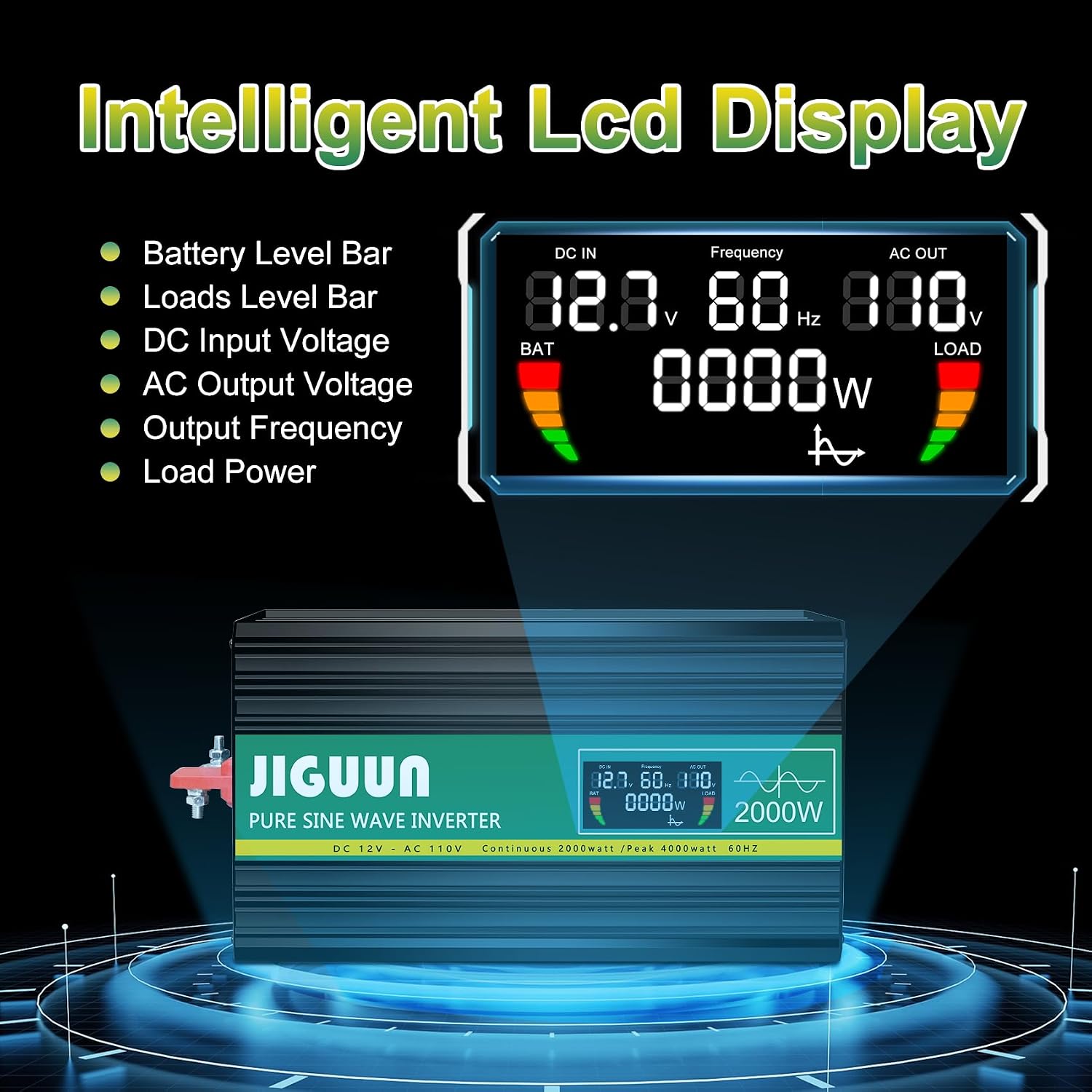
Imej 6.1: Terperinci view of the LCD display information.
6.3 Connecting AC and USB Devices
- With the inverter powered on, plug your 120V AC appliances into the four AC receptacles.
- Plug your USB-powered devices into the USB ports for charging.
- Pastikan jumlah wattage of all connected AC devices does not exceed 2000W continuously.

Imej 6.2: Cthamples of appliances powered by the inverter.
7. Penyelenggaraan
7.1 Pembersihan
Regularly clean the exterior of the inverter with a dry, soft cloth. Do not use liquid cleaners or solvents. Ensure cooling vents are free from dust and debris to maintain optimal airflow.
7.2 Sistem Penyejukan
The inverter features temperature-sensitive control fans that activate automatically when the internal temperature exceeds 45°C. These fans ensure rapid cooling and quiet operation. Ensure the fan vents are not obstructed.

Image 7.1: Inverter cooling fans and intelligent temperature control.
7.3 Penggantian Fius
The inverter has built-in fuses for protection. If a fuse needs replacement, it is recommended to contact customer service or a qualified technician. Spare 30A fuses are included in the package for emergency situations, but professional assistance is advised for replacement.

Image 7.2: Spare 30A fuses.
8. Penyelesaian masalah
If the inverter is not functioning correctly, refer to the following common issues and solutions:
| Masalah | Kemungkinan Punca | Penyelesaian |
|---|---|---|
| Tiada output kuasa / Inverter tidak dihidupkan | Sambungan bateri longgar Bateri rendah voltage Suis penyongsang MATI Fius ditiup | Check and tighten battery cables. Cas atau gantikan bateri. Ensure switch is ON. Contact customer service for fuse inspection/replacement. |
| Inverter shuts down / Error warning | Lebihan beban Terlalu panas Input rendah/Tinggi voltage Litar pintas | Kurangkan beban bersambung. Ensure proper ventilation, clear fan vents. Semak bateri voltage. Disconnect all loads, check for faulty wiring/appliances. |
| Connected appliance not working | Appliance power exceeds inverter capacity Kerosakan perkakas Inverter in protection mode | Sahkan kuasa perkakastage. Test appliance with another power source. Check inverter display for error codes. |
8.1 Protection System
The JIGUUN inverter is equipped with a comprehensive safety and security system (BMS) to protect itself and your devices:
- Bateri Rendah Voltage Perlindungan
- Bateri Lebih Voltage Perlindungan
- Perlindungan Polariti Terbalik
- Perlindungan Litar pintas
- Penyongsang Atas Voltage Perlindungan
- Penyongsang Vol Rendahtage Perlindungan
- Temperature Control (Overheating Protection)
- Ground Fault Circuit Interrupter (GFCI) Protection
- Perlindungan Lebihan

Image 8.1: Comprehensive safety and security system icons.
9. Spesifikasi
| Ciri | Spesifikasi |
|---|---|
| Nama Model | PRO2000W-12 |
| Kuasa Berterusan | 2000 Watt |
| Kuasa Lonjakan Puncak | 4000 Watt |
| Input DC Voltage | 12V |
| Keluaran AC Voltage | 120V |
| Kekerapan Output | 60Hz |
| Bentuk Gelombang Output | Gelombang Sinus Tulen |
| Kecekapan Penukaran | >90% |
| Kedai AC | 4 |
| Output USB | 2.1A |
| Berat Barang | 11.11 paun |
| Dimensi (L x W x H) | 19.29 x 9.65 x 6.85 inci |
| Penggunaan yang Disyorkan | Home, Office, Vehicle (RV, Camping, Emergency) |
| Sumber Kuasa | Solar dan Bateri Dikuasakan |
10. Waranti dan Sokongan
10.1 Maklumat Waranti
The JIGUUN PRO2000W-12 Power Inverter comes with a Waranti 1 tahun, which includes free replacement for manufacturing defects. Please retain your proof of purchase for warranty claims.
10.2 Sokongan Pelanggan
For technical assistance, troubleshooting, warranty claims, or any other inquiries, please contact JIGUUN customer service. Refer to the contact information provided with your product packaging or visit the official JIGUUN webtapak untuk butiran sokongan.