
COCOCAM ZY-C5
COCOCAM 4G LTE Outdoor Solar Security Camera User Manual
Model: ZY-C5
pengenalan
Thank you for choosing the COCOCAM 4G LTE Outdoor Solar Security Camera. This manual provides detailed instructions for the installation, operation, and maintenance of your camera. Please read this manual thoroughly before use to ensure proper functionality and to maximize the benefits of your device. This camera is designed for outdoor surveillance in areas without Wi-Fi access, utilizing 4G LTE connectivity and solar power for continuous operation.
Maklumat Keselamatan
Sila patuhi langkah berjaga-jaga keselamatan berikut untuk mengelakkan kerosakan pada produk atau kecederaan pada diri sendiri dan orang lain:
- Ensure the camera is installed securely to prevent it from falling.
- Jangan dedahkan kamera kepada suhu melampau di luar julat pengendaliannya (-20°C hingga 50°C).
- Keep the camera and solar panel away from open flames or heat sources.
- Jangan cuba membuka atau mengubah suai kamera. Ini akan membatalkan jaminan.
- Use only the provided accessories and power sources.
- Ensure all cables are properly connected and secured to prevent tripping hazards or damage.
- Buang bateri mengikut peraturan tempatan.
Kandungan Pakej
Sahkan bahawa semua item terdapat dalam pakej anda:
- 1x 4G Camera
- Panel Suria 1x
- 1x Kabel Pengecasan USB
- 1x Pendakap Panel Suria
- 1x Screw Bag for Camera
- 1x Screw Bag for Solar Panel
- 1x Manual Arahan
Produk Selesaiview
The COCOCAM 4G LTE Outdoor Solar Security Camera (Model ZY-C5) is a wireless surveillance solution designed for remote locations without Wi-Fi. It features 2K resolution, pan-tilt-zoom (PTZ) capabilities, and is powered by a 10000mAh battery and a 6W solar panel. The camera supports 4G LTE connectivity via a SIM card for real-time monitoring and alerts.

Image: The COCOCAM 4G LTE Outdoor Solar Security Camera, featuring its main unit, solar panel, and a smartphone displaying the live camera feed.
Persediaan
1. Pemasangan Kad SIM
The camera operates using a 4G LTE SIM card, making it ideal for areas without Wi-Fi. A SIM card is pre-installed for convenience.

Image: The COCOCAM 4G LTE camera installed outdoors, connected to its solar panel, highlighting its independence from Wi-Fi.
- Locate the SIM card slot on the camera, usually protected by a rubber cover.
- If replacing, gently press the existing SIM card to eject it.
- Insert the Nano-SIM (4FF) card into the slot, ensuring correct orientation.
- Close the rubber cover firmly to maintain IP66 water resistance.
2. Charging and Solar Panel Setup
The camera is powered by a 10000mAh rechargeable battery, continuously charged by the included 6W solar panel.

Image: The COCOCAM 4G LTE camera and its solar panel mounted on an exterior wall, illustrating the solar power connection for uninterrupted power.
- Connect the solar panel cable to the charging port on the camera.
- Position the solar panel in a location that receives maximum direct sunlight throughout the day for optimal charging efficiency.
- For initial setup or if the battery is low, you can also charge the camera using the provided USB cable.
3. Memasang Kamera
The camera is designed for easy wall mounting.
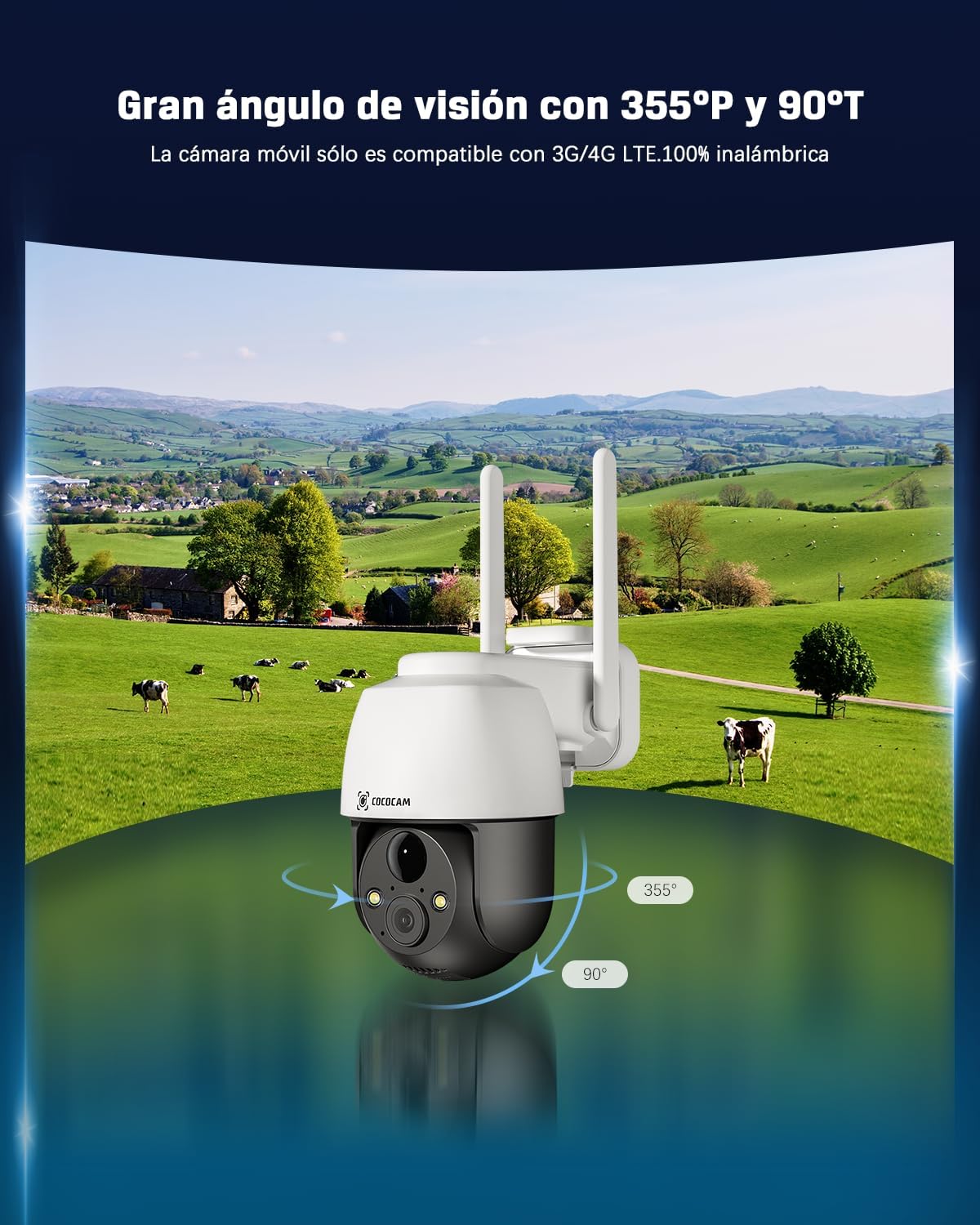
Image: The COCOCAM 4G LTE camera demonstrating its wide field of view with 355-degree horizontal pan and 90-degree vertical tilt.
- Pilih lokasi pemasangan yang sesuai yang menyediakan yang dikehendaki viewing angle and is within reach of the solar panel cable.
- Use the provided screw bag to securely attach the camera bracket to the wall.
- Pasangkan kamera pada pendakap yang dipasang.
- Laraskan sudut kamera untuk meliputi kawasan pengawasan yang diingini.
4. App Installation and Initial Connection
Control and monitor your camera remotely via the dedicated mobile application.
- Download the CloudEdge app from your smartphone's app store (Android/iOS).
- Daftar untuk akaun dan log masuk.
- Follow the in-app instructions to add your COCOCAM camera. This typically involves scanning a QR code on the camera or entering its device ID.
- Setelah disambungkan, anda boleh mengakses suapan langsung dan mengkonfigurasi tetapan.
Mengendalikan Kamera
1. Hidup View dan Kawalan PTZ
Access real-time video and control the camera's movement.
- Open the CloudEdge app and select your camera to view suapan langsung.
- Use the on-screen controls to pan (355° horizontal) and tilt (90° vertical) the camera, providing comprehensive coverage of your area.
2. Audio Dua Hala
Communicate with visitors or deter intruders using the built-in microphone and speaker.
- Ketik ikon mikrofon dalam siaran langsung view untuk bercakap melalui kamera.
- The camera's speaker will transmit your voice, and you can hear audio from the camera's location.
3. Penglihatan Malam
The camera provides clear visibility even in low-light conditions.

Image: Comparison of day and 2K full-color night vision captured by the COCOCAM camera, demonstrating its clarity in various lighting conditions.
- Kamera akan bertukar kepada mod penglihatan malam secara automatik dalam cahaya malap.
- Enjoy full-color night vision up to 25 meters with white light, and up to 30 meters with infrared.
4. Smart Detection and AI Analysis
Receive accurate alerts with advanced detection features.

Image: The COCOCAM 4G LTE camera demonstrating its AI-powered human detection, distinguishing people from other movements and sending precise alerts.
- The PIR human detection technology reduces false alarms by focusing on human shapes.
- Customize alarm areas and utilize the smart light and sound alarm system for enhanced security.
5. Pilihan Storan
Dirakam footage can be stored locally or in the cloud.
- Penyimpanan Kad TF: The camera supports local storage on a TF (microSD) card up to 128GB (card not included). Ensure the card is formatted before use.
- Storan Awan: Recorded 6-second fragments can be stored for 7 days of loop coverage (compatible when using the camera's built-in SIM card). COCOCAM offers unlimited data packages and a 7-day free trial for cloud storage.
6. Integrasi Pembantu Suara
Control your camera with voice commands.
- The COCOCAM 4G security camera works with Alexa and Google Assistant.
- Link your camera to your smart home system for convenient voice control and access to live streams.
Penyelenggaraan
- Pembersihan: Kerap mengelap kanta kamera dan panel solar dengan lembut, damp cloth to ensure clear images and efficient charging. Do not use harsh chemicals.
- Penjagaan Bateri: While the solar panel provides continuous charging, ensure the camera receives adequate sunlight. If the camera is stored for extended periods, fully charge the battery before storage and recharge every few months to maintain battery health.
- Kemas Kini Perisian: Check the CloudEdge app periodically for firmware updates to ensure optimal performance and access to new features.
Menyelesaikan masalah
| Masalah | Kemungkinan Punca | Penyelesaian |
|---|---|---|
| Kamera tidak bersambung ke rangkaian 4G. | No SIM card, incorrect SIM installation, no 4G coverage, SIM PIN active. | Ensure SIM card is correctly inserted and activated. Check 4G signal strength in the area. Disable SIM PIN on another device before inserting. |
| Bateri tidak dicas. | Solar panel not receiving enough sunlight, panel dirty, cable disconnected. | Relocate solar panel to a sunnier spot. Clean the solar panel surface. Check cable connection between panel and camera. |
| Kualiti gambar yang buruk. | Lens dirty, low light conditions, network issues. | Clean the camera lens. Ensure adequate lighting for optimal image quality. Check 4G signal strength. |
| Penggera palsu yang kerap. | Motion detection sensitivity too high, non-human triggers. | Adjust motion detection sensitivity in the app. Utilize human detection and customize alarm zones. |
| Audio dua hala tidak berfungsi. | Microphone/speaker blocked, app permissions, volume settings. | Ensure nothing is obstructing the microphone or speaker. Check app permissions for audio access. Adjust volume settings in the app. |
Spesifikasi Teknikal
| Ciri | Spesifikasi |
|---|---|
| Model | ZY-C5 |
| Resolusi Tangkapan Video | 2K (2304*1296) |
| Teknologi Ketersambungan | Tanpa Wayar (4G LTE) |
| Julat Pan/Sendeng | Mendatar 355°, Menegak 90° |
| Julat Penglihatan Malam | Up to 25 meters (color), 30 meters (infrared) |
| Sumber Kuasa | Solar powered, Battery powered (10000mAh) |
| Panel Suria Wattage | 6W |
| Tahap Ketahanan Air | IP66 |
| Suhu Operasi | -20°C hingga 50°C |
| Kapasiti Storan | TF card up to 128GB (not included) |
| Peranti Serasi | Smartphone, Tablet (Android/iOS) |
| Jenis Pengawal | Amazon Alexa, Android, Google Assistant, CloudEdge, iPhone |
| bahan | Akrilonitril Butadiena Stirena (ABS) |
| Dimensi Produk | 0.4 x 0.4 x 4cm; 490g |
Waranti dan Sokongan Pelanggan
COCOCAM is committed to providing high-quality products and excellent customer service. Your product is covered by a standard warranty. For specific warranty details, please refer to the documentation included with your purchase or contact COCOCAM customer support.
If you encounter any issues or have questions regarding your COCOCAM 4G LTE Outdoor Solar Security Camera, please do not hesitate to contact our support team. We offer professional technical support to assist you.
Visit the official COCOCAM store for more information and support: COCOCAM Store
Ask a question about this manual
Ask about setup, troubleshooting, compatibility, parts, safety, or missing instructions. Manuals+ will review the question and use this page’s manual context to help answer it.