
1. Pengenalan
The Mastech MS2203 is a professional 3-Phase Digital Power Clamp Meter designed for accurate measurement of electrical parameters in three-phase systems. This instrument features high sensitivity, True-RMS measurement, power factor correction, and a USB interface for data logging. This manual provides essential information for the safe and effective operation, maintenance, and troubleshooting of your MS2203 meter.
2. Maklumat Keselamatan
Untuk memastikan operasi dan servis meter yang selamat, ikuti langkah berjaga-jaga keselamatan ini:
- Sentiasa mematuhi kod keselamatan tempatan dan nasional.
- Jangan gunakan meter jika ia kelihatan rosak atau jika penebat pada wayar ujian terjejas.
- Pastikan suis putar berada di kedudukan yang betul untuk ukuran yang dikehendaki sebelum menyambungkan ke litar.
- Jangan melebihi penilaian input maksimum untuk sebarang fungsi.
- Sentiasa berhati-hati apabila bekerja dengan litar hidup.
- Simpan jari di belakang pelindung jari pada petunjuk ujian semasa pengukuran.
- Gantikan bateri apabila penunjuk bateri rendah muncul untuk memastikan bacaan yang tepat.
3. Produk Lebihview
The Mastech MS2203 is a versatile clamp meter capable of measuring AC voltage, AC current, frequency, active power, apparent power, reactive power, and power factor. It features a large LCD display with backlight, data hold, MAX/MIN recording, and a bar graph for quick visual indication.
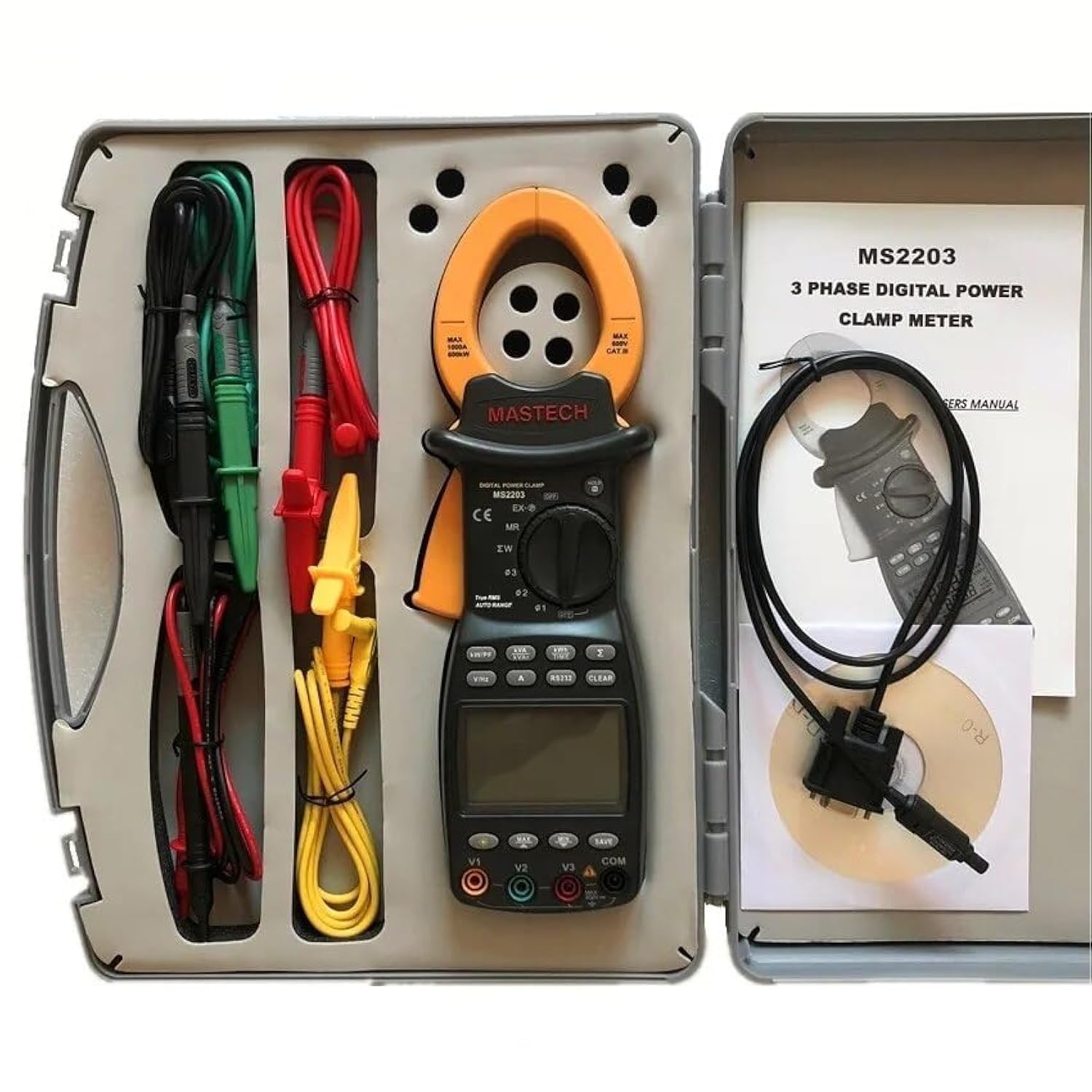
Image 3.1: The Mastech MS2203 3-Phase Digital Power Clamp Meter and its accessories, neatly organized within its protective carrying case. The kit includes the clamp meter, test leads, USB cable, and user manual.
Ciri-ciri Utama:
- Paparan: 9999 kiraan
- Jaw Opening: Φ50mm/2.0"
- Auto & Manual Ranging
- Data Logging: 28 groups
- True Root Mean Square (True-RMS) measurement
- Bar Graph display
- MAX/MIN Measurement function
- Fungsi Pegangan Data
- Paparkan Lampu Latar untuk keadaan cahaya malap
- Penunjuk Paparan Bateri Rendah
- RS232 Interface for Windows OS connectivity
4. Pembongkaran dan Kandungan
Carefully unpack the meter and check for any damage. Verify that all items listed below are present. If any item is missing or damaged, contact your dealer immediately.

Image 4.1: An illustrative diagram detailing the contents included with the Mastech MS2203, such as the main unit, test leads, alligator clips, RS232 cable, software, carrying case, and batteries.
Kandungan Pakej:
- Mastech MS2203 Kuasa Digital 3-Fasa Clamp Meter
- Test Leads (Red, Yellow, Green, Black)
- Klip Buaya
- RS232 Interface Cable
- PC data record graph software (CD-ROM)
- Membawa Sarung
- Bateri (2 x LR44, disertakan)
- Panduan Mula Pantas
- Sijil Penentukuran
5. Persediaan
5.1 Pemasangan Bateri
- Cari penutup petak bateri di belakang meter.
- Gunakan pemutar skru untuk melonggarkan skru dan tanggalkan penutupnya.
- Insert the two LR44 batteries, observing the correct polarity (+/-) as indicated inside the compartment.
- Gantikan penutup bateri dan kencangkannya dengan skru.
5.2 Menghubungkan Petunjuk Ujian
Insert the banana plugs of the test leads into the appropriate input jacks on the meter. For most measurements, the common (COM) jack will be used with the black lead, and the V1, V2, V3, or A jacks will be used with the colored leads (red, yellow, green) depending on the measurement type and phase configuration.
5.3 USB/RS232 Interface Setup
To connect the meter to a computer for data logging and analysis:
- Install the provided PC data record graph software from the CD-ROM onto your Windows OS computer.
- Connect one end of the RS232 interface cable to the meter's RS232 port.
- Connect the other end of the cable to an available USB port on your computer (an RS232-to-USB adapter may be required if your computer lacks an RS232 port).
- Follow the software instructions to establish communication with the meter.
6. Arahan Operasi
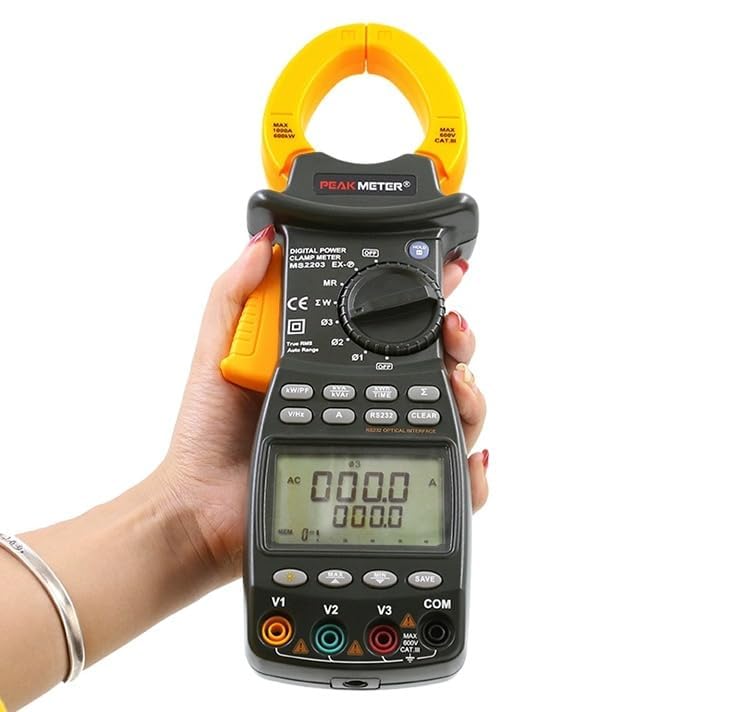
Image 6.1: The Mastech MS2203 in use, highlighting the digital display and the rotary selector for various measurement functions.
6.1 Hidupkan/Mati Kuasa
To power on the meter, rotate the function switch from the 'OFF' position to any desired measurement function. To power off, rotate the switch back to 'OFF'.
6.2 Pemilihan Fungsi
The rotary switch allows selection of different measurement modes. Ensure the switch is set to the appropriate function before taking a measurement.
6.3 Prosedur Pengukuran
Pengukuran Arus AC:
- Rotate the function switch to the 'A' (AC Current) position.
- Buka clamp rahang dengan menekan picu.
- Enclose only one conductor of the circuit within the jaws. Ensure the jaws are fully closed.
- Baca nilai semasa pada paparan.
Vol. ACtage Measurement (3-Phase):
- Rotate the function switch to the 'V' (AC Voltage) kedudukan.
- Connect the test leads to the V1, V2, V3, and COM input jacks.
- Connect the test leads to the respective phase conductors and neutral/ground of the 3-phase system.
- Meter akan memaparkan voltage readings for each phase.
Power Measurement (Active, Apparent, Reactive, Power Factor):
- Rotate the function switch to the 'W/PF' (Power/Power Factor) position.
- Connect the test leads and clamp the current jaws as required for 3-phase power measurement.
- The meter will display active power (W), apparent power (VA), reactive power (VAR), and power factor (PF).
6.4 Fungsi Khas
- Pegangan Data: Tekan butang 'HOLD' untuk membekukan bacaan semasa pada paparan. Tekan sekali lagi untuk melepaskan.
- Pengukuran MAX/MIN: Press the 'MAX/MIN' button to record the maximum and minimum values during a measurement session. Press again to cycle through MAX, MIN, and current readings.
- Pengelogan Data: The meter can store up to 28 groups of data. Refer to the detailed software manual for instructions on logging and retrieving data via the RS232 interface.
- Lampu latar: Press the backlight button to illuminate the display for use in dimly lit environments.
- True-RMS: The MS2203 provides True-RMS measurements for accurate readings on non-sinusoidal waveforms.
7. Penyelenggaraan
7.1 Pembersihan
Lap meter dengan iklanamp kain dan detergen lembut. Jangan gunakan bahan pelelas atau pelarut. Pastikan meter kering sepenuhnya sebelum digunakan.
7.2 Penggantian Bateri
When the low battery indicator appears on the display, replace the batteries as described in Section 5.1. Remove batteries if the meter is not to be used for an extended period.
7.3 Penyimpanan
Store the meter in its carrying case in a cool, dry environment, away from direct sunlight and extreme temperatures.
8. Penyelesaian masalah
- Tiada Paparan: Check battery installation and charge. Ensure the rotary switch is not in the 'OFF' position.
- Bacaan Tidak Tepat: Verify correct function selection and proper test lead connection. Ensure the clamp jaws are fully closed around a single conductor for current measurements. Check for low battery.
- No PC Communication: Ensure the RS232 cable is correctly connected and the software drivers are installed. Check COM port settings in the software.
9. Spesifikasi
Image 9.1: A detailed overview of the Mastech MS2203's technical specifications, including measurement ranges and display capabilities.
| Parameter | Nilai |
|---|---|
| Paparan | 9999 kiraan |
| Pembukaan Rahang | 50mm / 2.0" |
| Vol. ACtage | 600V |
| AC Semasa | 1000A |
| Kekerapan | 1000Hz |
| Kuasa Aktif | 600kW |
| Kekuatan Rupanya | 600kVA |
| Kuasa Reaktif | 600kVAR |
| Nombor Model Item | YQ-MS2203 |
| Dimensi Produk | 7.87 x 5.91 x 9.84 inci |
| Berat Barang | 1 Kilogram (2.2 Paun) |
| Bateri | 2 bateri LR44 (termasuk) |
10. Waranti dan Sokongan
Mastech products are designed for reliability and performance. For warranty information, technical support, or service inquiries, please refer to the warranty card included with your product or visit the official Mastech website. Do not attempt to repair the meter yourself, as this may void the warranty and pose a safety risk.