
1. Pengenalan
The Mastech MS8250D is a high-performance digital multimeter designed for accurate measurement of AC/DC voltage, AC/DC current, resistance, capacitance, frequency, and temperature. It features a 6600-count display, auto/manual ranging, True RMS, Non-Contact Voltage (NCV) detection, diode and continuity testing, and a USB interface for PC connectivity. This manual provides detailed instructions for safe and effective use of the device.
Ciri-ciri Utama:
- 6600-count digital display
- Automatic and Manual Ranging
- Pengukuran RMS yang benar
- Vol. Bukan Kenalantagpengesanan e (NCV).
- Diode and Continuity Tester (buzzer < 50Ω)
- Rakaman nilai MAX/MIN
- Fungsi Pegangan Data
- Paparan Lampu Latar
- Auto Matikan
- Mod Pengukuran Relatif
- Petunjuk Bateri Rendah
- USB Interface for Windows OS
2. Maklumat Keselamatan
AMARAN: To avoid electric shock or personal injury, and to avoid damage to the meter or to the equipment under test, read all safety information carefully before using the meter. This device complies with CE, RoHS, and UL safety standards.
- Always ensure the test leads are in good condition and properly connected.
- Jangan gunakan lebih daripada vol yang dinilaitage, seperti yang ditandakan pada meter, antara terminal atau antara mana-mana terminal dan tanah bumi.
- Berhati-hati apabila bekerja dengan voltagadalah melebihi 30V AC RMS, puncak 42V atau 60V DC. Ini voltagia menimbulkan bahaya kejutan.
- Sebelum mengukur arus, pastikan litar dinyahtenagakan dan meter disambung secara bersiri.
- Sentiasa putuskan sambungan petunjuk ujian daripada litar sebelum menukar fungsi atau julat.
- Jangan gunakan meter jika ia kelihatan rosak atau jika bekasnya terbuka.
- Gantikan bateri sebaik sahaja penunjuk bateri lemah muncul untuk memastikan bacaan yang tepat.
- Adhere to the specified measurement categories (CAT III 1000V / CAT IV 600V) for safe operation.
3. Produk Lebihview
Familiarize yourself with the components of your Mastech MS8250D Digital Multimeter.

Imej 3.1: Depan view of the Mastech MS8250D Digital Multimeter, showing the display, function dial, and input jacks. The display shows "1.987 V", indicating a voltage measurement. The function dial is set to T-RMS. Input jacks are labeled for µA mA, A, VΩHz%, and COM.
Komponen Utama:
- Paparan LCD: Menunjukkan bacaan ukuran, unit dan penunjuk fungsi.
- Dail Fungsi: Used to select the desired measurement function (e.g., Voltage, Current, Resistance, Diode, Continuity, Temperature).
- Butang Fungsi:
- DIBERI: Membekukan bacaan paparan semasa.
- RANGE: Switches between auto and manual ranging.
- REL: Mengaktifkan mod pengukuran relatif.
- MAX / MIN: Merekodkan nilai maksimum dan minimum.
- FUNGSI: Selects sub-functions within a dial position (e.g., AC/DC, Diode/Continuity).
- T-RMS: (Indicated on dial) True RMS measurement.
- NCV: Vol. Bukan Kenalantagpengesanan e.
- Butang Lampu Belakang: Activates display backlight.
- Bicu Input:
- COM: Terminal biasa untuk semua ukuran (plumbum negatif).
- VΩHz%: Input untuk voltage, resistance, frequency, capacitance, and diode/continuity measurements (positive lead).
- µA mA: Input untuk mikroampere dan miliampere current measurements (positive lead). Fused for protection.
- A: Input untuk ampere current measurements (positive lead). Fused for protection.
Komponen yang Disertakan:
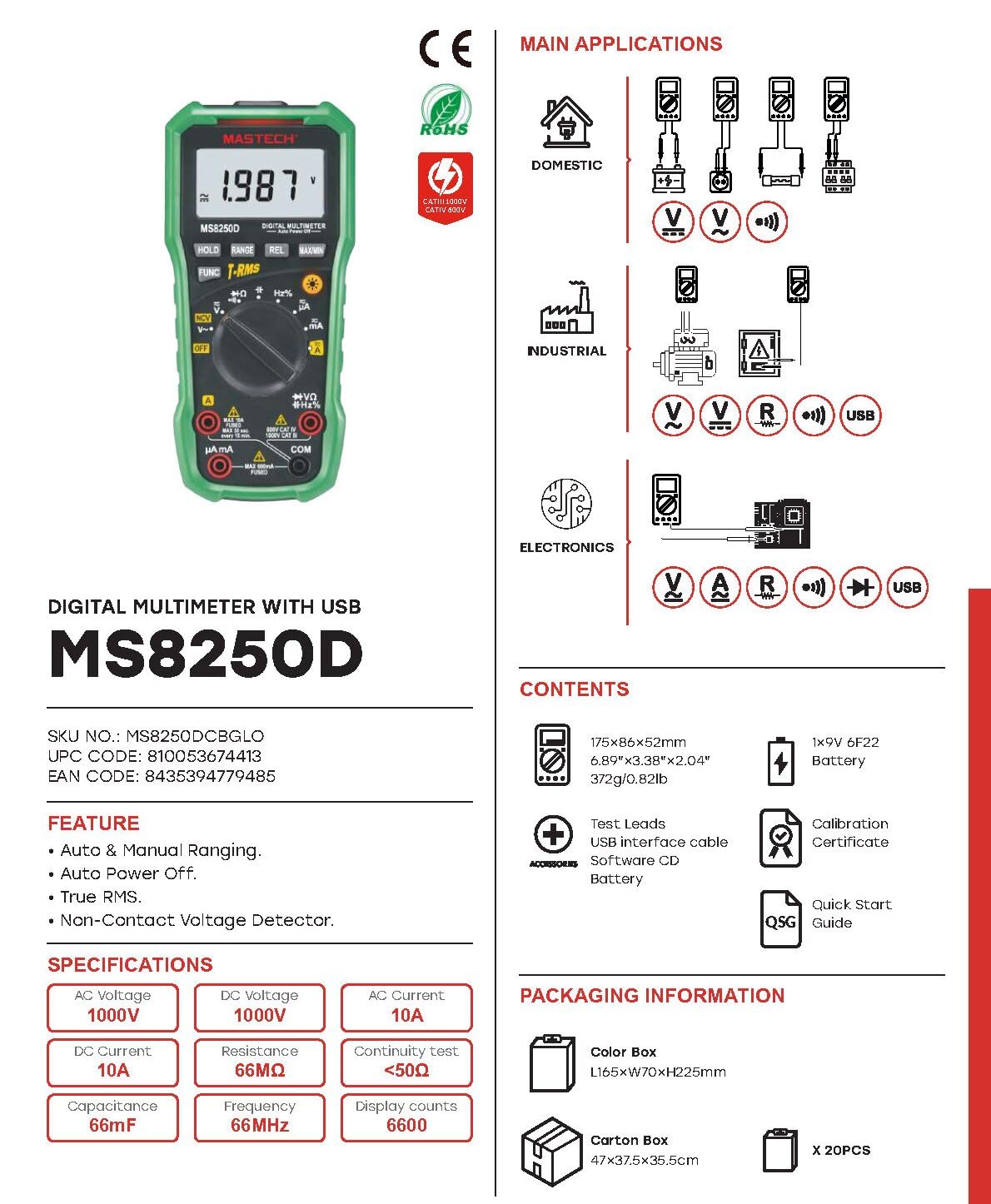
Imej 3.2: Diagram showing the Mastech MS8250D Multimeter and its included accessories. The image also illustrates typical applications in domestic, industrial, and electronics settings.
- Meter Pelbagai Digital Mastech MS8250D
- Petunjuk Ujian (Merah dan Hitam)
- 1x Bateri 9V 6F22 (dipasang terlebih dahulu atau disertakan secara berasingan)
- Kabel Antara Muka USB
- Software CD (for Windows OS)
- Sijil Penentukuran
- Panduan Permulaan Pantas
4. Persediaan
4.1 Pemasangan Bateri
The MS8250D requires one 9V 6F22 battery for operation. Two LR44 batteries are also mentioned in specifications, likely for a different internal component or an error in data. For the main power, use the 9V battery.
- Pastikan multimeter dimatikan.
- Cari penutup petak bateri di belakang meter.
- Gunakan pemutar skru untuk melonggarkan skru yang mengikat penutup.
- Tanggalkan penutup.
- Connect the 9V battery to the battery clips, observing correct polarity (+ and -).
- Letakkan bateri ke dalam petak.
- Gantikan penutup petak bateri dan kencangkannya dengan skru.
Nota: The meter also uses 2 LR44 batteries, which are typically included and pre-installed for specific functions like the backlight or non-contact voltage detection. Refer to the quick-start guide for specific details on these smaller batteries if replacement is needed.
4.2 Menghubungkan Petunjuk Ujian
Always connect the black test lead to the COM jack. Connect the red test lead to the appropriate input jack based on the measurement type:
- Untuk Voltage, Resistance, Capacitance, Frequency, Diode, and Continuity measurements: Connect the red lead to the VΩHz% jek.
- For Current measurements (µA or mA): Connect the red lead to the µA mA jek.
- For High Current measurements (A): Connect the red lead to the A jek.
Ensure the test leads are fully inserted into the jacks.
5. Arahan Operasi
5.1 Hidupkan/Mati Kuasa
To turn the meter ON, rotate the function dial from the "OFF" position to any desired measurement function. To turn the meter OFF, rotate the function dial back to the "OFF" position.
The meter features an Auto Matikan function to conserve battery life. It will automatically power off after a period of inactivity. To disable or re-enable this feature, refer to the quick-start guide or the full user manual provided on the software CD.
5.2 Auto Ranging and Manual Ranging
The MS8250D defaults to Julat Auto, which automatically selects the best measurement range. Press the JULAT butang untuk beralih ke Ranging Manual. In manual ranging, each press of the JULAT button cycles through available ranges. To return to auto ranging, press and hold the JULAT butang.
5.3 Mengukur Vol. AC/DCtage (V)
- Tetapkan dail fungsi kepada V~ (Jilid ACtage) atau V- (DC Voltage) kedudukan.
- Sambungkan plumbum ujian hitam ke COM bicu dan ujian merah membawa kepada VΩHz% jek.
- Sambungkan kuar ujian merentasi litar atau komponen yang hendak diukur.
- Baca voltage value on the display. The meter will automatically detect AC or DC if the dial is set to the combined V position, or you can use the FUNGSI button to toggle between AC and DC if available on your model.
5.4 Measuring AC/DC Current (A, mA, µA)
AMARAN: Jangan sekali-kali sambungkan meter secara selari dengan voltage sumber semasa mengukur arus. Ini boleh meniup fius atau merosakkan meter.
- MATIKAN kuasa litar.
- Tetapkan dail fungsi kepada A~ (AC Current), A- (DC Current), mA~, mA-, µA~, atau µA- kedudukan.
- Sambungkan plumbum ujian hitam ke COM jek.
- Sambungkan plumbum ujian merah ke A jack for high current, or µA mA jack for low current.
- Open the circuit where the current is to be measured and connect the meter in series with the load.
- Guna kuasa pada litar.
- Read the current value on the display. Use the FUNGSI button to toggle between AC and DC if needed.
5.5 Mengukur Rintangan (Ω)
- Tetapkan dail fungsi kepada Ω kedudukan.
- Sambungkan plumbum ujian hitam ke COM bicu dan ujian merah membawa kepada VΩHz% jek.
- Ensure the circuit or component under test is de-energized.
- Sambungkan kuar ujian merentasi komponen.
- Baca nilai rintangan pada paparan.
5.6 Diode Test and Continuity Test
- Tetapkan dail fungsi kepada Diod/Kesinambungan position (often shared with resistance or capacitance).
- Sambungkan plumbum ujian hitam ke COM bicu dan ujian merah membawa kepada VΩHz% jek.
- Gunakan FUNGSI button to select between Diode Test and Continuity Test.
- Untuk Ujian Diod: Sambungkan kuar merah ke anod dan kuar hitam ke katod diod. Paparan akan menunjukkan vol ke hadapantage drop (typically 0.5V to 0.8V for silicon diodes). Reversing the probes should show "OL" (Open Loop).
- Untuk Ujian Kesinambungan: Connect the probes across the circuit or component. If resistance is less than approximately 50Ω, the buzzer will sound, indicating continuity.
5.7 Mengukur Kapasitansi (F)
- Tetapkan dail fungsi kepada Kapasitansi position (often shared with resistance or diode).
- Sambungkan plumbum ujian hitam ke COM bicu dan ujian merah membawa kepada VΩHz% jek.
- Pastikan kapasitor dinyahcas sepenuhnya sebelum ujian untuk mengelakkan kerosakan pada meter.
- Sambungkan kuar ujian merentasi terminal kapasitor.
- Baca nilai kapasitans pada paparan.
5.8 Measuring Frequency (Hz) and Duty Cycle (%)
- Tetapkan dail fungsi kepada Hz% position (often shared with voltagdan).
- Sambungkan plumbum ujian hitam ke COM bicu dan ujian merah membawa kepada VΩHz% jek.
- Sambungkan prob ujian merentasi sumber isyarat.
- The display will show the frequency. Press the FUNGSI button to toggle to Duty Cycle measurement if available.
5.9 Bukan Kenalan Voltage (NCV) Pengesanan
- Tetapkan dail fungsi kepada NCV kedudukan.
- Hold the meter with the NCV sensor (usually at the top of the meter) near a live AC voltage sumber.
- The meter will indicate the presence of AC voltage through an audible beep and/or visual indicator (e.g., LED).
5.10 USB Interface (Windows OS)
The MS8250D includes a USB interface for connecting to a computer running Windows OS. This allows for data logging and real-time monitoring of measurements. Install the provided software from the CD and follow the on-screen instructions for driver installation and software usage.
6. Penyelenggaraan
6.1 Pembersihan
Lap bekas meter dengan iklanamp kain dan detergen lembut. Jangan gunakan bahan pelelas atau pelarut. Pastikan meter kering sepenuhnya sebelum digunakan.
6.2 Penggantian Bateri
When the low battery indicator appears on the display, replace the 9V battery immediately to ensure accurate readings. Follow the steps in Section 4.1 Battery Installation.
6.3 Penggantian Fius
If the meter fails to measure current, the fuse may be blown. Fuses are located inside the meter. To replace a fuse:
- Pastikan meter dimatikan dan semua kabel ujian diputuskan sambungannya.
- Open the battery compartment cover (and potentially the main case, depending on design).
- Keluarkan fius lama dengan berhati-hati.
- Replace with a fuse of the exact same type and rating (e.g., F600mA/250V for mA/µA range, F10A/250V for A range). Refer to the meter's internal markings or the full manual for specific fuse ratings.
- Reassemble the meter, ensuring all screws are tightened.
AMARAN: Never use a fuse with a different rating or bypass the fuse. This can damage the meter and pose a serious safety hazard.
7. Penyelesaian masalah
| Masalah | Kemungkinan Punca | Penyelesaian |
|---|---|---|
| Meter tidak dihidupkan. | Bateri mati. | Ganti bateri 9V. |
| "OL" (Lebihan) dipaparkan. | Measurement exceeds selected range or meter's maximum capacity. | Switch to a higher range (if in manual ranging) or ensure the measurement is within the meter's limits. |
| Tiada bacaan semasa. | Blown fuse; incorrect lead connection; open circuit. | Check and replace fuse if necessary. Ensure leads are connected correctly (in series). Verify circuit continuity. |
| Bacaan yang tidak tepat. | Low battery; poor lead contact; external interference. | Replace battery. Ensure leads are firmly connected. Move away from strong electromagnetic fields. |
| Display shows "USB" but no PC connection. | Drivers not installed; incorrect software settings. | Install drivers from the provided CD. Refer to software manual for connection instructions. |
8. Spesifikasi
The following table details the technical specifications of the Mastech MS8250D Digital Multimeter.

Imej 8.1: Detailed specifications table for the Mastech MS8250D, outlining ranges, resolutions, and accuracies for various measurement functions.
| Fungsi | Julat | Resolusi | Ketepatan |
|---|---|---|---|
| DC Voltage | |||
| 660mV | 0.1mV | ±(0.8%+3) | |
| 6.6V/66V/660V/1000V | 1mV/10mV/0.1V/1V | ±(0.5%+5) | |
| Vol. ACtage (RMS Sebenar) | |||
| 660mV | 0.1mV | ±(1.5%+5) | |
| 6.6V/66V | 1mV/10mV | ±(1.2%+5) | |
| 660V/1000V | 0.1V/1V | ±(1.0%+3) | |
| Arus DC | |||
| 660µA/6600µA/66mA/660mA | 0.1µA/1µA/10µA/0.1mA | ±(1.0%+5) | |
| 10A | 10mA | ±(2.0%+5) | |
| Arus AC (RMS Sebenar) | |||
| 660µA/6600µA/66mA/660mA | 0.1µA/1µA/0.01mA/0.1mA | ±(1.5%+5) | |
| 10A | 10mA | ±(3.0%+5) | |
| Rintangan | |||
| 660Ω / 6.6kΩ / 66kΩ / 660kΩ / 6.6MΩ | 0.1Ω / 1Ω / 10Ω / 100Ω / 1kΩ | ±(0.8%+5) | |
| 66MΩ | 10kΩ | ±(1.5%+5) | |
| Kapasitansi | |||
| 6.6nF/66nF/660nF/6.6µF/66µF | 1pF/10pF/0.1nF/1nF/10nF | ±(4.0%+5) | |
| 600µF | 1µF | ±(3.0%+5) | |
| 6.6mF/66mF | 1µF/10µF | ±(4.0%+5) | |
| Kekerapan | |||
| 66Hz/660Hz/6.6kHz/66kHz | 0.01Hz / 0.1Hz / 1Hz / 10Hz | ±(1.5%+5) | |
| 660kHz/6.6MHz/66MHz | 0.1kHz/1kHz/10kHz | ±(1.5%+5) | |
| Kitaran Tugas | |||
| 0.1%~99.9% | 0.1% | ±(2.0%+5) | |
Spesifikasi Umum:
- paparan: 6600 Kiraan
- Sumber Kuasa: 1x 9V 6F22 Battery (main power), 2x LR44 batteries (auxiliary, e.g., backlight)
- Auto Matikan: ya
- RMS Benar: ya
- Vol. Bukan KenalantagPengesan e (NCV): ya
- Diod Voltan Terbukatage: 3.2V
- Buzzer Kesinambungan: < 50Ω
- MAX / MIN: ya
- Pegangan Data: ya
- Paparan Bateri Rendah: ya
- Paparan Lampu Belakang: ya
- Antaramuka USB: Yes (Windows OS)
- Penilaian Keselamatan: CAT III 1000V / CAT IV 600V
- Ketepatan Pengukuran: 0.4% (general, specific accuracies per function in table)
- Vol Operasitage (Min): 3.2 Volt
- Penilaian Suhu Atas: 50 Darjah Celsius
- Dimensi (L x W x H): 20 x 15 x 25 cm
- Berat Barang: 1 kg
- Bahan: Akrilonitril Butadiena Stirena (ABS)
- warna: Biru
- Pengeluar: MASTEK
- Negara Asal: Taiwan
- Pensijilan: CE, RoHS, UL
9. Waranti dan Sokongan
Mastech products are designed for reliability and durability. For specific warranty information, please refer to the warranty card included with your product or contact Mastech customer support directly. Typically, Mastech offers a limited warranty against defects in materials and workmanship.
For technical support, troubleshooting assistance, or warranty claims, please contact your authorized Mastech dealer or visit the official Mastech webtapak untuk maklumat hubungan.
Tempoh Ketersediaan Alat Ganti EU: 1 Tahun