
1. Pengenalan
This manual provides instructions for the safe and effective operation of the Mastech MS2006B Digital AC Clamp Leakage Current Meter. This device is designed for measuring AC leakage current, offering a reliable tool for electrical testing and troubleshooting.
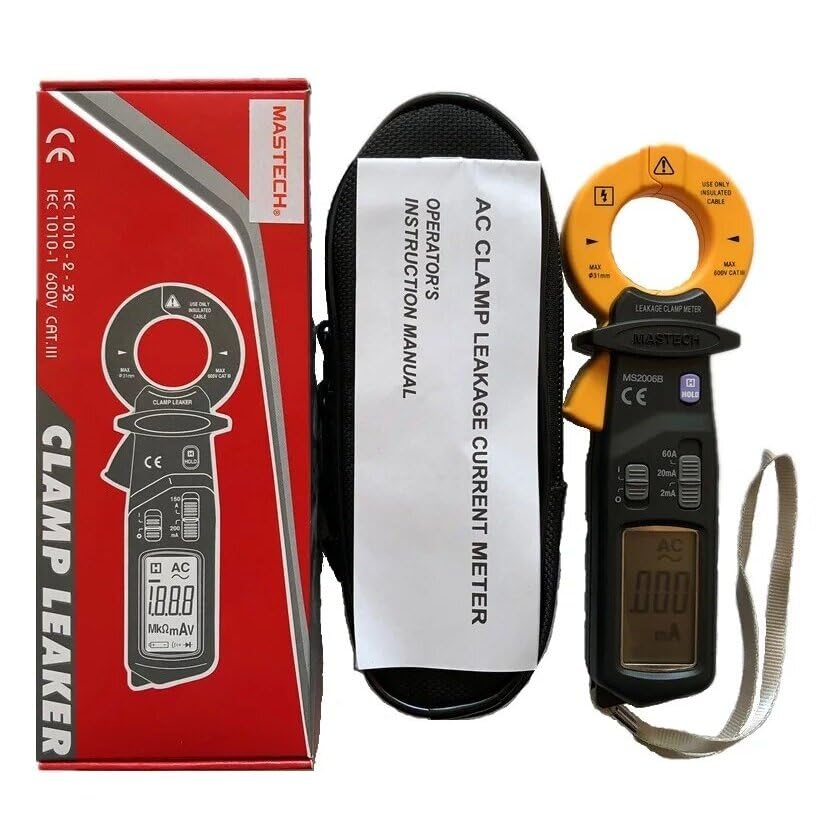
Image 1.1: The Mastech MS2006B Digital AC Clamp Leakage Current Meter, shown with its protective carrying case and instruction manual, alongside its retail packaging.
2. Maklumat Keselamatan
To ensure safe operation, please read and understand all safety warnings and operating instructions before using the meter. Failure to observe these warnings can result in severe injury or damage to the instrument.
- Sentiasa mematuhi kod keselamatan tempatan dan nasional.
- Jangan gunakan meter jika ia kelihatan rosak atau jika penebatnya terjejas.
- Ensure the meter's range is appropriate for the measurement being taken.
- Avoid contact with live circuits when replacing batteries or opening the case.
- Keep fingers behind the finger guards during operation.
- Jangan kendalikan meter dalam persekitaran gas meletup, wap atau habuk.
3. Ciri-ciri Produk
The Mastech MS2006B offers several key features for efficient and accurate measurements:
- paparan: 2000 counts digital display for clear readings.
- Pembukaan Rahang: Maximum jaw opening of Φ31mm (1.2 inches) to accommodate various cable sizes.
- Auto Matikan: Automatically powers off after a period of inactivity to conserve battery life.
- Pegangan Data: Membekukan bacaan yang dipaparkan untuk rakaman yang mudah.
- Paparan Bateri Rendah: Menunjukkan bila penggantian bateri diperlukan.
- AC Current Ranges: Includes 60A, 20mA, and 2mA measurement ranges.

Image 3.1: A clear front view of the Mastech MS2006B meter, highlighting its digital display, rotary switch for range selection, and the clamp Rahang.
4. Components and Packaging Contents
Setelah membuka bungkusan, sahkan bahawa semua barang yang disenaraikan di bawah ada dan tidak rosak:
- Mastech MS2006B Digital AC Clamp Meter Arus Kebocoran
- Protective Carry Bag
- Sijil Penentukuran
- Panduan Mula Pantas
- 2 x 1.5V LR44 Batteries (pre-installed or included separately)

Image 4.1: An informational diagram detailing the main applications, contents, and packaging information for the MS2006B meter.
5. Persediaan
5.1 Pemasangan Bateri
The MS2006B meter requires two (2) LR44 1.5V batteries for operation. These batteries are typically included with the device.
- Cari penutup petak bateri di belakang meter.
- Use a suitable tool (e.g., a small screwdriver or coin) to open the battery compartment.
- Insert the two LR44 batteries, observing the correct polarity (+ and -) as indicated inside the compartment.
- Pasang semula penutup petak bateri dan pasangkannya dengan kukuh.

Imej 5.1: Satu dalaman view of the MS2006B, illustrating the battery compartment and the meter's internal components.
6. Arahan Operasi
6.1 Menghidupkan/Mematikan
To power on the meter, rotate the rotary switch from the 'OFF' position to any desired measurement range (e.g., 60A, 20mA, 2mA). To power off, rotate the switch back to the 'OFF' position.
6.2 AC Leakage Current Measurement
- Select the appropriate AC current range (60A, 20mA, or 2mA) using the rotary switch. Start with the highest range if the current value is unknown.
- Buka clamp rahang dengan menekan picu.
- Enclose the single conductor (not multiple conductors) through which the leakage current is to be measured within the clamp rahang. Pastikan rahang ditutup sepenuhnya.
- Read the current value displayed on the LCD. If the reading is too low for the selected range, switch to a lower range for better resolution.
6.3 Fungsi Pegangan Data
Press the 'HOLD' button to freeze the current reading on the display. Press the 'HOLD' button again to release the reading and resume live measurement.
6.4 Auto Mati
The meter is equipped with an Auto Power Off feature to conserve battery life. If no operation is performed for approximately 15 minutes, the meter will automatically power off. To reactivate the meter, rotate the rotary switch to 'OFF' and then back to a measurement range, or press any button.
7. Penyelenggaraan
7.1 Pembersihan
Lap bekas meter dengan iklanamp kain dan detergen lembut. Jangan gunakan bahan pelelas atau pelarut. Pastikan meter kering sepenuhnya sebelum digunakan.
7.2 Penggantian Bateri
When the low battery indicator appears on the display, replace the batteries as described in Section 5.1. Always use two new LR44 1.5V batteries.
7.3 Penyimpanan
If the meter is not to be used for an extended period, remove the batteries to prevent leakage and store the meter in a cool, dry place away from direct sunlight.
8. Penyelesaian masalah
- Tiada Paparan: Periksa pemasangan bateri dan pastikan bateri tidak habis. Gantikan jika perlu.
- Bacaan Tidak Tepat: Pastikan clamp jaw is fully closed around a single conductor. Verify the correct measurement range is selected.
- Meter Tidak Dihidupkan: Confirm batteries are correctly installed and charged. Rotate the function switch to an 'ON' position.
9. Spesifikasi
| Parameter | Nilai |
|---|---|
| Paparan | 2000 Kiraan |
| Pembukaan Rahang | Φ31mm (1.2 inches) |
| Julat Arus AC | 60A, 20mA, 2mA |
| Sumber Kuasa | 2 x LR44 1.5V Batteries |
| Dimensi Produk | 7.87 x 5.91 x 9.84 inci |
| Berat Barang | 1 Kilogram (2.2 Paun) |
| Pengeluar | MASTEK |
| Nombor Model | YQ-MS2006B |
10. Waranti dan Sokongan
For warranty information and technical support, please refer to the documentation included with your product or contact Mastech customer service directly. Keep your purchase receipt as proof of purchase.