
1. Produk Lebihview
The NEWSKILL Chiron Pro is an ambidextrous wireless gaming mouse designed for precision and comfort. It features a high-performance optical sensor, programmable buttons, and customizable RGB lighting.

Imej: Bersudut view of the NEWSKILL Chiron Pro Wireless Gaming Mouse, showcasing its ergonomic shape and design.
2. Kandungan Pakej
- NEWSKILL Chiron Pro Wireless Gaming Mouse
- Penerima Wayarles USB 2.4GHz
- Kabel Pengecas/Data USB-C ke USB-A
- Manual Pengguna (dokumen ini)
3. Arahan Persediaan
3.1 Pengecasan Awal
Before first use, it is recommended to fully charge the mouse. Connect the provided USB-C cable to the mouse's front port and the USB-A end to a powered USB port on your computer or a USB wall adapter. A full charge takes approximately 2 hours and provides up to 80 hours of usage.

Imej: Depan view of the mouse, highlighting the USB-C charging port.
3.2 Sambungan Tanpa Wayar (2.4GHz)
- Locate the USB 2.4GHz wireless receiver. It is typically stored in a compartment on the underside of the mouse.
- Palamkan penerima USB ke dalam port USB yang tersedia pada komputer anda.
- Hidupkan tetikus menggunakan suis ON/OFF yang terletak di bahagian bawah tetikus.
- Your computer should automatically detect and install the necessary drivers. The mouse is ready for use once the RGB lighting activates.
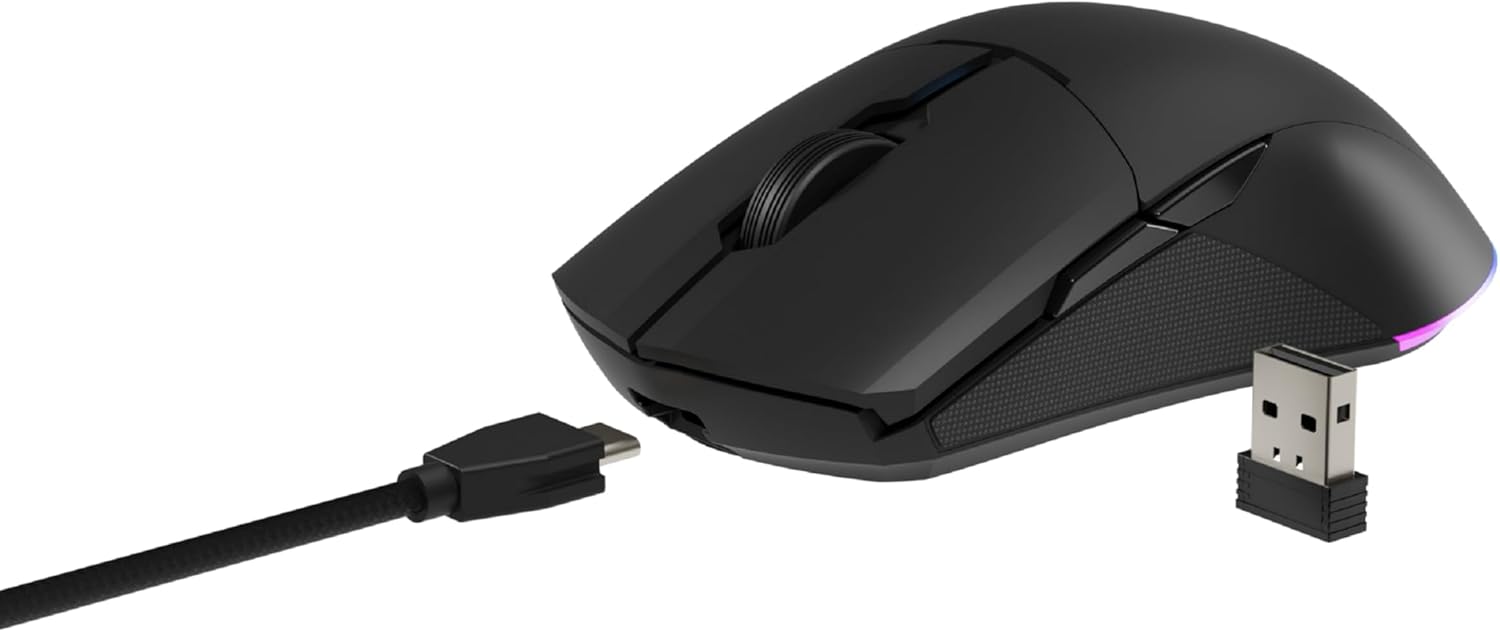
Image: The NEWSKILL Chiron Pro mouse shown with its USB-C cable and the 2.4GHz wireless receiver.
3.3 Sambungan Berwayar
The mouse can also be used in wired mode. Simply connect the USB-C cable to the mouse and the USB-A end to your computer. The mouse will function as a wired device and charge simultaneously.
4. Arahan Operasi
4.1 Fungsi Asas
- Butang Klik Kiri: Tindakan utama.
- Butang Klik Kanan: Menu tindakan/konteks sekunder.
- Roda Tatal: Tatal ke atas/bawah, klik tengah.
- Side Buttons (8 programmable): Default functions may vary, but are customizable via software.

Imej: Sisi view of the mouse, showing the textured grip and two side buttons.
4.2 Pelarasan DPI
The mouse features a Pixart PMW3335 optical sensor with up to 16000 configurable DPI. The DPI button on the underside of the mouse allows you to cycle through preset DPI levels. For fine-tuning and custom DPI settings, use the advanced software.

Image: Underside of the mouse, showing the DPI button, optical sensor, and ON/OFF switch.
4.3 Penyesuaian Pencahayaan RGB
The Chiron Pro features customizable RGB lighting. To personalize lighting effects, colors, and brightness, download and install the dedicated NEWSKILL software from the official website. The software also allows for button remapping and macro creation.

Image: The NEWSKILL Chiron Pro mouse displaying its customizable RGB lighting.
5. Penyelenggaraan
5.1 Pembersihan
To maintain optimal performance, regularly clean your mouse. Use a soft, dry cloth to wipe the surface. For stubborn dirt, a slightly damp cloth with mild soap can be used, ensuring no liquid enters the mouse. Avoid abrasive cleaners or solvents.
5.2 Penjagaan Bateri
To prolong battery life, avoid fully discharging the mouse frequently. Charge the mouse when the battery indicator suggests low power. Store the mouse in a cool, dry place when not in use for extended periods.
6. Penyelesaian masalah
- Tetikus tidak bertindak balas:
Ensure the mouse is turned ON. Check if the USB receiver is securely plugged into a working USB port. If using wired mode, ensure the USB-C cable is properly connected. Try a different USB port. - Isu sambungan wayarles:
Ensure the mouse is within range of the USB receiver (typically up to 10 meters). Avoid placing the receiver near other wireless devices that might cause interference. Re-pair the mouse if necessary (refer to software instructions). - DPI or button issues:
Ensure the NEWSKILL software is installed and up-to-date. Check your settings within the software. Reset to default settings if custom configurations are causing issues. - Masalah pengecasan:
Verify the USB-C cable is not damaged and is properly connected. Try a different USB port or charging adapter. Ensure the mouse is not in an extremely hot or cold environment during charging. - Missing USB Receiver:
The USB receiver is typically stored in a compartment on the underside of the mouse for safekeeping. Please check this compartment thoroughly. If it is genuinely missing, contact customer support.
7. Spesifikasi
| Ciri | Spesifikasi |
|---|---|
| Jenama | KEMAHIRAN BERITA |
| Nama Model | CHIRON PRO |
| Nombor Model | 10831240 |
| warna | Hitam |
| Teknologi Ketersambungan | Wireless (2.4GHz), USB (Wired) |
| Jenis Sensor | Optical (Pixart PMW3335) |
| DPI | Sehingga 16000 DPI |
| Bilangan Butang | 8 (Boleh Diprogram) |
| Tukar Jangka Hayat | Huano switches (up to 20 million clicks) |
| Orientasi Tangan | Ambidextrous |
| Hayat Bateri | Sehingga 80 jam |
| Masa Mengecas | lebih kurang 2 jam |
| Dimensi Produk | 12.4 x 6.75 x 0.1 cm |
| Berat Produk | 500 g |
| Sistem Operasi yang Serasi | Windows 10, Windows 7, Windows Vista, Windows XP, Linux |
8. Waranti dan Sokongan
8.1 Maklumat Waranti
NEWSKILL products are covered by a manufacturer's warranty. For specific warranty terms and conditions, please refer to the warranty card included with your product or visit the official NEWSKILL webtapak. Simpan bukti pembelian anda untuk tuntutan waranti.
8.2 Sokongan Pelanggan
If you encounter any issues or have questions regarding your NEWSKILL Chiron Pro Wireless Gaming Mouse, please visit the official NEWSKILL support website or contact their customer service team. You can find contact information on the NEWSKILL webtapak: www.newskillgaming.com