
1. Produk Lebihview
The ULTRAK 495 Professional 100-Lap Digital Stopwatch is designed for precise timekeeping in various sports and training activities. It features a large, easy-to-read display and multiple functions to support athletes, coaches, and referees.
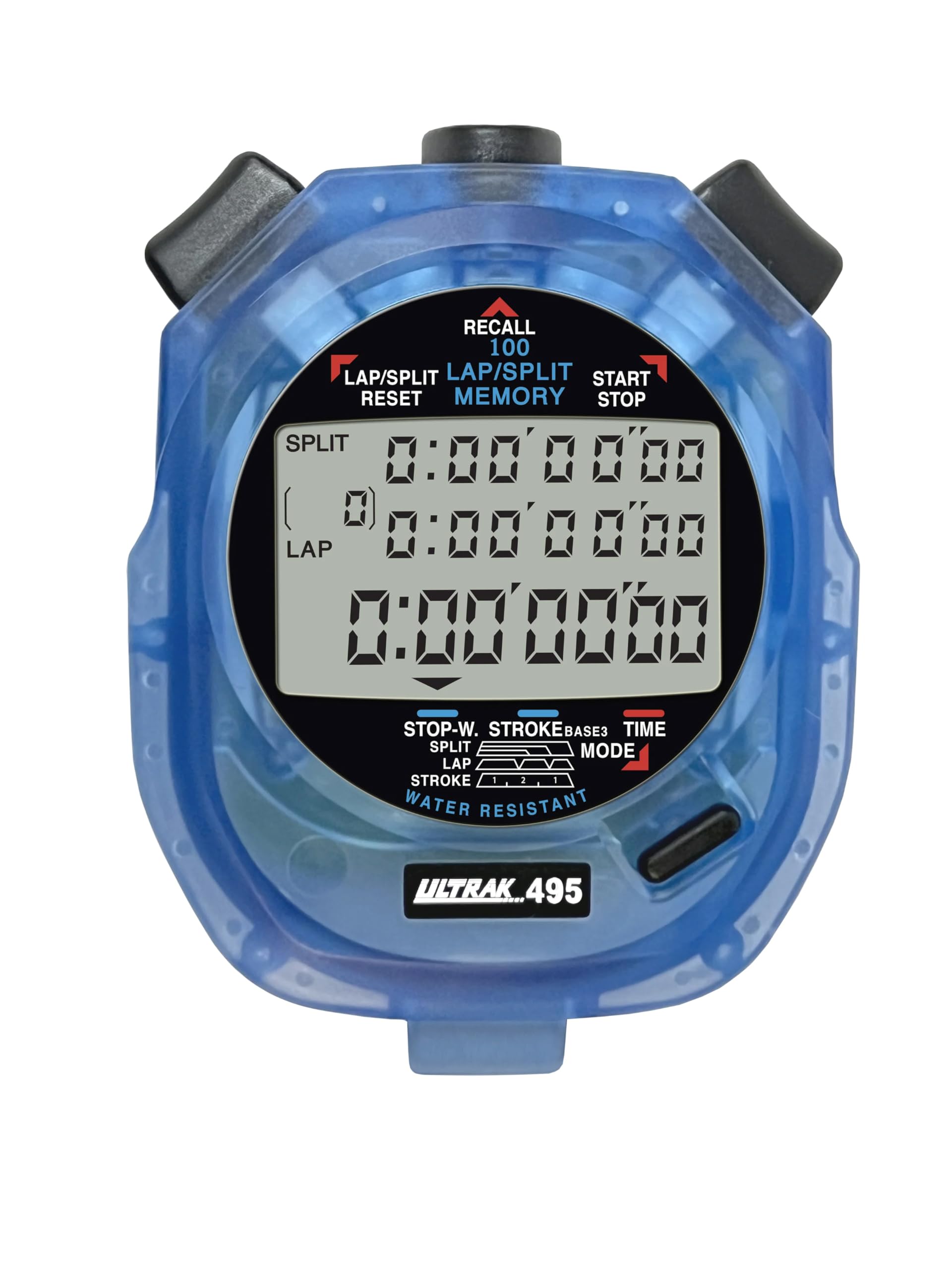
Figure 1: ULTRAK 495 Stopwatch in blue.
Ciri-ciri Utama:
- 100 Dual Split Recallable Memory: Enhances accuracy for track and field events, ideal for athletes and coaches requiring precise timekeeping.
- Fungsi Serbaguna: Includes stroke/frequency, time, and calendar functions, suitable for diverse sports activities.
- Water Resistant Design: Allows for outdoor use in various weather conditions.
- Paparan 3 Baris Besar: Facilitates easy viewing of multiple lap times simultaneously.
- Durable Lithium Battery: Ensures reliability for extended use.
2. Persediaan
2.1. Pemasangan Bateri
The ULTRAK 495 Stopwatch comes with one Lithium Metal battery pre-installed. If battery replacement is needed, refer to the Maintenance section.
2.2. Tetapan Masa dan Tarikh Permulaan
Untuk menetapkan masa dan tarikh:
- Tekan ke MODE button repeatedly until the time/calendar display mode is active.
- Tekan dan tahan butang SET button (usually located on the top right) until the digits begin to flash.
- Gunakan LAP/SPLIT/RESET button (top left) to adjust the flashing digit.
- Tekan ke SET button to move to the next digit or setting (e.g., hours, minutes, seconds, month, day, year).
- Setelah semua tetapan betul, tekan butang MODE butang untuk keluar dari mod tetapan.

Figure 2: Stopwatch displaying various modes, including Time/Calendar.
3. Operasi
3.1. Stopwatch Mode (Standard Timing)
This mode is used for basic timing of events.
- Ensure the stopwatch is in the standard stopwatch mode (usually indicated by "STOPWATCH" on the display). If not, press MODE sehingga ia muncul.
- Tekan MULA/BERHENTI (top right button) to begin timing.
- Tekan MULA/BERHENTI sekali lagi untuk menjeda pemasa.
- Tekan MULA/BERHENTI untuk menyambung semula pengaturan masa.
- To reset the timer to zero, ensure it is stopped, then press LAP/SPLIT/RESET (top left button).
3.2. Lap/Split Timing with Memory Recall
The ULTRAK 495 can record up to 100 lap and split times.
- In stopwatch mode, press MULA/BERHENTI untuk memulakan masa.
- Tekan LAP/SPLIT/RESET to record a split time. The display will momentarily show the split time while the main timer continues running in the background. The bottom row displays the running event or lap time.
- Repeat step 2 for each lap or split you wish to record.
- Tekan MULA/BERHENTI to end the timing session.
- To recall recorded times, press the INGAT SEMULA button (top center). Use the LAP/SPLIT/RESET dan MULA/BERHENTI buttons to navigate through the stored lap and split times.
- To exit recall mode, press MODE. To clear memory, ensure the stopwatch is stopped and not in recall mode, then press and hold LAP/SPLIT/RESET.

Figure 3: Display showing simultaneous split, lap, and total times.
3.3. Mod Pemasa Undur
The stopwatch includes a countdown timer function.
- Tekan MODE until the countdown timer display appears.
- Tekan dan tahan SET untuk memasuki mod tetapan.
- guna LAP/SPLIT/RESET to adjust the time and SET untuk bergerak antara jam, minit, dan saat.
- Setelah masa undur yang diingini ditetapkan, tekan MODE untuk keluar dari mod tetapan.
- Tekan MULA/BERHENTI untuk memulakan kira detik. Penggera akan berbunyi apabila pemasa mencapai sifar.
3.4. Stroke/Frequency Measuring Mode
This mode is useful for measuring stroke rates in swimming or other repetitive actions.
- Tekan MODE until the stroke/frequency mode is displayed.
- Tekan MULA/BERHENTI to begin measuring.
- Tekan LAP/SPLIT/RESET at the start of each stroke or cycle. The stopwatch will calculate and display the frequency.
- Tekan MULA/BERHENTI untuk berhenti mengukur.
4. Penyelenggaraan
4.1. Pembersihan
Wipe the stopwatch with a soft, dry cloth. For stubborn dirt, use a slightly damp kain dan sabun lembut, kemudian keringkan dengan teliti. Elakkan bahan kimia yang keras atau pembersih yang kasar.
4.2. Tahan Air
The ULTRAK 495 is water-resistant, making it suitable for use in various weather conditions. However, it is not designed for submersion. Avoid pressing buttons while the stopwatch is wet to prevent water ingress.
4.3. Penggantian Bateri
The stopwatch uses one Lithium Metal battery. When the display becomes dim or functions become erratic, it's time to replace the battery. Carefully open the battery compartment (usually on the back, secured by small screws) and replace with a new battery of the same type. Ensure proper polarity and securely close the compartment.
5. Penyelesaian masalah
- Paparan kosong atau malap: Periksa bateri. Gantikan jika perlu.
- Stopwatch resets unexpectedly during timing: This can sometimes occur due to low battery or a temporary electrical glitch. Try replacing the battery. If the issue persists, ensure buttons are not being pressed inadvertently.
- Butang tidak bertindak balas: Ensure the stopwatch is not in a locked mode (if applicable, check manual for specific lock features). If wet, ensure it is completely dry. If still unresponsive, try replacing the battery.
- Masa atau tarikh salah: Refer to section 2.2 to re-set the time and date.
6. Spesifikasi
| Ciri | Perincian |
|---|---|
| Nombor Model | 495 |
| Ingatan | 100 Dual Split Recallable Laps |
| Paparan | Large 3-Row Display |
| Fungsi | Stopwatch, Lap/Split, Countdown Timer, Stroke/Frequency, Time, Calendar |
| Tahan Air | Yes (Water Resistant) |
| Jenis Bateri | 1 bateri Lithium Metal (termasuk) |
| bahan | plastik |
| Dimensi Produk | 0.2"D x 2.5"W x 3.5"H |
| Berat Barang | 3.2 auns |
7. Waranti dan Sokongan
For specific warranty information and customer support, please refer to the documentation included with your product or visit the official Ultrak webtapak. Simpan resit pembelian anda sebagai bukti pembelian untuk sebarang tuntutan waranti.