
DOOGEE N55 Pro
DOOGEE N55 Pro Cell Phone User Manual
Panduan komprehensif anda untuk persediaan, operasi dan penyelenggaraan.
1. Pengenalan
Welcome to the DOOGEE N55 Pro user manual. This guide provides detailed instructions to help you get the most out of your new smartphone. The DOOGEE N55 Pro is designed for optimal performance and user experience, featuring the latest Android 14 OS, a powerful octa-core processor, and a large 5150mAh battery.
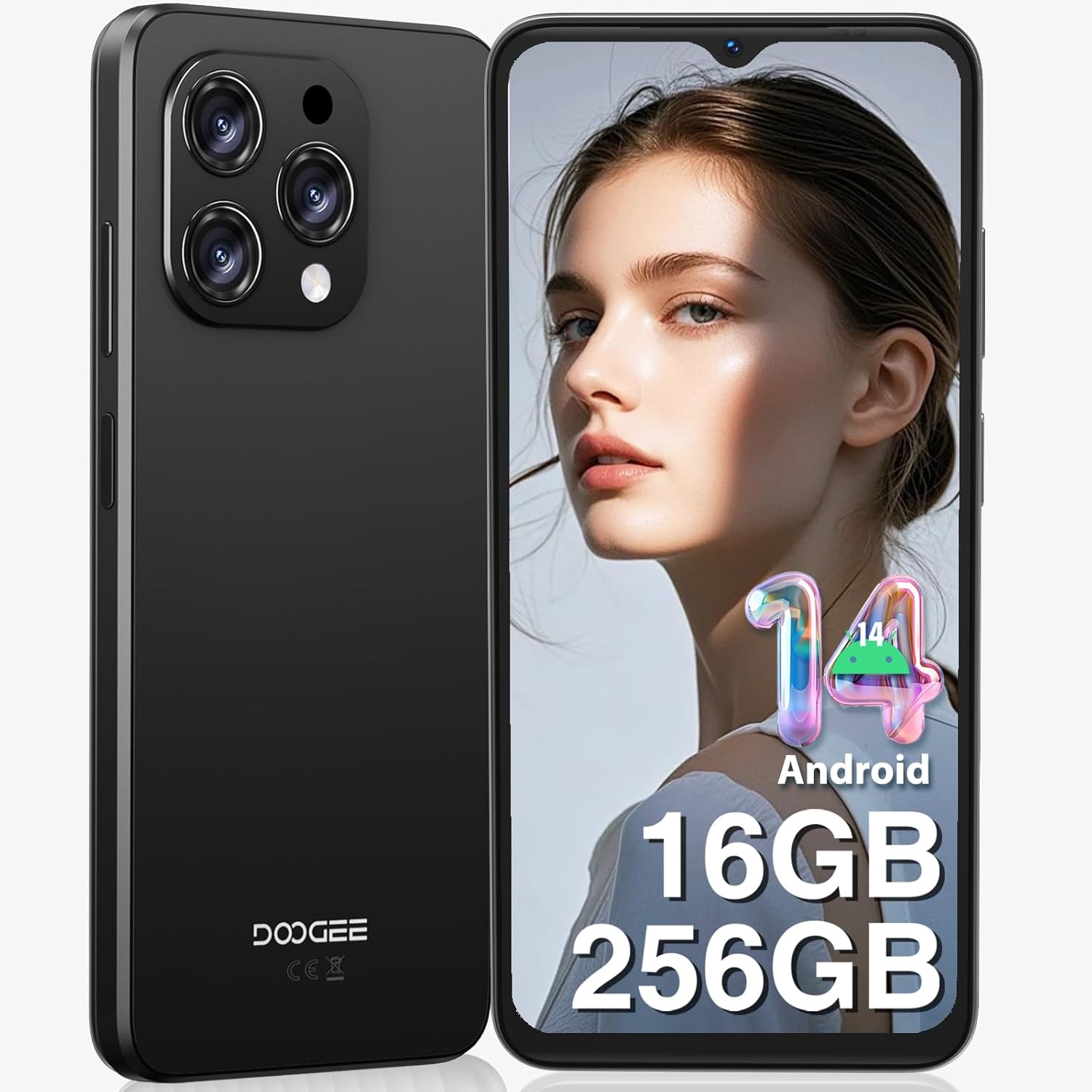
Rajah 1: Depan dan belakang view of the DOOGEE N55 Pro Cell Phone, showcasing reka bentuk anggun dan modul kameranya.
2. Apa yang ada di dalam Kotak
Upon unboxing your DOOGEE N55 Pro, please verify that all the following items are included:
- 1 x Telefon Bimbit DOOGEE N55 Pro Android 14
- 1 x Kabel Port Jenis-C
- 1 x Pengecas
- 1 x Pin Kad SIM
- 1 x Filem Pelindung TP (sudah disapu terlebih dahulu)
- 1 x sarung pelindung TPU
- 1 x Manual Pengguna
- 1 x Kad Waranti

Figure 2: Illustration of the DOOGEE N55 Pro and its included accessories, such as the charger, USB-C cable, and protective case.
3. Produk Lebihview
3.1 Ciri-ciri Utama
- Sistem pengendalian: Android 14
- Pemproses: Octa-core processor for smooth performance
- Memori & Storan: Up to 16GB RAM (6GB physical + 10GB virtual) and 256GB ROM, expandable up to 1TB via TF card
- paparan: 6.56-inch HD+ 90Hz IPS Waterdrop Screen (720 x 1612 resolution)
- Bateri: Bateri berkapasiti besar 5150mAh
- Kamera: 13MP AI Main Camera and 8MP Front Camera
- Keselamatan: Support for Face Unlock
- Ketersambungan: Dual SIM 4G, Bluetooth, Wi-Fi, GPS, 3.5mm Audio Jack
3.2 Reka Bentuk dan Paparan
The DOOGEE N55 Pro features a refined and elegant design, with an ultra-lightweight body weighing only 186g and a slim thickness of 8.6mm. The 6.56-inch HD+ IPS Waterdrop Screen offers a 90Hz refresh rate for a smooth and immersive visual experience.

Figure 3: The 6.56-inch HD+ 90Hz IPS Waterdrop Screen, highlighting its resolution, PPI, and aspect ratio for a dynamic display.

Figure 4: The lightweight and elegant design of the DOOGEE N55 Pro, emphasizing its slim profile (8.6mm thickness, 186g weight) and comfortable grip.
Video 1: A visual demonstration of the DOOGEE N55 Pro's 6.56-inch HD+ 90Hz IPS Waterdrop Screen, showcasing its vibrant display and smooth refresh rate.
Video 2: This video highlights the refined and elegant design of the DOOGEE N55 Pro, showcasing its sleek aesthetics and comfortable form factor.
3.3 Performance and Operating System
Equipped with a powerful octa-core processor, the DOOGEE N55 Pro ensures smooth multitasking and efficient handling of demanding applications. It runs on the latest Android 14 operating system, offering enhanced security, improved privacy features, and a more intuitive user interface.

Figure 5: Visual representation of the DOOGEE N55 Pro's memory configuration, including 16GB RAM (6GB physical + 10GB virtual) and 256GB ROM, with expansion capability up to 1TB.

Figure 6: Screenshots demonstrating the upgraded Android 14 interface on the DOOGEE N55 Pro, highlighting its safety and fluency improvements.
Video 3: This video showcases the latest Android 14 system on the DOOGEE N55 Pro, demonstrating its features and smooth operation.
4. Persediaan
4.1 Memasukkan Kad SIM dan Kad TF
The DOOGEE N55 Pro supports dual Nano SIM cards or a combination of one Nano SIM and one TF card for expanded storage. Use the provided SIM ejector tool to open the SIM tray located on the side of the device. Carefully place your SIM card(s) and/or TF card into the tray according to the diagram on the tray, then reinsert it into the phone.
Note: This device does not support Verizon, AT&T, and Xfinity networks. Please check compatibility with your local frequency band before purchasing.
4.2 Kuasa Awal Hidup dan Wizard Persediaan
Press and hold the power button on the side of the phone until the DOOGEE logo appears. Follow the on-screen instructions to complete the initial setup, including language selection, Wi-Fi connection, Google account sign-in, and security settings (Face ID, PIN, pattern, or password).
5. Arahan Operasi
5.1 Navigasi
Navigate through the Android 14 interface using gestures or the traditional navigation bar. Swipe up from the bottom to go home, swipe up and hold for recent apps, and swipe from the left or right edge to go back.
5.2 Penyesuaian
Personalize your phone by changing wallpapers, widgets, and notification settings. Access these options through the Settings app or by long-pressing on the home screen.
6. Penggunaan Kamera
The DOOGEE N55 Pro is equipped with a 13MP AI Main Camera and an 8MP Front Camera. The camera system supports various modes including HDR, Water Mark, Video, Picture, Beauty, Pro Mode, Portrait, Gif, Panorama, Filter, QR Code, and Night mode.

Gambar 7: Lebihview of the DOOGEE N55 Pro's camera system, detailing the 13MP main camera and 8MP front camera, along with supported features like HDR and Night mode.
6.1 Mengambil Foto dan Video
Open the Camera app. Select your desired mode (Photo, Video, Portrait, etc.). Tap the shutter button to capture a photo or start/stop video recording. Adjust settings like flash, timer, and aspect ratio from the camera interface.
7. Pengurusan Bateri
The DOOGEE N55 Pro features a 5150mAh large battery, providing extended usage times. To optimize battery life:
- Kurangkan kecerahan skrin.
- Dayakan mod penjimat bateri apabila diperlukan.
- Tutup apl latar belakang yang tidak digunakan.
- Lumpuhkan Wi-Fi, Bluetooth dan GPS apabila tidak digunakan.

Figure 8: Visual representation of the 5150mAh large battery, indicating estimated standby time (419 hours), video playback (9.5 hours), calling (36 hours), and music playback (35 hours).
8. Ketersambungan
8.1 Wi-Fi dan Bluetooth
Connect to Wi-Fi networks via Settings > Network & internet > Wi-Fi. Pair Bluetooth devices via Settings > Connected devices > Bluetooth.
8.2 GPS and OTG
The phone supports GPS, Glonass, Galileo, and Beidou for accurate navigation. OTG (On-The-Go) functionality allows you to connect USB devices like flash drives or keyboards using an OTG adapter (not included).
9. Penyelenggaraan
To ensure the longevity and optimal performance of your DOOGEE N55 Pro:
- Pastikan peranti bersih menggunakan kain lembut dan kering.
- Elakkan daripada mendedahkan telefon kepada suhu yang melampau atau cahaya matahari langsung.
- Jangan cuba membongkar peranti.
- Regularly update the operating system to receive the latest security patches and features.
- Gunakan hanya aksesori asli atau yang diperakui.
10. Penyelesaian masalah
| Masalah | Penyelesaian yang Mungkin |
|---|---|
| Telefon tidak dihidupkan | Ensure the battery is charged. Press and hold the power button for at least 10 seconds to force restart. |
| Apl ranap atau beku | Clear app cache (Settings > Apps > [App Name] > Storage & cache > Clear cache). Restart the phone. |
| Isyarat rangkaian yang lemah | Check SIM card insertion. Move to an area with better coverage. Verify network compatibility with your carrier. |
| Bateri cepat habis | Kurangkan kecerahan skrin, lumpuhkan ciri yang tidak digunakan (Wi-Fi, Bluetooth, GPS), tutup aplikasi latar belakang. |
| Buka Kunci Wajah tidak berfungsi | Ensure proper lighting and clear camera lens. Re-register your face data in security settings. |
11. Spesifikasi
- Nama Model: N55 Pro
- Sistem pengendalian: Android 14
- Model CPU: 1.2GHz Cortex A8 Processor (Octa Core)
- RAM: 16 GB (6GB fizikal + 10GB maya)
- Kapasiti Storan Memori: 256 GB (expandable to 1TB)
- Saiz Skrin: 6.56 Inci
- Resolusi: 720 x 1612
- Kadar Segar Semula: 90 Hz
- Kapasiti Bateri: 5150 Miliamp jam
- Kamera Utama: Kamera AI 13MP
- Kamera Depan: 8MP
- Ketersambungan: Bluetooth, Wi-Fi, GPS
- Ciri Khas: Support Face Unlock, Widevine L1
- Dimensi: 7.68 x 4.09 x 2.05 inci
- Berat Barang: 13.7 auns
12. Waranti dan Sokongan
DOOGEE offers comprehensive support for your N55 Pro device:
- 30-Day Money Back Guarantee and Free Return: Jika anda tidak berpuas hati dengan pembelian anda.
- Waranti Terhad 2 Tahun: Meliputi kecacatan pembuatan.
- Sokongan Dalam Talian 24/7: Dedicated one-on-one assistance for any queries or issues.
For further assistance, please visit the official DOOGEE store or contact their customer service through the provided warranty card information.
Ask a question about this manual
Ask about setup, troubleshooting, compatibility, parts, safety, or missing instructions. Manuals+ will review the question and use this page’s manual context to help answer it.