
1. Pengenalan
The LAUNCH X431 IMMO Plus is an advanced all-in-one OBD2 car diagnostic device designed for professional automotive technicians and locksmiths. This tool integrates comprehensive diagnostic functions, advanced key programming, ECU coding, and over 39 special reset services. It is equipped with a 10.1-inch touchscreen, 4G connectivity, and a powerful 47800 mAh battery, ensuring efficient and reliable operation.
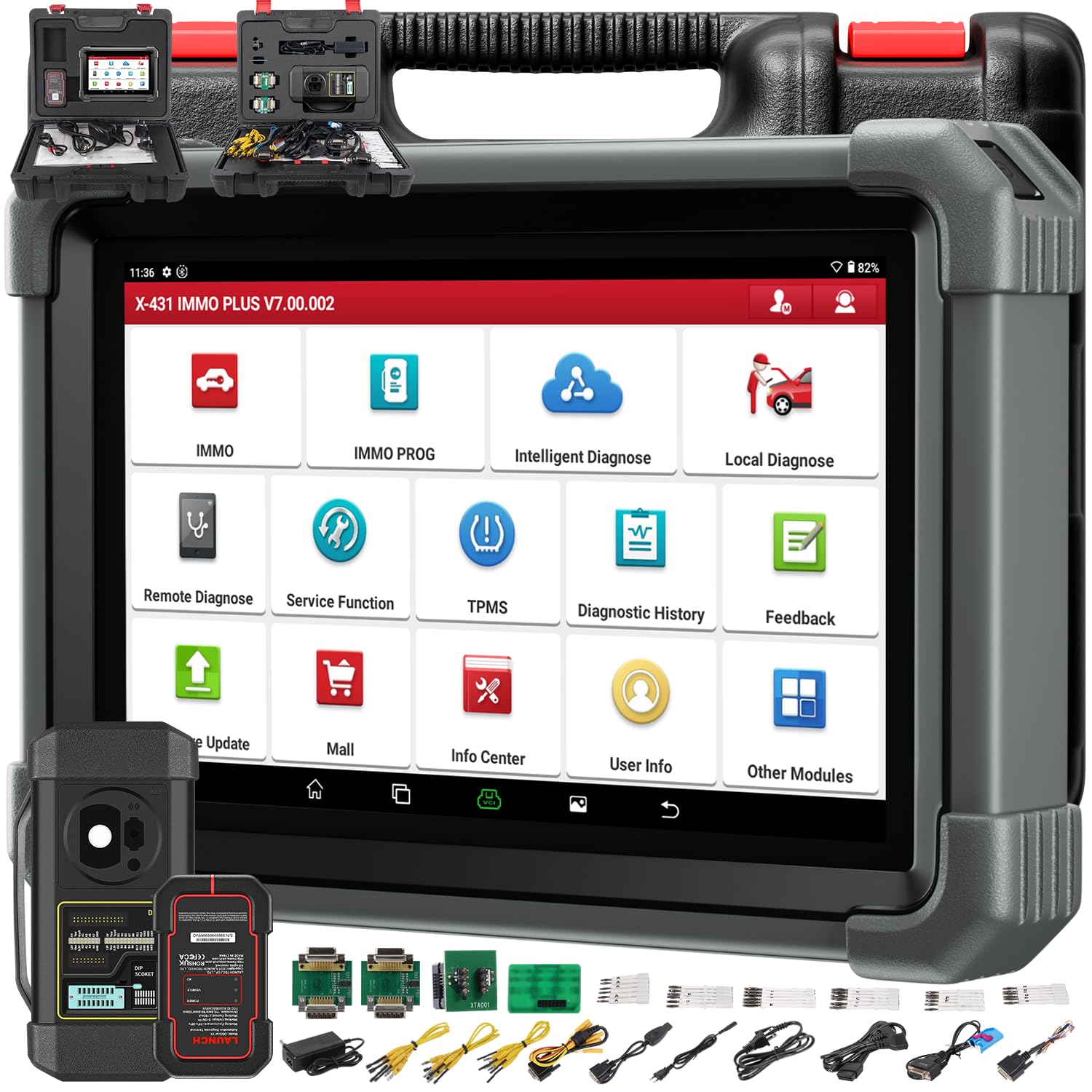
Image 1.1: The LAUNCH X431 IMMO Plus diagnostic device shown with the X-PROG3 key programmer.
2. Apa yang ada di dalam Kotak
Sahkan bahawa semua komponen hadir semasa menyahkotak:
- LAUNCH X431 IMMO Plus Diagnostic Tablet
- LAUNCH X431 ProGIII Key Programmer
- Necessary cables and adapters (not explicitly listed in source, but implied for operation)
3. Persediaan
3.1 Pengaktifan Peranti Awal
Upon first use, the device requires activation. Follow the on-screen prompts to register your device using the provided serial number and activation code. Ensure a stable internet connection (Wi-Fi or 4G) during this process.
3.2 Menyambung ke Kenderaan
- Locate the vehicle's OBD-II port, typically under the dashboard on the driver's side.
- Connect the diagnostic cable to the OBD-II port.
- Connect the other end of the cable to the LAUNCH X431 IMMO Plus device.
- Putarkan penyalaan kenderaan ke kedudukan 'ON' (enjin dimatikan).
- Power on the LAUNCH X431 IMMO Plus device.
4. Arahan Operasi
4.1 Diagnostik Sistem Penuh
The device supports comprehensive diagnostics for all vehicle systems, including Engine (ENG), Transmission Control Module (TCM), Body Control Module (BCM), Tire Pressure Monitoring System (TPMS), Supplemental Restraint System (SRS), and Anti-lock Braking System (ABS).
- Baca/Kosongkan DTC: Dapatkan dan padamkan kod masalah diagnostik.
- Strim Data Langsung: View parameter data masa nyata daripada pelbagai sensor.
- Maklumat Kenderaan: Access vehicle identification details.
- Ujian Aktif: Perform bidirectional control tests (see section 4.4).

Image 4.1: The diagnostic tablet interface showing vehicle diagnostic options and broad compatibility.
4.2 Advanced Key Programming (IMMO)
Utilizing the included X-PROG3 key programmer, the X431 IMMO Plus offers extensive immobilizer functions:
- Read PIN/CS codes.
- Add/Delete keys.
- Perform 'All Keys Lost' procedures.
- ECU reset, adaptation, refresh, and coding.
- Read and write EEPROM/MCU chips.
- Engine/Gearbox ECU replacement and cloning.
- MC9S12 encryption chip read/write.
- Remote learning.

Image 4.2: The X-PROG3 key programmer, an essential component for advanced immobilizer functions.
4.3 Pengekodan ECU Lanjutan
ECU coding allows for advanced vehicle customization and module management:
- Restore ECU code data for replaced modules.
- Activate, tune, or convert ECU modules.
- Optimize vehicle performance and fuel efficiency.
- Unlock hidden features and disable unwanted functions.
- Perform Programmable Module Installation (PMI) for Ford, Lincoln, and Mazda vehicles.

Image 4.3: The advanced ECU coding interface on the diagnostic tablet, showing options for vehicle customization and parameter modification.
4.4 Kawalan Dwiarah / Ujian Aktif
This function allows the diagnostic tool to send commands to vehicle ECUs to test specific components or subsystems, helping to quickly identify malfunctions.
- Activate radiator fans.
- Modulasikan pendikit.
- Mengendalikan cermin.
- Hidupkan/matikan lampu.
- Test door lock actuators.
- Activate transmission oil pump.
- Perform injector buzz tests.

Image 4.4: A tablet screen displaying system controls for various vehicle functions, demonstrating bidirectional control capabilities.
4.5 39+ Special Reset Services
The X431 IMMO Plus provides a wide range of special functions for maintenance and service tasks:
- Set Semula Minyak
- Tetapan Semula Sensor Sudut Stereng (SAS)
- Tetapan Semula Brek Parkir Elektronik (EPB)
- Pendarahan ABS
- Padanan Bateri
- Penjanaan Semula Penapis Zarah Diesel (DPF).
- Penyesuaian Pendikit
- Tetapan Semula Sistem Pemantauan Tekanan Tayar (TPMS)
- Pengekodan Penyuntik
- Transmission Learning
Note: The availability of specific functions may vary depending on the vehicle model and year.

Image 4.5: The tablet interface showcasing the extensive list of over 39 special service functions available.
4.6 CAN FD & DOIP Protocols
The device supports advanced communication protocols for newer vehicles:
- CAN FD: Supported for GM vehicles from 2020 onwards.
- DOIP: Supported for Volvo (2018+), Land Rover (2017+), and Jaguar (2017+) vehicles. An additional transparent adapter may be required for DOIP.
- AutoAuth untuk FCA SGW: Provides secure gateway access for 2018 and newer FCA vehicles (Chrysler, Dodge, Jeep).
5. Penyelenggaraan
5.1 Kemas Kini Perisian
The LAUNCH X431 IMMO Plus includes 2 years of free software updates. Regularly update the device software to ensure access to the latest vehicle models, diagnostic functions, and bug fixes. Connect the device to Wi-Fi and navigate to the 'Software Update' section in the main menu.
5.2 Pembersihan dan Penyimpanan
- Clean the device screen and body with a soft, damp kain. Elakkan pembersih atau pelarut yang melelas.
- Store the device in its original case in a dry, cool environment when not in use.
- Elakkan mendedahkan peranti kepada suhu yang melampau, cahaya matahari langsung atau kelembapan berlebihan.
6. Penyelesaian masalah
6.1 Peranti Tidak Dihidupkan
- Ensure the battery is sufficiently charged. Connect the device to its charger.
- Periksa butang kuasa untuk fungsi yang betul.
6.2 Communication Errors with Vehicle
- Verify that the diagnostic cable is securely connected to both the device and the vehicle's OBD-II port.
- Ensure the vehicle's ignition is in the 'ON' position (engine off).
- Check for any blown fuses in the vehicle's OBD-II circuit.
- Confirm that the vehicle model and year are correctly selected in the diagnostic software.
6.3 Isu Kemas Kini Perisian
- Ensure a stable and strong internet connection.
- Semak ruang storan yang tersedia pada peranti.
- Restart the device and attempt the update again.
7. Spesifikasi

Image 7.1: The LAUNCH X431 IMMO Plus Scanner, highlighting its technical specifications and features.
| Ciri | Penerangan |
|---|---|
| Jenama | PELANCARAN |
| Nama Model | X431 IMMO Plus |
| Nombor Bahagian Pengilang | YZH03-A |
| UPC | 884508000348 |
| Sumber Kuasa | Dikuasakan Bateri |
| Saiz Skrin | 10.1 Inches (estimated from image description) |
| Ketersambungan | 4G, Wi-Fi (2.4GHz/5GHz) |
| Kapasiti Bateri | 47800 mAh |
| Sistem Operasi | Android 10.0 |
| Penyimpanan | 64GB |
| Komponen yang Disertakan | LAUNCH X431 IMMO Plus, LAUNCH X431 ProGIII |
8. Waranti dan Sokongan
8.1 Waranti Pengilang
The LAUNCH X431 IMMO Plus comes with a Waranti pengilang selama 2 tahun. Sila simpan bukti pembelian anda untuk tuntutan waranti. Waranti melindungi kecacatan pada bahan dan mutu kerja di bawah penggunaan biasa.
8.2 Sokongan Teknikal
For technical assistance, software updates, or troubleshooting beyond this manual, please contact LAUNCH customer support. Refer to the official LAUNCH webtapak atau pembungkusan produk untuk maklumat hubungan terkini.