
1. Pengenalan dan Lebihview
The Grizzl-E Ultimate Level 2 EV Charger is a high-performance, hardwired electric vehicle charging station designed for both indoor and outdoor use. This unit delivers up to 80 Amps (19.2 kW) of power, providing rapid charging for compatible electric and plug-in hybrid vehicles. Manufactured in Canada, it features a robust UL Type 4 rated metal enclosure built to withstand various environmental conditions.
Equipped with Wi-Fi connectivity, the Grizzl-E Ultimate integrates with the Grizzl-E Connect software, allowing users to monitor charging sessions in real-time, set charging schedules, view energy consumption statistics, and receive updates. The charger is UL Tested and Certified, incorporating multiple safety protections including over current, over voltage, di bawah voltage, missing diode, ground fault, and over temperature protections, along with self-monitoring and power outage recovery features, and a built-in GFCI.

Image: The Grizzl-E Ultimate EV Charger, its mobile application interface, and the J1772 charging connector.

Image: The Grizzl-E Ultimate charger in an outdoor setting, demonstrating its high-speed charging capabilities and suitability for both indoor and outdoor environments.
2. Maklumat Keselamatan
Sila baca semua arahan keselamatan dengan teliti sebelum pemasangan dan operasi. Kegagalan mematuhi arahan ini boleh mengakibatkan renjatan elektrik, kebakaran atau kecederaan serius.
- Pemasangan Profesional Diperlukan: This charger is hardwired and must be installed by a qualified and licensed electrician in accordance with all local and national electrical codes and regulations.
- Keselamatan Elektrik: Ensure the electrical circuit is properly sized and protected by a circuit breaker appropriate for the selected amperage setting (e.g., 100A circuit breaker for 80A output). The unit has a built-in GFCI for ground fault protection.
- Keadaan Persekitaran: The charger is rated for indoor and outdoor use (UL Type 4 enclosure). Avoid submerging the unit in water.
- Jangan buka: Do not attempt to open, disassemble, repair, or modify the charger unit. This will void the warranty and may pose a safety hazard.
- Penjagaan Kabel: Always handle the charging cable and connector with care. Do not drive over the cable or subject it to excessive force.

Image: Safety and certification features of the Grizzl-E Ultimate charger, including its robust design and adjustable current settings.
3. Kandungan Pakej
Sahkan bahawa semua item terdapat dalam pakej sebelum meneruskan pemasangan:
- Grizzl-E Ultimate EV Charger Unit
- 25-foot J1772 Charging Cable (attached to unit)
- Pendakap Pemasangan Dinding
- Mounting Screws (for bracket)
- Hardwire Kit (includes terminal lugs and heat shrink wrap)
- Cable Holder/Holster
- Security Screws and Key

Image: All components included in the Grizzl-E Ultimate EV Charger package.
4. Pemasangan (Persediaan)
The Grizzl-E Ultimate charger is designed for hardwired installation only. It is imperative that installation is performed by a certified and licensed electrician to ensure safety and compliance with all electrical codes.
4.1 Pemeriksaan Pra-Pemasangan
- Electrical Panel Capacity: Ensure your electrical panel has sufficient capacity for the desired charging amperage. For 80A output, a dedicated 100A circuit breaker is required. Other amperage settings (48A, 40A, 32A, 24A, 16A) require appropriately sized circuit breakers (e.g., 60A for 48A output).
- Pendawaian: Use appropriate gauge wiring for the selected amperage and distance from the electrical panel.
- lokasi: Choose a suitable mounting location that is accessible, allows for proper cable management, and is within reach of your vehicle's charging port.
4.2 Memasang Unit
- Secure the wall mounting bracket to a sturdy surface using the provided mounting screws.
- Hang the Grizzl-E Ultimate unit onto the mounted bracket.
- Install the security screws at the bottom of the unit to secure it to the bracket.
4.3 Sambungan Elektrik
- BAHAYA: Ensure power to the circuit is OFF at the main breaker before making any electrical connections.
- Remove the front cover of the Grizzl-E unit to access the wiring terminals.
- Connect the supply wires (L1, L2, Ground) from your electrical panel to the corresponding terminals inside the charger using the provided hardwire kit (terminal lugs and heat shrink wrap).
- Carefully replace the front cover, ensuring all seals are properly seated.
4.4 Persediaan Wi-Fi
After electrical installation, power on the unit. Download the Grizzl-E Connect app from your device's app store. Follow the in-app instructions to connect your charger to your home Wi-Fi network. This enables smart features and remote control.
5. Operasi
Operating your Grizzl-E Ultimate charger is straightforward, whether you prefer simple plug-and-charge functionality or advanced control via the mobile app.
5.1 Pengecasan Asas
- Ensure the charger is powered on. The LED indicator on the unit will show its status.
- Plug the J1772 connector firmly into your electric vehicle's charging port.
- The charger will automatically initiate the charging process. The LED indicator will change to reflect active charging.
- To stop charging, simply unplug the connector from your vehicle.
5.2 Using the Grizzl-E Connect App
The Grizzl-E Connect app provides enhanced control and monitoring capabilities:
- Pemantauan masa nyata: View current charging status, power delivery, and energy consumed.
- Charging Schedules: Set specific times for charging to begin and end, optimizing for off-peak electricity rates.
- AmpPelarasan era: Adjust the maximum current output of the charger directly from the app. Available settings include 80A, 48A, 40A, 32A, 24A, and 16A. This allows you to match the charger's output to your vehicle's capacity or your home's electrical infrastructure.
- Energy Statistics: Access detailed historical data on your charging sessions and energy usage.
- Kemas kini Firmware: Receive and install over-the-air firmware updates to ensure your charger has the latest features and improvements.
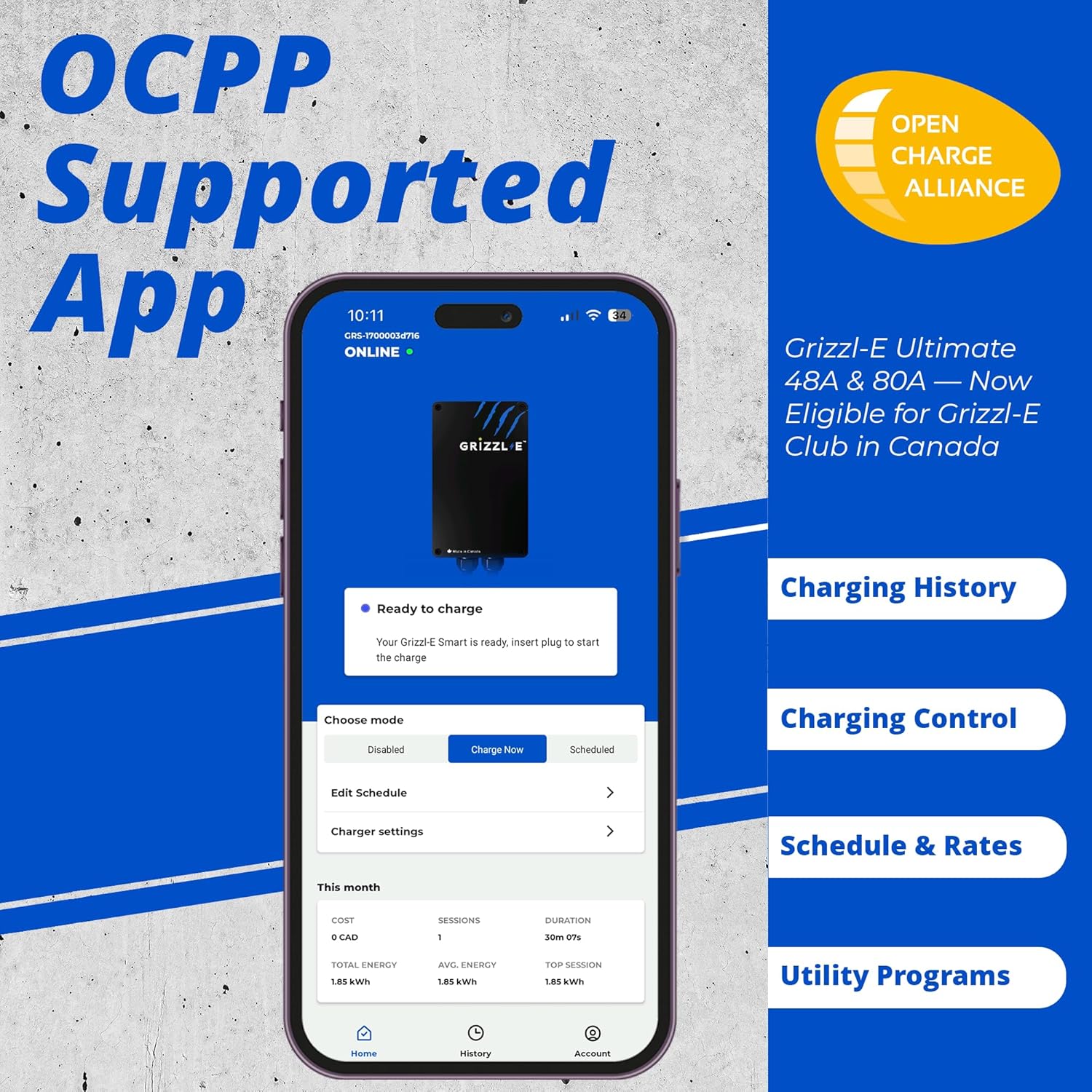
Image: The Grizzl-E Connect mobile application interface, demonstrating its features for charging control and monitoring.
6. Penyelenggaraan
The Grizzl-E Ultimate charger is designed for minimal maintenance. Regular care will ensure optimal performance and longevity.
- Pembersihan: Periodically wipe the exterior of the charger unit and the charging cable with a soft, damp cloth. Do not use abrasive cleaners or solvents. Ensure the unit is dry before use.
- Pemeriksaan Kabel dan Penyambung: Regularly inspect the charging cable for any signs of wear, cuts, or damage. Check the J1772 connector for debris or damage to the pins. If any damage is found, discontinue use and contact customer support.
- Kemas Kini Perisian: Keep the Grizzl-E Connect app and your charger's firmware updated to benefit from the latest features and security enhancements. Updates are typically managed through the app.

Image: Proper cable management and care for the Grizzl-E charging cable and connector.
7. Penyelesaian masalah
If you encounter issues with your Grizzl-E Ultimate charger, refer to the following common troubleshooting steps:
| Masalah | Kemungkinan Punca | Penyelesaian |
|---|---|---|
| Charger has no power/LED off | Circuit breaker tripped; no power to unit. | Check the circuit breaker in your electrical panel and reset if tripped. Ensure the unit is properly hardwired. |
| Pengecasan tidak bermula | Penyambung tidak dimasukkan sepenuhnya; kenderaan tidak bersedia untuk mengecas; kerosakan pengecas. | Ensure the J1772 connector is fully seated. Check your vehicle's charging settings. Consult the Grizzl-E Connect app for diagnostic messages. Unplug and re-plug the charger. |
| Isu sambungan Wi-Fi | Weak Wi-Fi signal; incorrect password; router issues. | Ensure the charger is within Wi-Fi range. Verify Wi-Fi password in the app. Restart your router. If issues persist, refer to the app's connectivity guide. |
| Reduced charging speed | Amperage setting too low; vehicle limitation; electrical issue. | Semak amperage setting in the Grizzl-E Connect app and adjust if necessary. Confirm your vehicle's maximum charging rate. Consult an electrician if you suspect an electrical issue. |
For persistent issues or error codes not listed, please contact Grizzl-E customer support.
8. Spesifikasi
| Ciri | Spesifikasi |
|---|---|
| Nombor Model | GRU-077-W-HW-25DJ80-A-GB |
| Input Voltage | 240 Voltan AC |
| Arus Keluaran | Adjustable: 16A, 24A, 32A, 40A, 48A, 80A |
| Output Kuasa Maksimum | 19.2 kW |
| Jenis Penyambung | J1772 Type 1 |
| Panjang Kabel | 25 kaki (7.6 meter) |
| Penilaian Kepungan | UL Type 4 (Indoor/Outdoor) |
| Pensijilan | UL Tersenarai |
| Ketersambungan | Wi-Fi |
| Dimensi (H x W x D) | 10.25 x 6.25 x 3.75 inci (26 x 16 x 9.3 cm) |
| Berat Barang | 23.5 paun |

Image: Physical dimensions of the Grizzl-E Ultimate charger unit and cable length.
9. Waranti dan Sokongan
The Grizzl-E Ultimate Level 2 EV Charger comes with a Waranti pengilang selama 3 tahun, covering defects in materials and workmanship under normal use. For warranty claims or technical assistance, please contact Grizzl-E customer support.
Sokongan Pelanggan
For comprehensive support, including frequently asked questions, detailed installation guides, and contact information, please visit the official Grizzl-E website or refer to the support section within the Grizzl-E Connect app.
When contacting support, please have your charger's model number (GRU-077-W-HW-25DJ80-A-GB) and serial number readily available.