
Bobtot K701S
Bobtot K701S 5.1/2.1 Channel Surround Sound System User Manual
Model: K701S
1. Pengenalan
Terima kasih kerana membeliasing the Bobtot K701S 5.1/2.1 Channel Surround Sound System. This system is designed to provide a powerful and immersive audio experience for your home entertainment. With 800W peak power and a 6.5-inch subwoofer, it delivers clear, dynamic sound. This manual will guide you through the setup, operation, and maintenance of your new sound system.

Image 1.1: Bobtot K701S 5.1/2.1 Channel Surround Sound System with subwoofer, satellite speakers, and remote control.
2. Arahan Keselamatan Penting
Please read and follow these safety instructions carefully before operating the system to prevent electric shock, fire, or damage to the unit.
- Jangan dedahkan perkakas ini kepada hujan atau lembapan.
- Jangan sekat sebarang bukaan pengudaraan. Pasang mengikut arahan pengilang.
- Jangan pasang berhampiran mana-mana sumber haba seperti radiator, daftar haba, dapur, atau radas lain (termasuk amppenghidup) yang menghasilkan haba.
- Lindungi kord kuasa daripada berjalan atau tersepit, terutamanya pada palam, bekas kemudahan dan tempat keluar dari radas.
- Hanya gunakan lampiran/aksesori yang ditentukan oleh pengilang.
- Cabut plag radas ini semasa ribut petir atau apabila tidak digunakan untuk jangka masa yang lama.
- Rujuk semua perkhidmatan kepada pegawai perkhidmatan yang berkelayakan. Servis diperlukan apabila alat telah rosak dengan cara apa pun.
3. Kandungan Pakej
Buka kotak dengan berhati-hati dan pastikan semua item ada dan dalam keadaan baik. Jika ada item yang hilang atau rosak, sila hubungi sokongan pelanggan.
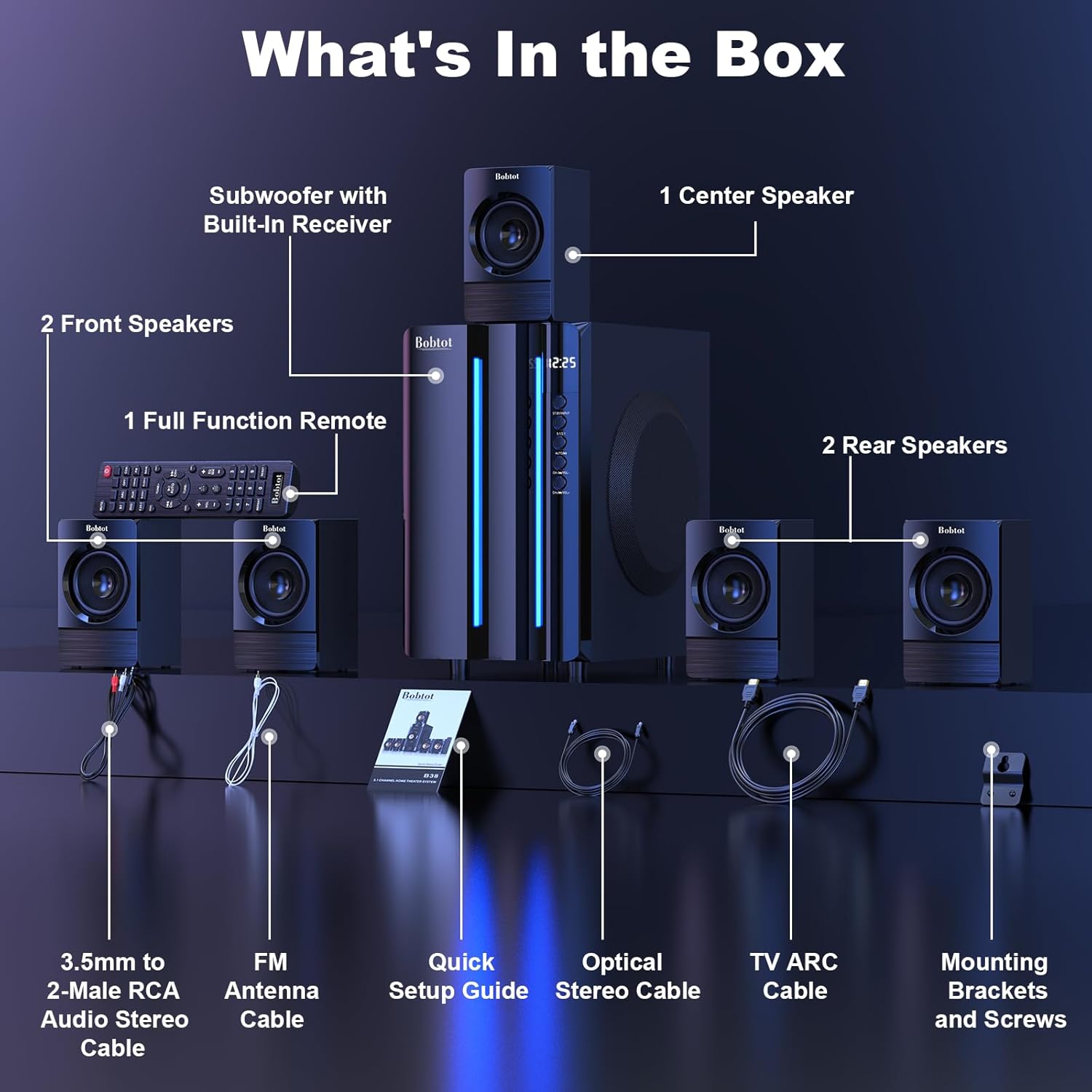
Image 3.1: Visual representation of all items included in the Bobtot K701S package.
- 1 x Subwoofer with Built-in Receiver
- 1 x Center Speaker
- 2 x Front Speakers
- 2 x Rear Speakers
- 1 x Alat Kawalan Jauh Fungsi Penuh
- 1 x Kabel Stereo Audio RCA 3.5mm ke 2-Jantan
- 1 x Kabel Antena FM
- 1 x Panduan Penyediaan Pantas
- 1 x Kabel Stereo Optik
- 1 x Kabel ARC TV (HDMI)
- 1 x Kabel Sepaksi
- 1 x Kabel AUX
- 1 x Kabel RCA
- Pendakap dan Skru Pemasangan
- Manual Pengguna (dokumen ini)
4. Komponen Selesaiview
4.1 Subwoofer (Main Unit)
The subwoofer houses the main receiver and amplifier for the entire system. It features a 6.5-inch driver for deep bass and includes all input/output ports.

Imej 4.1: Terperinci view of the 6.5-inch subwoofer, highlighting its internal components.
4.2 Pembesar Suara Satelit
The system includes five satellite speakers: one center, two front (left/right), and two rear (left/right). These speakers are wired and connect directly to the subwoofer unit.
4.3 Alat Kawalan Jauh
The full-function remote control allows you to manage power, input modes, volume, channel selection, and other settings from a distance.
5. Persediaan Sistem
Follow these steps to set up your Bobtot K701S surround sound system.
5.1 Sambungan Pembesar suara
The five satellite speakers come with integrated cables. Connect each speaker to the corresponding "Audio Output" slot on the rear of the subwoofer unit. The cables are color-coded or labeled for easy identification (e.g., FL for Front Left, FR for Front Right, CEN for Center, SL for Surround Left, SR for Surround Right).
- Front Center and L/R speakers: Cables are approximately 13 feet long.
- Rear L/R speakers: Cables are approximately 31 feet long.
Place all speakers in the same room for optimal surround sound performance.

Image 5.1: Recommended speaker placement for a 5.1 channel surround sound experience.
5.2 Power On and Initial Test
- Connect the subwoofer to a power outlet using the provided power cable.
- Hidupkan subwufer menggunakan suis kuasa.
- Press the power button on the remote control or the front panel.
- Test the remote control functionality.
- Switch to "BT" (Bluetooth) mode and connect your mobile device to "B701D" via Bluetooth to ensure audio playback.
5.3 Menyambung Peranti Luaran
Choose the appropriate input mode and connect your external device (e.g., TV, projector, DVD player, game console) to the subwoofer using the corresponding audio cables provided.
- Ensure the cable is securely plugged into the correct input slot on the subwoofer.
- Select the matching input mode on the system (e.g., HDMI ARC, OPT, COA, AUX, USB, DVD).

Imej 5.2: Selesaiview of the rear panel connections and supported multimedia inputs.
6. Arahan Operasi
6.1 Fungsi Kawalan Jauh
The remote control provides full command over your sound system. Always press the power button before selecting an input mode when turning on the unit.

Image 6.1: Detailed diagram of the remote control buttons and their functions.
- Hidupkan/Mati Kuasa: Menghidupkan atau mematikan sistem.
- Input Mode Select: Buttons for BT, ARC, OPT, COA, DVD, AUX, USB/SD, FM to switch between audio sources.
- 5.1/2.1 Channel Select: Toggles between 5.1 surround sound and 2.1 stereo mode (in 2.1 mode, only the two front speakers play).
- Volume Control (VOL +/-): Melaraskan volum sistem keseluruhan.
- Mic Volume Adjustment (MIC +/-): Adjusts the volume for connected microphones (supports wireless/wired microphones).
- Echo Control (ECHO +/-): Adjusts the echo effect for microphones.
- TALA +/-: For FM radio tuning.
- CH +/-: For FM radio channel selection.
- MATI: Membisukan atau menyahredamkan output audio.
6.2 Mod Input
The Bobtot K701S supports various input methods:
- Bluetooth (BT): Untuk sambungan tanpa wayar ke telefon pintar, tablet dan peranti lain yang didayakan Bluetooth.
- ARC HDMI: Connects to your TV's HDMI ARC port for high-quality audio transmission and TV remote control integration.
- Optik (OPT): Digital audio input for TVs, game consoles, and other devices with an optical output.
- Koaksial (COA): Digital audio input, similar to optical, for compatible devices.
- AUX: Analog audio input using a 3.5mm or RCA cable for a wide range of devices.
- USB/SD: Mainkan audio files directly from USB drives or SD cards.
- Radio FM: Built-in FM tuner for listening to radio stations.
- DVD: Dedicated input for DVD players.
6.3 Channel Configuration (5.1 / 2.1)
The system offers two channel modes: 5.1 and 2.1. You can switch between these modes using the remote control or the front panel. In 5.1 mode, all five satellite speakers and the subwoofer are active, providing a full surround sound experience. In 2.1 mode, only the two front speakers and the subwoofer are active, suitable for stereo audio.
7. Connectivity Guide
This section details how to connect various devices to your sound system.
7.1 Sambungan Bluetooth
- Press the "BT" button on the remote control or front panel to select Bluetooth mode. The display will show "BT".
- Pada peranti mudah alih anda, dayakan Bluetooth dan cari peranti yang tersedia.
- Select "B701D" from the list to pair. Once connected, you will hear a confirmation sound.
7.2 Sambungan HDMI ARC
- Connect one end of the HDMI ARC cable to the "HDMI ARC" port on the subwoofer.
- Connect the other end to the "HDMI ARC" port on your TV.
- Select "ARC" input mode on the sound system.
- Pastikan output audio TV anda ditetapkan kepada HDMI ARC atau pembesar suara luaran.
7.3 Optical/Coaxial Connection
- Connect an optical or coaxial cable from your device's digital audio output to the corresponding "OPT" or "COA" input on the subwoofer.
- Select "OPT" or "COA" input mode on the sound system.
- Ensure your device's audio output is set to PCM (Pulse-code modulation) for optical/coaxial connections, as some devices may default to other formats not supported by the system.
7.4 Sambungan AUX
- Use the provided 3.5mm to 2-Male RCA cable or a standard RCA cable.
- Connect the cable from your device's audio output (e.g., headphone jack, RCA L/R output) to the "AUX" input on the subwoofer.
- Select "AUX" input mode on the sound system.
7.5 Main Semula USB/SD
- Masukkan pemacu kilat USB atau kad SD yang mengandungi audio files into the respective port on the subwoofer.
- Select "USB/SD" input mode. The system will automatically begin playing compatible audio files.
7.6 Radio FM
- Connect the FM antenna cable to the "FM ANTENNA" port on the subwoofer. Extend the antenna for better reception.
- Select "FM" input mode.
- Use the "TUNE +/-" or "CH +/-" buttons on the remote to scan for and select radio stations.
8. Spesifikasi
| Ciri | Spesifikasi |
|---|---|
| Nombor Model | K701S |
| Jenis Pembesar Suara | Satelit |
| Konfigurasi Saluran Bunyi Sekeliling | 5.1 |
| Kuasa Keluaran Puncak | 800 Watt |
| Diameter Subwoofer | 6.5 Inci |
| Respons Kekerapan | 20 KHz |
| Teknologi Komunikasi Tanpa Wayar | Bluetooth 5.0 |
| Teknologi Ketersambungan | Bluetooth, HDMI ARC, Optical, Coaxial, AUX, USB, DVD, FM |
| Kaedah Kawalan | Alat Kawalan Jauh |
| Sumber Kuasa | Elektrik Bertali |
| Input Voltage | 120 Volt |
| Dimensi Produk (L x W x H) | 31.8 x 19.8 x 33 cm |
| Berat Barang | 6.56 Kilogram |
| bahan | Wood (MDF), Acrylonitrile Butadiene Styrene (ABS) |
| Ciri Khas | Bass Amppemberitahuan |
9. Penyelesaian masalah
If you encounter issues with your Bobtot K701S system, refer to the following common problems and solutions:
9.1 Tiada Bunyi
- Semak Kuasa: Ensure the system is powered on and the power cable is securely connected.
- Tahap Kelantangan: Increase the master volume on the system and your connected device.
- Mod Input: Verify that the correct input mode is selected on the system (e.g., BT, ARC, OPT).
- Sambungan Kabel: Ensure all audio cables are securely connected to both the system and the source device.
- Source Device Output: Check the audio output settings on your source device (e.g., TV, DVD player) to ensure it's sending audio to the correct output port and format (e.g., PCM for optical/coaxial).
9.2 Poor Sound Quality / Distortion
- Tahap Kelantangan: Reduce the volume if it's too high, causing distortion.
- Integriti Kabel: Periksa kabel audio untuk kerosakan atau sambungan yang longgar.
- Penempatan pembesar suara: Ensure speakers are placed correctly and not obstructed.
- Kualiti Sumber: Uji dengan sumber audio yang berbeza atau file to rule out issues with the original content.
9.3 Alat Kawalan Jauh Tidak Berfungsi
- Bateri: Gantikan bateri dalam alat kawalan jauh.
- Garis penglihatan: Ensure there is a clear line of sight between the remote and the system's IR receiver.
- Jarak: Kendalikan alat kawalan jauh dalam julat berkesannya.
9.4 Isu Sambungan Bluetooth
- Mod Berpasangan: Pastikan sistem berada dalam mod pasangan Bluetooth.
- Jarak Peranti: Keep your Bluetooth device within a few meters of the system.
- Gangguan: Beralih dari peranti wayarles lain yang mungkin menyebabkan gangguan.
- Lupakan Peranti: On your mobile device, "forget" or "unpair" the "B701D" and attempt to reconnect.
10. Penjagaan dan Penyelenggaraan
- Pembersihan: Use a soft, dry cloth to clean the surfaces of the system. Do not use liquid cleaners or aerosols.
- Pengudaraan: Ensure the subwoofer has adequate ventilation and is not placed in an enclosed space that could restrict airflow.
- penempatan: Avoid placing the system in direct sunlight, near heat sources, or in areas with high humidity.
- Matikan: Turn off and unplug the system when not in use for extended periods.
11. Waranti dan Sokongan Pelanggan
Bobtot is committed to providing a positive customer experience. If you encounter any issues with your B701D Home Surround Sound System, please refer to this user manual for initial troubleshooting.
For further assistance, please contact Bobtot customer support through the Amazon buyer-seller messaging service. Our support team is available to help you with any questions or concerns you may have.
Ask a question about this manual
Ask about setup, troubleshooting, compatibility, parts, safety, or missing instructions. Manuals+ will review the question and use this page’s manual context to help answer it.