
FCOB RC02RFB
Manual Arahan Alat Kawalan Jauh RF Putih Dwi FCOB CCT RC02RFB
Model: RC02RFB
1. Pengenalan
The FCOB CCT Dual White RF Remote RC02RFB is designed for controlling CCT (Correlated Color Temperature) LED strips. This remote features 2.4GHz RF wireless transmission, allowing for 4-zone group control, brightness adjustment, and color temperature tuning. It is compatible with various FCOB CCT controllers, providing a convenient solution for managing your LED lighting.
2. Kandungan Pakej
Sila sahkan bahawa semua item terdapat dalam pakej anda:
- 1x RC02RFB Remote Control
- 1x RF Remote Bracket
- 2x Screws for Bracket Installation
- 1x Double-sided Adhesive for Bracket Installation
- 1x RC02RF Remote Control Manual (this document)
Note: 3A batteries are required for the remote control and are not included in the package.

Image: The FCOB CCT Remote RC02RFB, shown alongside its wall-mount bracket and two screws for installation.
3. Produk Lebihview
3.1 Remote Control Layout and Functions

Image: A detailed diagram illustrating each button and feature on the FCOB CCT Remote RC02RFB, including ON/OFF, color temperature slider, brightness controls, dynamic modes, and zone selection.
- Master HIDUP/MATI: Power on or off all linked devices.
- Color Temp Adjust Slider: Touch to dim brightness from 1% to 100% and adjust color temperature.
- Juruterbang Lamp: Lampu penunjuk.
- Cold-Warm White Switching: Press to cycle through cool white, nature white, and warm white.
- Kecerahan +/-: Tambah atau kurangkan kecerahan.
- Dynamic Modes (M): Press to switch between various dynamic lighting modes.
- 100%/60%/30% Brightness: Shortcut buttons for specific brightness levels.
- Kelajuan +/-: Laraskan kelajuan mod dinamik.
- Zone ON/(un)link Button (1-4): Turn on a specific zone or initiate linking/unlinking.
- Zone OFF/Night Light Mode: Turn off a specific zone or activate night light mode.
4. Persediaan
4.1 Pemasangan Bateri
The RC02RFB remote control requires 3A batteries (not included). Open the battery compartment on the back of the remote and insert the batteries, ensuring correct polarity.
4.2 Arahan Penghubung
To link the remote control to an FCOB CCT controller:
- Disconnect the LED controller from its power supply for 10 seconds.
- Reconnect the LED controller to the power supply.
- Within 3 seconds of reconnecting power, short press the desired zone button (1, 2, 3, or 4) on the remote control 3 times.
- The LED strip connected to the controller will blink slowly 3 times, indicating successful linking.

Image: Visual guide for linking the remote control to an LED strip controller, detailing power cycling and button presses.
Important: If the LED strip does not blink slowly, linking has failed. Please repeat the above steps. A light that has already been linked cannot be linked again to the same zone.
4.3 Arahan Penyahpautan
To unlink the remote control from an FCOB CCT controller:
- Disconnect the LED controller from its power supply for 10 seconds.
- Reconnect the LED controller to the power supply.
- Within 3 seconds of reconnecting power, short press the previously connected zone button (1, 2, 3, or 4) on the remote control 5 times.
- The LED strip connected to the controller will blink quickly 10 times, indicating successful unlinking.

Image: Visual guide for unlinking the remote control from an LED strip controller, detailing power cycling and button presses.
Important: If the LED strip does not blink quickly, unlinking has failed. Please repeat the above steps. A light that hasn't been linked does not need to be unlinked.
5. Installation of Remote Bracket
The included remote bracket allows for convenient storage and access to your remote control. You can install it using either screws or double-sided adhesive.
5.1 Installation with Screws
- Choose a suitable location on a wall or surface.
- Mark the positions for the two screws using the bracket as a template.
- Gerudi lubang pandu jika perlu.
- Secure the bracket to the surface using the provided screws.
5.2 Installation with Double-Sided Adhesive
- Ensure the installation surface is smooth, clean, and dry.
- Peel off the protective backing from one side of the double-sided adhesive.
- Apply the adhesive firmly to the back of the remote bracket.
- Peel off the remaining protective backing and press the bracket firmly onto the desired surface.

Image: Illustrations demonstrating how to install the remote control bracket using either screws or double-sided adhesive.
6. Arahan Operasi
6.1 Kawalan Kuasa
Tekan ke ON button to turn on all linked LED strips. Press the DIMATIKAN button to turn off all linked LED strips.
6.2 Pelarasan Kecerahan
- Touch Slider: Gently touch and slide your finger along the color temperature adjust slider to dim the brightness from 1% to 100%.
- Brightness +/- Buttons: Tekan Kecerahan+ untuk meningkatkan kecerahan dan kecerahan- untuk mengurangkan kecerahan.
- Preset Brightness Buttons: Gunakan 100%, 60%, atau 30% buttons for quick brightness level selection.
6.3 Pelarasan Suhu Warna
Use the touch slider to adjust the color temperature of your CCT LED strips. Slide towards the yellow side for warmer white light and towards the blue side for cooler white light. You can also press the Penukaran Putih Sejuk-Suam button to cycle through cool white, nature white, and warm white presets.

Image: A user adjusting the color temperature on the remote, demonstrating the transition from warm white to cool white light.
6.4 Mod Dinamik
Tekan ke M button to cycle through various pre-programmed dynamic lighting modes. Use the Kelajuan+ dan Kelajuan- buttons to adjust the speed of the selected dynamic mode.
6.5 Zone Control and Grouping
The RC02RFB remote supports controlling up to 4 independent zones. Each zone can control one or multiple linked controllers.
- Zone ON: Press the corresponding zone button (1, 2, 3, or 4) to turn on the lights in that specific zone.
- Zone OFF/Night Light: Press the corresponding zone button (1, 2, 3, or 4) again to turn off the lights in that zone or activate night light mode if supported by the controller.
The remote features auto-transmitting and auto-sync functions. One controller can transmit signals to another controller within 30 meters (98 feet), extending the effective control distance. This allows for independent control of individual areas without device limits.

Image: A visual representation of the 4-zone wireless control capability, demonstrating how one remote can manage LED controllers across different areas of a home.

Image: An illustration detailing the auto-transmitting and auto-sync features, where one controller relays signals to others, extending the control range.
7. Keserasian
The RC02RFB remote control is designed to work with FCOB CCT controllers. Compatible controllers include, but are not limited to:
- C02RF Controller
- Pengawal C02W
- WB5 Controller
- LM051 Controller
- LM052 Controller
- LM053 Controller
It supports 5050SMD, 3528SMD, 5630SMD CCT FCOB COB CCT 3-wire (+ WW CW) LED strips. Please note that this remote requires a compatible controller to function.

Image: The FCOB CCT remote displayed with several compatible CCT controllers (C02W, C02RF, WB5, LM051, LM052, LM053) and an illuminated LED strip, illustrating system compatibility.
8. Penyelesaian masalah
- Jauh tidak bertindak balas: Ensure batteries are correctly installed and have sufficient charge. Replace batteries if necessary.
- Linking failure: If the LED strip does not blink as expected during linking, repeat the linking steps carefully. Ensure the remote is within close proximity to the controller during the linking process.
- Kawalan sekejap-sekejap: Check for obstructions between the remote and the controller. Ensure the remote is within the specified 98-foot (30-meter) control range.
- Incorrect color temperature/brightness: Verify that the remote is correctly linked to the desired zone. Adjust settings using the touch slider and dedicated buttons.
9. Spesifikasi
| Ciri | Spesifikasi |
|---|---|
| Jenama | FCOB |
| Nombor Model | RC02RFB-Z |
| Berat Barang | 3.52 auns |
| Dimensi Pakej | 5.91 x 5.91 x 0.79 inci |
| Sumber Kuasa (Pengawal) | AC/DC (Remote uses batteries) |
| Bateri Diperlukan | Yes (3A batteries, not included) |
| Ciri Khas | Tanpa wayar |
| Teknologi Ketersambungan | Frekuensi Radio (2.4GHz) |
| Julat Kawalan | Sehingga 98 kaki (30 meter) |
| Peranti Serasi | C02RF, C02W, LM051, LM052, LM053, WB5 Controllers |
9.1 Maklumat Kecekapan Tenaga
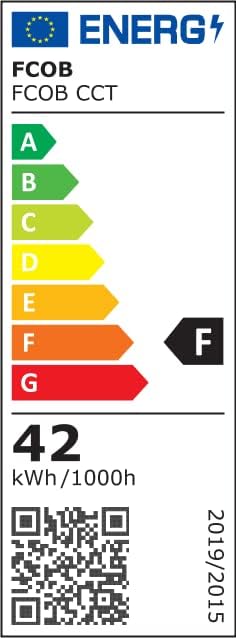
Image: The energy label for FCOB CCT products, indicating an energy efficiency class of F and an energy consumption of 42 kWh per 1000 hours.
For more details, visit the EPREL database: https://eprel.ec.europa.eu/qr/1552759
10. Maklumat dan Amaran Keselamatan
10.1 General Attention
- Suhu penyimpanan: -40 ℃ hingga + 80 ℃
- Suhu Operasi: -25 ℃ hingga + 60 ℃
- Permukaan Pemasangan: Must be smooth, clean, and dry.
- Komponen LED: The part of LED components cannot be fixed on the surface of a sharp edge.
- Jalur LED: The strip cannot be collided or crushed. The strip can be cut following the cutting lines only.
10.2 Packaging Warning

Image: A close-up of the product packaging, displaying caution regarding moisture and electrostatic sensitive devices, and a warning about the plastic bag being a suffocation hazard.
CAUTION! THIS BAG CONTAINS MOISTURE ELECTROSTATIC SENSITIVE DEVICES!
WARNING! To avoid the danger of suffocation, keep this plastic bag away from babies and children. Do not use this bag in cribs, beds, baby strollers, or playpens. This bag is not a toy.
11. Waranti dan Sokongan
For technical support, warranty information, or other inquiries, please contact the manufacturer:
- Pengeluar: SHENZEN CHAOGUOSE Technology Co., Limited
- E-mel Sokongan: support@fcob.com
- Webtapak: www.fcob.com
- Alamat: 201, 2F, C-C2, Chuangfu Tech Park, Beihuan Rd, Shiyan St, Baoan District, Shenzhen, Guangdong, China
- Wakil SPR: Like Sun GmbH, Planckstr. 59, 45147 Essen
Ask a question about this manual
Ask about setup, troubleshooting, compatibility, parts, safety, or missing instructions. Manuals+ will review the question and use this page’s manual context to help answer it.