
Segway F2 Pro
Manual Pengguna Skuter Tendang Elektrik & Kunci Kabel Segway Ninebot F2 Pro
Model: F2 Pro
pengenalan
This manual provides essential information for the safe operation, maintenance, and troubleshooting of your Segway Ninebot F2 Pro Electric KickScooter and the accompanying 5-Digit Combination Cable Lock. Please read this manual thoroughly before using the product to ensure proper usage and to maximize your riding experience.
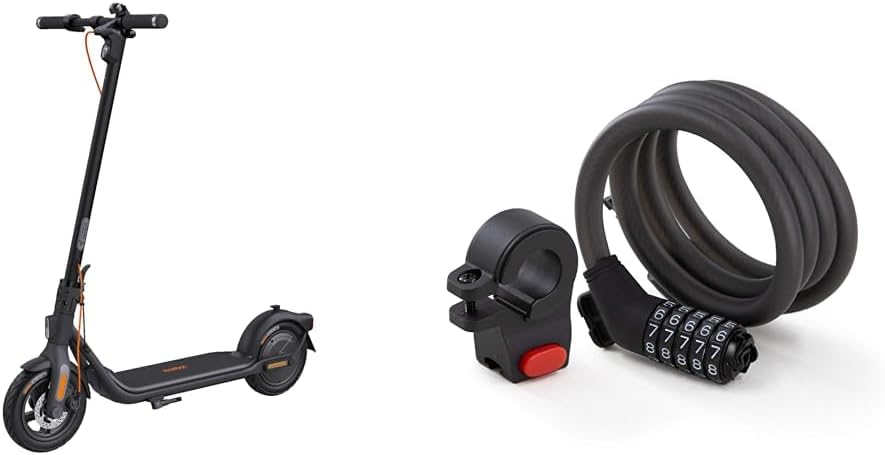
Image: The Segway Ninebot F2 Pro Electric KickScooter shown alongside the 5-Digit Combination Cable Lock, illustrating the complete product bundle.
Maklumat Keselamatan
Operating an electric kickscooter carries inherent risks. To reduce the risk of injury, it is crucial to follow all instructions and warnings in this manual. Always wear a helmet and other protective gear (knee pads, elbow pads) when riding. Ensure you are familiar with local laws and regulations regarding electric scooter usage.
- Always check the scooter before each ride for loose parts, tire pressure, and brake functionality.
- Jangan menunggang dalam keadaan basah, di permukaan yang licin, atau dalam hujan lebat.
- Avoid riding on uneven terrain, potholes, or over obstacles.
- Kekalkan jarak selamat dari kenderaan lain dan pejalan kaki.
- Jangan lakukan aksi atau gerakan mengejut.
- Ensure the kickscooter is fully charged before long rides.
- The cable lock is a deterrent and does not guarantee absolute security against theft.
Kandungan Pakej
Sahkan bahawa semua item terdapat dalam pakej anda:
- Segway Ninebot F2 Pro Electric KickScooter
- 5-Digit Combination Cable Lock
- Penyesuai Pengecasan
- Manual Pengguna (dokumen ini)
- Panduan Mula Pantas
- Mounting Bracket for Cable Lock
- Necessary Screws and Hex Wrench
Persediaan
1. KickScooter Assembly
- Unfold the Stem: Carefully lift the stem until it locks into place.
- Pasangkan Hendal: Connect the handlebar to the stem. Ensure the cables are not pinched. Secure it with the provided screws and hex wrench.
- Caj Permulaan: Fully charge the scooter before its first use. Connect the charging adapter to the charging port on the scooter and then to a power outlet. The indicator light on the charger will change when fully charged.

Imej: Sebelah view of the Segway Ninebot F2 Pro Electric KickScooter, illustrating its assembled form and overall design.
2. Cable Lock Setup
- Pemasangan Braket Pemasangan: Attach the cable lock's mounting bracket to a suitable location on your scooter's stem or frame using the provided hardware.
- Menetapkan Gabungan Anda:
- Kod lalai ialah 00000.
- Align the default code with the indicator marks.
- With the keyhole facing up, turn the number setting knob 90 degrees clockwise.
- Tetapkan kombinasi 5 digit yang anda inginkan.
- Turn the knob back 90 degrees counter-clockwise to its original position. Your new combination is now set.

Image: The Segway 5-Digit Combination Cable Lock, showing its coiled cable and the combination dial mechanism.
Arahan Operasi
1. KickScooter Operation
- Hidupkan/Mati Kuasa: Press and hold the power button on the dashboard to turn the scooter on or off.
- Mod Menunggang: Short press the power button to cycle through riding modes (e.g., ECO, Drive, Sport). Each mode offers different speed and power characteristics.
- Pecutan: Push off with your foot to gain initial speed, then press the throttle lever to accelerate.
- Brek: Use the hand brake lever to slow down or stop. The scooter features a dual braking system for effective stopping.
- Lampu: Double-press the power button to turn the headlight and taillight on or off.
- Papan Pemuka Pintar: The dashboard displays speed, battery level, riding mode, and light status.

Image: A close-up of the Segway Ninebot F2 Pro's smart dashboard and power button, highlighting indicators for speed, battery, speed mode, lights, and cruise control.

Image: An illustration detailing the Segway Ninebot F2 Pro's motor performance, showing 900W Max Output, 20 Mph Max Speed, and 22% Hill Grade capability.
2. Cable Lock Usage
- Mengunci: Dial your personal combination to open the lock. Wrap the cable around your scooter and a secure fixed object (e.g., a bike rack, pole). Insert the locking head into the mechanism and scramble the numbers to secure.
- Membuka kunci: Dial your personal combination to align with the indicator marks. The lock will open, allowing you to remove the cable.

Image: The Segway 5-Digit Combination Cable Lock shown attached to the handlebar of the KickScooter, demonstrating how it can be stored or used for security.

Imej: Dari dekat view of the Segway 5-Digit Combination Cable Lock's dial mechanism while attached to the KickScooter's handlebar, showing the numbers.
Penyelenggaraan
Regular maintenance ensures the longevity and optimal performance of your Segway Ninebot F2 Pro KickScooter and Cable Lock.
- Pembersihan: Wipe the scooter and lock with a damp cloth. Do not use alcohol, gasoline, kerosene, or other corrosive chemical solvents. Do not wash with a high-pressure water jet.
- Tekanan Tayar: Check tire pressure regularly and inflate to the recommended PSI (usually found on the tire sidewall).
- Brek: Periodically inspect brake pads and cables for wear and tear. Adjust or replace as needed.
- Penjagaan Bateri: Store the scooter in a dry place between 0°C and 40°C (32°F and 104°F). Charge the battery at least once every 30 days if not in use to prevent over-discharge.
- Pengikat: Periksa semua skru dan bolt secara berkala untuk memastikan ia ketat.
- Kunci Kabel: Keep the cable and locking mechanism clean. Lubricate the locking mechanism periodically with a silicone-based lubricant.
Menyelesaikan masalah
| Masalah | Kemungkinan Punca | Penyelesaian |
|---|---|---|
| Skuter tidak dihidupkan | Bateri lemah; Sambungan longgar; Butang kuasa rosak | Cas bateri; Periksa semua sambungan kabel; Hubungi sokongan jika masalah berterusan. |
| Julat/kelajuan dikurangkan | Tekanan tayar rendah; Lebihan beban; Kemerosotan bateri; Kerap naik bukit | Inflate tires to recommended pressure; Reduce load; Ensure full charge; Adjust riding style. |
| Brek terasa lemah | Pad brek haus; Kabel brek longgar | Inspect and replace brake pads; Adjust brake cable tension. |
| Cable lock not opening | Incorrect combination; Mechanism jammed | Ensure correct combination is entered precisely; Apply light pressure while turning dials; Lubricate if stiff. |
Spesifikasi
| Ciri | Perincian |
|---|---|
| Nama Model | F2 Pro |
| Jenama | Segway |
| warna | Hitam |
| Motor Power (Rated/Max) | 450W / 900W |
| Kelajuan Maks | Sehingga 20 mph (32 km/j) |
| Julat Maks | Up to 34 miles (55 km) (in ECO mode) |
| Kecondongan Maks | Sehingga 22% |
| Bahan Roda | Getah |
| Bahan Bingkai | Keluli Aloi |
| Gaya Brek | Hand brake (Dual braking system) |
| Ciri Khas | Portable, App-Enabled, Smart Dashboard |
| Cable Lock Type | 5-Digit Combination Cable Lock |
| Cable Lock Material | Braided Steel with PVC coating |
Waranti & Sokongan
Segway products come with a limited warranty. Please refer to the warranty card included in your package or visit the official Segway webtapak untuk terma dan syarat waranti terperinci khusus untuk wilayah anda.
For technical support, spare parts, or service inquiries, please contact Segway customer service through their official website or the contact information provided in your product documentation. When contacting support, please have your product model number (F2 Pro) and purchase date ready.
Official Segway Webtapak: www.segway.com
Ask a question about this manual
Ask about setup, troubleshooting, compatibility, parts, safety, or missing instructions. Manuals+ will review the question and use this page’s manual context to help answer it.