
1. Pengenalan
Thank you for choosing the FULODE F-6000 IEM Dual Channel UHF Wireless In-Ear Monitor System. This system is designed to provide high-quality, reliable audio monitoring for stage performances, studio sessions, and church services. Featuring advanced UHF band PLL phase-locking technology, it offers stable transmission, excellent anti-interference capabilities, and a wide operating range. Please read this manual thoroughly to ensure proper setup and optimal performance of your new system.
2. Maklumat Keselamatan
- Jangan dedahkan unit kepada hujan atau lembapan untuk mengelakkan kebakaran atau kejutan elektrik.
- Jangan buka casing. Tiada bahagian yang boleh diservis pengguna di dalamnya. Rujuk semua servis kepada kakitangan yang berkelayakan.
- Elakkan meletakkan unit berhampiran sumber haba atau di bawah cahaya matahari langsung.
- Pastikan pengudaraan yang betul di sekeliling unit.
- Gunakan hanya penyesuai kuasa yang disediakan.
- Jauhkan daripada kanak-kanak.
- Prolonged exposure to high volume levels can cause permanent hearing damage. Adjust volume to a comfortable level.
3. Produk Lebihview
The FULODE F-6000 IEM system includes a wireless desktop transmitter and multiple wireless bodypack receivers, along with earphones and necessary cables. The system is designed for ease of use and robust performance.
3.1 Wireless Desktop Transmitter
The transmitter features a durable metal housing and a clear LED display for monitoring frequencies and signal levels. It supports two independent channels.

Imej: Depan view of the FULODE F-6000 IEM Wireless Desktop Transmitter, highlighting its controls and display.
Kawalan Panel Depan:
- Suis kuasa: Turns the unit on/off for each channel.
- Kawalan Kelantangan Fon Kepala: Melaraskan kelantangan pemantauan untuk fon kepala yang disambungkan.
- Output Fon Kepala 6.35mm: Untuk pemantauan langsung daripada pemancar.
- Function Setting Buttons: Digunakan untuk menavigasi menu dan melaraskan tetapan.
- LED High Definition Display: Shows frequency, RF, and AF signal levels.
- Set Button with Pressing Function: For selecting and confirming settings.
Sambungan Panel Belakang:
- Penyambung Antena: Untuk memasang antena yang disertakan.
- DC IN (12V-18V): Input kuasa untuk pemancar.
- AF IN (R) & AF IN (L): Combo XLR/6.35mm inputs for right and left audio signals.
- AF Level Controls: Adjusts the input audio level for each channel.
3.2 Wireless Bodypack Receiver
The bodypack receiver is compact and designed for portability, featuring a plastic construction with a metal clip for secure attachment. It operates on two AA batteries (not included).

Image: The FULODE F-6000 IEM Wireless Bodypack Receiver with its battery compartment open, showing the two AA battery slots.
Bodypack Features:
- Antena: For receiving wireless signals.
- LED High Definition Display: Shows current frequency, battery status, and signal indicators.
- Penunjuk Bateri Rendah: Alerts when batteries are running low.
- RF Indicator Light: Illuminates when receiving a radio frequency signal.
- Suis Kuasa dan Kawalan Kelantangan: Integrated knob for turning on/off and adjusting earphone volume.
- Output Fon Kepala: 3.5mm jack for connecting earphones.
- Function Setting Button (SET): For navigating settings and frequency adjustment.
- Exit Button (ESC): To exit menus or cancel selections.
- Petak Bateri: Boleh memuatkan dua bateri AA.
3.3 Fon telinga
The system includes high-quality in-ear earphones designed for comfortable and clear audio monitoring.
4. Persediaan
Follow these steps to set up your FULODE F-6000 IEM system:
4.1 Connect the Transmitter
- Pasang Antena: Screw the two enhanced antennas into the ANTENNA ports on the rear panel of the desktop transmitter.
- Sambungkan Kuasa: Plug the DC power adapter into the DC IN port on the rear of the transmitter, then plug the adapter into a power outlet.
- Sambungkan Input Audio: Connect your audio source (e.g., mixing console, audio interface) to the AF IN (R) and AF IN (L) combo jacks on the rear panel using XLR or 6.35mm cables. Adjust the AF Level controls as needed.
- Hidupkan kuasa: Press the POWER button on the front panel for each channel you intend to use. The LED display will illuminate.
Video: A detailed guide on setting up the FULODE F-6000 IEM system, including connecting antennas, power, and audio inputs.
4.2 Prepare the Bodypack Receiver
- Masukkan Bateri: Open the battery compartment on the back of the bodypack receiver and insert two AA batteries, ensuring correct polarity. Close the compartment securely.
- Sambungkan Fon Telinga: Plug the included earphones into the 3.5mm Headphone Output jack on the top of the bodypack receiver.
- Hidupkan kuasa: Rotate the Power/Volume knob clockwise to turn on the bodypack. The display will light up.
5. Beroperasi
5.1 Frequency Selection and Pairing
The system supports 40 adjustable frequencies (520 MHz-580 MHz) to minimize interference. You can manually adjust frequencies or use the auto-pairing function.
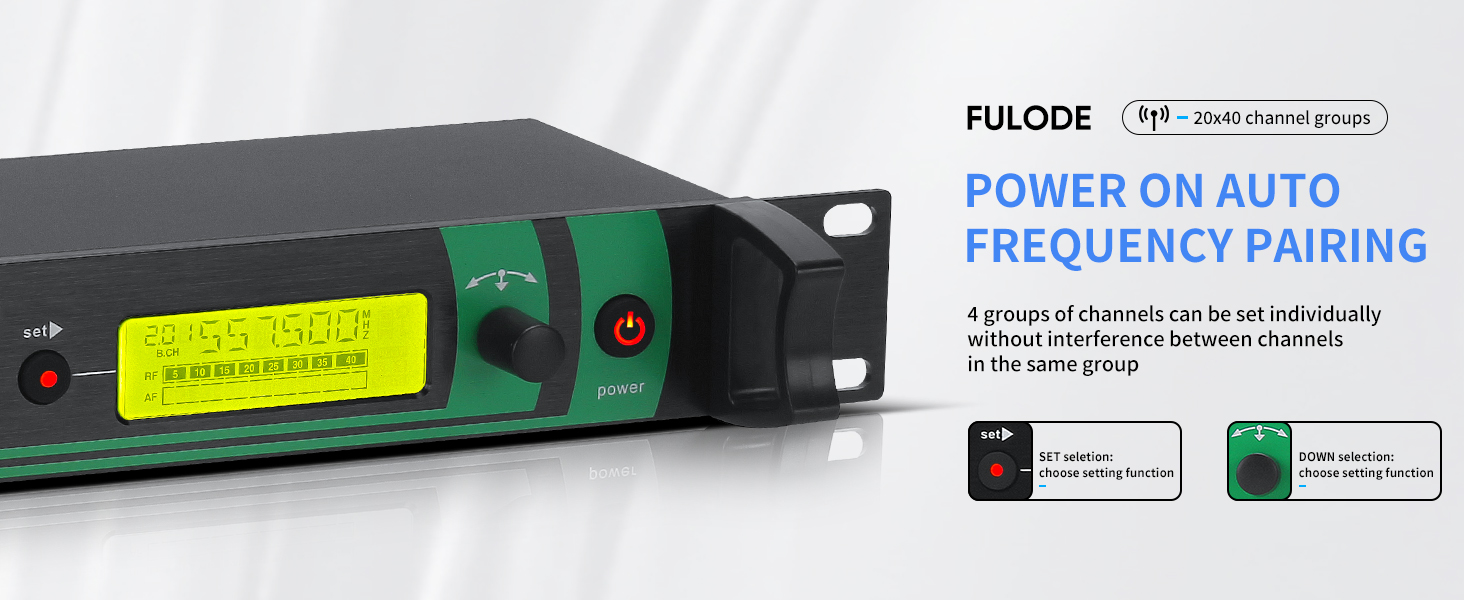
Image: The transmitter's display showing options for automatic frequency pairing and manual adjustment.
- On Transmitter: Press the SET button to enter the frequency selection mode. Use the Up/Down selection buttons to choose a group and then a specific channel. Press SET again to confirm.
- On Bodypack Receiver: With the bodypack powered on, open the battery compartment. Press the SET button inside the compartment to initiate pairing. The bodypack will automatically sync with the transmitter's selected frequency.
5.2 Pelarasan Kelantangan
- Pemancar: Use the Headphone Volume Control knob on the front panel to adjust the monitoring volume for the connected headphones.
- Penerima Bodypack: Rotate the Power/Volume knob on the top of the bodypack to adjust the volume of your earphones.
5.3 Julat Tanpa Wayar
The FULODE F-6000 IEM system offers a wireless range of up to 330 feet (100 meters) in optimal conditions. Ensure a clear line of sight between the transmitter and receivers for best performance.

Image: Visual representation of the wireless range, showing effective distances for the FULODE IEM system.
6. Penyelenggaraan
- Pembersihan: Use a soft, dry cloth to clean the units. Do not use liquid cleaners or aerosols.
- Storan: Store the system in a cool, dry place away from direct sunlight and extreme temperatures. Remove batteries from bodypack receivers if not used for extended periods.
- Penjagaan Bateri: Replace AA batteries in bodypack receivers when the low battery indicator appears. Consider using rechargeable batteries for frequent use.
7. Penyelesaian masalah
| Masalah | Kemungkinan Punca | Penyelesaian |
|---|---|---|
| Tiada bunyi dari fon telinga | Low battery in bodypack; incorrect frequency; earphones not connected; transmitter not powered on. | Replace batteries; ensure bodypack and transmitter are on the same frequency; check earphone connection; power on transmitter. |
| Interference/Static | Nearby wireless devices; operating too far from transmitter; frequency conflict. | Change frequency on transmitter and bodypack; reduce distance to transmitter; identify and move away from interfering devices. |
| Bodypack not pairing | Incorrect pairing procedure; transmitter not in pairing mode. | Repeat pairing steps carefully; ensure transmitter is ready for pairing. |
8. Spesifikasi
- Jenama: FULODE
- Nombor Model: F-2000 IEM
- Teknologi Tanpa Wayar: UHF RF
- Julat Kekerapan: 520 MHz - 580 MHz
- Frekuensi boleh laras: 40 frekuensi pratetap
- Julat Tanpa Wayar: Sehingga 330 kaki (100 meter)
- Transmitter Material: logam
- Bodypack Material: Plastic with metal clip
- Bodypack Power: 2x Bateri AA (tidak termasuk)
- Jack fon kepala: 6.35 mm (Transmitter), 3.5mm (Bodypack)
- Jenis Pemacu Audio: Pemandu Armature Seimbang
- Kawalan Bunyi: Pembatalan Bunyi Adaptif
- Impedans: 32 ohm
- Berat Barang: 2.11 Kilograms (total system)
- Kegunaan Khusus: Stage Performance, Sound Broadcasting, Studio, Church
9. Apa yang ada di dalam Kotak

Image: All components included in the FULODE F-6000 IEM system package.
- Wireless Desktop Transmitter x1
- Wireless Bodypack Receiver x6
- High Sound Quality Earphones x6
- Enhanced Antennas x2
- 6.35mm Audio Cables x4
- High Quality Power Supply x1
- Manual Arahan x1
10. Waranti dan Sokongan
This FULODE product comes with a 360-day warranty. For technical support or warranty claims, please contact FULODE Official Shop directly through your purchase platform or visit their official store page.
Untuk maklumat lanjut dan produk, sila layari FULODE Store.