
pengenalan
This manual provides detailed instructions for the proper use and maintenance of your Vikye Vikyekgug8ba9tr 1080P Mini Wearable Body Camera. Please read this manual thoroughly before operating the device to ensure optimal performance and longevity.
The Vikye Vikyekgug8ba9tr is a portable video recorder designed for various recording needs. It captures clear and stable 1080P high-resolution images in diverse environments. Key features include a 180° rotating lens, loop recording, motion detection, infrared night vision, and both video and audio recording capabilities. The integrated 1.5-inch screen allows for real-time display and adjustments during recording. Its magnetic back clip design offers convenient attachment for activities like running, cycling, or daily tasks.
Produk Selesaiview
Ciri-ciri Utama
- 1080P High-Resolution Recording: Captures clear and stable video footage.
- Kanta Berputar 180°: Allows for flexible recording angles.
- Skrin Paparan 1.5 inci: Menyediakan masa nyata viewing dan main balik.
- Penglihatan Malam Inframerah: Enables recording in low-light or dark conditions without additional illumination.
- Rakaman Gelung: Mengganti foo lama secara automatiktage apabila storan penuh.
- Pengesanan Pergerakan: Starts recording automatically when movement is detected.
- Video and Audio Recording: Supports both visual and auditory capture.
- Klip Belakang Magnetik: For easy and secure attachment to clothing or surfaces.
- Bahan ABS tahan lasak: Provides excellent impact resistance.
Kandungan Pakej
- Portable Video Recorder x 1
- Kabel Data x 1
- Manual Pengguna x 1
- Beg simpanan x 1
- Note: A small memory card (up to 128GB) is not included and must be purchased separately.
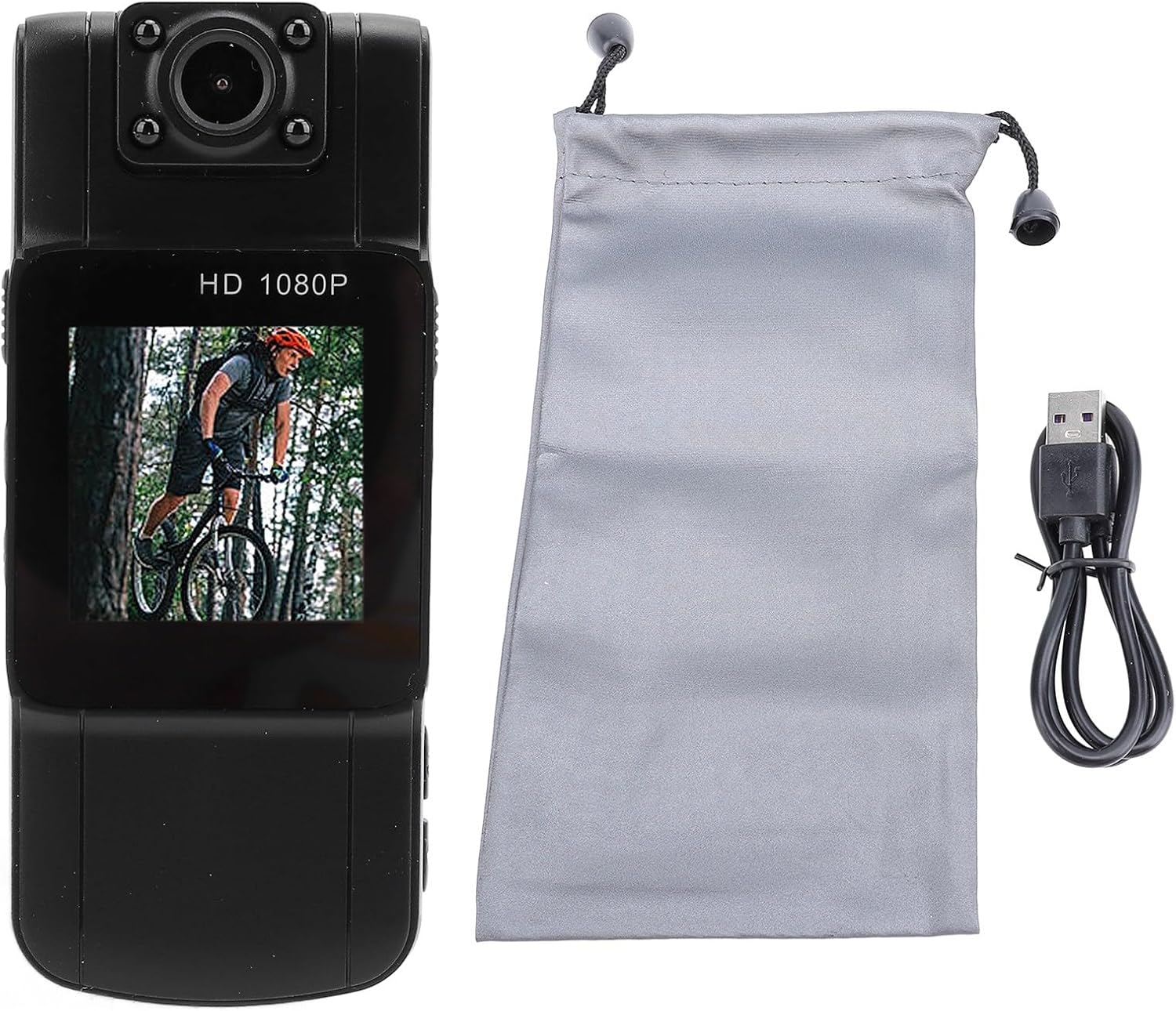
Image: The camera, a USB data cable, and a grey storage bag are shown, representing the typical package contents.
Persediaan
- Cas Peranti: Connect the provided data cable to the camera's charging port and a USB power source. The charging indicator will show the charging status. Ensure the device is fully charged before first use.
- Masukkan Kad MicroSD: Locate the microSD card slot on the side of the camera. Gently insert a compatible microSD card (up to 128GB, not included) until it clicks into place. Ensure the card is inserted correctly to avoid damage.
- Download Application (Optional): If an accompanying mobile application is available, scan the QR code provided in the physical user manual to download and install it. Follow the app's instructions for pairing and advanced settings.
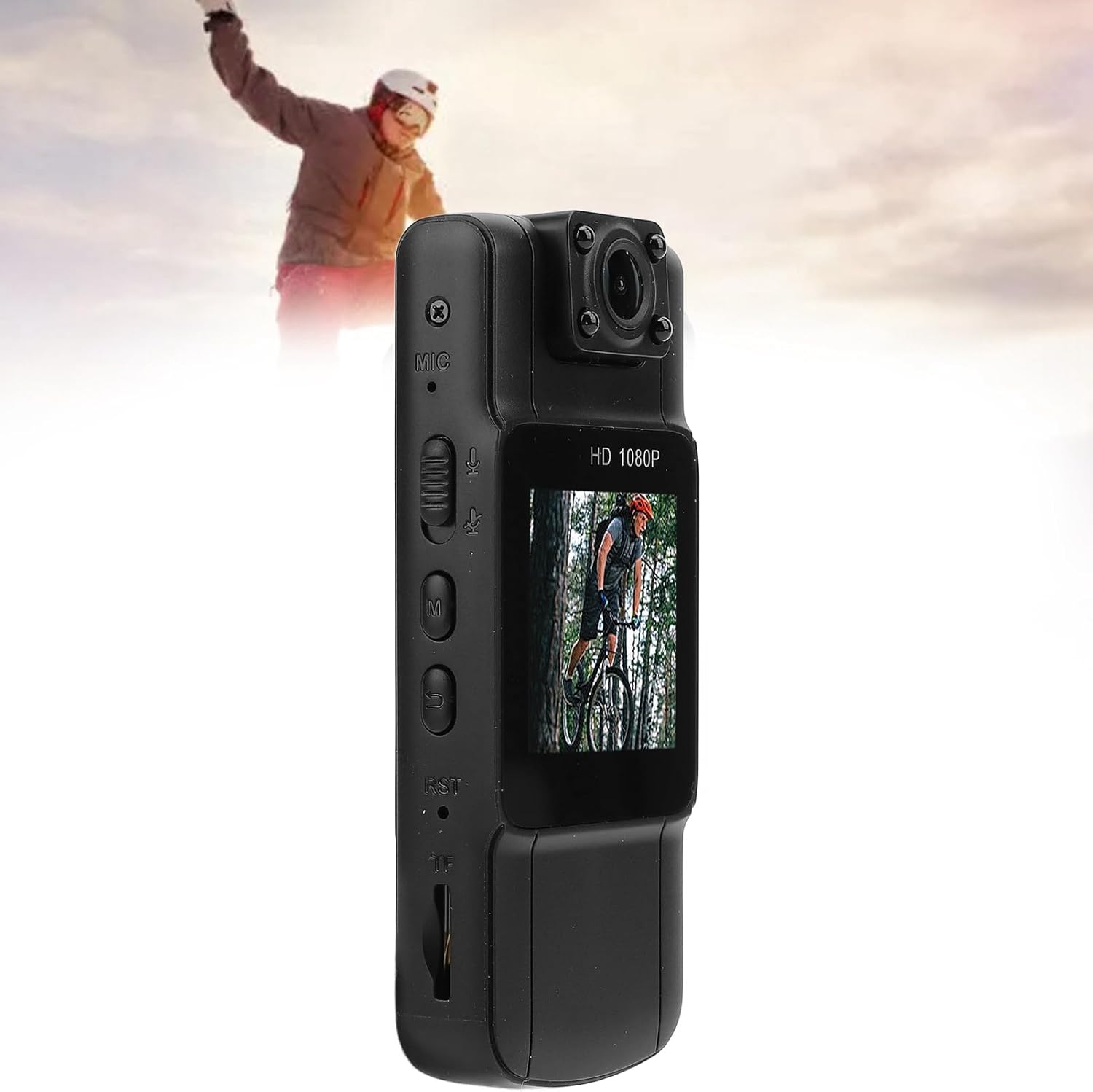
Imej: Sebelah view of the camera highlighting the various buttons and the microSD card slot, indicating where to insert the memory card.
Arahan Operasi
Operasi Asas
- Hidupkan/Mati Kuasa: Press and hold the Power button for a few seconds to turn the camera on or off.
- Mula/Hentikan Rakaman: Once powered on, press the Record button to start video recording. Press it again to stop.
- Penukaran Mod: Use the Mode button to switch between video recording, audio recording, and photo capture modes.
- Putaran Kanta: Manually rotate the camera lens up to 180 degrees to adjust your recording angle as needed.
Ciri Lanjutan
- Penglihatan Malam: In low-light conditions, the camera's infrared night vision will activate automatically or can be manually toggled via a dedicated button (refer to device interface for specific button). This allows for clear recording in darkness.
- Pengesanan Pergerakan: Activate motion detection from the camera's settings menu. When enabled, the camera will automatically begin recording when movement is detected within its field of view.
- Rakaman Gelung: Ciri ini memastikan rakaman berterusan dengan menulis ganti fail tertua files when the memory card is full. This is typically enabled by default.
- Klip Belakang Magnetik: Utilize the magnetic back clip to securely attach the camera to metal surfaces or clothing for hands-free recording during various activities.

Image: The camera screen shows a cyclist, with additional graphics illustrating photo, video, and audio recording capabilities.

Image: The camera is centrally placed, surrounded by images depicting different environments and professions where the magnetic clip can be used, such as an office, warehouse, car, and by police or medical personnel.

Image: The camera screen shows a cyclist, while the background depicts medical personnel, illustrating the camera's utility in low-light or professional settings with its night vision feature.
Penyelenggaraan
- Pembersihan: Use a soft, dry cloth to clean the camera body. For the lens, use a specialized lens cleaning cloth and solution to avoid scratches. Do not use harsh chemicals or abrasive materials.
- Storan: Store the camera in a cool, dry place away from direct sunlight and extreme temperatures. Use the provided storage bag for protection when not in use.
- Penjagaan Bateri: Untuk memanjangkan hayat bateri, elakkan daripada menyahcas sepenuhnya bateri dengan kerap. Cas peranti dengan kerap, walaupun tidak digunakan untuk tempoh yang lama.
- Kemas kini Firmware: Semak pengeluar webtapak secara berkala untuk sebarang kemas kini perisian tegar yang tersedia untuk memastikan prestasi optimum dan akses kepada ciri baharu.
Menyelesaikan masalah
| Masalah | Kemungkinan Punca | Penyelesaian |
|---|---|---|
| Kamera tidak dihidupkan. | Bateri lemah; kerosakan peranti. | Charge the battery fully. If the issue persists, contact customer support. |
| Tidak boleh merakam video/audio. | No microSD card; microSD card full or corrupted; incorrect mode. | Insert a microSD card. Format or replace the card. Ensure the camera is in the correct recording mode. |
| Kualiti imej/video yang lemah. | Dirty lens; low light conditions (night vision not active); incorrect settings. | Clean the lens. Ensure night vision is active in dark environments. Check resolution settings. |
| Peranti membeku atau menjadi tidak bertindak balas. | Gangguan perisian; masalah kad memori. | Press the reset button (if available) or hold the power button to force a restart. Reformat or replace the microSD card. |
Spesifikasi
| Ciri | Perincian |
|---|---|
| Jenis Produk | Perakam Video Mudah Alih |
| bahan | ABS |
| Skrin | 1.5 inch 240x240 |
| Resolusi Rakaman | 1080P |
| Format Rakaman | AVI |
| Penyimpanan | Supports MicroSD card up to 128GB (not included) |
| Jenis Bateri | 1000mAh Lithium-ion battery (built-in) |
| Ciri Khas | 180° Rotating Lens, Loop Recording, Motion Detection, Delayed Recording, Night Vision Recording, Voice Recording, Magnetic Back Clip Design |
Waranti dan Sokongan
For warranty information and technical support, please refer to the documentation included with your purchase or visit the official Vikye webtapak. Simpan resit pembelian anda sebagai bukti pembelian untuk sebarang tuntutan waranti.
If you encounter any issues not covered in this manual, please contact Vikye customer service for assistance.