1. Pengenalan
This manual provides detailed instructions for the installation, operation, and maintenance of your AINAVITO 9 Inch Car Stereo Navigation System, Model RM. This system is designed to enhance your driving experience with advanced features including 5G WiFi, Wireless CarPlay, Android Auto, GPS navigation, and a QLED HD display. Please read this manual thoroughly before installation and use to ensure proper functionality and safety.
2. Kandungan Pakej
Sahkan bahawa semua komponen terdapat dalam pakej:
- 1x Car Stereo Radio with Frame
- 1x Antena GPS
- 1x Frame Removal Tool
- 1x Kabel RCA
- 1x Kabel Kuasa
- 1x Car Microphone
- 1x Belakang View Kamera 1080P
- 2x Kabel USB
- 1x Manual Pengguna (dokumen ini)
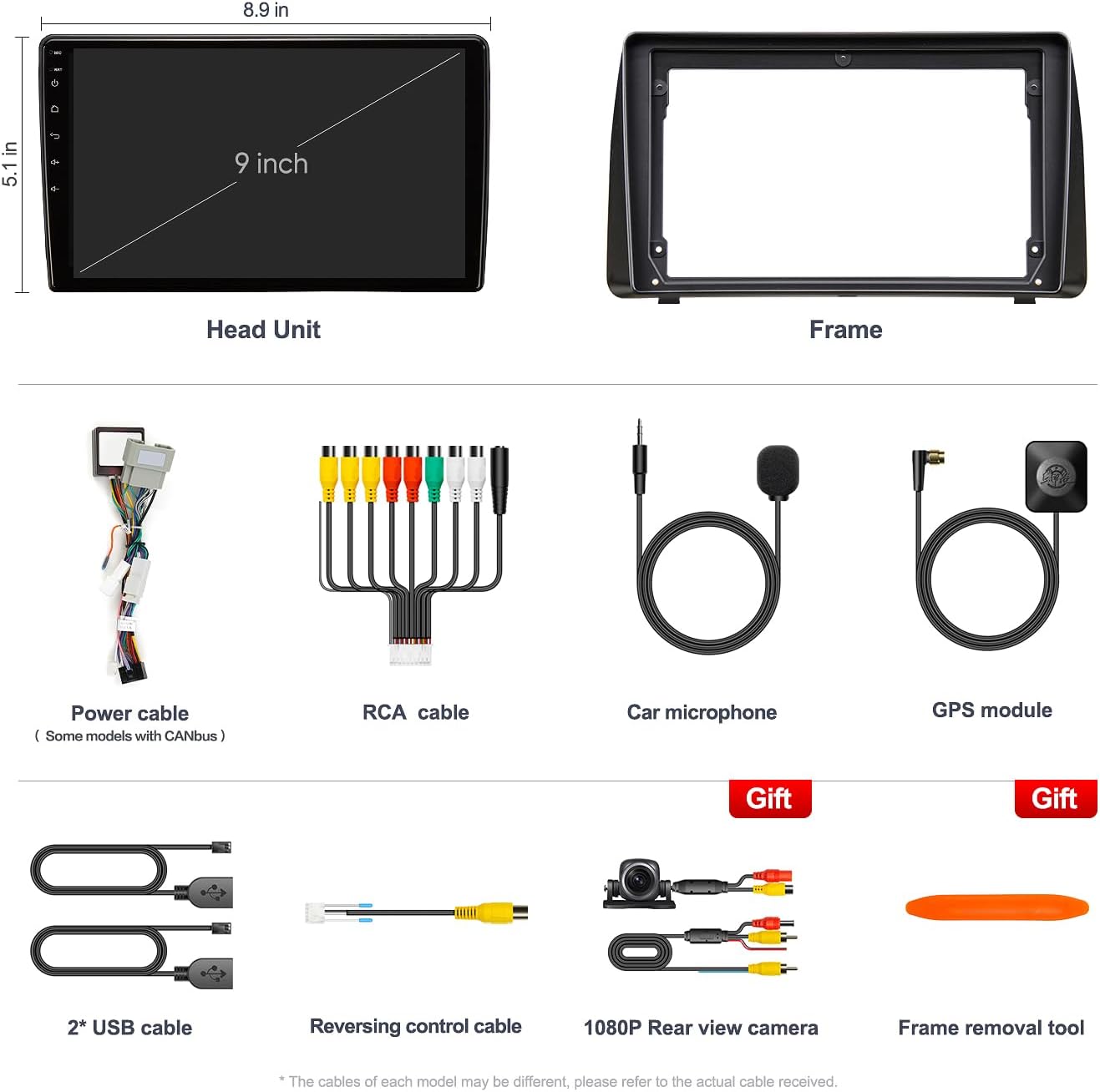
Image: AINAVITO 9 Inch Head Unit, custom frame, and various connection cables including RCA, power, microphone, GPS antenna, USB cables, and a 1080P rear view kamera.
3. Ciri-ciri Produk
- Keserasian: Designed for Dodge Grand Caravan (2011-2020) and Chrysler Town & Country (2012-2016).
- Sistem pengendalian: Android 12 with 2GB RAM and 64GB ROM for smooth performance.
- Ketersambungan: Supports wireless/wired CarPlay and Android Auto, 5G Wi-Fi, Bluetooth 5.0, AUX, AM/FM radio, and HDMI video play.
- paparan: QLED 1280x720 HD screen with vibrant colors, clear visuals, and 178° viewsudut-sudut.
- Audio: Built-in 48-band EQ and DSP for customizable sound, compatible with power amplifiers and original car speakers.
- Navigasi: Integrated GPS module with support for online maps and navigation apps.
- Keselamatan: Includes a 1080P backup camera (IP69 waterproof, 170° wide-angle lens) for safer reversing.
- Kawalan: Full Steering Wheel Control (SWC) support and customizable physical buttons.

Imej: Selesaiview of AINAVITO car stereo features including CarPlay, FM/AM, SWC, Bluetooth 5.0, Android Auto, DSP, HDMI Video, GPS, and 2+64G memory.

Image: Close-up of the 2.5D HD QLED screen highlighting 1280x720px resolution and high performance.

Image: Visual representation of the HD Double Layer Fully Fit Seamless Screen with features like better color accuracy, brightness, higher contrast, 2.5D touchscreen, 1280x720 resolution, 178° viewing angles, and 1080p video play.

Image: Ultra HD 1080P Real Version Adjustable Reversing Camera with 140° wide angle, high definition, night vision, and IP69 waterproof rating.

Image: Illustration of the HDMI Sync Screen feature, showing the car stereo display mirrored onto an external monitor.
4. Persediaan & Pemasangan
This section guides you through the installation process. The system is designed for plug-and-play installation, but professional guidance is recommended if you are unsure.
4.1. Semakan Pra-Pemasangan
- Ensure your vehicle is compatible: Dodge Grand Caravan (2011-2020) or Chrysler Town & Country (2012-2016).
- Sahkan semua kandungan pakej ada.
- Putuskan sambungan bateri kenderaan sebelum memulakan pemasangan untuk mengelakkan kerosakan elektrik.
4.2. Mengeluarkan Radio Asal
Carefully remove the original car radio and trim. Use the provided pry tool to avoid damaging plastic components.
Video: Detailed installation method for Dodge Grand Caravan 2011-2020, showing removal of the original radio and trim.
Video: Step-by-step guide on how to install the Dodge Caravan car radio.
4.3. Sambungan Pendawaian
Connect the provided wiring harness to the new head unit and the vehicle's existing wiring. Ensure all connections are secure. The system is designed for plug-and-play, minimizing the need for wire tapping.
Video: Demonstrates how to install the car stereo using the plug-and-play method.
4.4. Pemasangan Kamera Sandaran
Install the 1080P backup camera according to your vehicle's specifications. Route the camera cable to the head unit and connect it to the designated input.
Video: Instructions on how to install the backup camera.

Image: Before and after installation comparison, showing the seamless integration of the 9-inch car stereo into the dashboard.
5. Arahan Operasi
5.1. CarPlay Wayarles & Android Auto
Connect your smartphone via Bluetooth or USB for seamless integration. Access navigation, messages, music, and calls directly from the car stereo display.

Image: Demonstrates Wired & Wireless CarPlay for iPhone and Wired Android Auto for Android smartphones, showing navigation and media playback on the car stereo.

Image: Side-by-side comparison of Wireless/Wire CarPlay and Wireless/Wire Android Auto interfaces on the car stereo display.
5.2. Navigasi GPS
Utilize the built-in GPS module for accurate navigation. Connect to 5G Wi-Fi to access online maps and real-time traffic updates.

Image: GPS Navigation interface showing a map with route information and various app icons like Apple Maps, Waze, Google Maps, and YouTube.
5.3. Bluetooth 5.0
Pair your phone via Bluetooth for hands-free calling, phonebook synchronization, and music streaming.

Image: Interface showing WiFi and Bluetooth connection options, with a phone call screen and music playback.
5.4. Kefungsian Skrin Pisah
The split-screen feature allows you to run two applications simultaneously, such as navigation and media playback.

Image: Split Screen functionality demonstrating YouTube video playback alongside a map application.
5.5. Displaying Car Information (Door/AC)
The system can display original car door and AC information. This feature may require specific settings adjustments in the factory menu.
Video: Instructions on how to display door and AC information on the car stereo.
6. Tetapan Audio
The AINAVITO system features a built-in 48-band Equalizer (EQ) and Digital Sound Processor (DSP) for advanced audio customization. Adjust frequency bands, balance, fader, and subwoofer settings to optimize your sound experience.
7. Penyesuaian
7.1. Customizing Side Button Functions
The physical buttons on the side of the unit can be programmed to perform various functions according to your preference. This is done through the factory settings menu.
Video: Guide on how to customize the single keybutton shortcut function on the car stereo.
7.2. Steering Wheel Control (SWC) Setup
Program your vehicle's steering wheel controls to interact with the car stereo, allowing for safe and convenient operation while driving.
Video: Instructions on how to set up steering wheel controls and side buttons.
8. Penyelesaian masalah
- Tiada Kuasa: Check all power cable connections and vehicle fuses. Ensure the battery is properly reconnected.
- Tiada Bunyi: Verify speaker connections. Check audio settings (EQ, balance, fader) and ensure mute is off.
- Bluetooth/CarPlay/Android Auto Disconnection: Ensure your phone's Bluetooth is on and paired. For wired connections, check the USB cable. Restarting both the phone and the car stereo can often resolve connectivity issues.
- Kehilangan Isyarat GPS: Pastikan antena GPS dipasang dengan betul dan mempunyai jelas view of the sky. Check settings for online map access if using Wi-Fi.
- Volume Resets: Some units may reset volume settings upon vehicle shutdown. Check for firmware updates or specific settings in the factory menu if this persists.
- Screen Scratches Easily: Consider applying a screen protector to prevent damage.
9. Spesifikasi
| Ciri | Spesifikasi |
|---|---|
| Berat Barang | 3.61 paun |
| Dimensi Pakej | 13.98 x 9.41 x 5.28 inci |
| Saiz Paparan | 9 Inci |
| Nama Model | RM |
| Resolusi Skrin | QLED 1280*720 |
| Sistem Operasi | Android 12 |
| RAM | 2GB |
| ROM | 64GB |
| Teknologi Ketersambungan | 5G Wi-Fi, Bluetooth 5.0, HDMI Video Play, FM/AM/AUX, Wireless/Wire CarPlay & Android Auto, Mirroring + Airplay |
| Ciri Khas | 48-Band EQ, Professional DSP, GPS Navigation, Split Screen, Secondary Video Window, Dual USB (6PIN+4PIN) |
| Mod Keluaran Audio | Surround/Bass Boost/Bass Filter/Sound Field |
| Jenis Pemasangan | Pemasangan Papan Pemuka |
10. Waranti & Sokongan
Your AINAVITO car stereo comes with a Waranti 12 bulan dari tarikh pembelian.
AINAVITO is committed to providing professional engineer guidance and 24-hour after-sale service. If you have any questions related to product use, settings, or installation, please contact customer support through the Amazon platform by clicking on the store name ("Sold By ----Speedroad") and finding the "ASK a Question" button. Our engineers will reply to you within 24 hours.

Image: Information on how to contact AINAVITO for 24-hour technical support via Amazon.