
1. Pengenalan
Thank you for choosing the BRAINGAIN Adjustable Weight Bench. This manual provides essential information for the safe assembly, operation, and maintenance of your new fitness equipment. Designed for versatility and durability, this bench supports a wide range of exercises, from incline and decline presses to flat bench workouts, accommodating various fitness levels and routines. Please read this manual thoroughly before assembly and use, and retain it for future reference.

Image: The BRAINGAIN Adjustable Weight Bench shown from the side, illustrating its multiple backrest and seat adjustment positions, from flat to various incline and decline angles.
2. Maklumat Keselamatan
AMARAN: Kegagalan mematuhi arahan keselamatan ini boleh mengakibatkan kecederaan serius atau kematian.
- Sentiasa berunding dengan doktor sebelum memulakan sebarang program senaman.
- Ensure all bolts, nuts, and other connections are securely tightened before each use. Regularly inspect the bench for any signs of wear or damage.
- The maximum weight capacity for this bench is 450 kg (user weight + weights). Do not exceed this limit.
- Use the bench on a flat, stable surface. Ensure adequate space around the bench for safe operation.
- Jauhkan kanak-kanak dan haiwan peliharaan daripada peralatan semasa digunakan.
- Do not make any modifications to the bench. Use only manufacturer-approved replacement parts.
- Always use proper lifting techniques and controlled movements during exercises.
- Jika anda mengalami kesakitan, pening, atau ketidakselesaan, berhenti bersenam serta-merta.
3. Kandungan Pakej
Please verify that all components are present and undamaged before proceeding with assembly. If any parts are missing or damaged, do not assemble the bench and contact customer support.
- Main Frame Components
- Pad sandaran
- Pad Kerusi
- Perhimpunan Pijakan Kaki
- Adjustment Pins/Levers
- Hardware (bolts, washers, nuts, tools)
- Manual Pengguna
4. Arahan Perhimpunan
Assembly is designed to be straightforward and typically takes around 10 minutes. It is recommended to have two people for easier assembly. Ensure you have enough clear space to work.
- Buka Pembungkusan Komponen: Carefully remove all parts from the packaging and lay them out on a clean, soft surface to prevent scratches. Check against the package contents list.
- Pasang Bar Penstabil: Secure the front and rear stabilizer bars to the main frame using the provided bolts and nuts. Ensure they are tightly fastened.
- Install Backrest Support: Connect the backrest support frame to the main frame. This typically involves aligning holes and inserting a pivot bolt, secured with a nut.
- Mount Backrest Pad: Attach the backrest pad to its support frame using the screws provided.
- Mount Seat Pad: Attach the seat pad to the main frame using the screws provided.
- Pasang Tempat Letak Kaki: Attach the footrest assembly to the designated slot on the main frame. Ensure it can be adjusted and secured with its pin.
- Insert Adjustment Pins: Insert the adjustment pins for the backrest and seat into their respective mechanisms. Test their functionality.
- Semakan Akhir: Double-check all bolts, nuts, and pins to ensure they are fully tightened and secured. Ensure the bench is stable and does not wobble.

Imej: Selesaiview of the BRAINGAIN Adjustable Weight Bench, highlighting its high-strength alloy steel frame, 450 kg weight support, integrated handle, multi-position backrest, and double-wheel stabilizers. This image illustrates the key structural components.
5. Arahan Operasi
5.1 Melaraskan Sandaran Belakang
The BRAINGAIN Adjustable Weight Bench features 9 distinct backrest positions, allowing for flat, incline, and decline workouts.
- Locate the backrest adjustment pin/lever, typically found at the base of the backrest support.
- Pull the pin outwards or lift the lever to disengage it from its current position.
- Carefully move the backrest to your desired angle.
- Release the pin/lever, ensuring it fully engages into one of the adjustment holes. Wiggle the backrest slightly to confirm it is securely locked in place before use.
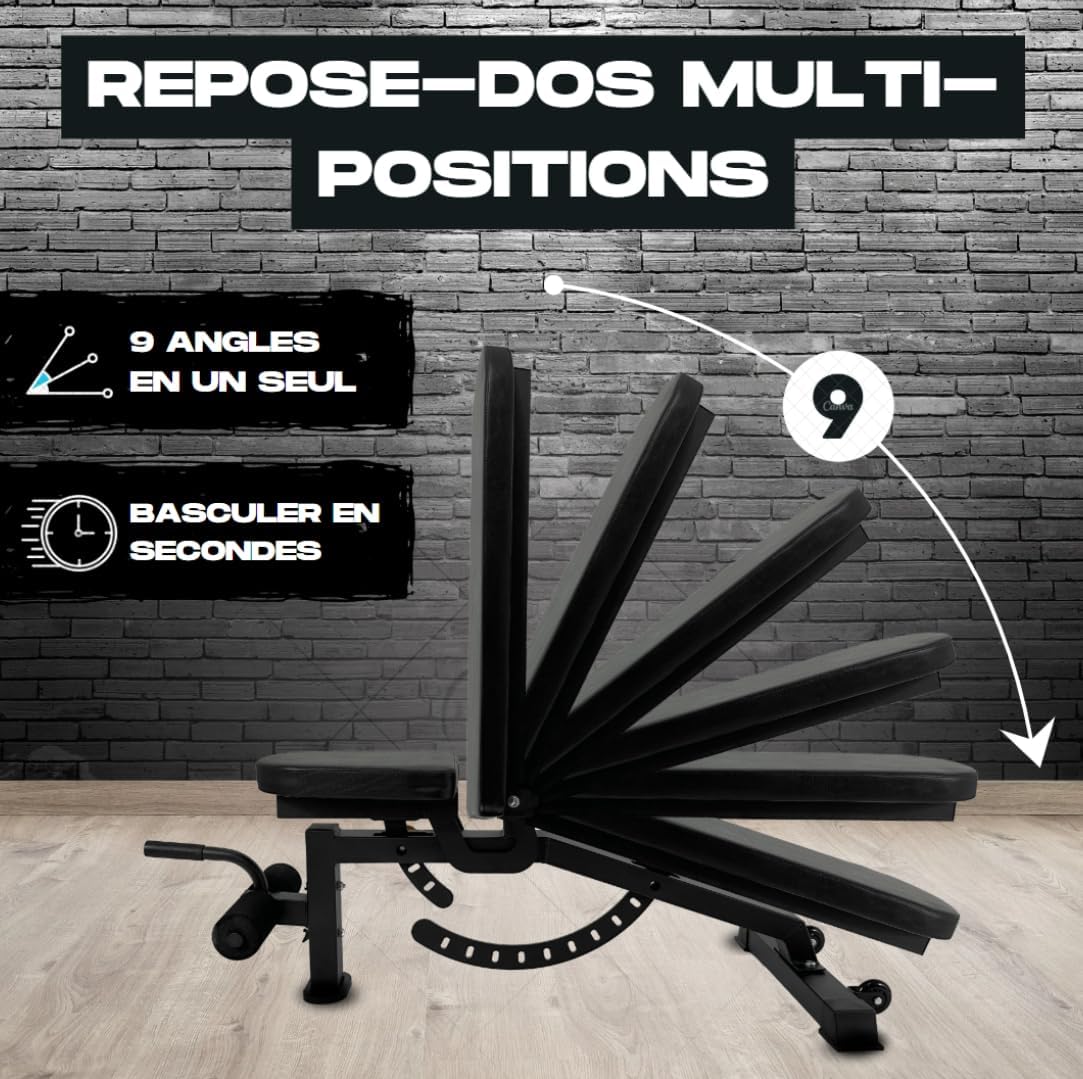
Image: The BRAINGAIN Adjustable Weight Bench demonstrating its 9 multi-position backrest angles, illustrating how the backrest can be quickly adjusted from flat to various incline and decline settings.
5.2 Melaraskan Tempat Duduk
The seat pad can also be adjusted to complement the backrest angle, providing optimal support and comfort during different exercises.
- Locate the seat adjustment pin/lever, usually beneath the seat pad.
- Pull the pin outwards or lift the lever to disengage it.
- Adjust the seat to one of its 4 available positions.
- Release the pin/lever, ensuring it fully engages into the desired hole. Confirm the seat is stable before use.
5.3 Using the Footrest
The removable footrest provides additional stability and support, particularly useful for decline exercises or sit-ups.
- To attach, slide the footrest assembly into the designated receiver on the front of the bench.
- Secure it with the provided adjustment pin.
- The footrest offers 3 positions for varied support. Adjust by pulling the pin and sliding the footrest to the desired position, then re-engaging the pin.
- To remove, disengage the pin and slide the footrest out.

Imej: Jarak dekat view of the BRAINGAIN Adjustable Weight Bench's footrest and adjustment pins. This image highlights the integrated handle, the padded foot rollers, and the yellow adjustment pins for securing the backrest and seat positions.
6. Penyelenggaraan
- Pembersihan: Wipe down the bench pads and frame with a damp cloth after each use to remove sweat and dirt. Use a mild soap solution for deeper cleaning, then wipe dry. Avoid abrasive cleaners.
- Pemeriksaan: Periodically inspect all bolts, nuts, and moving parts for tightness and wear. Tighten any loose fasteners. Check the upholstery for tears or excessive wear.
- Storan: Store the bench in a dry, cool place away from direct sunlight and extreme temperatures.
7. Penyelesaian masalah
- Bangku goyang:
- Ensure the bench is on a flat, even surface.
- Check all assembly bolts and nuts for tightness. Retighten if necessary.
- Verify that the rubber feet are properly installed and making full contact with the floor.
- Adjustment Pin Does Not Engage Fully:
- Ensure the backrest/seat is aligned correctly with the adjustment holes.
- Periksa sebarang halangan dalam mekanisme pelarasan.
- Apply a small amount of silicone lubricant to the pin if it feels stiff.
- Bunyi Berdecit:
- Identify the source of the squeak.
- Tighten any loose bolts or connections in that area.
- Apply a small amount of silicone lubricant to pivot points if needed.
8. Spesifikasi
| Atribut | Perincian |
|---|---|
| Jenama | BRAINGAIN |
| Nombor Model | B0D1YK93ML |
| UPC | 601947067271 |
| warna | Hitam |
| Gaya | 9-in-1 Adjustable |
| Bahan Bingkai | Keluli Aloi |
| Kapasiti Berat Maks | 450 Kilogram |
| Dimensi Produk (L x W x H) | 120 x 55 x 90 cm |
| Berat Barang | 16 Kilogram |
| Tarikh Mula-mula Tersedia | 17 April 2024 |
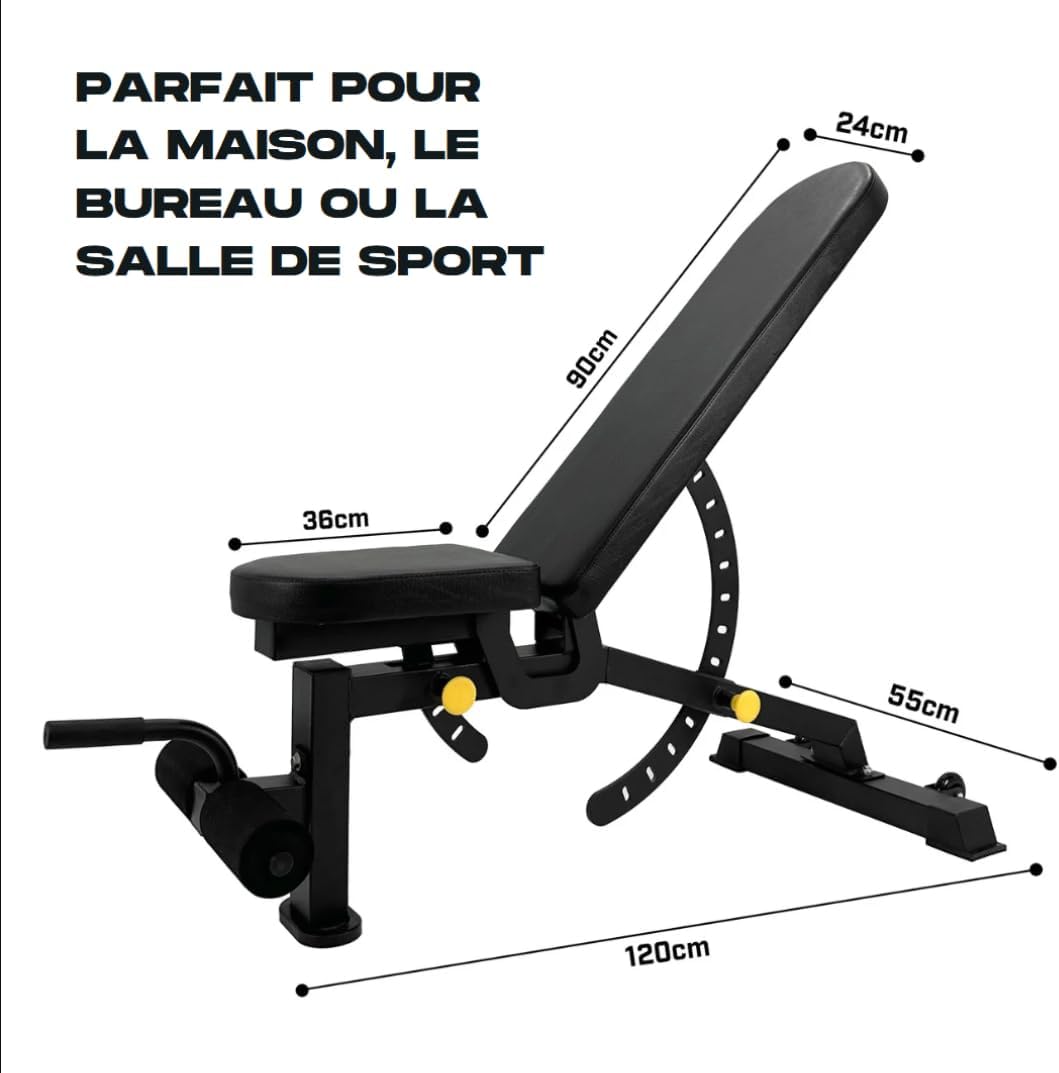
Image: The BRAINGAIN Adjustable Weight Bench with its key dimensions (length, width, height) clearly labeled, indicating its compact size suitable for home gyms or commercial spaces.
9. Waranti dan Sokongan
BRAINGAIN products are manufactured to high-quality standards. For information regarding warranty coverage, please refer to the warranty card included with your purchase or visit the official BRAINGAIN website. If you have any questions, require assistance with assembly, or need replacement parts, please contact BRAINGAIN customer support through their official channels.
Untuk bantuan lanjut, sila layari: www.braingain.com