
Qlima MS-AC 5001
Qlima MS-AC 5001 Split-unit Air Conditioner User Manual
Your guide to efficient cooling and comfort.
1. Pengenalan
Thank you for choosing the Qlima MS-AC 5001 Split-unit Air Conditioner. This manual provides essential information for the safe and efficient operation, installation, maintenance, and troubleshooting of your new air conditioning unit. Please read this manual thoroughly before using the appliance and keep it for future reference.
2. Arahan Keselamatan
Always observe the following basic safety precautions when using electrical appliances to reduce the risk of fire, electric shock, and injury.
- Keselamatan Umum:
- Jangan kendalikan unit dengan tangan yang basah.
- Jauhkan kanak-kanak dan haiwan peliharaan dari unit.
- Pastikan unit diletakkan pada permukaan yang stabil dan rata.
- Jangan sekat saluran masuk atau alur keluar udara.
- Keselamatan Elektrik:
- Only connect the unit to a properly grounded power outlet.
- Jangan gunakan kord sambungan atau penyesuai.
- Jika kord kuasa rosak, ia mesti diganti oleh pengilang, ejen servisnya, atau orang yang berkelayakan yang serupa untuk mengelakkan bahaya.
- Keselamatan Pemasangan:
- Pastikan pengudaraan yang betul untuk kedua-dua unit dalaman dan luaran.
- Do not install the unit near heat sources or in direct sunlight.
- Unit mesti dipasang mengikut peraturan pendawaian kebangsaan.
3. Produk Lebihview
The Qlima MS-AC 5001 is a compact split-unit air conditioner designed for efficient cooling of small to medium-sized spaces. Its split design separates the cooling unit (indoor) from the compressor unit (outdoor), allowing for quieter operation indoors.
Ciri-ciri Utama:
- Penyejukan Kuat: 1.46 kilowatts capacity for effective cooling.
- Penggunaan Tenaga Rendah: Efficient 1452 watts power usage.
- Operasi mudah: Equipped with touch controls and a built-in stabilizer.
- Split System Design: Separated compressor and cooling unit for optimal performance.
- Fungsi Dehumidifier: Helps reduce humidity in the air.
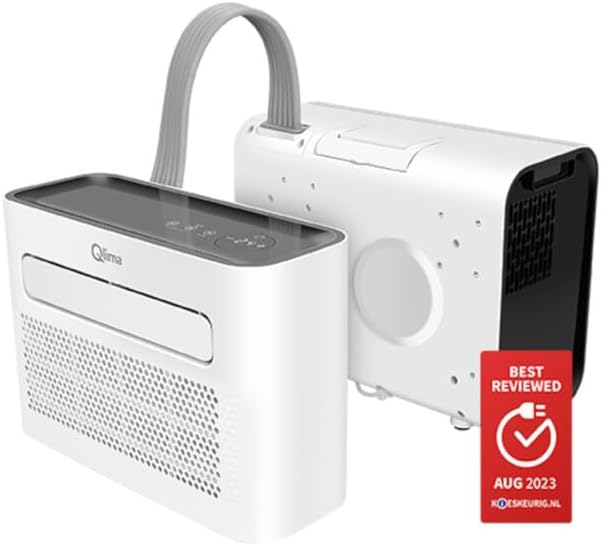
This image displays the Qlima MS-AC 5001 Split-unit Air Conditioner, featuring its compact indoor unit and the separate outdoor compressor unit, connected by a flexible hose. The indoor unit has a sleek white design with a dark top panel and a front air outlet, while the outdoor unit is also white with ventilation grilles.
4. Persediaan
Follow these steps for proper setup of your Qlima MS-AC 5001 air conditioner.
4.1 Membongkar dan Pemeriksaan
- Keluarkan semua bahan pembungkusan dengan berhati-hati.
- Check the unit for any signs of damage during transit. If damaged, do not operate and contact your retailer.
- Ensure all components are present: indoor unit, outdoor unit, connecting hose/cable, power cord, and user manual.
4.2 Garis Panduan Penempatan
- Unit Dalaman: Place the indoor unit on a flat, stable surface in the room you wish to cool. Ensure there is adequate space around the unit for proper airflow (at least 20 cm from walls).
- Unit Luar: Position the outdoor unit outside, ensuring it is on a stable surface and has unrestricted airflow. Keep it away from direct sunlight and heat sources. The connecting hose length should be considered for optimal placement.
4.3 Connecting the Units
- Connect the flexible hose/cable from the indoor unit to the outdoor unit. Ensure a secure and tight connection to prevent leaks.
- Palamkan kord kuasa ke salur keluar elektrik yang dibumikan. Pastikan voltage matches the unit's requirements (1.1E+2 Volts).
5. Arahan Operasi
The Qlima MS-AC 5001 features intuitive touch controls for easy operation.
5.1 Panel Kawalan
The control panel is located on the top of the indoor unit. It typically includes buttons for Power, Mode, Temperature Up/Down, and Fan Speed.
5.2 Fungsi Asas
- HIDUP/MATI Kuasa: Tekan ke kuasa butang untuk menghidupkan atau mematikan unit.
- Pelarasan Suhu: Gunakan Up dan Bawah arrows to set your desired temperature. The unit will automatically adjust its operation to reach and maintain this temperature.
- Pemilihan Mod: Tekan ke Mod button to cycle through available operating modes:
- Mod Penyejukan: For active cooling of the room.
- Mod Penyahlembapan: To reduce humidity levels without significant cooling.
- Kelajuan Kipas: Adjust the fan speed (if available) to control the airflow intensity.
6. Penyelenggaraan
Penyelenggaraan tetap memastikan prestasi optimum dan memanjangkan jangka hayat penghawa dingin anda.
6.1 Membersihkan Penapis Udara
- Matikan dan cabut plag unit sebelum membersihkan.
- Locate and remove the air filter from the indoor unit (refer to diagrams in the full manual if available).
- Clean the filter with a vacuum cleaner or wash it gently with lukewarm water and mild detergent.
- Benarkan penuras kering sepenuhnya sebelum memasukkannya semula.
- Bersihkan penapis udara setiap dua minggu atau lebih kerap bergantung pada penggunaan dan kualiti udara.
6.2 Membersihkan Bahagian Luar
- Wipe the exterior of both units with a soft, damp kain.
- Jangan gunakan bahan kimia, bahan pengikis atau pelarut yang keras.
6.3 Penyimpanan
- If storing the unit for an extended period, ensure it is clean and dry.
- Simpan di tempat yang sejuk dan kering, jauh dari cahaya matahari langsung dan suhu yang melampau.
7. Penyelesaian masalah
Sebelum menghubungi sokongan pelanggan, sila rujuk isu biasa berikut dan penyelesaiannya.
| Masalah | Kemungkinan Punca | Penyelesaian |
|---|---|---|
| Unit tidak dihidupkan. | Tiada bekalan kuasa; Kord kuasa tidak dipasang; Pemutus litar tersandung. | Periksa salur keluar kuasa; Pastikan kord kuasa dipasang dengan selamat; Tetapkan semula pemutus litar. |
| Unit berjalan tetapi tidak menyejukkan. | Air filter is dirty; Room temperature is already low; Doors/windows are open; Air inlets/outlets are blocked. | Clean the air filter; Adjust desired temperature; Close doors/windows; Ensure clear airflow. |
| Bunyi luar biasa dari unit. | Unit tidak berada di atas permukaan yang rata; Bahagian longgar; Halangan pada kipas. | Place unit on a level surface; Check for and remove any obstructions; If noise persists, contact support. |
| Kebocoran air. | Drain hose is blocked or improperly connected. | Check and clear the drain hose; Ensure proper connection. |
8. Spesifikasi
Detailed technical specifications for the Qlima MS-AC 5001.
| Spesifikasi | Nilai |
|---|---|
| Jenama | Qlima |
| Nombor Model | MS-AC 5001 |
| Dimensi Produk | 21 x 21 x 46 cm |
| Kapasiti | 1.46 Kilowatt |
| Kuasa Penyejukan | 1452 Watt |
| Ciri Khas | Dehumidifier |
| Voltage | 1.1E+2 Volt |
| Sumber Kuasa | Elektrik dengan kord |
| Faktor Bentuk | Minisplit |
| Kaedah Kawalan | Sentuh |
9. Waranti dan Sokongan
The Qlima MS-AC 5001 comes with a limited warranty. Please refer to your purchase documentation for specific terms and conditions of the warranty.
For technical assistance, service, or warranty claims, please contact your retailer or the official Qlima customer support. Ensure you have your model number (MS-AC 5001) and proof of purchase ready when contacting support.
Ask a question about this manual
Ask about setup, troubleshooting, compatibility, parts, safety, or missing instructions. Manuals+ will review the question and use this page’s manual context to help answer it.