
1. Pengenalan
Terima kasih kerana membeliasing the Soundmaster MCD5600 Stereo System. This versatile audio system combines classic and modern audio technologies, including a record player, DAB+ and FM radio, double cassette deck, CD player, USB playback, and Bluetooth connectivity. It also features a digitization function to convert your analog media to MP3 files on a USB drive. This manual provides essential information for safe operation, setup, and maintenance of your device. Please read it thoroughly before use and retain it for future reference.
2. Arahan Keselamatan
- Sumber Kuasa: Pastikan bekalan kuasa sepadan dengan voltage specified on the unit. Disconnect from the power outlet during lightning storms or when unused for long periods.
- Pengudaraan: Jangan sekat sebarang bukaan pengudaraan. Benarkan ruang yang mencukupi di sekeliling unit untuk aliran udara yang betul untuk mengelakkan terlalu panas.
- Air dan Kelembapan: Do not expose the unit to rain, moisture, dripping, or splashing. Do not place objects filled with liquids, such as vases, on the apparatus.
- haba: Jauhkan unit daripada sumber haba seperti radiator, daftar haba, dapur, atau radas lain (termasuk amppenghidup) yang menghasilkan haba.
- Pembersihan: Bersihkan hanya dengan kain kering. Jangan gunakan pembersih cecair atau pembersih aerosol.
- Servis: Jangan cuba servis produk ini sendiri. Rujuk semua perkhidmatan kepada pegawai perkhidmatan yang berkelayakan.
- penempatan: Letakkan unit pada permukaan yang stabil dan rata untuk mengelakkannya daripada jatuh.
3. Kandungan Pakej
Sila pastikan semua barang ada semasa membuka bungkusan:
- Soundmaster MCD5600 Main Unit
- 2 x External Speakers
- Alat Kawalan Jauh
- Manual Arahan (dokumen ini)
- FM/DAB+ Antenna
- Kabel Kuasa
4. Produk Lebihview
Familiarize yourself with the main components and controls of your stereo system.
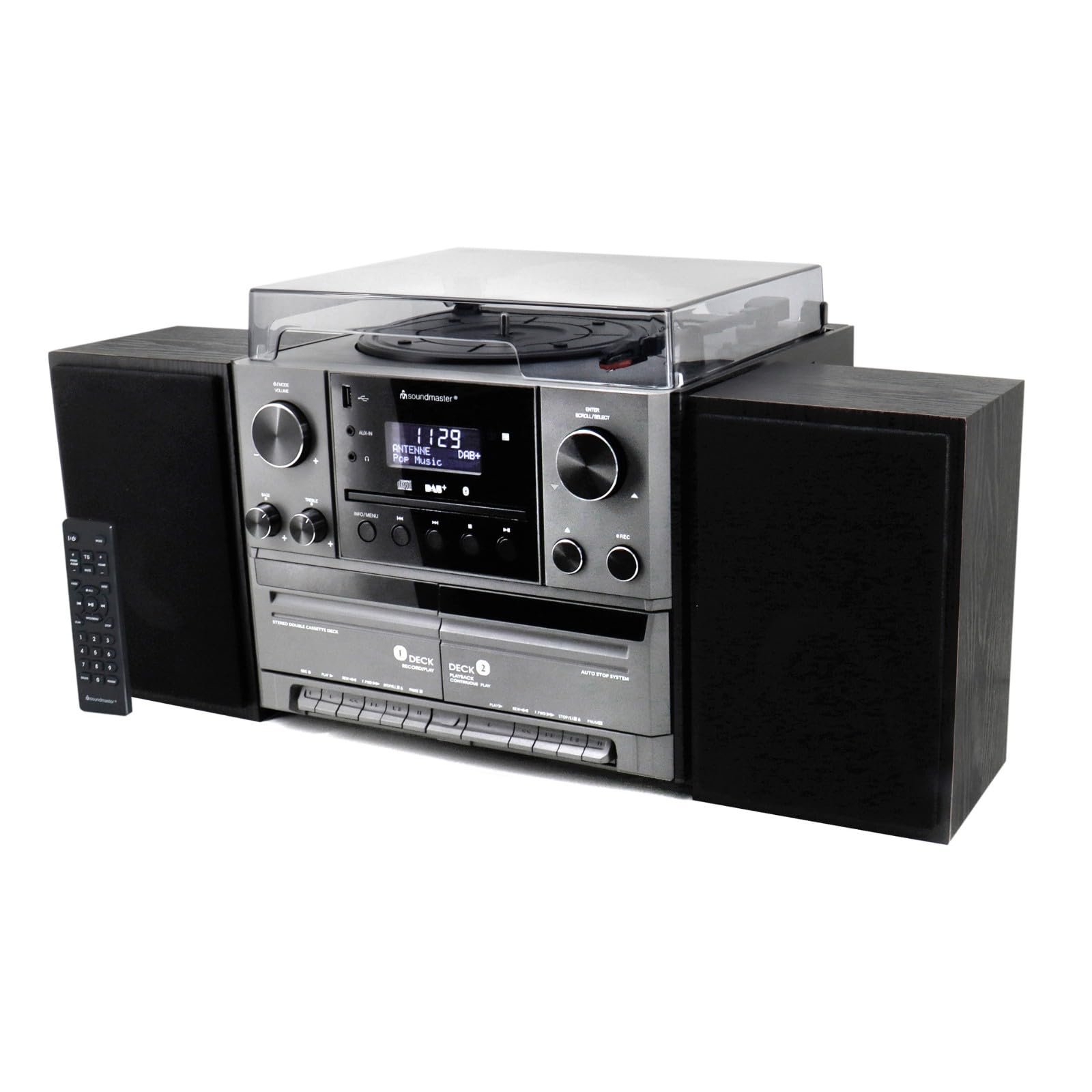
Rajah 4.1: Depan view of the Soundmaster MCD5600 stereo system, showing the main unit flanked by two speakers, with the remote control positioned to the left. The display, control knobs, and various media inputs are visible.

Rajah 4.2: Depan view of the Soundmaster MCD5600 stereo system with the CD tray open and a cassette tape inserted into one of the two cassette decks. This image highlights the multi-media capabilities of the unit.
5. Persediaan
5.1 Pembesar Suara Penyambung
Connect the included speakers to the speaker terminals on the rear of the main unit. Ensure correct polarity (red to red, black to black) for optimal sound quality. Place speakers equidistant from the listening position for the best stereo effect.
5.2 Sambungan Antena
Connect the supplied 75 Ohm antenna to the FM/DAB+ antenna input on the rear panel. Extend the antenna fully and position it for the best possible radio reception.
5.3 Sambungan Kuasa
Plug the power cable into the AC inlet on the rear of the unit, then connect the other end to a standard wall outlet.
6. Arahan Operasi
6.1 Kawalan Am
- Butang Kuasa: Tekan untuk menghidupkan atau MATI unit.
- Tombol Kelantangan: Rotate to adjust the overall sound volume.
- Source/Function Button: Press repeatedly to cycle through available audio sources (CD, Phono, Tape, FM, DAB+, Bluetooth, USB).
- paparan: Shows current mode, track information, radio frequency, and time.
6.2 Operasi Pemain CD
- Tekan ke CD source button.
- Tekan ke BUKA/TUTUP butang untuk membuka dulang CD.
- Place a CD (CD/CD-MP3/CD-R/CD-RW/WMA compatible) with the label side up into the tray.
- Tekan BUKA/TUTUP sekali lagi untuk menutup dulang. Unit ini akan membaca cakera.
- Tekan MAIN/JEDA untuk memulakan atau menjeda main semula.
- guna SKIP FORWARD/BACKWARD butang untuk menavigasi trek.
- The PROGRAM dan ULIKAN functions allow for customized playback sequences and continuous repetition.
6.3 Record Player Operation
- Tekan ke FON source button.
- Select the appropriate speed (33, 45, or 78 RPM) using the speed selector switch based on your record type.
- Place a record on the turntable platter. For 45 RPM singles, use the included adapter.
- Carefully lift the tonearm using the cueing lever and position it over the desired track on the record.
- Lower the tonearm gently onto the record. Playback will begin automatically.
- Pada akhir rekod, angkat lengan nada dan kembalikannya ke kedudukan rehatnya.
6.4 Operasi Pemain Kaset
The unit features two cassette decks: Deck 1 (Record/Play) and Deck 2 (Continuous Play).
- Tekan ke PITA source button.
- Tekan ke BERHENTI/EJECT button on the desired deck to open the cassette door.
- Insert a cassette tape with the open edge facing upwards. Close the door.
- Tekan BERMAIN untuk memulakan main balik.
- guna CEPAT KE HADAPAN dan REWIND butang untuk menavigasi pita.
- To record, ensure Deck 1 is selected, insert a blank tape, select your desired input source (e.g., Phono, CD, Radio), and press the REKOD butang.
6.5 Radio (FM/DAB+) Operation
- Tekan ke FM or DAB+ source button.
- For FM radio, use the MENALA knob or buttons to manually tune or auto-scan for stations.
- For DAB+ radio, the unit will automatically scan for available digital stations. Use the SCROLL/SELECT knob to browse and select stations.
- To save a station as a preset, refer to the specific instructions in the full manual for your model.
6.6 Operasi Bluetooth
- Tekan ke BLUETOOTH source button. The display will show "PAIRING" or similar.
- Dayakan Bluetooth pada peranti luaran anda (telefon pintar, tablet, dll.).
- Cari untuk "MCD5600" (or similar device name) in your device's Bluetooth settings and select it to pair.
- Once paired, you can play audio from your device through the stereo system.
6.7 Main Semula USB
- Masukkan pemacu kilat USB ke dalam port USB di panel hadapan.
- Tekan ke USB source button.
- The unit will read the contents of the USB drive. Use the navigation buttons to browse folders and select MP3 files untuk main balik.
6.8 Digitization (Encoding)
The MCD5600 allows you to convert audio from vinyl records, cassette tapes, or radio broadcasts directly to MP3 files pada pemacu USB yang disambungkan.
- Masukkan pemacu kilat USB ke dalam port USB.
- Select the desired audio source (Phono, Tape, FM, DAB+).
- Start playback of your chosen source (e.g., start a record, play a cassette, tune to a radio station).
- Tekan ke REKOD button on the main unit. The display will indicate recording is in progress.
- Tekan BERHENTI when you wish to end the recording. The audio will be saved as an MP3 file pada pemacu USB anda.
7. Penyelenggaraan
- Pembersihan Unit: Wipe the exterior surfaces with a soft, dry, lint-free cloth. Do not use abrasive cleaners or solvents.
- Record Player Stylus: Periodically check the stylus for dust and debris. Clean gently with a soft brush designed for styli, brushing from back to front. Replace the stylus if sound quality deteriorates significantly.
- Cassette Heads: After extended use, clean the cassette heads, pinch rollers, and capstans with a cotton swab lightly dampditambah dengan isopropil alkohol.
- Kanta CD: Avoid touching the CD lens. If cleaning is necessary, use a specialized CD lens cleaner disc.
8. Penyelesaian masalah
| Masalah | Kemungkinan Punca | Penyelesaian |
|---|---|---|
| Tiada kuasa | Kabel kuasa tidak disambungkan; Salur keluar kuasa rosak | Periksa sambungan kabel kuasa; Cuba soket yang berbeza |
| Tiada bunyi | Volume too low; Incorrect source selected; Speakers not connected | Increase volume; Select correct source; Check speaker connections |
| CD skips or doesn't play | CD dirty or scratched; CD inserted incorrectly | Clean CD; Insert CD label-side up |
| Penerimaan radio yang lemah | Antenna not extended or positioned correctly | Extend and reposition antenna; Try auto-scan for DAB+ |
| Penggandingan Bluetooth gagal | Device too far; Bluetooth not enabled on external device | Move device closer; Ensure Bluetooth is enabled and in pairing mode |
9. Spesifikasi
- Nombor Model: MCD5600SW
- Jenama: Soundmaster
- warna: Hitam
- Pemain CD: CD, CD-MP3, CD-R, CD-RW, WMA compatible; Program/Repeat functions
- Pemain rekod: 33/45/78 RPM speeds
- Dek Kaset: Double cassette (Deck 1: Record/Play, Deck 2: Continuous Play)
- Radio: FM-PLL with preset stations, DAB+ Digital Radio (75 Ohm antenna connection)
- Ketersambungan: Port USB, Bluetooth
- Ciri Khas: Digitization (CD, cassette, radio to USB-MP3 encoding)
10. Maklumat Waranti
This Soundmaster MCD5600 Stereo System comes with a manufacturer's warranty. Spare parts availability is guaranteed for 1 year from the date of purchase. For detailed warranty terms and conditions, please refer to the warranty card included with your product or contact your retailer. Keep your proof of purchase for any warranty claims.
11. Sokongan
If you encounter any issues not covered in the troubleshooting section or require further assistance, please contact your retailer or the Soundmaster customer support. Contact details can typically be found on the manufacturer's webtapak atau dalam pembungkusan produk anda.