
Angrox NS-RCFNA-21-Upgrade
Angrox Universal TV Remote Control Instruction Manual
Model: NS-RCFNA-21-Upgrade
Jenama: Angrox
1. Pengenalan
Thank you for choosing the Angrox Universal TV Remote Control. This remote is designed to simplify your entertainment experience by providing a single control solution for a wide range of smart TVs. It offers seamless compatibility and intuitive operation, making it an ideal replacement for lost or broken original remotes.

Rajah 1.1: Depan view of the Angrox Universal TV Remote Control.
2. Maklumat Keselamatan
- Jauhkan bateri daripada kanak-kanak. Jika tertelan, dapatkan rawatan perubatan segera.
- Jangan campurkan bateri lama dan baharu, atau jenis bateri yang berlainan.
- Tanggalkan bateri jika alat kawalan jauh tidak akan digunakan untuk tempoh yang lama untuk mengelakkan kebocoran.
- Avoid exposing the remote to direct sunlight, heat sources, or excessive moisture.
- Jangan cuba membuka atau mengubah suai alat kawalan jauh.
3. Kandungan Pakej
Pakej harus mengandungi item berikut:
- 1 x Angrox Universal TV Remote Control
- 1 x Manual Arahan (dokumen ini)
Nota: 2 bateri AAA diperlukan untuk operasi dan tidak termasuk dalam pakej.
4. Bahagian dan Ciri
Familiarize yourself with the buttons and functions of your new remote control.
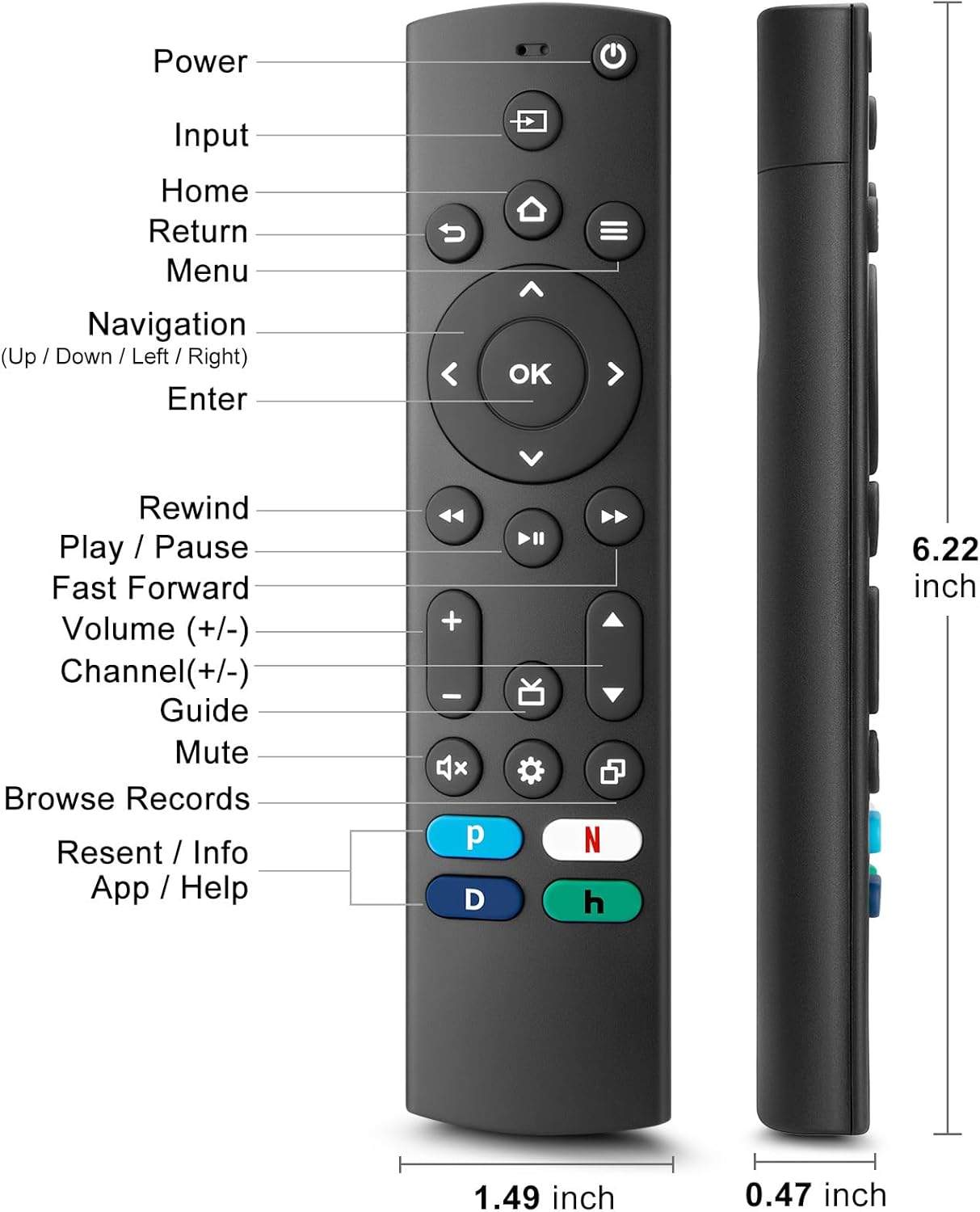
Figure 4.1: Labeled buttons and dimensions of the remote control.
- Butang Kuasa: Menghidupkan atau mematikan TV.
- Butang Input: Memilih sumber input (HDMI, AV, dsb.).
- Butang rumah: Kembali ke skrin utama TV.
- Navigation Pad (Up/Down/Left/Right) & OK Button: Untuk navigasi dan pemilihan menu.
- Butang Kembali: Kembali ke skrin sebelumnya.
- Butang Menu: Accesses TV settings or options menu.
- Rewind/Play/Pause/Fast Forward Buttons: Kawalan main balik media.
- Kelantangan Naik/Turun: Melaraskan kelantangan TV.
- Saluran Atas/Bawah: Menukar saluran TV.
- Butang Bisukan: Membisukan atau menyahredamkan bunyi TV.
- Butang Tetapan: Accesses quick settings.
- Dedicated Hotkeys (Netflix, P-Video, Disney+, Hulu): Akses terus kepada perkhidmatan penstriman popular.
This remote control utilizes infrared (IR) technology for stable performance and a fast response time of 0.2 seconds, with a control range of up to 40 feet. Please note that this remote does TIDAK support voice search functions.

Figure 4.2: Remote's stable performance and precise control features.

Figure 4.3: This remote does not include voice search functionality.
5. Persediaan
5.1. Pemasangan Bateri
- Buka penutup petak bateri di bahagian belakang alat kawalan jauh.
- Insert two (2) AAA batteries, ensuring the positive (+) and negative (-) terminals align with the markings inside the compartment.
- Tutup penutup petak bateri dengan selamat.
5.2. Initial Pairing and TV Compatibility
This universal remote is designed for easy setup with most major TV brands. Simply press and hold two specific buttons simultaneously to pair it with your TV.

Figure 5.1: Easy 2-button setup for various TV brands.
| Jenama TV | Button Combination (Press & Hold) | Nota |
|---|---|---|
| Insignia TV | OK + Home Button | |
| TV Toshiba | OK + Home Button | |
| Roku TV | OK + Up Arrow | |
| TV Hisense | OK + Down Arrow | Hulu not supported |
| TV TCL | OK + Right Arrow | Hulu not supported |
| TV Samsung | OK + Return Button | |
| Vizio TV | OK + Menu Button | |
| TV LG | OK + Rewind Button | Hulu not supported |
| TV Philips | OK + Play/Pause Button | Prime Video, Disney+, Hulu not supported |
| Sony TV | OK + Fast Forward Button | Hulu not supported |
Once the remote is paired, it should function immediately. No further programming is typically required.
5.3. Compatibility Notes
This remote is designed to be a universal replacement for many TV models, including specific Insignia and Toshiba smart TV remotes (e.g., NS-RCFNA-21, NS-RCFNA-19, CT-95018, CT-RC1US-21, CT-RC1US-19). However, it is important to note that it may not be compatible with all specific original remote models or streaming devices, particularly those with unique pairing methods or voice control features.

Gambar 5.2: Cthamples of remote controls and devices that are NOT compatible with this universal remote.

Figure 5.3: This remote is not compatible with TV Cube or TV Stick streaming devices.
For optimal performance, ensure your TV's infrared receiver is unobstructed.
Video 5.1: An official product video demonstrating the features and ease of use of the Angrox Universal TV Remote. This video highlights the remote's compatibility and quick access buttons for streaming services.
6. Mengendalikan Alat Jauh
Once paired, the Angrox Universal TV Remote operates like a standard TV remote. Point the remote directly at your TV's infrared receiver for best results.
6.1. Fungsi Asas
- Kuasa: Tekan ke kuasa butang sekali untuk menghidupkan atau mematikan TV.
- Kelantangan: Gunakan Kelantangan Naik (+) dan Perlahankan suara (-) butang untuk melaraskan tahap bunyi.
- Saluran: Gunakan Channel Up (▲) dan Channel Down (▼) butang untuk menukar saluran.
- Navigasi: Gunakan Atas bawah kiri kanan arrows to navigate through menus and options. Press OK untuk mengesahkan pilihan.
- Rumah: Tekan ke Rumah button to return to the main smart TV interface.
- kembali: Tekan ke Kembali button to go back to the previous screen or menu.
6.2. Dedicated Hotkeys
The remote features dedicated hotkeys for quick access to popular streaming platforms:
- Netflix: Instantly launch the Netflix application.
- P-Video (Prime Video): Instantly launch the Prime Video application.
- Disney+: Instantly launch the Disney+ application.
- Hulu: Instantly launch the Hulu application.

Figure 6.1: Quick access to streaming services with dedicated hotkeys.
7. Penyelenggaraan
- Pembersihan: Lap alat kawalan jauh dengan kain lembut dan kering. Jangan gunakan pembersih atau pelarut yang melelas.
- Penggantian Bateri: Replace batteries when the remote's response becomes sluggish or it stops functioning. Always replace both batteries at the same time.
- Storan: Simpan alat kawalan jauh di tempat yang sejuk dan kering jauh dari cahaya matahari langsung dan suhu yang melampau.
8. Penyelesaian masalah
| Masalah | Kemungkinan Punca | Penyelesaian |
|---|---|---|
| Remote not responding to TV. | Low or dead batteries. Incorrect pairing. Obstruction between remote and TV. | Replace batteries with new AAA batteries. Re-attempt pairing using the correct button combination for your TV brand (refer to Section 5.2). Ensure no objects are blocking the TV's IR receiver. |
| Specific hotkey (e.g., Hulu) not working. | TV brand incompatibility with specific hotkey functions. | Some TV brands (e.g., Hisense, TCL, LG, Philips, Sony) may not support all dedicated hotkeys. This is a limitation of the TV's software, not the remote. You may need to navigate to these apps manually. |
| Tiada fungsi kawalan suara. | This remote does not support voice commands. | The Angrox Universal TV Remote Control is designed for infrared (IR) control and does not include a microphone for voice search. This is an intended feature. |
| Remote feels unresponsive or delayed. | Weak batteries. Remote too far from TV. | Replace batteries. Ensure you are within the effective range (up to 40 feet) and pointing directly at the TV. |
9. Spesifikasi
| Ciri | Perincian |
|---|---|
| Nombor Model | NS-RCFNA-21-Upgrade |
| Jenama | Angrox |
| Dimensi (L x W x H) | 6.22 x 1.49 x 0.47 inci |
| Berat Barang | 1.76 auns |
| Sumber Kuasa | 2 x Bateri AAA (tidak termasuk) |
| bahan | ABS dan Silikon berkualiti tinggi |
| Teknologi Kawalan | Inframerah (IR) |
| Masa Tindak Balas | 0.2 saat |
| Julat Kawalan | Sehingga 40 kaki |
| Ciri Khas | Universal, Ergonomic, Lightweight, Pre-Programmed, No Programming Required (for most TVs) |
| warna | Hitam |
| Peranti Serasi | Television (Insignia, Toshiba, Pioneer, Samsung, TCL, LG, Hisense, Vizio, Sony, Philips, Roku TVs) |
10. Waranti dan Sokongan
Angrox products are manufactured with high-quality materials and undergo strict quality control. For information regarding warranty coverage, returns, or technical support, please refer to the product listing page on Amazon or contact Angrox customer service directly through the Amazon platform.
You can visit the official Angrox store on Amazon for more information and contact options: Angrox Store
Ask a question about this manual
Ask about setup, troubleshooting, compatibility, parts, safety, or missing instructions. Manuals+ will review the question and use this page’s manual context to help answer it.