
BLIXTSNABB 78 cm 700 black
BLIXTSNABB Induction Hob User Manual
Model: BLIXTSNABB 78 cm 700 black
Jenama: Generik
1. Maklumat Keselamatan
Please read all instructions carefully before using the BLIXTSNABB induction hob. Keep this manual for future reference.
- Keselamatan Elektrik: Ensure the hob is installed by a qualified electrician and connected to a properly grounded outlet. Do not use extension cords.
- Keselamatan Kanak-kanak: Keep children away from the hob during operation and while it is cooling down. The surface can remain hot after use.
- Bahaya Bakar: The cooking zones become hot during use. Always use oven mitts or pot holders when handling hot cookware.
- Induction Cookware: Only use cookware suitable for induction hobs (magnetic base). Non-induction cookware will not heat.
- Pengudaraan: Ensure adequate ventilation around the hob as specified in the installation instructions.
- Pembersihan: Putuskan kuasa sebelum membersihkan. Gunakan hanya agen dan kaedah pembersih yang disyorkan.
- Bahan mudah terbakar: Do not store flammable materials near or on the hob.
2. Produk Lebihview
The BLIXTSNABB induction hob offers efficient and precise cooking with multiple cooking zones and advanced features. Its sleek black design integrates seamlessly into modern kitchens.

Figure 2.1: BLIXTSNABB Induction Hob - Top View. This image shows the overall layout of the hob, including the four main cooking zones, the central control panel, and the 'BRIDGE ZONE' and 'MULTI-FLEX ZONE' indicators.

Figure 2.2: BLIXTSNABB Induction Hob in a Kitchen Setting. This image illustrates the hob integrated into a kitchen countertop, demonstrating its aesthetic appeal and how it appears during use with cookware.
3. Persediaan & Pemasangan
Proper installation is crucial for the safe and efficient operation of your induction hob. It is recommended that installation be performed by a certified professional.
3.1 Membongkar
- Tanggalkan hob dari pembungkusannya dengan berhati-hati.
- Inspect for any damage during transit. If damaged, do not install and contact your supplier.
- Simpan bahan pembungkusan untuk pengangkutan atau perkhidmatan yang berpotensi pada masa hadapan.
3.2 Countertop Preparation
Ensure your countertop is suitable for the hob's dimensions and weight. The hob requires a cut-out in the countertop. Refer to the diagram below for precise measurements.
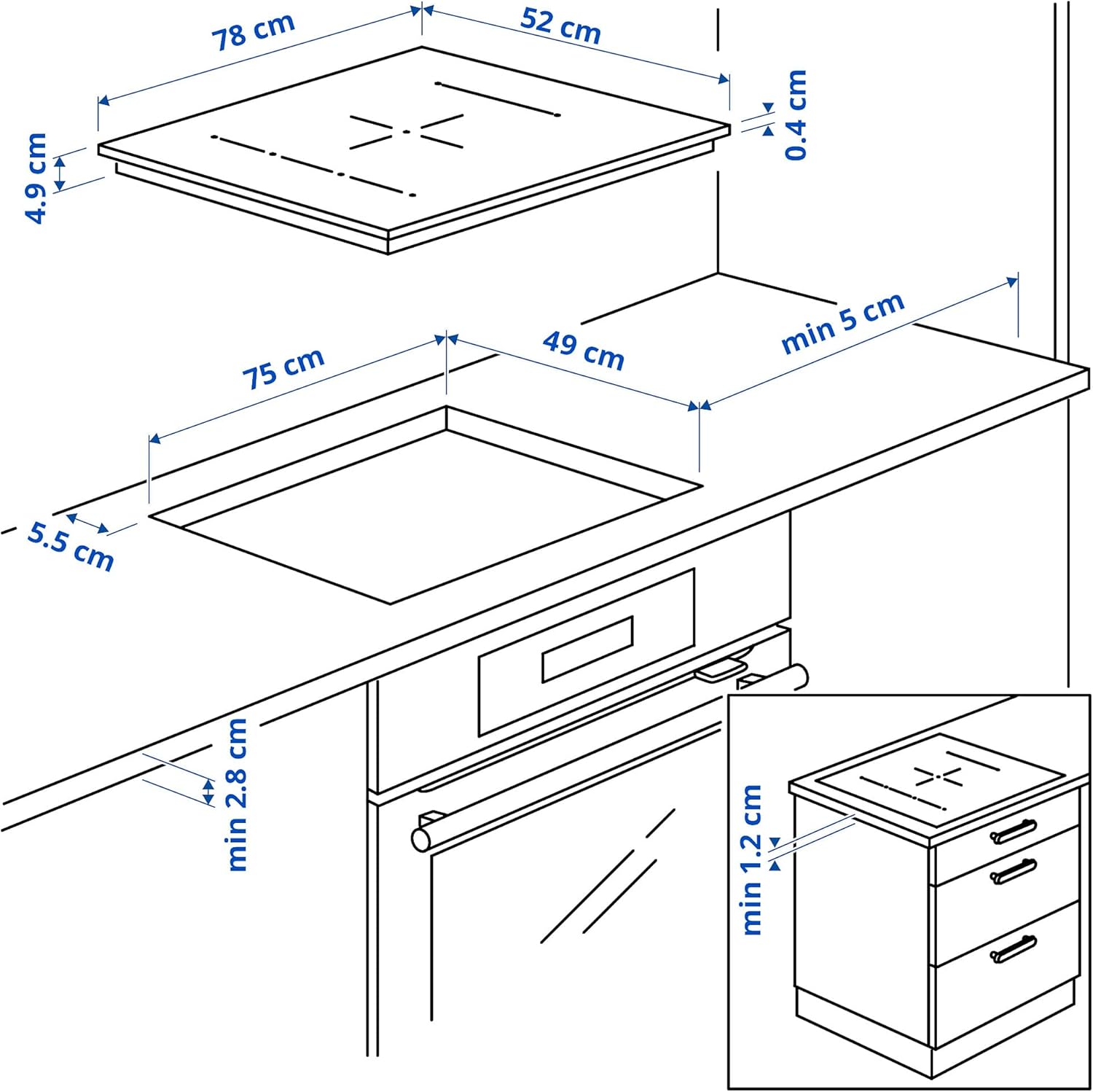
Figure 3.1: Installation Dimensions. This diagram provides critical measurements for the hob's width (78 cm), depth (52 cm), height (4.9 cm), and the required cut-out width (75 cm) and depth (49 cm) for proper installation into a kitchen counter.
| Pengukuran | Nilai |
|---|---|
| Hob Width | 78.0 sm |
| Hob Depth | 52.0 sm |
| Hob Height | 4.9 sm |
| Hob Weight | 14.78 kg |
| Lebar Potongan | 75.0 sm |
| Kedalaman Potongan | 49.0 sm |
| Jarak minimum dari dinding belakang | min 5 cm |
| Minimum distance from side cabinet | min 1.2 cm |
| Minimum distance from front edge | min 5.5 cm |
3.3 Sambungan Elektrik
- Ensure the main power supply is disconnected before making any electrical connections.
- Connect the hob to a dedicated electrical circuit with appropriate voltage (230V) and current rating as per local electrical codes.
- The hob must be properly grounded.
4. Arahan Operasi
The BLIXTSNABB induction hob features intuitive touch controls and flexible cooking zones for versatile cooking.
4.1 Panel Kawalan Selesaiview

Figure 4.1: Control Panel Detail. This image highlights the touch-sensitive controls, including individual power sliders for each zone, the boost function, and the timer controls.
- Hidupkan/Mati Kuasa: Sentuh simbol kuasa untuk menghidupkan atau mematikan hob.
- Cooking Zone Selection: Select a cooking zone by touching its corresponding control area.
- Pelarasan Aras Kuasa: Use the slider or +/- buttons to adjust the power level from 1 (low) to 9 (high).
- Fungsi Boost: Touch the 'Boost' symbol for maximum power for rapid heating. This function is time-limited.
- Pemasa: Set a cooking timer for individual zones or a general timer for the hob.
4.2 Zon Memasak
The BLIXTSNABB hob features multiple cooking zones, including flexible zones for larger cookware.

Figure 4.2: Cooking Zone Layout. This diagram illustrates the arrangement of the cooking zones, including the two 22x22 cm multi-flex zones on the left, and two 18x21 cm zones on the right, along with a central circular zone.
- Multi-Flex Zone: The left side of the hob features two rectangular zones (22 cm x 22 cm each) that can be combined to form a larger cooking area for griddles or large pots.
- Bridge Zone: The right side of the hob also has two zones (18 cm x 21 cm each) that can be linked to accommodate oblong cookware.
- Central Zone: A circular zone is available for standard round pots and pans.

Figure 4.3: Single Pot Operation. This image demonstrates the hob in use with a single pot, highlighting the active cooking zone.

Figure 4.4: Multiple Pot Operation. This image shows the hob accommodating two different sized pots on separate cooking zones, illustrating its flexibility.
4.3 Using the Hob
- Place suitable induction cookware centrally on the desired cooking zone.
- Sentuh butang kuasa untuk menghidupkan dapur.
- Pilih zon memasak yang ingin anda aktifkan.
- Adjust the power level using the slider or +/- controls.
- To use the Boost function, select the zone and then touch the 'Boost' symbol.
- To combine zones, select the 'Multi-Flex' or 'Bridge' function for the respective areas.
- After cooking, turn off the individual zone or the entire hob using the power button. The residual heat indicator will remain lit until the zone is cool.
5. Penyelenggaraan dan Pembersihan
Regular cleaning and maintenance will ensure the longevity and optimal performance of your BLIXTSNABB induction hob.
- Pembersihan Harian: After each use, wipe the hob surface with a damp cloth and mild detergent. Dry thoroughly with a clean cloth.
- Noda degil: For burnt-on food or stubborn stains, use a ceramic hob scraper (ensure it is suitable for induction surfaces) and a specialized ceramic hob cleaner. Follow the product instructions.
- Elakkan bahan pelelas: Do not use abrasive sponges, scouring pads, or harsh chemical cleaners, as these can scratch or damage the glass surface.
- Tumpahan: Clean up spills immediately, especially sugary liquids, as they can cause permanent damage if left to cool on the surface.
- Panel Kawalan: Wipe the control panel gently with a soft, damp kain. Pastikan ia kering sebelum mengendalikan dapur.
- Pengudaraan: Periodically check that the ventilation openings underneath the hob are not obstructed.
6. Penyelesaian masalah
If you encounter issues with your BLIXTSNABB induction hob, refer to the table below for common problems and their solutions.
| Masalah | Kemungkinan Punca | Penyelesaian |
|---|---|---|
| Hob does not turn on | No power supply; Hob locked; Overheating protection activated. | Check power connection; Unlock control panel (refer to specific lock function in manual); Allow hob to cool down. |
| Zon memasak tidak memanaskan | Cookware not suitable for induction; Cookware not centered; Incorrect zone selected. | Use induction-compatible cookware; Center cookware on zone; Select correct zone. |
| Display shows an error code (e.g., E0, F1) | Specific internal fault; Overheating; Voltage isu. | Refer to the full error code list in the comprehensive manual (if available); Turn off and restart hob; If persistent, contact service. |
| Hob makes a buzzing/humming noise | Normal operation of induction technology; Cookware material/construction. | This is normal and not a fault. Some cookware may produce more noise than others. |
| Hob turns off unexpectedly | Overheating; Spill on control panel; Cookware removed. | Allow hob to cool; Clean control panel; Place cookware back on zone. |
Jika masalah berterusan selepas mencuba penyelesaian ini, sila hubungi sokongan pelanggan.
7. Spesifikasi
Detailed technical specifications for the BLIXTSNABB induction hob.
| Ciri | Perincian |
|---|---|
| Model | BLIXTSNABB 78 cm 700 black |
| Jenama | Generik |
| Pengeluar | ProTuning |
| Rujukan Pengeluar | IK.604.678.30 |
| ASIN | B0D1CSBGKH |
| taip | Hob Induksi |
| Lebar Dipasang | 78.0 sm |
| Kedalaman Berhimpun | 52.0 sm |
| Ketinggian Berhimpun | 4.9 sm |
| Berat badan | 14.78 kg |
| Lebar Potongan | 75.0 sm |
| Kedalaman Potongan | 49.0 sm |
| Voltage | 230 Volt |
| Zon Memasak | Multi-flex zones, Bridge zones, Central circular zone |
8. Waranti & Sokongan
Your BLIXTSNABB induction hob comes with a Jaminan 5 tahun, covering defects in materials and workmanship under normal household use. Please retain your proof of purchase for warranty claims.
8.1 Syarat Waranti
For detailed terms and conditions of the guarantee, please refer to the separate guarantee brochure provided with your purchase or visit the manufacturer's official webtapak.
8.2 Sokongan Pelanggan
If you require technical assistance, have questions about your product, or need to make a warranty claim, please contact our customer support team:
- Sokongan dalam talian: Visit the Generic brand support page (search online for 'Generic appliance support').
- Sokongan Telefon: Refer to the contact information provided in your purchase documentation.
- When contacting support, please have your model number (BLIXTSNABB 78 cm 700 black) and ASIN (B0D1CSBGKH) ready.
Ask a question about this manual
Ask about setup, troubleshooting, compatibility, parts, safety, or missing instructions. Manuals+ will review the question and use this page’s manual context to help answer it.