1. Pengenalan
This manual provides detailed instructions for the setup, operation, and maintenance of your Cheerlux C50 Projector. Please read this manual thoroughly before using the product to ensure proper function and to prevent damage.
The Cheerlux C50 is a high-performance projector featuring Android 9.0, Wi-Fi 5.0G, Bluetooth 5.1, autofocus, and 4P keystone correction. It offers a brightness of 4000 Lumens and a contrast ratio of 2500:1, delivering a full HD 1920x1080 resolution display.
2. Maklumat Keselamatan
- Do not block the ventilation openings of the projector. Ensure adequate space around the device for proper airflow.
- Elakkan melihat terus ke dalam kanta projektor apabila lamp sedang dihidupkan, kerana cahaya terang boleh menyebabkan kerosakan mata.
- Jangan letakkan projektor di atas permukaan yang tidak stabil.
- Jauhkan projektor daripada air, kelembapan dan suhu yang melampau.
- Gunakan hanya penyesuai kuasa yang dibekalkan dengan projektor.
- Jangan cuba membuka atau membaiki projektor sendiri. Hubungi kakitangan servis yang berkelayakan untuk mendapatkan bantuan.
- Jauhkan daripada kanak-kanak.
3. Kandungan Pakej
Sahkan bahawa semua item terdapat dalam pakej:
- Projektor Cheerlux C50
- Alat Kawalan Jauh
- Palam Kuasa
- Kabel Isyarat AV
- Manual Pengguna (dokumen ini)
- Support Base (1x)
- Kain Pembersih Lensa
- Kabel VGA
- Kit Pembersihan
4. Produk Lebihview
Biasakan diri anda dengan komponen dan port projektor.
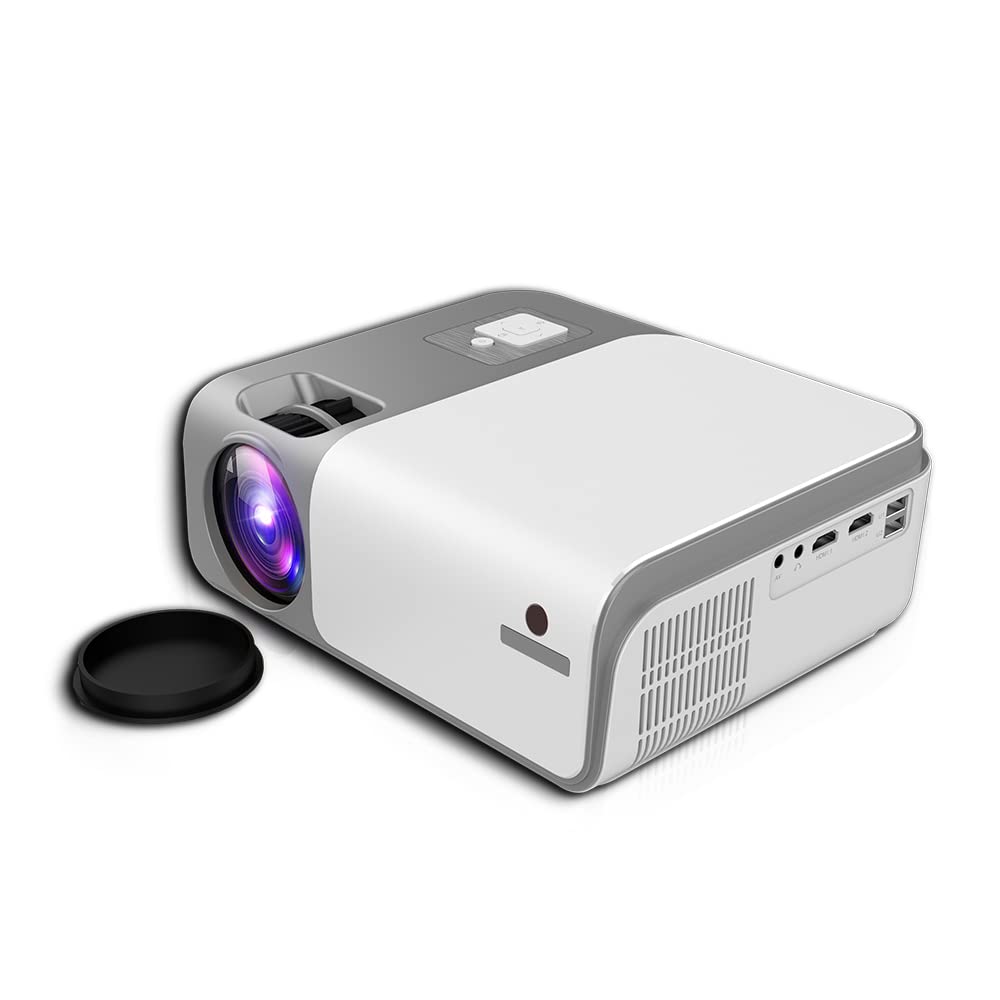
Rajah 4.1: Depan dan sisi view of the Cheerlux C50 Projector. This image shows the projector's lens, ventilation grilles, and various input ports on the side, including USB and HDMI.

Rajah 4.2: The Cheerlux C50 Projector demonstrating screen mirroring with a smartphone. A wireless signal icon indicates the mirroring function, allowing content from a mobile device to be displayed on the projector.
Port Input/Output:
- 2x USB Sockets: Untuk menyambungkan pemacu USB atau peranti USB yang lain.
- 2x HDMI Sockets: For connecting HDMI-enabled devices like laptops, gaming consoles, or media players.
- 1x Composite AV Socket: For connecting older devices using AV cables.
- Soket fon kepala: Untuk menyambungkan peranti audio luaran atau fon kepala.
5. Persediaan
5.1 Penempatan
Position the projector on a stable, flat surface or mount it securely. Ensure the projector lens is perpendicular to the projection surface for optimal image quality.
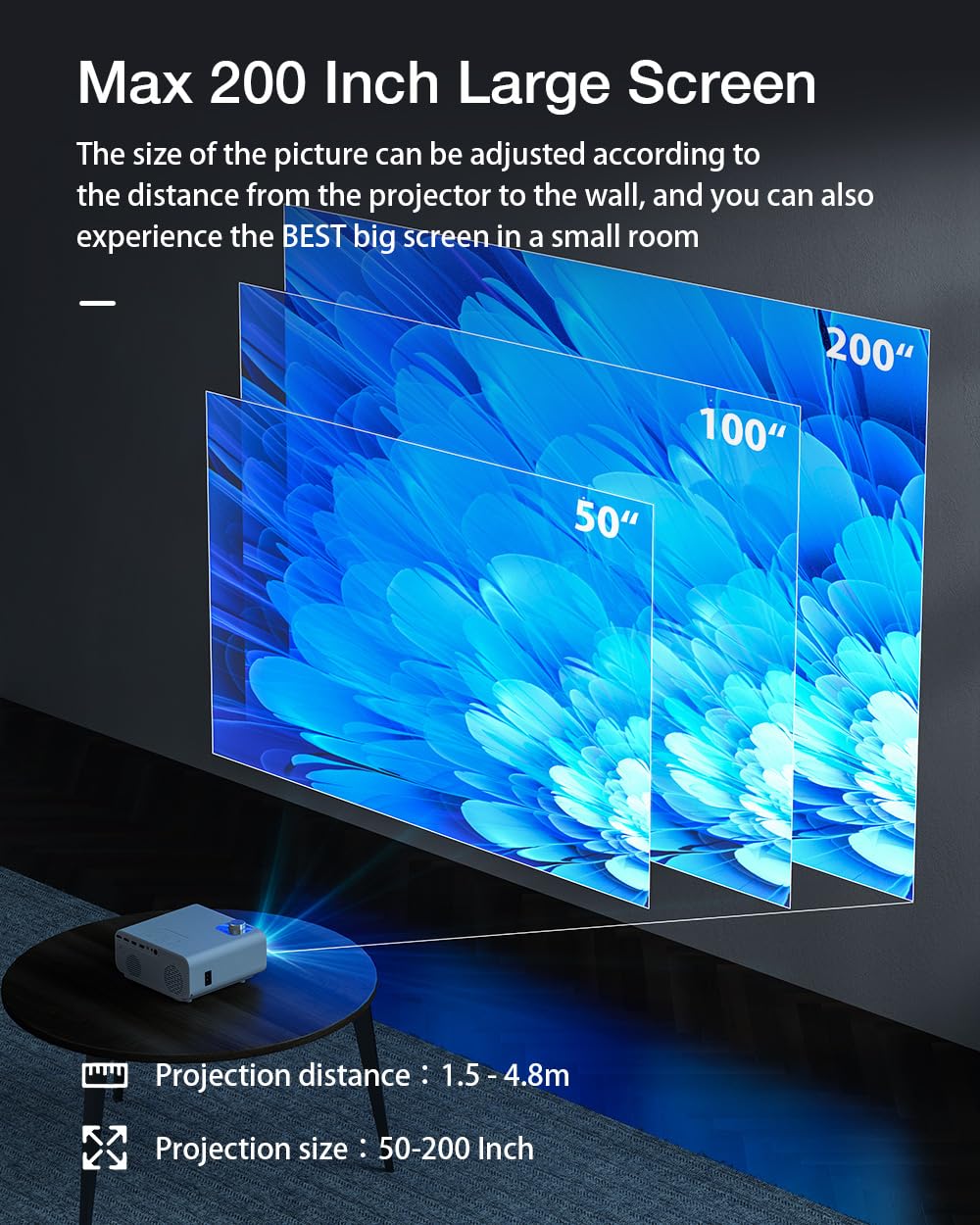
Rajah 5.1: Projection distance and screen size guide. The projector can achieve a screen size of 50 to 200 inches with a projection distance ranging from 1 to 8 meters (approximately 3.3 to 26.2 feet).
- Jarak Unjuran: 1 - 8 meter (3.3 - 26.2 kaki)
- Saiz Imej yang Diunjurkan: 50 - 200 inci
- Nisbah Aspek: 16:9
5.2 Sambungan Kuasa
- Sambungkan kabel kuasa ke port input kuasa projektor.
- Palamkan hujung kabel kuasa yang satu lagi ke salur keluar elektrik yang sesuai.
- Lampu penunjuk kuasa pada projektor harus menyala.
5.3 Fokus dan Pembetulan Keystone
- Fokus automatik: The Cheerlux C50 features an autofocus function. The projector will automatically adjust the image clarity upon startup or movement.
- Pembetulan Batu Kunci 4P: If the projected image appears distorted (trapezoidal), use the 4P keystone correction feature to adjust each corner of the image independently until it forms a perfect rectangle. This is particularly useful when the projector is not perfectly aligned with the screen. Refer to the on-screen menu for keystone adjustment options.
6. Arahan Operasi
6.1 Hidupkan/Mati Kuasa
- Hidupkan kuasa: Press the power button on the projector or the remote control. The projector will start up and display the Android 9.0 home screen.
- Matikan: Press the power button again. A shutdown confirmation prompt may appear. Select "Power Off" to safely shut down the projector.
6.2 Sistem Operasi Android 9.0
The Cheerlux C50 Projector runs on Android 9.0, providing access to a smart interface and various applications.

Rajah 6.1: The Android 9.0 operating system interface on the Cheerlux C50 Projector. The screen shows various streaming and social media application icons, indicating smart functionality.
- Navigasi: Gunakan alat kawalan jauh untuk menavigasi antara muka Android.
- Permohonan: Access pre-installed applications or download new ones from the app store (if available) to watch videos, browse the internet, and more.
- tetapan: Adjust system settings, network connections, display options, and other preferences through the settings menu.
6.3 Pencerminan Skrin
The projector supports screen mirroring from compatible smartphones and tablets.
- Pastikan kedua-dua peranti mudah alih dan projektor anda disambungkan ke rangkaian Wi-Fi yang sama.
- On the projector's Android interface, select the "Mirroring" or "Screen Share" application.
- On your mobile device, activate its screen mirroring feature (e.g., "Smart View" pada Samsung, "Screen Cast" pada Android, "AirPlay" pada iOS).
- Select the projector's name from the list of available devices on your mobile device.
- The mobile device's screen content will now be displayed on the projector.
7. Ketersambungan
7.1 Sambungan Wi-Fi
Connect the projector to a wireless network to access online content and enable screen mirroring.
- Go to the projector's "Settings" menu.
- Select "Network & Internet" or "Wi-Fi".
- Hidupkan Wi-Fi dan pilih rangkaian yang anda inginkan daripada senarai.
- Masukkan kata laluan Wi-Fi jika diminta dan sambungkan.
7.2 Sambungan Bluetooth
Connect Bluetooth speakers, headphones, or other compatible devices for audio output.
- Go to the projector's "Settings" menu.
- Select "Connected Devices" or "Bluetooth".
- Turn on Bluetooth and put your Bluetooth device into pairing mode.
- Select your device from the list of available devices on the projector and pair.
7.3 Sambungan Berwayar (HDMI, USB, AV)
- HDMI: Connect an HDMI cable from your source device (e.g., laptop, gaming console) to one of the projector's HDMI ports. Select the corresponding HDMI input source from the projector's input menu.
- USB: Insert a USB flash drive or external hard drive into a USB port. The projector's media player will typically detect the device, allowing you to browse and play media files.
- DARI: Connect an AV cable from your source device to the projector's AV input. Select the AV input source from the projector's input menu.
8. Penyelenggaraan
- Pembersihan Kanta: Use the provided lens cleaning cloth or a soft, lint-free cloth to gently wipe the projector lens. Do not use abrasive cleaners or solvents.
- Penyingkiran habuk: Regularly clean the projector's ventilation openings with a soft brush or compressed air to prevent dust buildup, which can affect performance and lifespan.
- Storan: Apabila tidak digunakan untuk tempoh yang lama, simpan projektor di tempat yang sejuk dan kering, terlindung daripada habuk dan cahaya matahari langsung.
9. Penyelesaian masalah
- Tiada Kuasa:
- Ensure the power cable is securely connected to both the projector and a working power outlet. Check if the power indicator light is on.
- Tiada gambar:
- Verify that the correct input source (HDMI, AV, USB) is selected. Check cable connections. Ensure the lens cap is removed.
- Imej Kabur:
- Allow the autofocus to adjust. If still blurry, manually adjust focus if an option is available, or ensure the projector is within the recommended projection distance.
- Imej Herot (Trapezoid):
- Use the 4P keystone correction feature in the projector's settings menu to adjust the image corners.
- Tiada Bunyi:
- Check the volume settings on both the projector and the source device. Ensure external speakers or headphones are properly connected if used. Verify that the correct audio output is selected in settings.
- Isu Pencerminan Skrin:
- Ensure both devices are on the same Wi-Fi network. Restart both the projector and the mobile device. Check for compatibility issues with your mobile device's mirroring protocol.
10. Spesifikasi
| Jenama | Generik |
| Nama Model | Cheerlux C50 |
| Sistem Operasi | Android 9.0 |
| Kecerahan | 4000 Lumen |
| Nisbah Kontras | 2500:1 |
| Resolusi Asli | 1920 x 1080 Piksel (HD Penuh) |
| Jenis Paparan | LED |
| Nisbah Aspek | 16:9 |
| Jarak Unjuran | 1 - 8 meter |
| Projected Image Size | 50 - 200 inci |
| Teknologi Ketersambungan | Wi-Fi 5.0G, Bluetooth 5.1 |
| Antara Muka Perkakasan | 2x HDMI, 2x USB, 1x Composite AV, Headphone Socket |
| Ciri Khas | Autofocus, 4P Keystone Correction, Screen Mirroring, Built-In Wi-Fi |
| Peranti Serasi | Gaming Console, Smartphone, Laptop, TV, Speakers |
| Dimensi Produk | 260 x 210 x 102 mm (21 x 26 x 10 cm) |
| Berat Barang | 1 kg |
| Wattage | 150 Watt |
| Kadar Segar Semula | 480 MHz |
11. Waranti dan Sokongan
Untuk maklumat jaminan dan sokongan teknikal, sila rujuk dokumentasi yang disediakan semasa pembelian atau hubungi peruncit anda. Simpan bukti pembelian anda untuk sebarang tuntutan jaminan.


