
1. Pengenalan
The AJAZZ AK680 is a compact 65% wired mechanical gaming keyboard designed for efficiency and performance. Featuring 68 keys, hot-swappable switches, and customizable backlighting, it offers a versatile typing and gaming experience. This manual provides essential information for setting up, operating, maintaining, and troubleshooting your keyboard.

Imej 1.1: Selesaiview of the AJAZZ AK680 keyboard highlighting its compact design and key features.
Ciri-ciri Utama:
- Reka Letak 68-Key Padat: Saves desk space and enhances portability.
- Full Key Hot-Swappable: Compatible with most 3-pin mechanical switches for easy customization without soldering.
- Anti-Ghosting & N-Key Rollover: Ensures all key presses are registered accurately, even during rapid input.
- EVA Sandwich Design: Reduces typing noise and provides a more solid feel.
- Mixed Color Backlighting: Features 19 different customizable lighting effects.
- Programmable Software: Allows for macro editing, light effect customization, and key redefinition.
- Reka bentuk ergonomik: Memberikan keselesaan semasa penggunaan yang berpanjangan.
2. Persediaan
2.1 Kandungan Pakej
- Papan Kekunci Mekanikal AJAZZ AK680
- Kabel USB
- Keycap Puller / Switch Puller (may be combined)
- Manual Pengguna
2.2 Menyambung Papan Kekunci
- Cari port USB-C pada papan kekunci dan port USB-A pada komputer anda.
- Sambungkan hujung USB-C kabel yang disediakan ke papan kekunci.
- Sambungkan hujung kabel USB-A ke port USB yang tersedia pada komputer anda.
- Papan kekunci akan dikenali secara automatik oleh sistem pengendalian anda. Pemacu tambahan biasanya tidak diperlukan untuk fungsi asas.
Keserasian: The AK680 keyboard is compatible with Windows Vista/XP/7/8/10/11, MAC, Android, and Linux operating systems.
3. Arahan Operasi
3.1 Fungsi Utama Asas
The AK680 features a 68-key layout. Many functions are accessed via the Fn kekunci digabungkan dengan kekunci lain.

Image 3.1: The compact 65% layout of the AK680 keyboard, showing its dimensions and some Fn key functions.
3.2 Kawalan Lampu Latar
The keyboard features mixed color backlighting with multiple effects.
- Tekan Fn + | to cycle through 19 different backlight modes and color designs.
- Specific key combinations for brightness and speed adjustment may vary; refer to the included quick guide or software for detailed controls.
3.3 Programmable Software
To unlock the full customization potential of your AK680 keyboard, download and install the official AJAZZ software from the manufacturer's weblaman web. Perisian ini membolehkan anda:
- Pengeditan Makro: Create and assign complex key sequences to a single key.
- Light Effect Customization: Fine-tune backlight patterns, colors, and speeds.
- Key Redefinition: Remap individual keys to perform different functions.
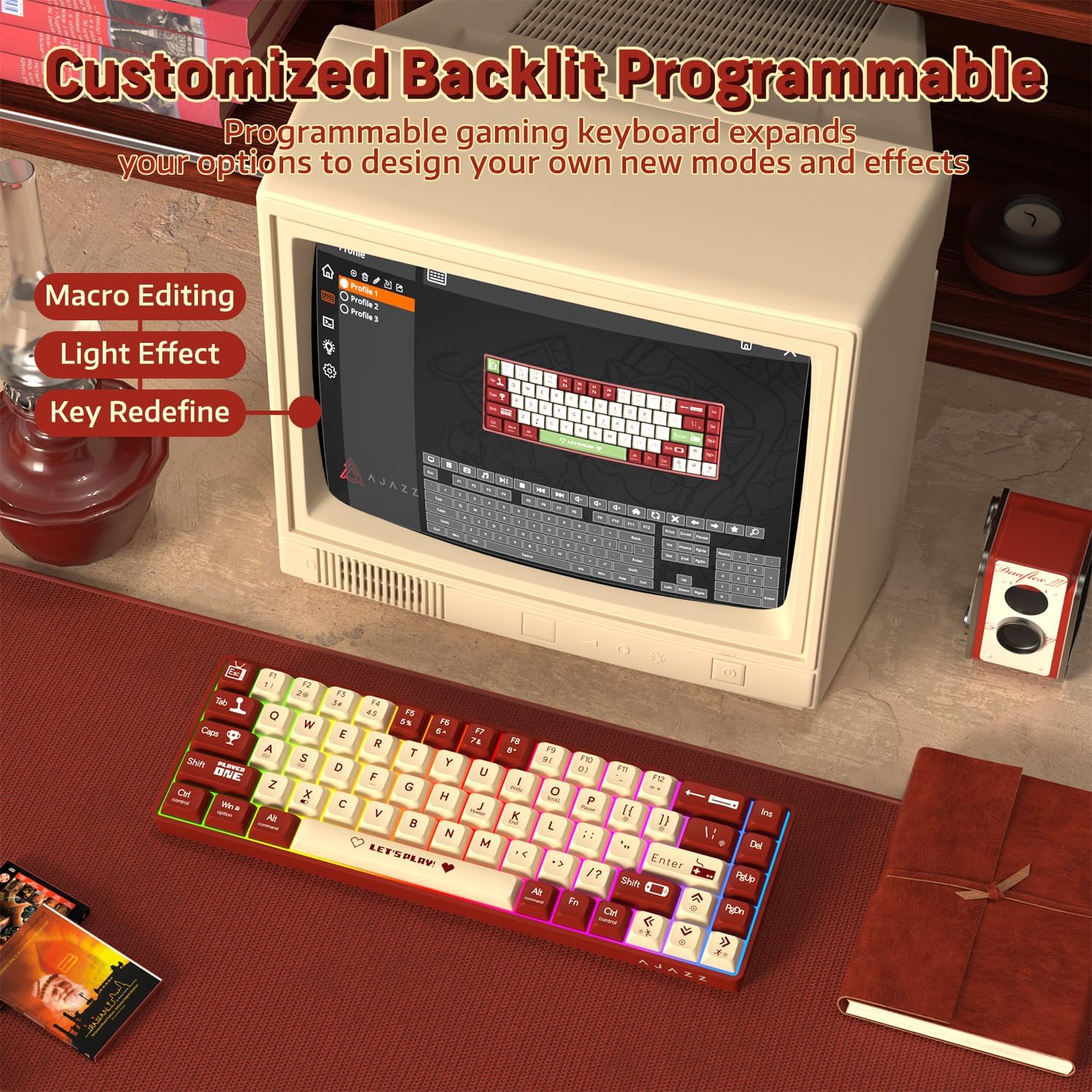
Image 3.2: The programmable software interface for customizing key functions and lighting effects.
4. Penyelenggaraan
4.1 Membersihkan Papan Kekunci
- Putuskan sambungan papan kekunci daripada komputer anda sebelum membersihkan.
- Gunakan kain lembut dan tidak berbulu sedikit dampdisapu dengan air atau larutan pembersih lembut untuk mengelap penutup kekunci dan casis.
- Untuk habuk dan serpihan di antara penutup kekunci, gunakan udara termampat atau berus kecil.
- Elakkan menyembur cecair terus ke papan kekunci.
4.2 Menggantikan Suis
The AK680 features hot-swappable sockets, allowing you to change switches without soldering.
- Gunakan penarik penutup kekunci yang disediakan untuk menanggalkan penutup kekunci yang dikehendaki dengan berhati-hati.
- Use the provided switch puller to gently grip the top and bottom clips of the switch.
- Tarik suis terus ke atas untuk mengeluarkannya dari PCB.
- Sejajarkan pin suis 3-pin baharu dengan lubang pada PCB.
- Tekan suis baharu dengan kuat ke tempatnya sehingga ia berbunyi klik. Pastikan pin tidak bengkok.
- Pasang semula penutup kekunci.

Image 4.1: Illustration of the hot-swappable switch mechanism and how to replace switches.
5. Penyelesaian masalah
5.1 Papan Kekunci Tidak Bertindak Balas
- Pastikan kabel USB disambungkan dengan selamat ke kedua-dua papan kekunci dan komputer.
- Cuba sambungkan papan kekunci ke port USB lain pada komputer anda.
- Uji papan kekunci pada komputer lain untuk menolak isu khusus sistem.
- Mulakan semula komputer anda.
5.2 Lampu Latar Tidak Berfungsi atau Tidak Betul
- Pastikan papan kekunci disambungkan dengan betul dan menerima kuasa.
- Tekan Fn + | untuk mengitar melalui mod lampu latar.
- Check the programmable software for any disabled lighting effects or brightness settings.
5.3 Kekunci Tidak Mendaftar atau Menaip Dua Kali
- This could indicate a faulty switch. Try replacing the affected switch as described in Section 4.2.
- Pastikan suis dipasang sepenuhnya di dalam soketnya.
- Clean around the affected keycap and switch to remove any debris.

Image 5.1: The AK680 features full anti-ghosting to prevent key conflicts during rapid typing.
6. Spesifikasi
| Ciri | Perincian |
|---|---|
| Jenama | AJAZZ |
| Nombor Model | AK680 |
| Susun atur | 65% (68 Kunci) |
| Ketersambungan | Berwayar (USB) |
| Jenis Suis | Mechanical (Red Switches, Hot-swappable 3-pin) |
| Lampu latar | Mixed Color / Rainbow RGB |
| Anti-Ghosting | Anti-Ghosting Kunci Penuh |
| Keserasian | Windows, macOS, Android, Linux |
| bahan | Plastic chassis, ABS keycaps |
| Dimensi (lebih kurang) | 32.7 x 13.8 x 4.4 cm (12.87 x 5.43 x 1.73 inci) |
| Berat (lebih kurang) | 270 g (0.6 paun) |
7. Waranti dan Sokongan
7.1 Maklumat Waranti
Please refer to the specific warranty terms provided by your retailer or the manufacturer at the time of purchase. Warranty periods and coverage may vary by region and seller. Typically, manufacturing defects are covered for a limited period.
7.2 Sokongan Pelanggan
For technical assistance, product inquiries, or warranty claims, please contact the seller or visit the official AJAZZ webtapak untuk sumber sokongan dan maklumat hubungan.