1. Pengenalan dan Lebihview
The Ditec RM-L 1370 is a universal replacement remote control designed for a wide range of Sony Bravia televisions. This remote offers direct compatibility with various Sony LCD, LED, UHD, OLED, and QLED 4K Ultra HD Smart Android TV models, eliminating the need for complex programming or pairing. It features dedicated hotkeys for popular streaming services like YouTube and Netflix for convenient access.

Image: The Ditec RM-L 1370 remote control, highlighting its compatibility as a single remote solution for Sony TVs.
2. Persediaan dan Penggunaan Awal
This remote control is designed for immediate use without any setup or programming. Simply insert the required batteries, and it will be ready to operate your compatible Sony TV.
2.1 Pemasangan Bateri
- Cari petak bateri di belakang alat kawalan jauh.
- Geser buka penutup petak bateri.
- Insert two (2) AAA batteries (not included), ensuring correct polarity (+ and - terminals).
- Tutup penutup petak bateri dengan selamat.

Imej: Belakang view of the remote control, illustrating the battery compartment location.
2.2 Penggunaan Pertama
Once batteries are installed, point the remote control towards your Sony TV and press the Power button. The remote should operate your TV without any further configuration.
3. Arahan Operasi
The Ditec RM-L 1370 remote control provides all standard functions for your Sony Bravia TV, along with convenient shortcut buttons.
3.1 Fungsi Asas
- Butang Kuasa: Menghidupkan atau mematikan TV.
- Butang Nombor (0-9): Untuk pemilihan saluran langsung.
- Kelantangan Naik/Turun: Melaraskan kelantangan TV.
- Saluran Atas/Bawah: Menukar saluran TV.
- Pad Navigasi (Atas/Bawah/Kiri/Kanan/Masuk): Untuk navigasi dan pemilihan menu.
- Butang rumah: Accesses the TV's Smart Home screen or main menu.
- Return/Back Button: Kembali ke skrin atau menu sebelumnya.
- Butang Pilihan: Memaparkan pilihan sensitif konteks.
3.2 Ciri Istimewa
- YouTube Hotkey: Directly launches the YouTube application.
- Netflix Hotkey: Directly launches the Netflix application.
The remote features an enhanced infrared sensor for a farther transmitting distance, allowing effective control up to 50 feet.

Image: The remote control demonstrating its farther distance sensor, capable of operating up to 50 feet.
4. Keserasian
The Ditec RM-L 1370 universal remote is compatible with a wide range of Sony Bravia LCD, LED, UHD, OLED, and QLED 4K Ultra HD Smart Android TVs. It is designed to replace many original Sony remote models, including but not limited to:
- RMT-TX100U, RMT-TX102U
- RMF-TX200U, RMF-TX201U, RMF-TX220U
- RMT-TX300U, RMF-TX310U
- RMT-TX500U, RMF-TX520U, RMF-TX600U
- And many other Sony TV remote models.
For a comprehensive list of compatible Sony TV remote models, please refer to the image below:
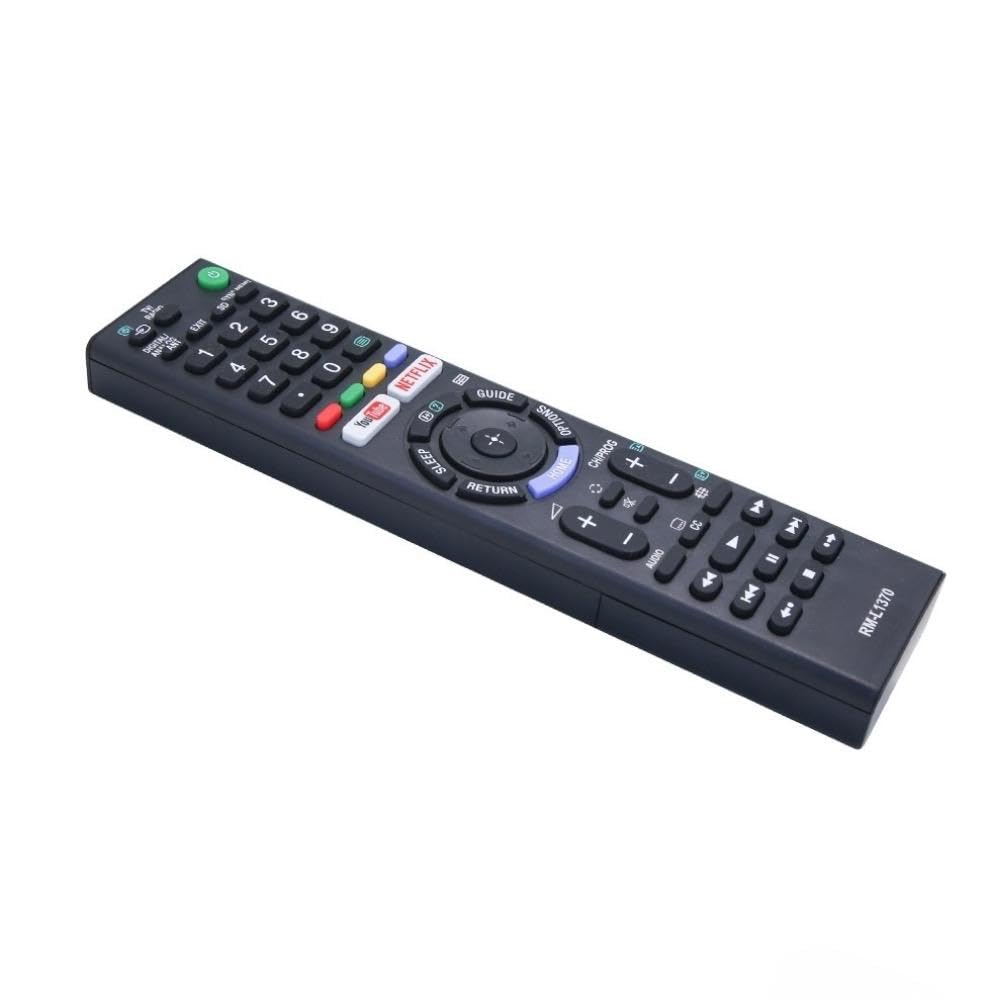
Image: A detailed list of Sony TV remote models that are compatible with the Ditec RM-L 1370.
It is recommended to compare the appearance of this remote with your original remote for visual confirmation of compatibility.
5. Penyelenggaraan
5.1 Penggantian Bateri
When the remote control's performance degrades or it stops responding, replace the batteries with two new AAA alkaline batteries. Always replace both batteries at the same time. Do not mix old and new batteries or different types of batteries.
5.2 Pembersihan
To clean the remote control, use a soft, dry cloth. Do not use liquid cleaners, sprays, or abrasive materials, as these may damage the remote's surface or internal components.
6. Penyelesaian masalah
- Jauh tidak bertindak balas:
- Periksa sama ada bateri dimasukkan dengan betul dengan polariti yang betul.
- Gantikan bateri lama dengan yang baru.
- Pastikan tiada halangan antara alat kawalan jauh dan penerima inframerah TV.
- Make sure you are within the effective operating range (up to 50 feet).
- Butang khusus tidak berfungsi:
- Some advanced functions or TV-specific features might not be supported by a universal replacement remote.
- Ensure the TV is powered on and functioning correctly.
7. Spesifikasi
| Ciri | Perincian |
|---|---|
| Jenama | Ditec |
| Model | RM-L 1370 |
| Peranti Serasi | Sony Bravia LCD, LED, UHD, OLED, QLED 4K Ultra HD Smart Android TVs |
| Jenis Penyambung | Inframerah (IR) |
| Bateri Diperlukan | 2 x AAA (tidak termasuk) |
| Ciri Khas | Ergonomic design, YouTube & Netflix Hotkeys |
| Dimensi Produk | 3 x 3 x 12 cm |
| Berat Barang | 80 g |
| Negara Asal | China |
8. Sokongan
For assistance with compatibility or any questions regarding your Ditec RM-L 1370 remote control, you may contact support by sending a picture of your old remote or your device's brand name and model number to +91 9924350801. This will help in verifying compatibility or addressing specific queries.

Image: Information on how to contact support for compatibility checks or questions.