
1. Pengenalan
Thank you for choosing the Loddery 9.7-inch Android 13 Vertical Car Stereo. This manual provides detailed instructions for the installation, operation, and maintenance of your new car stereo system. Please read this manual thoroughly before use to ensure proper functionality and to maximize your user experience. Keep this manual for future reference.
2. Produk Lebihview
2.1 Ciri-ciri Utama
- Sistem pengendalian: Android 13 for broad application compatibility.
- paparan: 9.7-inch vertical touchscreen with 1024x600 resolution.
- Ketersambungan: Built-in Wi-Fi, Bluetooth 4.0, dual USB interfaces.
- Navigasi: Integrated GPS with support for offline maps and real-time updates via Wi-Fi.
- Penyepaduan Telefon Pintar: Mirror Link (iOS/Android), wired/wireless Carplay, and Android Auto support.
- Audio: Hi-Fi audio with EQ sound effects, FM radio, support for APE/FLAC/WAV/MP3/WMA formats.
- Video: Supports MKV/RMVB/AVI/MP4/MDV video formats.
- Sokongan Kamera: AHD signal input for high-definition backup camera (optional 12LED HD backup camera included in some packages).
- Kawalan: Steering wheel control function support.
- berbilang bahasa: Supports switching between up to 40 national languages.
2.2 Kandungan Pakej
Sahkan bahawa semua item terdapat dalam pakej:
- 1 x Loddery 9.7-inch Car MP5 Player
- 1 x Kabel Kuasa
- 1 x Antena GPS
- 1 x Kabel Input Kamera
- 1 x RCA Input and Output Cable Set
- 2 x Kabel USB
- 2 x Metal Mounting Frames
- 4 x Skru Pemasangan
- 1 x Manual Arahan (dokumen ini)
- 1 x 12LED HD Backup Camera (if included in your specific package)

Imej: Depan view of the Loddery 9.7-inch vertical car stereo, showing the main unit, a backup camera, and icons for CarPlay and Android Auto.
3. Persediaan dan Pemasangan
Pemasangan profesional disyorkan untuk prestasi dan keselamatan yang optimum. Pastikan bateri kenderaan diputuskan sambungannya sebelum memulakan pemasangan.
3.1 Semakan Pra-Pemasangan
- Confirm compatibility with your vehicle's double DIN slot.
- Gather necessary tools (screwdrivers, wire strippers, electrical tape, etc.).
3.2 Sambungan Pendawaian
Rujuk gambarajah pendawaian yang disediakan dengan unit anda untuk sambungan tertentu. Sambungan umum termasuk:
- Kabel kuasa: Connect to vehicle's power, ground, and accessory wires.
- Antena GPS: Lekapkan di lokasi yang jelas view dari langit.
- Input Kamera: Connect the backup camera cable to the designated input.
- Input/Output RCA: Untuk luaran amppengangkat, subwufer atau output video.
- Kabel USB: Route to an accessible location for USB devices.
- Steering Wheel Control Wires: Connect to your vehicle's steering wheel control interface (if applicable).

Imej: Belakang view of the car stereo unit, displaying the multiple wiring harnesses for power, audio, video, USB, and GPS antenna connections.
3.3 Memasang Unit
The unit is designed for a double DIN vertical mount. Use the provided metal frames and screws to secure the unit into your vehicle's dashboard.

Image: An illustration demonstrating the installation process, highlighting how the outer frame is used for both 10-inch and 9-inch car machine installations to ensure compatibility.

Image: A side-by-side comparison showing a vehicle's dashboard before and after the installation of the Loddery 9.7-inch vertical car stereo, demonstrating its integrated appearance.
4. Arahan Operasi
4.1 Operasi Asas
- Hidupkan/Mati Kuasa: Press and hold the power button (usually marked with a power symbol) to turn the unit on or off. A short press may mute or put the unit into standby.
- Kawalan Kelantangan: Gunakan tombol kelantangan fizikal atau kawalan pada skrin untuk melaraskan tahap audio.
- Skrin Utama: Tap the home icon to return to the main application interface.
4.2 System Navigation (Android 13)
The unit runs on Android 13, providing a familiar smartphone-like interface.
- Laci Apl: Swipe up or tap the apps icon to access all installed applications.
- tetapan: Access system settings (Wi-Fi, Bluetooth, display, sound, etc.) through the 'Settings' app.
- Berbilang tugas: Use the recent apps button to switch between open applications.

Image: The main user interface of the Loddery car stereo, displaying a grid of application icons including navigation, radio, Bluetooth, music, settings, and other apps, along with system status indicators.
4.3 Ketersambungan
- Wi-Fi: Go to Settings > Network & Internet > Wi-Fi to connect to available networks for internet access, map updates, and app downloads.
- Bluetooth: Go to Settings > Connected devices > Bluetooth to pair your smartphone for hands-free calling, contact synchronization, and audio streaming.
- Pautan Cermin: Supports both iOS (unidirectional) and Android (two-way) mirror link. Follow on-screen instructions in the 'Mirror Link' app to connect your phone.
- Carplay/Android Auto: Connect your smartphone via USB for wired Carplay/Android Auto, or follow the instructions in the respective app for wireless connection. This allows access to phone contacts, navigation, and music directly from the stereo interface.

Image: The car stereo screen showing the Wi-Fi connection interface, with an on-screen keyboard for entering network passwords, indicating strong signal and faster transmission speed.
4.4 Navigasi GPS
The unit comes with built-in offline maps. For real-time traffic and map updates, ensure the unit is connected to Wi-Fi.
- Open the 'Maps' application to access navigation features.
- Download additional offline map data for areas you frequently travel without internet access.
4.5 Fungsi Audio
- Radio FM: Access the 'Radio' app to scan for and save FM stations.
- Pemain muzik: Use the 'Music' app to play audio files from USB drives or internal storage. Supports APE, FLAC, WAV, MP3, WMA formats.
- Hi-Fi Audio: The unit features Hi-Fi audio with EQ sound effects. Adjust equalizer settings in the audio settings menu for a personalized listening experience.
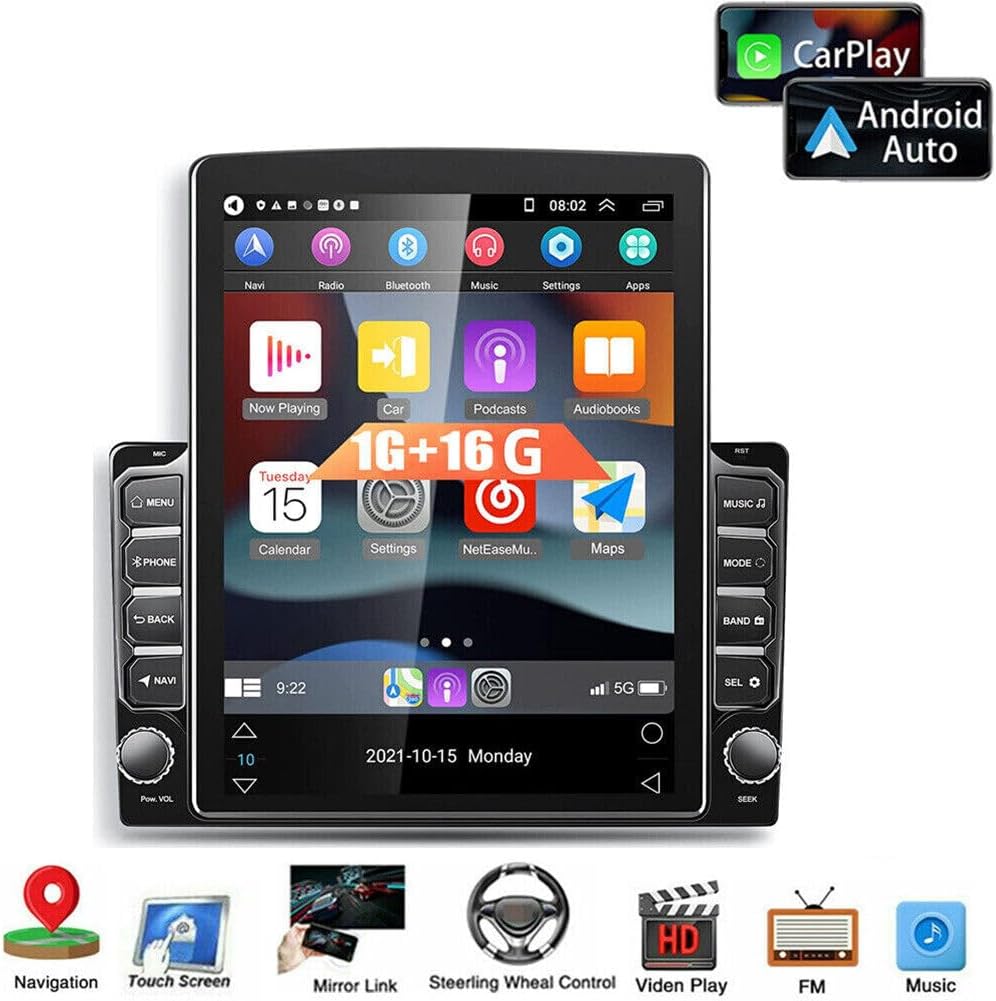
Image: The car stereo screen showing a graphic equalizer display, illustrating the Hi-Fi audio and EQ sound effect capabilities, designed to create a live concert-like sound experience.
4.6 Kawalan Roda Stereng
If your vehicle supports steering wheel controls, you can configure them to operate the stereo.
- Go to 'Car Settings' > 'Steering Learn' to program your steering wheel buttons.
- Ikut arahan pada skrin untuk menetapkan fungsi pada setiap butang.

Image: The car stereo screen displaying the 'Steering Learn' interface within the car settings, with an arrow pointing to a steering wheel, indicating the functionality to configure steering wheel controls.
4.7 Kamera Sandaran
The unit supports AHD signal input for a high-definition rear view camera. When properly connected, the display will automatically switch to the camera view apabila kenderaan dalam keadaan mengundur.
- Ensure the backup camera is correctly wired to the 'Camera Input' and the reverse trigger wire.
- Adjust camera settings (if available) in the system settings for optimal view.

Image: The car stereo screen showing a clear, high-definition rear view from a backup camera, complete with parking guidelines, emphasizing the AHD signal input for enhanced safety.
5. Penyelenggaraan
Penyelenggaraan tetap membantu memastikan jangka hayat dan prestasi optimum stereo kereta anda.
- Pembersihan: Gunakan kain lembut dan kering untuk membersihkan skrin dan bahagian luar. Untuk calitan degil, sedikit damp Kain dengan pencuci yang lembut dan tidak kasar boleh digunakan, kemudian lap sehingga kering dengan segera. Elakkan bahan kimia yang keras.
- Kemas Kini Perisian: Periodically check for system updates via Wi-Fi in the 'Settings' menu to ensure you have the latest features and security patches.
- Suhu: Avoid exposing the unit to extreme temperatures for extended periods. The operating temperature range is -40℃ to 80℃.
6. Penyelesaian masalah
Jika anda menghadapi masalah, rujuk kepada masalah dan penyelesaian biasa berikut:
- Tiada Kuasa:
- Check all power connections (ACC, B+, Ground) and ensure they are secure.
- Sahkan fius kenderaan untuk stereo tidak ditiup.
- Pastikan bateri kenderaan mempunyai cas yang mencukupi.
- Tiada Bunyi:
- Periksa sambungan pendawaian pembesar suara.
- Pastikan kelantangan tidak disenyapkan atau ditetapkan kepada sifar.
- Sahkan tetapan output audio dalam menu sistem.
- Jika menggunakan luaran amppenghawa dingin, periksa kuasa dan sambungannya.
- GPS Tidak Berfungsi/Tidak Tepat:
- Pastikan antena GPS disambungkan dengan betul dan dipasang di lokasi yang jelas view dari langit.
- Semak tetapan GPS dalam menu sistem.
- Verify that map data is installed and up to date.
- Isu Kesambungan Bluetooth:
- Pastikan Bluetooth didayakan pada kedua-dua stereo dan telefon pintar anda.
- Padamkan gandingan sebelumnya dan cuba pasangkan semula peranti.
- Move the phone closer to the stereo to rule out interference.
- Skrin sentuh Tidak Responsif:
- Perform a soft reset of the unit (refer to the power button instructions or a small reset button if available).
- Pastikan skrin bersih dan bebas daripada serpihan.
Jika masalah berterusan selepas mencuba penyelesaian ini, sila hubungi sokongan pelanggan.
7. Spesifikasi Teknikal
| Nama Produk | Loddery Car Navigation Player |
| Nombor Model | QA1181X-5974-1602189781 |
| Sistem Operasi | Android 13 |
| Saiz Skrin | 9.7 Inci |
| Resolusi Skrin | 1024x600 |
| Memori (RAM+ROM) | 2GB RAM + 32GB ROM (as per title, description states 1GB+16GB, refer to product listing for exact configuration) |
| Versi Bluetooth | 4.0 |
| Sokongan Wi-Fi | ya |
| Navigasi GPS | Peta luar talian terbina dalam |
| Pautan Cermin | Android/IOS (Two-way for Android, Unidirectional for iOS) |
| Antaramuka USB | USB berganda |
| Format Audio | APE/FLAC/WAV/MP3/WMA |
| Format Video | MKV/RMVB/AVI/MP4/MDV |
| Format Gambar | PNG/JPEG/JPG/GIF/WBMP/BNP |
| Suhu Operasi | -40 ℃ hingga 80 ℃ |
| Berat Barang | 3.53 paun |
| Dimensi Produk | 12.99 x 11.42 x 3.94 inci |
8. Waranti dan Sokongan
This product is covered by a standard manufacturer's warranty. For specific details regarding warranty duration and terms, please refer to the purchase documentation or contact the seller directly.
For technical support, troubleshooting assistance beyond what is provided in this manual, or warranty claims, please contact the Loddery customer service team or the retailer from whom you purchased the product. Please have your model number (QA1181X-5974-1602189781) and proof of purchase available when contacting support.