
1. Pengenalan
The Chasing Poolmate Hydro 4 Robotic Pool Cleaner is an advanced, cordless solution designed for efficient and hassle-free pool maintenance. This cleaner is suitable for all pool types up to 1,100 sq. ft., offering comprehensive cleaning of the pool floor, walls, and waterline. Featuring dual motors, powerful suction, and smart app control, the Hydro 4 ensures your pool remains spotless with minimal effort.

Imej: The Chasing Poolmate Hydro 4 Robotic Pool Cleaner positioned next to a clean swimming pool, showcasing its sleek design and readiness for operation.
2. Maklumat Keselamatan
- Baca semua arahan dengan teliti sebelum mengendalikan peranti.
- Ensure the power adapter is kept away from water.
- Do not operate the cleaner if the power cord or device is damaged.
- Keep children and pets away from the pool area during cleaner operation.
- Hanya gunakan pengecas dan aksesori yang disediakan.
- Keluarkan pembersih dari kolam renang selepas setiap kitaran pembersihan dan sebelum mengecas.
3. Kandungan Pakej
The Poolmate Hydro 4 package includes:
- Pembersih Kolam Robotic Poolmate Hydro 4
- Bateri & Pengecas
- Filter Basket (4.1L capacity)
4. Persediaan
4.1 Pengecasan Awal
Before first use, fully charge the Hydro 4 battery. Connect the charger to the floating battery unit and plug it into a power outlet. The charging time is approximately 4 hours. Ensure the battery unit is dry before charging.
4.2 Meletakkan Pembersih di dalam Kolam Renang
Once charged, ensure the floating battery unit is securely connected to the cleaner via its tether. Gently lower the Hydro 4 into the pool. The cleaner will sink to the bottom. Place the floating battery unit on the water surface, ensuring it is not submerged.

Image: The Poolmate Hydro 4 robotic cleaner submerged in the pool with its floating battery unit on the surface, ready for operation.
5. Arahan Operasi
5.1 Menghidupkan
Press the power button on the floating battery unit to start the cleaning cycle. The cleaner will begin its operation automatically.
5.2 Using the Poolmate App
For advanced control and scheduling, download the Poolmate app from your smartphone's app store. Connect the cleaner via Wi-Fi or Bluetooth.
- Jadualkan Pembersihan: Set specific times for the cleaner to operate.
- Tukar Mod: Select from various cleaning modes (e.g., Regular, Fast, Ultra, Floor, Waterline) to suit your pool's needs.
- Kawalan manual: Guide the cleaner manually to target specific dirty areas.
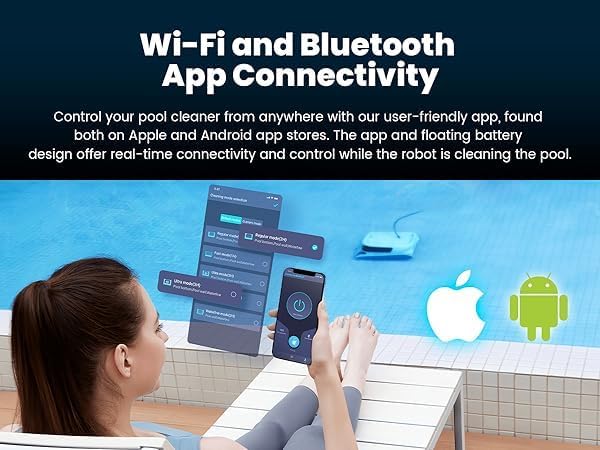
Image: A smartphone displaying the Poolmate app interface, showing options for Wi-Fi and Bluetooth connectivity to control the robotic pool cleaner.
5.3 Mod Pembersihan
The Hydro 4 offers adaptive cleaning modes:
- Mod Biasa: Standard cleaning for floor, walls, and waterline.
- Mod Pantas: Quicker cleaning cycle.
- Mod Ultra: Intensive cleaning for heavily soiled pools.
- Mod Lantai: Focuses solely on cleaning the pool floor.
- Mod Garis Air: Specifically targets the pool's waterline.

Image: The Poolmate Hydro 4 robotic cleaner next to a pool, with graphics illustrating different adaptive cleaning modes like Regular, Fast, Ultra, Pool Bottom, and Waterline.
5.4 Pembersihan Automatik
The cleaner utilizes an Anti-Resonance algorithm for over 95% coverage, ensuring thorough cleaning of the pool floor, walls, and waterline. Its dual drive motors and smart navigation prevent it from getting stuck.
Video: An official seller video demonstrating the Poolmate Hydro 4 Robotic Pool Cleaner in action, showcasing its automatic cleaning capabilities for pool walls, floor, and waterline.
6. Penyelenggaraan
6.1 Easy Filter Cleaning
After each cleaning cycle, remove the cleaner from the pool. Open the top cover, lift out the 4.1L large top-load filter basket, and rinse it thoroughly with a garden hose to remove trapped debris. This ensures optimal filtering abilities for subsequent cleanings.

Image: A hand removing the large top-load filter basket from the Poolmate Hydro 4 robotic cleaner, demonstrating easy access for cleaning.

Image: A close-up of the Poolmate Hydro 4's filter basket, highlighting its capacity to trap dust, bugs, pollen, sebum, and dander for exceptional filtration.
6.2 Penjagaan Am
After cleaning the filter, allow the cleaner to drain and dry before storing. Store the cleaner in a cool, dry place away from direct sunlight.
7. Penyelesaian masalah
- Pembersih tidak bergerak: Check battery charge level. Ensure the power button on the floating unit is pressed.
- Prestasi pembersihan yang lemah: Clean the filter basket. Ensure the brushes are free of debris. Select an appropriate cleaning mode for the pool condition.
- Cleaner getting stuck: The smart navigation system is designed to prevent this. If it occurs, manually guide the cleaner using the app.
- Isu sambungan apl: Ensure Wi-Fi or Bluetooth is enabled on your smartphone and the cleaner. Restart both the app and the cleaner if issues persist.
8. Spesifikasi
| Ciri | Perincian |
|---|---|
| Jenama | Chasing |
| Nama Model | Hydro 4 Battery |
| bahan | plastik |
| Dimensi Produk | 15"L x 10"W x 19"H |
| Sumber Kuasa | Dikuasakan Bateri |
| Kapasiti Bateri | 14,400mAh |
| Hayat Bateri | Sehingga 210 minit |
| Masa Mengecas | 4 Jam |
| Kuasa Sedutan | 5070 GPH |
| Kapasiti Bakul Penapis | 4.1 Liter |
| Kaedah Kawalan | App (WiFi & Bluetooth) |
| Kawasan Pembersihan | Bahagian bawah kolam, dinding kolam dan garis air |
| Waranti | Alat Ganti 2 Tahun dan Buruh |
9. Waranti & Sokongan
The Poolmate Hydro 4 Robotic Pool Cleaner comes with a alat ganti 2 tahun dan waranti buruh. For any assistance or support, please contact our dedicated US-based customer service team.
Pengeluar: Chasing
Nombor Bahagian Pengilang: 40.40.300.0003
UPC: 843722101828
Webtapak: www.poolmatebot.com
e-mel: sales@poolmatebot.com
Tel: +86 (0)755 26407202