
WOLFANG WT02
WOLFANG WT02 Solar Trail Camera User Manual
Model: WT02
pengenalan
Thank you for choosing the WOLFANG WT02 Solar Trail Camera. This advanced wildlife camera is designed for capturing high-quality photos and videos of wildlife, monitoring property, or for general outdoor surveillance. Featuring 4K video resolution, 48MP image capture, integrated solar power, and robust IP66 waterproofing, the WT02 offers reliable performance in various environmental conditions. This manual provides detailed instructions for setup, operation, maintenance, and troubleshooting to ensure you get the most out of your camera.

Image: WOLFANG WT02 Solar Trail Camera banner highlighting 4K 48MP and integrated solar.
Maklumat Keselamatan
- Do not expose the camera to extreme temperatures or direct sunlight for prolonged periods when not in use.
- Ensure all covers and latches are securely closed to maintain the IP66 waterproof rating.
- Use only recommended battery types (AA batteries) and ensure correct polarity during installation.
- Jauhkan kamera daripada medan magnet yang kuat.
- Jangan cuba membuka atau mengubah suai kamera. Ini akan membatalkan jaminan.
- Buang bateri dan komponen elektronik secara bertanggungjawab mengikut peraturan tempatan.
Kandungan Pakej
Sila semak kandungan pakej semasa dibuka untuk memastikan semua item ada:
- 1 x WOLFANG WT02 Trail Camera
- 1 x Kad Mikro SD 32GB (prapasang)
- 1 x Tali Pemasangan
- 1 x Pendakap Lekap Boleh Laras
- 1 x Kabel USB
- Skru dan Palam Dinding
- Manual Pengguna

Image: All components included in the WOLFANG WT02 Trail Camera package, including the camera, mounting accessories, USB cable, and user manual.
Produk Selesaiview
The WOLFANG WT02 Trail Camera features a robust design with integrated solar charging capabilities. Key components include:
- Panel Suria: Located on top for continuous charging of the built-in battery.
- Kanta Kamera: High-resolution lens for capturing 4K video and 48MP images.
- LED inframerah: 26pcs 850nm infrared LEDs for clear night vision up to 65ft.
- Sensor Gerakan PIR: Mengesan pergerakan untuk mencetuskan rakaman.
- Skrin LCD: Untuk navigasi menu dan viewmedia yang ditangkap.
- Butang Kawalan: For navigating the camera's settings.
- Petak Bateri: For optional 4x AA batteries (not included) for auxiliary power.
- Slot Kad SD: Menyokong kad Micro SD sehingga 128GB.
- Port USB: For connecting to a computer or external power.

Imej: Bahagian hadapan terperinci view of the WOLFANG WT02 Solar Trail Camera, showing the lens, infrared LEDs, motion sensor, and solar panel.
Persediaan
1. Menguasakan Kamera
The WT02 camera features a built-in 2500mAh rechargeable battery powered by the integrated solar panel. For optimal performance, especially in low temperatures or during initial setup, it is recommended to charge the solar power before use.
- Pengecasan Suria: Place the camera in direct sunlight to allow the solar panel to charge the internal battery.
- Auxiliary AA Batteries: For extended operation or in low-light conditions, you can install 4 AA batteries (not included) in the battery compartment. These act as auxiliary power.

Image: Illustration showing the solar panel charging the built-in 2500mAh battery and the option for 4x AA backup batteries.
2. Memasukkan Kad Mikro SD
A 32GB Micro SD card is included and pre-installed in the card slot. The camera supports Micro SD cards up to 128GB.
- Open the camera's side latch to access the internal compartment.
- Cari slot kad SD Mikro.
- If replacing, gently push the existing card until it clicks and ejects. Insert the new Micro SD card with the gold contacts facing down until it clicks into place.
- Tutup petak dengan selamat.

Imej: Jarak dekat view of the WOLFANG WT02 camera's side, showing the Micro SD card slot and USB port for easy access.
3. Memasang Kamera
The WT02 can be mounted using the included strap or the adjustable mounting bracket.
- Pemasangan Tali: Masukkan tali yang disediakan melalui slot di bahagian belakang kamera dan ikatkannya di sekeliling pokok atau tiang.
- Pemasangan Kurungan: Use the adjustable mounting bracket and screws to attach the camera to a wall or flat surface. This allows for precise angle adjustment.
Position the camera at a height that allows for optimal detection of subjects and ensures the solar panel receives sufficient sunlight.
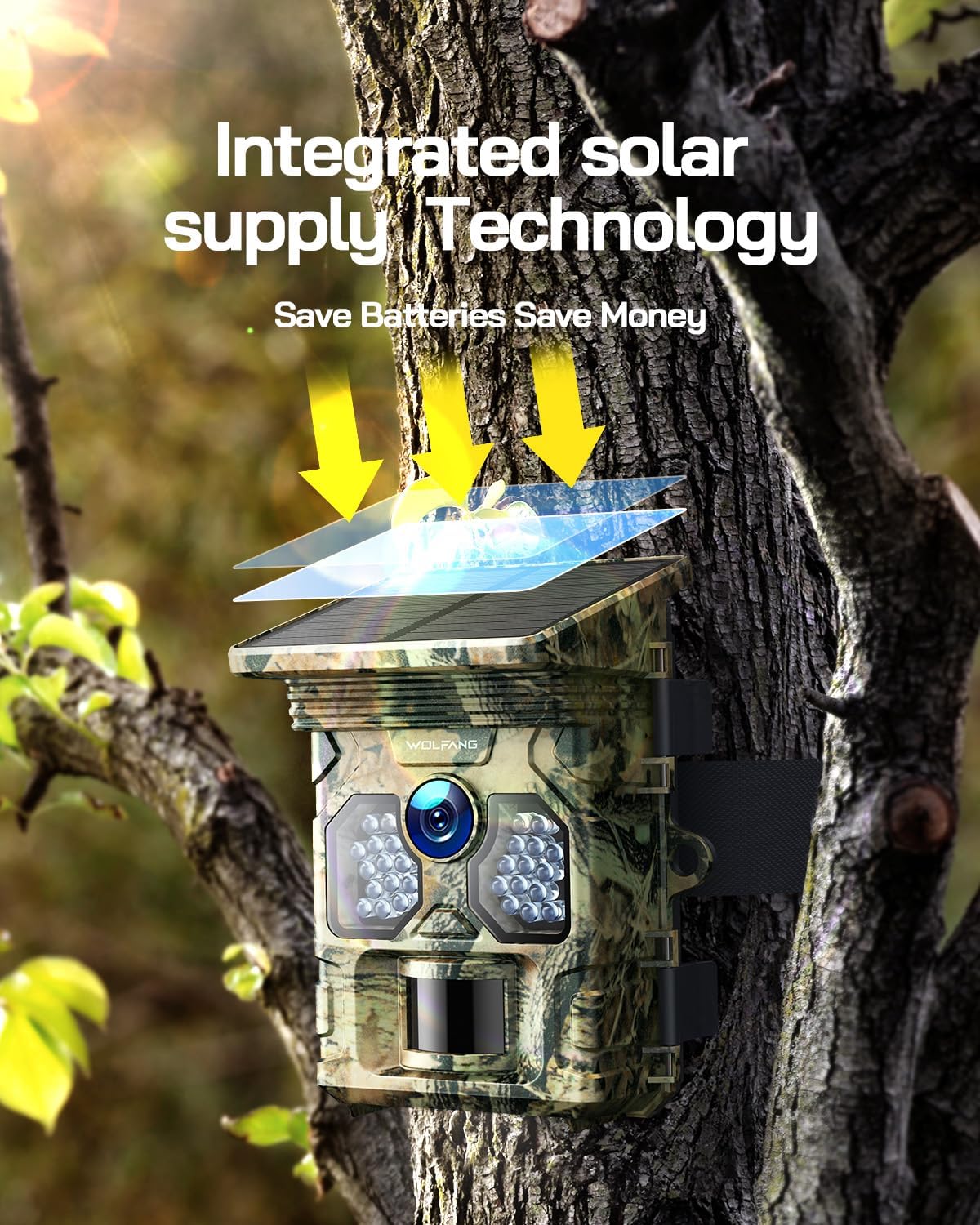
Image: The WOLFANG WT02 Trail Camera mounted on a tree, illustrating its integrated solar supply technology in action.
Mengendalikan Kamera
1. Hidupkan/Mati Kuasa dan Navigasi Menu
To power on the camera, slide the mode switch to the "ON" position. The LCD screen will illuminate. Use the navigation buttons (Up, Down, Left, Right, OK, Menu) to browse through settings and options.

Image: The internal view of the WOLFANG WT02 camera, showing the LCD screen and control buttons for intuitive setup and navigation.
2. Setting Photo and Video Modes
Akses menu untuk mengkonfigurasi pelbagai tetapan:
- Mod: Select between Photo, Video, or Photo+Video mode.
- Resolusi Foto: Choose from various resolutions up to 48MP. Higher resolution results in larger file saiz.
- Resolusi Video: Select from resolutions up to 4K at 30fps.
- Sensitiviti PIR: Adjust the sensitivity of the motion sensor (Low, Medium, High) based on the environment to avoid false triggers.
- Selang Pencetus: Tetapkan kelewatan antara pencetus berturut-turut.
- Selang Masa: Konfigurasikan kamera untuk mengambil gambar pada selang masa yang ditetapkan tanpa mengira gerakan.
- Tarikh & Masa: Tetapkan tarikh dan masa yang betul untuk masa yang tepatamps pada media anda.

Image: Visual representation of the WOLFANG WT02's ability to capture 4K video and 48MP photos.

Image: Depiction of the WOLFANG WT02's ultra-fast 0.1-second trigger speed, capturing a running fox.
3. Night Vision Operation
The WT02 automatically switches to night vision mode in low-light conditions, utilizing its 26pcs 850nm infrared LEDs to capture clear black and white images and videos without disturbing wildlife.

Image: A close-up of the camera's infrared LEDs, illustrating its superb night vision capabilities with a panther's eyes in the background.

Image: Comparison showing the clarity and detail of night vision captured by the WT02, contrasting with insufficient light and overexposure.
4. Viewdalam Media Tangkapan
awak boleh view photos and videos directly on the camera's LCD screen by switching to "Playback" mode. Alternatively, remove the Micro SD card and insert it into a computer's card reader, or connect the camera directly to a computer using the USB cable to access the files.
Penyelenggaraan
- Pembersihan: Use a soft, dry cloth to clean the camera lens and solar panel. For stubborn dirt, a slightly damp kain boleh digunakan, tetapi pastikan tiada kelembapan memasuki kamera.
- Penjagaan Bateri: If using AA batteries, replace them when the low battery indicator appears. For the built-in rechargeable battery, ensure the solar panel is regularly exposed to sunlight.
- Kalis air: Always ensure the camera's latches and seals are clean and properly closed to maintain its IP66 waterproof rating.
- Storan: When storing the camera for extended periods, remove any auxiliary AA batteries and ensure the built-in battery is partially charged. Store in a cool, dry place.

Image: The WOLFANG WT02 camera mounted on a tree in the rain, demonstrating its IP66 super waterproof capability.
Menyelesaikan masalah
| Masalah | Kemungkinan Punca | Penyelesaian |
|---|---|---|
| Kamera tidak dihidupkan. | Low battery; incorrect battery installation; faulty SD card. | Ensure solar panel is charged or install fresh AA batteries with correct polarity. Check if SD card is properly inserted or try a different card. |
| No photos/videos captured. | PIR sensitivity too low; SD card full or corrupted; camera in wrong mode. | Increase PIR sensitivity. Format or replace SD card. Ensure camera is in Photo, Video, or Photo+Video mode. |
| Kualiti penglihatan malam yang lemah. | Infrared LEDs obstructed; low battery. | Clear any obstructions from the front of the camera. Ensure sufficient battery power. |
| False triggers. | PIR sensitivity too high; camera facing moving branches or heat sources. | Decrease PIR sensitivity. Reposition camera to avoid unwanted motion sources. |
Spesifikasi
| Ciri | Perincian |
|---|---|
| Jenama | WOLFANG |
| Model | WT02 |
| Resolusi Foto | Sehingga 48MP |
| Resolusi Video | 4K@30FPS |
| Kecepatan Pencetus | 0.1 saat |
| Julat Penglihatan Malam | Up to 65ft (20m) with 26pcs 850nm IR LEDs |
| Penilaian Kalis Air | IP66 |
| Penyimpanan | Micro SD card, up to 128GB (32GB included) |
| Bekalan Kuasa | Built-in 2500mAh rechargeable battery (solar charged), supports 4x AA batteries (not included) |
| Suhu Operasi | -4°F hingga 140°F (-20°C hingga 60°C) |
| Ketersambungan | USB |

Image: Four common applications for the WOLFANG WT02 Trail Camera: hunting, farm security, wildlife monitoring, and home security.
Waranti dan Sokongan Pelanggan
WOLFANG provides a 2-year warranty for the WT02 Solar Trail Camera. If you encounter any issues or have questions regarding your product, please contact our customer service team.
E-mel Perkhidmatan Pelanggan: support.vc@wolfang.co
Please include your model number (WT02) and a detailed description of your issue when contacting support for faster assistance.
Ask a question about this manual
Ask about setup, troubleshooting, compatibility, parts, safety, or missing instructions. Manuals+ will review the question and use this page’s manual context to help answer it.