
JONR ED12
JONR ED12 Wet Dry Vacuum Cleaner User Manual
Model: ED12 | Brand: JONR
1. Pengenalan dan Lebihview
Thank you for choosing the JONR ED12 Wet Dry Vacuum Cleaner. This cordless, self-propelled, and versatile cleaning device is designed to simplify your hard floor cleaning routine. It combines vacuuming and mopping in one step, ensuring efficient and thorough cleaning with its innovative features like two-tank technology and edge-to-edge cleaning capabilities.
This manual provides essential information for the safe and effective use, maintenance, and troubleshooting of your JONR ED12 vacuum cleaner. Please read it thoroughly before first use and keep it for future reference.

Figure 1.1: JONR ED12 Wet Dry Vacuum Cleaner and included accessories.
2. Arahan Keselamatan
Untuk mengurangkan risiko kebakaran, kejutan elektrik atau kecederaan, sentiasa ikuti langkah berjaga-jaga keselamatan asas semasa menggunakan peralatan elektrik. Ini termasuk:
- Jangan gunakan di luar atau di permukaan basah.
- Jangan biarkan digunakan sebagai mainan. Perhatian yang rapi diperlukan apabila digunakan oleh atau berhampiran kanak-kanak.
- Gunakan hanya seperti yang diterangkan dalam manual ini. Gunakan hanya lampiran yang disyorkan pengilang.
- Jangan gunakan dengan kord atau palam yang rosak. Jika perkakas tidak berfungsi sebagaimana mestinya, telah terjatuh, rosak, ditinggalkan di luar rumah, atau terjatuh ke dalam air, kembalikannya ke pusat servis.
- Jangan tarik atau bawa dengan kord, gunakan kord sebagai pemegang, tutup pintu pada kord, atau tarik kord di sekeliling tepi atau sudut yang tajam. Jangan jalankan perkakas di atas kord. Jauhkan kord dari permukaan yang dipanaskan.
- Jangan cabut plag dengan menarik kord. Untuk mencabut palam, pegang palam, bukan kordnya.
- Jangan pegang palam atau perkakas dengan tangan yang basah.
- Jangan letakkan sebarang objek ke dalam bukaan. Jangan gunakan dengan mana-mana bukaan yang disekat; jauhkan daripada habuk, serabut, rambut dan apa sahaja yang boleh mengurangkan aliran udara.
- Jauhkan rambut, pakaian longgar, jari dan semua bahagian badan daripada bukaan dan bahagian yang bergerak.
- Matikan semua kawalan sebelum mencabut plag.
- Gunakan lebih berhati-hati semasa membersihkan di tangga.
- Jangan gunakan untuk mengambil cecair mudah terbakar atau mudah terbakar, seperti petrol, atau gunakan di kawasan yang mungkin terdapat.
- Jangan ambil apa-apa yang terbakar atau berasap, seperti rokok, mancis, atau abu panas.
- Jangan gunakan tanpa penapis di tempatnya.
- Elakkan permulaan yang tidak disengajakan. Pastikan suis berada dalam kedudukan mati sebelum menyambung ke pek bateri, mengambil atau membawa perkakas.
3. Kandungan Pakej
Carefully unpack your JONR ED12 Wet Dry Vacuum Cleaner and check that all items are present and in good condition. The package should include:
- JONR ED12 Main Body x1
- Pangkalan Pengecasan x1
- Berus Pembersih x1
- Pengecas x1
- Additional Brush Roller x1 (may vary by package)

Figure 3.1: All components included in the JONR ED12 package.
4. Persediaan
4.1 Perhimpunan
- Masukkan pemegang ke dalam badan utama sehingga ia berbunyi klik dengan selamat pada tempatnya.
- Pastikan tangki air bersih dan tangki air kotor diletakkan dengan betul di dalam petak masing-masing.
4.2 Mengecas Peranti
Place the JONR ED12 onto the charging base. Connect the charger to the charging base and plug it into a power outlet. The battery indicator on the display will show charging status. A full charge typically takes several hours. The device has a runtime of approximately 25-30 minutes on a full charge.
4.3 Mengisi Tangki Air Bersih
Remove the clean water tank (850ml capacity) from the main body. Open the tank cap and fill it with clean water. For enhanced cleaning, you may add a small amount of non-foaming floor cleaning solution suitable for wet vacuums. Do not exceed the MAX fill line. Close the cap securely and reinsert the tank into the vacuum cleaner.

Figure 4.1: Clean water tank (850ml) and dirty water tank (450ml) capacities.
5. Arahan Operasi
5.1 Menghidupkan/Mematikan
Press the ON/OFF key on the handle to power on the device. Press it again to power off.
5.2 Pemilihan Mod
The JONR ED12 offers two cleaning modes:
- Mod Auto: This is the default mode for general cleaning. The vacuum automatically adjusts suction power and water flow based on the detected mess.
- Mod Maks: For tougher stains and heavily soiled areas, switch to Max Mode for increased suction and water output.
Press the Mode key on the handle to switch between Auto Mode and Max Mode.
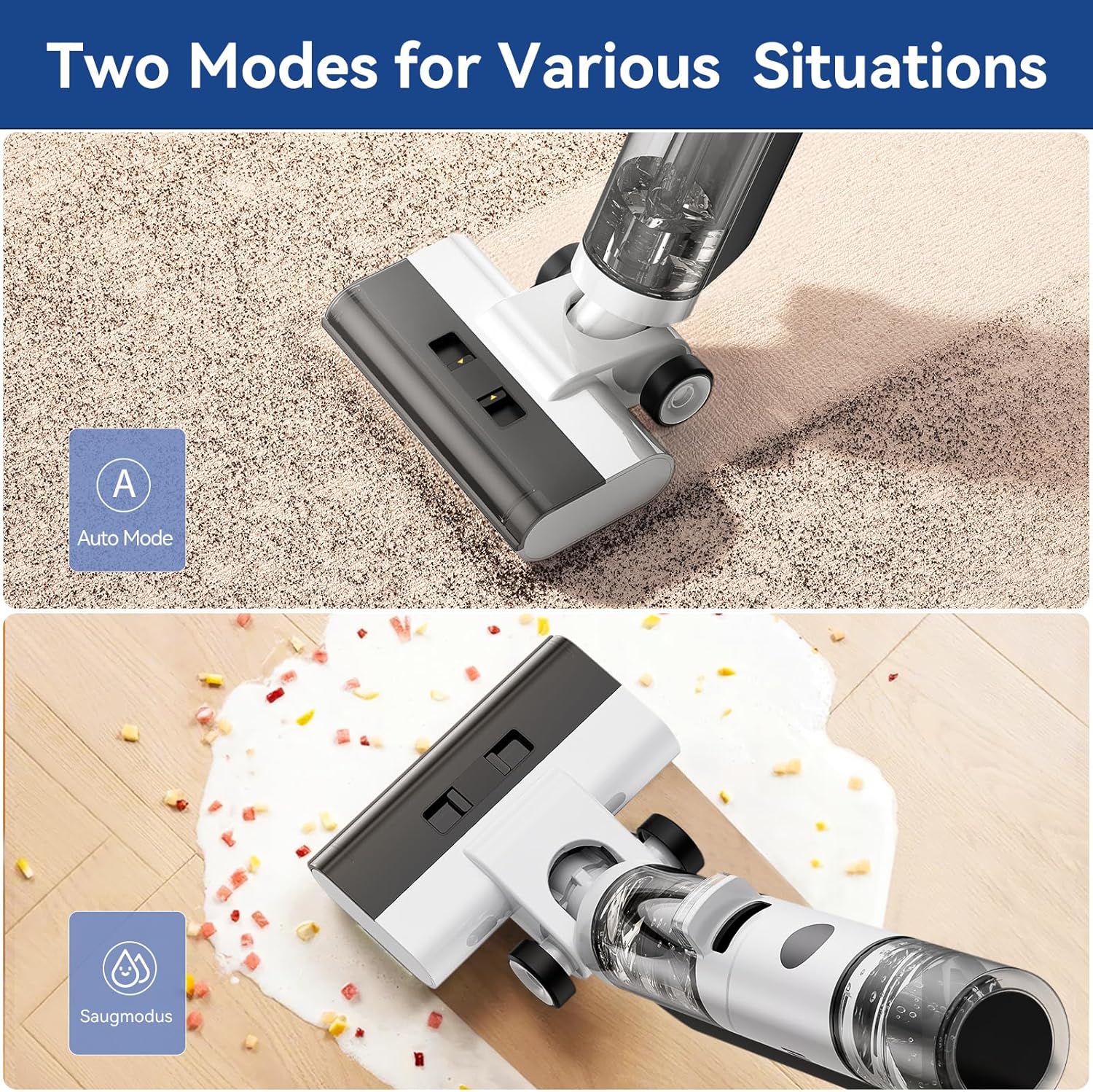
Figure 5.1: Two cleaning modes for various situations.
5.3 Proses Pembersihan
Tilt the vacuum cleaner back to engage the brush roller. Slowly push and pull the vacuum across the hard floor surface. The device will dispense clean water, scrub the floor, and then vacuum up the dirty water and debris into the dirty water tank. The two-tank technology ensures you always clean with fresh water, preventing secondary contamination.

Figure 5.2: Never clean with dirty water thanks to two-tank technology.

Figure 5.3: The JONR ED12 effectively cleans multiple sealed hard floor types.
Pembersihan 5.4 Tepi
The JONR ED12 features an edge-to-edge cleaning design, allowing the brush roller to reach close to baseboards and corners, minimizing uncleaned areas. Simply guide the vacuum along the edges of your room for thorough cleaning.
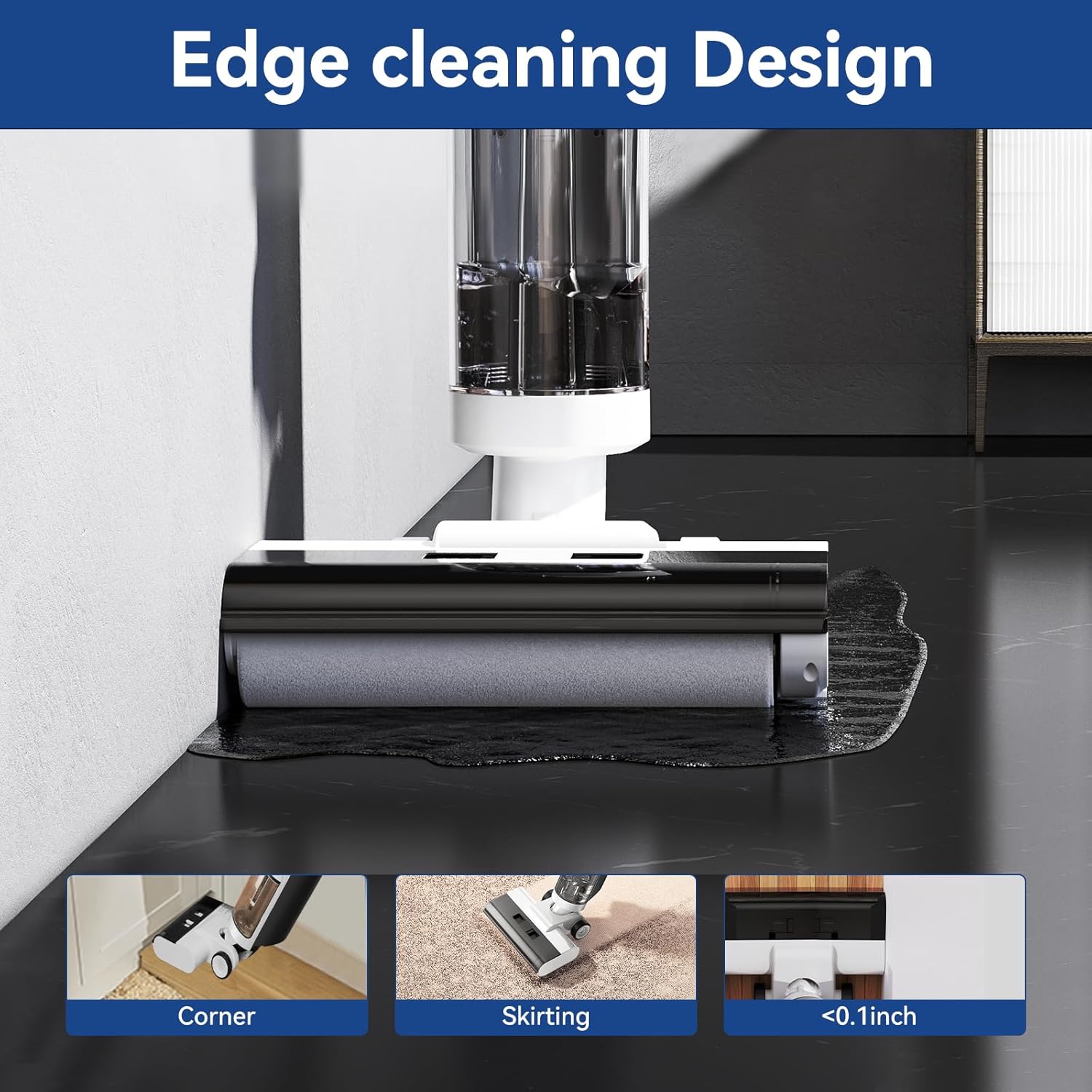
Figure 5.4: Edge cleaning design for thorough cleaning along walls and corners.
5.5 Fungsi Pembersihan Kendiri
After each use, it is recommended to run the self-cleaning cycle. Place the vacuum back on its charging base. Press the Self-Cleaning Key (often combined with the Mode key) to initiate the cycle. The vacuum will automatically clean the brush roller and internal pathways, ensuring hygiene and preventing odors. This process typically takes less than 35 seconds.
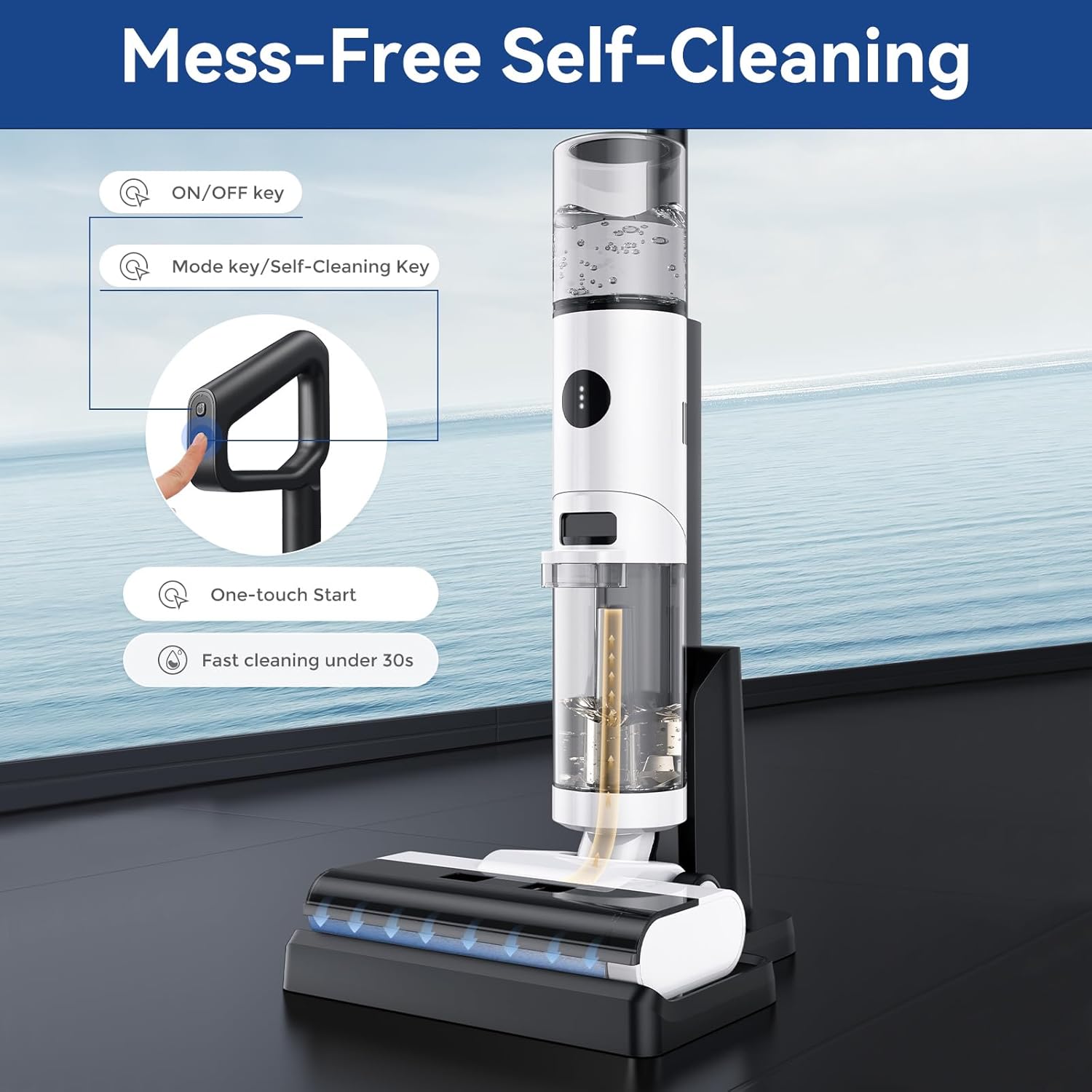
Figure 5.5: Mess-Free Self-Cleaning with one-touch start.
Video 5.1: Demonstration of the one-touch start and fast self-cleaning function.
Video 5.2: Selesaiview of the JONR ED12's 4-in-1 capabilities, including edge cleaning.
6. Penyelenggaraan
Regular maintenance is crucial for the longevity and optimal performance of your JONR ED12 vacuum cleaner.
6.1 Mengosongkan dan Membersihkan Tangki Air Kotor
After each use, or when the dirty water tank (450ml capacity) is full, remove it from the main body. Open the tank and dispose of the dirty water. Rinse the tank thoroughly with clean water. It is important to clean the metal strips on the side of the dirty water tank cover, as residue can accumulate and affect performance.
6.2 Cleaning the Brush Roller
Even with the self-cleaning function, it's advisable to periodically remove and manually clean the brush roller to remove any tangled hair or debris. Use the provided cleaning brush for this purpose. Ensure the brush roller is completely dry before reinserting it.
6.3 Membersihkan Penapis
The filter located in the dirty water tank assembly should be rinsed under running water regularly. Allow it to air dry completely before reinstallation. A clogged filter can reduce suction power.
6.4 Disassembly for Deep Cleaning
For a more thorough cleaning, certain components can be disassembled. Refer to the video below for detailed instructions on how to disassemble the JONR ED12 for deep cleaning.
Video 6.1: Guide on how to disassemble the JONR ED12 wet & dry vacuum cleaner for cleaning.
7. Penyelesaian masalah
If you encounter issues with your JONR ED12, please refer to the following common problems and solutions:
| Masalah | Kemungkinan Punca | Penyelesaian |
|---|---|---|
| Vacuum stops after a few seconds / Doesn't stay powered on. | Dirty water tank metal strips are obstructed or dirty. Low battery. | Clean the two metal strips on the side of the dirty water tank cover. Ensure the device is fully charged. |
| Poor suction / Leaves streaks. | Dirty water tank full. Clogged filter. Brush roller tangled or dirty. | Empty and clean the dirty water tank. Clean or replace the filter. Clean the brush roller thoroughly. |
| Air vent leakage. | Improper assembly or seal issue. | Ensure all tanks and covers are securely in place. Check seals for damage. Refer to the video below for guidance. |
| Peranti tidak dicas. | Charger or charging base issue. Improper connection. | Ensure the charger is properly connected to the base and power outlet. Verify the vacuum is correctly seated on the charging base. |
Video 7.1: Instructions on how to solve air vent leakage issues.
If the problem persists after trying these solutions, please contact JONR customer support.
8. Spesifikasi
- Jenama: JONR
- model: ED12
- Ciri Khas: Tanpa beg
- Masa jalan: 30 minutes (approximate)
- Hayat Bateri: 25 minutes (approximate)
- Faktor Bentuk: pegang tangan
- Tahap Bunyi: 80 dB
- Jenis Pengawal: Butang Tekan
- Kuasa Kuda Motor: 1.26 kuasa kuda
- Kaedah Kawalan: Sentuh
- Bilangan Kelajuan: 2
- mudah alih: ya
- Bilangan Tahap Kuasa: 2
- Penggunaan Dalaman/Luar: Dalaman
- Jenis Selesai: Berkilat
- Dimensi Produk: 11.1 x 10.63 x 44.09 inci
- Berat Barang: 14.97 paun
- Bateri: 1 bateri Lithium Ion diperlukan (termasuk)
9. Waranti dan Sokongan
For warranty information and customer support, please refer to the warranty card included with your product or visit the official JONR webtapak. Simpan resit pembelian anda sebagai bukti pembelian untuk sebarang tuntutan waranti.
If you require further assistance or have questions not covered in this manual, please contact JONR customer service through their official channels.
Ask a question about this manual
Ask about setup, troubleshooting, compatibility, parts, safety, or missing instructions. Manuals+ will review the question and use this page’s manual context to help answer it.