
1. Pengenalan
Terima kasih kerana membeliasing the FYDEE A7 Vinyl Turntable. This record player combines vintage aesthetics with modern functionality, offering a rich audio experience. It features built-in stereo speakers, 3-speed playback, two-way Bluetooth connectivity, RCA output, and AUX input. This manual provides essential information for safe operation, setup, and maintenance of your turntable.
2. Arahan Keselamatan
- Sumber Kuasa: Use only the provided power adapter (5V 1A DC). Ensure the voltage matches before connecting.
- Air dan Kelembapan: Do not expose the unit to rain, moisture, or liquids. Do not place objects filled with liquids, such as vases, on the unit.
- haba: Jauhkan unit daripada sumber haba seperti radiator, daftar haba, dapur, atau radas lain (termasuk amppenghidup) yang menghasilkan haba.
- Pengudaraan: Pastikan pengudaraan yang betul. Jangan sekat sebarang bukaan pengudaraan.
- Pembersihan: Cabut palam unit daripada salur keluar kuasa sebelum membersihkan. Gunakan kain lembut dan kering. Jangan gunakan pembersih cecair atau pembersih aerosol.
- Servis: Jangan cuba servis unit sendiri. Rujuk semua servis kepada kakitangan perkhidmatan yang berkelayakan.
- penempatan: Letakkan unit di atas permukaan yang stabil dan rata untuk mengelakkan kerosakan daripada jatuh.
3. Kandungan Pakej
Sila pastikan semua item yang disenaraikan di bawah disertakan dalam pakej anda:
- FYDEE A7 Vinyl Turntable
- Penyesuai Kuasa (5V 1A)
- RCA kabel
- Penutup Habuk
- Penyesuai 45 RPM
- Manual Pengguna
4. Produk Lebihview (Komponen)
Familiarize yourself with the various parts of your FYDEE A7 Turntable.

Image 4.1: Turntable Top View. This image shows the top of the turntable with key components labeled, including the 45 RPM Adapter, Lift Lever, Tone Arm, Auto-stop switch, Speed selector, and Stylus.
- Pinggan: The rotating platform where records are placed.
- gelendong: The central pin on the platter for placing records.
- Penyesuai 45 RPM: Used for playing 7-inch records with a large center hole.
- Tuas Angkat: Meningkatkan dan menurunkan tonearm.
- Lengan Nada: Memegang kartrij dan stilus.
- Stilus (Jarum): The part that reads the grooves of the record.
- Auto-stop Switch: Mendayakan atau melumpuhkan fungsi henti automatik pada penghujung rekod.
- Pemilih Kelajuan: Allows selection of 33, 45, or 78 RPM playback speeds.
- Berat kontra: Adjusts the tracking force of the tonearm.

Image 4.2: Turntable Front and Rear Panels. This image highlights the Indicator Light, Mode/Power knob, Volume knob on the front, and the RCA Output and AUX In ports on the rear.
- Mode/Power Knob: Turns the unit on/off and selects the audio source (LP, Bluetooth, AUX).
- Tombol Kelantangan: Laraskan kelantangan main balik.
- Lampu Penunjuk: Shows the current status or mode.
- Keluaran RCA: Connects the turntable to external amppengangkat atau pembesar suara berkuasa.
- AUX In: Connects external audio devices (e.g., MP3 player, smartphone) to play through the turntable's speakers.
- Bicu Fon Kepala (3.5mm): Untuk mendengar peribadi dengan fon kepala.
5. Persediaan
- Membongkar: Tanggalkan meja putar dan semua aksesori daripada pembungkusan dengan berhati-hati. Simpan pembungkusan untuk pengangkutan atau penyimpanan pada masa hadapan.
- penempatan: Place the turntable on a stable, level surface away from direct sunlight, heat sources, and excessive dust or vibrations.
- Penutup habuk: Install the removable dust cover by aligning its hinges with the slots on the back of the turntable. The dust cover protects the platter and tonearm assembly when not in use.
- Perlindungan Stilus: Remove the clear plastic stylus protector from the stylus assembly. Be careful not to touch the stylus itself.
- Pelarasan Pengimbang: The counterweight helps reduce needle skipping. Gently slide the counterweight onto the rear of the tonearm. Rotate it until the tonearm is balanced horizontally. Then, rotate the counterweight to apply the recommended tracking force (refer to cartridge specifications if available, otherwise a light, even pressure is suitable).
- Sambungan Kuasa: Connect the power adapter to the DC IN port on the back of the turntable, then plug the adapter into a wall outlet.
6. Arahan Operasi
6.1. Playing Vinyl Records
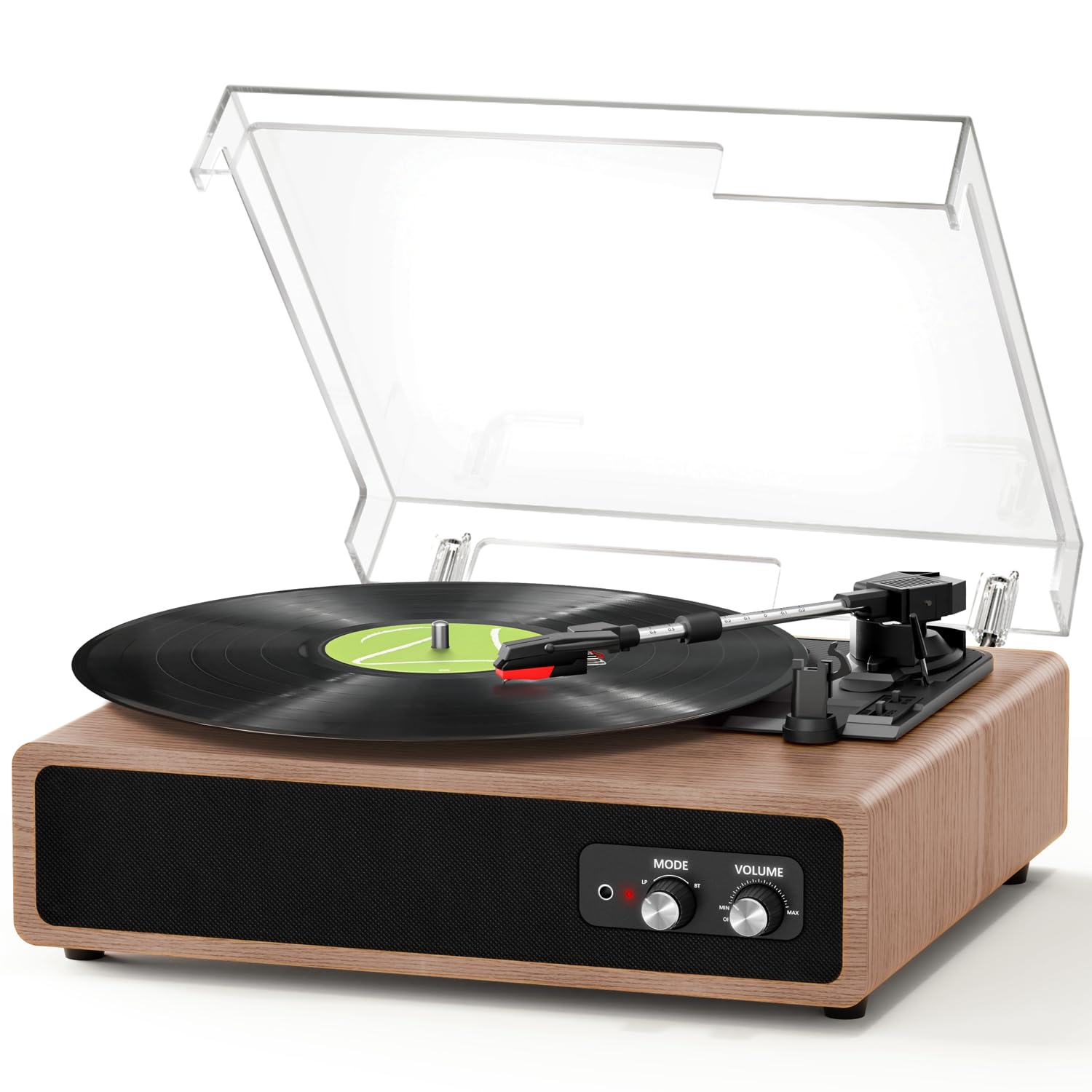
Image 6.1: Record Size Compatibility. The turntable supports 7-inch, 10-inch, and 12-inch vinyl records, with a 45 RPM adapter included for smaller records with larger center holes.
- Hidupkan kuasa: Turn the Mode/Power knob clockwise to power on the unit.
- Select LP Mode: Rotate the Mode/Power knob to the 'LP' position.
- Rekod Tempat: Place a vinyl record on the platter. If playing a 7-inch record with a large center hole, place the 45 RPM adapter on the spindle first.
- Pilih Kelajuan: Set the Speed selector switch to the appropriate speed (33, 45, or 78 RPM) for your record.
- Auto-stop: Set the Auto-stop switch to ON if you want the platter to stop automatically at the end of the record. Set to OFF for continuous play or for some records that may trigger auto-stop prematurely.
- Mula Main Semula: Gently push the Lift Lever up to raise the tonearm. Manually move the tonearm over the desired starting groove of the record. Slowly push the Lift Lever down to lower the tonearm onto the record.
- Laraskan Kelantangan: Rotate the Volume knob to your desired listening level.
- Tamat Main Semula: When the record finishes (or if auto-stop is ON), gently lift the tonearm using the Lift Lever and return it to its rest.
6.2. Bluetooth Reception (Playing Music from a Mobile Device)

Image 6.2: Two-Way Bluetooth Connectivity. This image illustrates the turntable's ability to receive Bluetooth audio from a smartphone and transmit Bluetooth audio to an external speaker.
- Hidupkan kuasa: Turn the Mode/Power knob clockwise to power on the unit.
- Select BT Mode: Rotate the Mode/Power knob to the 'BT' position. The indicator light will flash, indicating it's in pairing mode.
- Pasangkan Peranti: On your mobile device (smartphone, tablet), enable Bluetooth and search for 'FYDEE A7' (or similar). Select it to pair.
- Main Muzik: Once paired, the indicator light will stop flashing. You can now play music from your mobile device through the turntable's built-in speakers.
- Laraskan Kelantangan: Control volume using both your mobile device and the turntable's Volume knob.
6.3. Bluetooth Transmission (Playing Turntable Audio to an External Bluetooth Speaker)

Image 6.3: Bluetooth Streaming. The turntable can stream audio from records or AUX input to a Bluetooth-enabled speaker, offering flexible listening options.
- Hidupkan kuasa: Turn the Mode/Power knob clockwise to power on the unit.
- Sediakan Penceramah Luaran: Letakkan pembesar suara Bluetooth luaran anda ke dalam mod berpasangan.
- Mulakan Penghantaran: While in LP or AUX mode, the turntable will automatically search for nearby Bluetooth speakers. The indicator light will flash during search.
- Sambung: Once connected, the indicator light will stop flashing. Audio from the turntable will now play through the external Bluetooth speaker.
- Laraskan Kelantangan: Control volume primarily on your external Bluetooth speaker.
6.4. Input AUX
Connect an external audio device (e.g., MP3 player, smartphone) to the turntable using a 3.5mm audio cable (not included).
- Sambungkan Kabel: Plug one end of the 3.5mm audio cable into the AUX IN port on the turntable and the other end into the headphone jack or audio output of your external device.
- Pilih Mod AUX: Rotate the Mode/Power knob to the 'AUX' position.
- Main Muzik: Start playback on your external device. Audio will play through the turntable's speakers.
- Laraskan Kelantangan: Control volume using both your external device and the turntable's Volume knob.
6.5. Output RCA
Sambungkan meja putar ke sumber luaran amplifier or powered speakers for enhanced sound.
- Connect RCA Cable: Plug the RCA cable (included) into the RCA OUT ports on the back of the turntable (Red to Red, White to White).
- Sambung ke Amplebih hidup: Connect the other end of the RCA cable to the corresponding audio input on your amppembesar atau pembesar suara berkuasa.
- Pilih Input: Pilih input yang betul pada amppembesar/ pembesar suara.
- Mainkan Audio: Play a record or use AUX/Bluetooth reception on the turntable. Audio will be routed through your external system.
- Laraskan Kelantangan: Control volume primarily on your external amppembesar atau pembesar suara berkuasa.
6.6. Output Fon Kepala
For private listening, connect headphones to the 3.5mm headphone jack on the front of the unit.
- Sambungkan Fon Kepala: Pasangkan fon kepala 3.5mm anda ke dalam bicu fon kepala.
- Laraskan Kelantangan: Use the turntable's Volume knob to adjust the headphone volume.
7. Penyelenggaraan
- Membersihkan Stylus: Use a soft brush (not included) to gently clean the stylus. Always brush from the back to the front of the stylus. Do not use liquid cleaners on the stylus.
- Membersihkan Unit: Wipe the turntable's surface with a soft, dry, lint-free cloth. Do not use abrasive cleaners, waxes, or solvents.
- Penjagaan Penutup Habuk: The dust cover can be wiped with a soft, damp kain. Elakkan bahan kimia keras yang boleh menggaru atau mengaburkan plastik.
- Penjagaan Rekod: Keep your records clean and free of dust to ensure optimal sound quality and prolong stylus life. Store records vertically in their sleeves.
8. Penyelesaian masalah
| Masalah | Kemungkinan Punca | Penyelesaian |
|---|---|---|
| Tiada kuasa | Penyesuai kuasa tidak disambungkan atau rosak. | Pastikan penyesuai kuasa disambungkan dengan selamat ke unit dan soket kuasa yang berfungsi. |
| Tiada suara dari pembesar suara | Volume too low; incorrect mode selected; external speakers connected via RCA. | Increase volume. Ensure correct mode (LP, BT, AUX) is selected. If RCA is connected, sound will output through external speakers. |
| Melangkau atau bunyi herot | Record is dirty or damaged; stylus is dirty or worn; tracking force incorrect; turntable not level. | Clean the record. Clean or replace the stylus. Adjust the counterweight. Place the turntable on a level surface. |
| Penggandingan Bluetooth gagal | Turntable not in pairing mode; device too far; interference. | Ensure turntable is in BT mode (flashing indicator). Move device closer. Turn off other Bluetooth devices. |
| Auto-stop not working correctly | Auto-stop switch is OFF; specific record type. | Ensure Auto-stop switch is ON. Some records, especially older or very light ones, may not trigger auto-stop reliably. |
9. Spesifikasi
| Ciri | Spesifikasi |
|---|---|
| Nombor Model | A7 |
| Jenama | FYDEE |
| Kelajuan Main Semula | 33 1/3, 45, 78 RPM |
| Jenis Motor | Bergerak tali pinggang |
| Ketersambungan | Bluetooth (Reception & Transmission), AUX In, RCA Out |
| Pembesar Suara Terbina dalam | Yes (2 x 3W stereo speakers) |
| Output Fon Kepala | Bicu 3.5mm |
| Sumber Kuasa | Penyesuai Kuasa 5V 1A DC |
| bahan | Wood, ABS |
| Berat Barang | 2.67 Kilogram |
| Dimensi (L x W x H) | 37.4 x 33.3 x 18.1 cm |
| Ciri Khas | Auto-stop function, Removable Dust Cover, Counterweight, Portable, Retro Design |
10. Waranti dan Sokongan
This product comes with a standard manufacturer's warranty. For specific warranty details, please refer to the documentation provided at the time of purchase or contact your retailer. If you encounter any issues or require technical assistance, please contact FYDEE customer support through your purchase platform or the official FYDEE webtapak.