
1. Pengenalan
Thank you for choosing the Yunir MP3 Player. This device is designed to provide a portable and versatile music experience with its Bluetooth 5.0 connectivity, 2.4-inch TFT touch screen, and support for various audio formats. This manual will guide you through the setup, operation, and maintenance of your new MP3 player.
2. Kandungan Pakej
Sila semak pakej untuk item berikut:
- Yunir MP3 Player
- Fon Kepala Berwayar
- Kabel Pengecasan (USB)
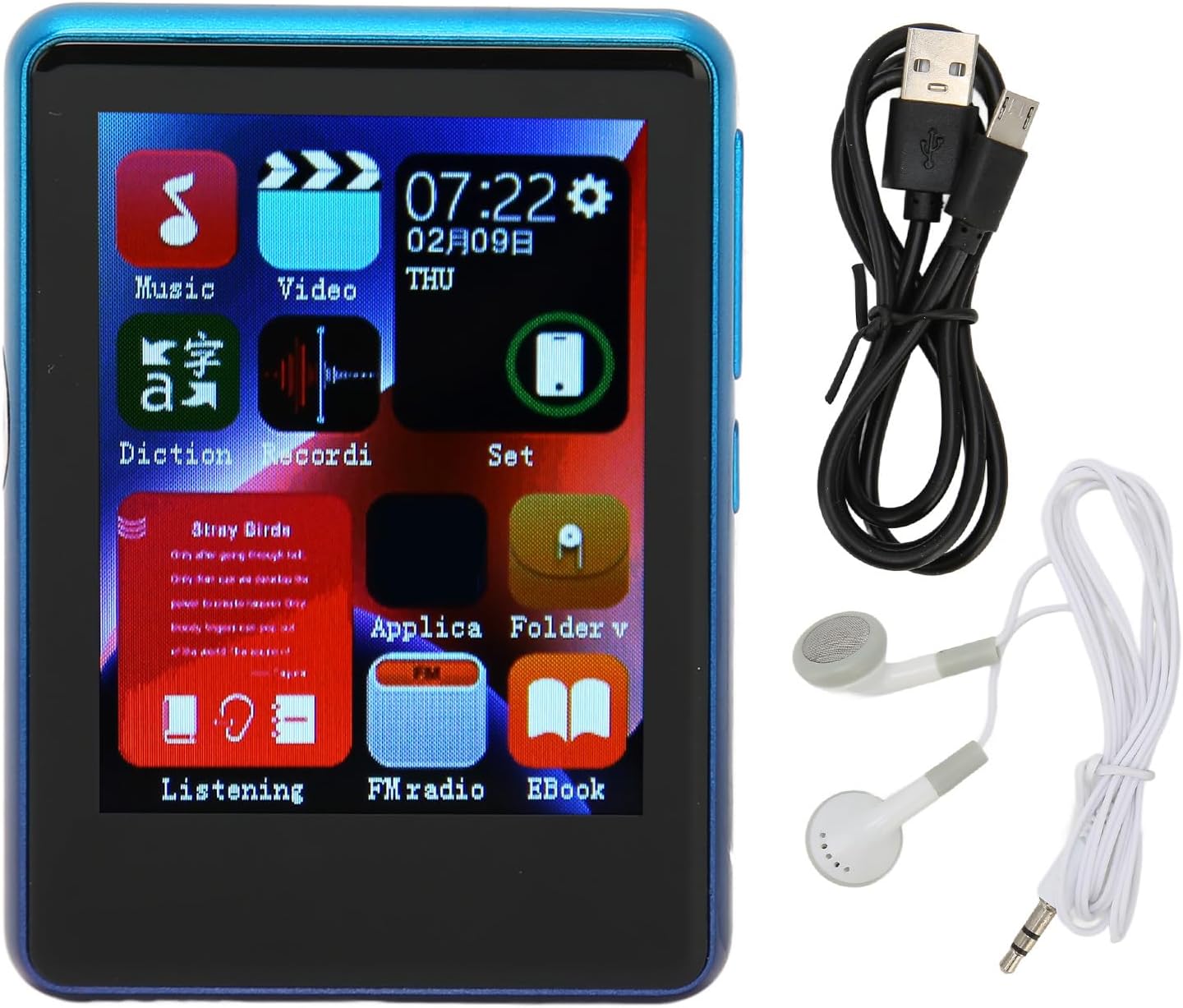
Image: The Yunir MP3 Player, accompanied by its wired headphones and USB charging cable, as included in the package.
3. Produk Lebihview
3.1 Susun atur Peranti
Familiarize yourself with the buttons, ports, and screen of your MP3 player.

Image: Multiple side views of the MP3 player, highlighting the volume control buttons (+ and -) and the power button on the side.

Image: A close-up of the bottom edge of the MP3 player, displaying the speaker grille, 3.5mm headphone jack, and Micro USB charging/data port.
- 2.4-inch TFT Touch Screen: Untuk navigasi dan interaksi.
- Butang Kelantangan (+/-): Laraskan tahap output audio.
- Butang Kuasa: Hidupkan/matikan peranti atau kunci/buka kunci skrin.
- Bicu Fon Kepala 3.5mm: Connect wired headphones.
- Port USB Mikro: Untuk pengecasan dan pemindahan data.
- Slot Kad Mikro SD: Expand storage up to 256GB (card not included).
4. Persediaan
4.1 Mengecas Peranti
- Connect the small end of the included USB charging cable to the Micro USB port on the MP3 player.
- Sambungkan hujung kabel USB yang lebih besar ke penyesuai kuasa USB (tidak disertakan) atau port USB komputer.
- The device will indicate that it is charging. Allow sufficient time for a full charge before first use.
Nota: Ensure the charging port is clean and free of debris to prevent connection issues.
4.2 Memasukkan Kad SD Mikro
The device has 4GB of built-in memory and supports expansion up to 256GB via a Micro SD card (not included).
- Cari slot kad Micro SD di sisi pemain.
- Gently insert the Micro SD card into the slot with the gold contacts facing down until it clicks into place.
- Untuk mengeluarkan, tolak kad masuk sedikit sehingga ia keluar.
5. Arahan Operasi
5.1 Hidupkan/Mati Kuasa
- Untuk Menghidupkan: Tekan dan tahan butang Power sehingga skrin menyala.
- Untuk Mematikan: Press and hold the Power button, then select "Power Off" on the screen.
- Kunci/Buka Kunci Skrin: Tekan butang Kuasa sebentar untuk mengunci atau membuka kunci skrin.
5.2 Navigasi
The MP3 player features a 2.4-inch TFT touch screen for intuitive navigation. Tap icons to open applications or settings, and swipe to scroll through lists.

Image: The MP3 player's main menu interface, showing various application icons such as Music, Video, FM Radio, and EBook, indicating touch screen functionality.
5.3 Main balik Muzik
The player supports a wide range of audio formats including MP3, APE, FLAC, WMA, WAV, and AAC, up to 24-bit quality.

Image: The MP3 player screen showing a music playback interface, with text indicating support for multiple audio formats like MP3, APE, FLAC, WMA, WAV, and AAC.
- From the main menu, tap the "Music" icon.
- Layari pustaka muzik anda mengikut artis, album, genre atau folder.
- Ketik lagu untuk memulakan main balik.
- Use the on-screen controls for play/pause, skip tracks, and adjust volume.
5.4 Kesambungan Bluetooth
Connect to Bluetooth headphones or speakers for wireless audio.

Image: The MP3 player connected to wired headphones, illustrating its audio output capabilities, including the 3.5mm stereo line output jack for stable transmission.
- From the main menu, tap the "Set" or "Bluetooth" icon (if available).
- Hidupkan Bluetooth dan imbas peranti yang tersedia.
- Select your Bluetooth device from the list to pair.
- Once paired, audio will stream wirelessly to your connected device.
5.5 Radio FM
The MP3 player includes an FM radio function.
- Connect wired headphones to the 3.5mm jack; they act as the antenna.
- From the main menu, tap the "FM Radio" icon.
- Gunakan kawalan pada skrin untuk mengimbas stesen atau menala secara manual.
5.6 E-book Function
Baca teks files directly on your device.
- From the main menu, tap the "EBook" icon.
- Browse for compatible text files stored on your device or Micro SD card.
- Ketik a file untuk membuka dan membaca.
6. File Pengurusan
6.1 Memindahkan Files
- Connect the MP3 player to your computer using the USB charging cable.
- The player should appear as a removable disk drive on your computer.
- Drag and drop music, video, or e-book files into the appropriate folders on the device's internal storage or the Micro SD card.
- Keluarkan peranti dengan selamat dari komputer anda sebelum memutuskan sambungan kabel USB.
7. Penyelenggaraan
- Pembersihan: Use a soft, dry cloth to clean the screen and body of the player. Avoid liquid cleaners.
- Storan: Simpan peranti di tempat yang sejuk dan kering jauh dari cahaya matahari langsung dan suhu yang melampau.
- Penjagaan Bateri: Untuk memanjangkan hayat bateri, elakkan daripada menyahcas sepenuhnya bateri dengan kerap. Cas peranti dengan kerap, walaupun tidak digunakan untuk tempoh yang lama.
- Elakkan Titisan: Lindungi peranti daripada kejutan fizikal dan jatuhan.
8. Penyelesaian masalah
| Masalah | Penyelesaian yang Mungkin |
|---|---|
| Peranti tidak dihidupkan. | Pastikan bateri dicas. Sambungkan ke sumber kuasa dan cuba lagi. |
| Tidak boleh memindahkan files ke peranti. | Check USB cable connection. Ensure the device is recognized by the computer. Try a different USB port or cable. |
| Tiada bunyi dari fon kepala. | Periksa sambungan fon kepala. Pastikan kelantangan tidak diredamkan atau terlalu rendah. Uji dengan fon kepala yang berbeza. |
| Peranti Bluetooth tidak berpasangan. | Ensure Bluetooth is enabled on both devices. Place devices close to each other. Try unpairing and re-pairing. |
| Charging port issues. | Inspect the charging port for debris or damage. Use the original charging cable. If issues persist, contact support. |
9. Spesifikasi
| Ciri | Perincian |
|---|---|
| Nama Model | Yunirc3gg08n9f6-12 |
| Paparan | 2.4 Inches TFT, Touch Screen |
| Ketersambungan | Bluetooth 5.0, USB |
| Memori Dalaman | 4 GB |
| Memori Boleh Diperkembangkan | Up to 256GB (Micro SD Card) |
| Format Audio yang Disokong | MP3, APE, FLAC, WMA, WAV, AAC (up to 24-bit) |
| Ciri Khas | FM Radio, E-book Function |
| Berat badan | 0.11 Kilogram |
| Komponen yang Disertakan | Wired Headphone, Charging Cable |
10. Waranti dan Sokongan
This product comes with a standard manufacturer's warranty. For detailed warranty information, please refer to the warranty card included in your package or contact your retailer.
For technical support or customer service, please contact the vendor through your purchase platform or refer to the contact information provided with the product.