
1. Lebihview
The OBEST H360 Motorcycle Helmet Bluetooth Headset provides a true wireless audio solution for various helmet types, including motorcycle, cycling, ski, vintage, and off-road helmets. It features Bluetooth 5.3 technology for stable and fast connections, active noise cancellation for clear communication, and a long-lasting battery. The headset includes a wireless remote control for easy operation while riding.

Imej: Selesaiview of the OBEST H360 Wireless Bluetooth Headset components.
2. Apa yang ada di dalam Kotak
Pakej termasuk item berikut:
- Sarung Pengecas Tanpa Wayar
- Headset (2 speakers)
- Kawalan Jauh Tanpa Wayar
- Kabel Pengecasan Jenis-C
- Velcro Pads (4 pieces)
- Manual Pengguna
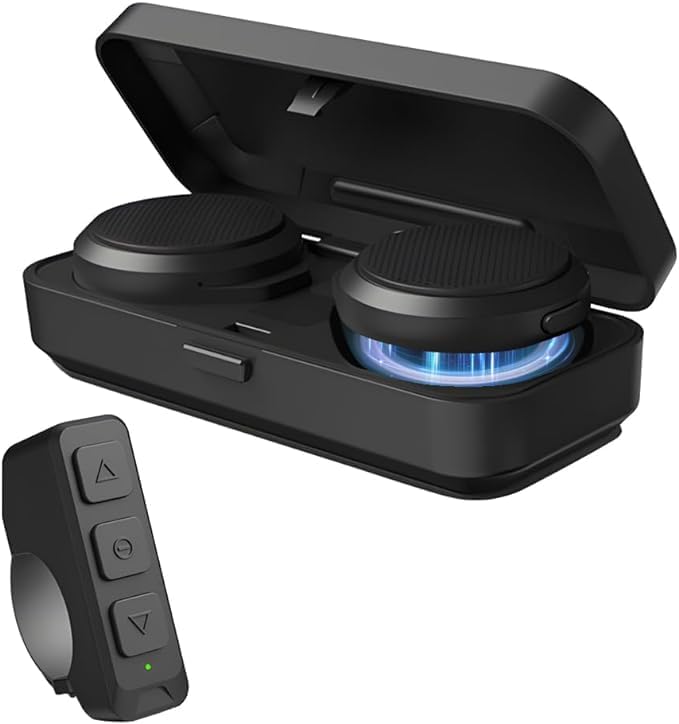
Image: All components included in the OBEST H360 package.
3. Persediaan & Pemasangan
Follow these steps to install your OBEST H360 headset into your helmet:
- Sediakan topi keledar: Ensure your helmet's ear pockets are clean and dry.
- Attach Velcro to Speakers: Peel the protective backing from the adhesive side of two Velcro pads. Attach one pad to the back of each headset speaker.
- Install Speakers in Helmet: Carefully position each speaker inside the helmet's ear pockets. Press firmly to secure the Velcro. Ensure the speakers are centered over your ears for optimal sound.
- Kabel Laluan: Tuck any excess speaker cables neatly under the helmet's lining to prevent tangling and ensure comfort.
- Attach Remote Control: The wireless remote control can be mounted on your handlebar or other convenient location using its integrated strap.

Image: Visual guide for headset installation in a helmet.
Video Pemasangan
Video: A short demonstration of the motorcycle helmet Bluetooth headset installation process.
4. Arahan Operasi
4.1. Hidupkan/Mati Kuasa
- Hidupkan kuasa: Open the charging case. The headsets will automatically power on.
- Matikan: Place the headsets back into the charging case and close the lid. They will automatically power off.
4.2. Berpasangan Bluetooth
- Ensure the headsets are powered on and in pairing mode (indicated by flashing LED lights).
- Pada telefon bimbit anda, dayakan Bluetooth dan cari peranti yang tersedia.
- Select "OBEST H360" from the list to connect. A voice prompt will confirm successful pairing.
- To pair the wireless remote control, ensure it is powered on and in pairing mode. Select it from your phone's Bluetooth list.
4.3. Call & Music Control (via Remote Control)
The wireless remote control allows for easy management of calls and music:
- Jawab/Tutup Panggilan: Tekan butang tengah.
- Main/Jeda Muzik: Tekan butang tengah.
- Increase Volume/Previous Track: Tekan butang atas.
- Decrease Volume/Next Track: Tekan butang bawah.

Image: Remote control functions for calls, music, and GPS.
5. Mengecas
The OBEST H360 headset comes with a portable charging case to keep your headsets powered on the go.
- Charging Headsets: Place the headsets into the charging case. The LED display on the case will show the charging status for each earphone (L/R) and the case's battery capacity.
- Sarung Pengecasan: Connect the Type-C charging cable to the charging port on the case and to a suitable USB power source. The LED display will indicate the charging progress.

Image: Charging case with digital display for battery levels.
6. Penyelenggaraan
- Keep the headset and charging case clean and dry.
- Elakkan daripada mendedahkan peranti kepada suhu yang melampau atau cahaya matahari langsung.
- Jangan cuba membuka atau membaiki peranti sendiri. Hubungi sokongan pelanggan untuk mendapatkan bantuan.
7. Penyelesaian masalah
- Tiada Kuasa: Ensure the headsets and charging case are fully charged.
- Tidak boleh berpasangan: Make sure Bluetooth is enabled on your device and the headset is in pairing mode. Try restarting both devices.
- Kualiti Bunyi Lemah: Check the speaker placement in the helmet. Ensure there are no obstructions. Adjust volume levels on both the headset and your connected device.
- Alat Kawalan Jauh Tidak Menjawab: Ensure the remote control is paired and its battery is charged.
8. Spesifikasi
| Ciri | Perincian |
|---|---|
| Nama Model | Motorcycle Helmet Bluetooth Headset (H360) |
| Teknologi Ketersambungan | Wayarles (Bluetooth 5.3) |
| Kawalan Bunyi | Pembatalan Bunyi Aktif |
| Hayat Bateri (Fon Kepala) | 5.5 Jam (Masa Berbual) |
| Masa Tunggu Sedia | Sehingga 50 Jam |
| Mengecas Bateri Kes | 1900mAh |
| Antara Muka Pengecasan | Jenis-C |
| Jarak Penghantaran | Sehingga 10 meter |
| Kaedah Kawalan | Jauh |
| Berat Barang | 9.2 auns |
| bahan | Plastik Atau Silikon |

Image: Dimensions of the headset components.
9. Waranti dan Sokongan
For warranty information or customer support, please refer to the contact details provided in your product packaging or visit the official OBEST webtapak.