
1. Pengenalan
Thank you for choosing the Peski K-51 Portable Bluetooth Karaoke Machine. This compact and versatile device is designed to provide an enjoyable karaoke experience with its high-quality sound, dynamic lighting, and dual wireless microphones. This manual will guide you through the setup, operation, and maintenance of your new karaoke machine to ensure you get the most out of its features.
2. Apa yang ada di dalam Kotak
- Mini Karaoke Machine (1 unit)
- Wireless Microphone (2 units)
- USB Cable (2 units)
- Manual Pengguna (1 unit)
3. Produk Lebihview
The Peski K-51 features a compact speaker unit with integrated controls and two wireless microphones for duet performances. The speaker includes a leather handle for portability and dynamic LED lighting for an enhanced experience.
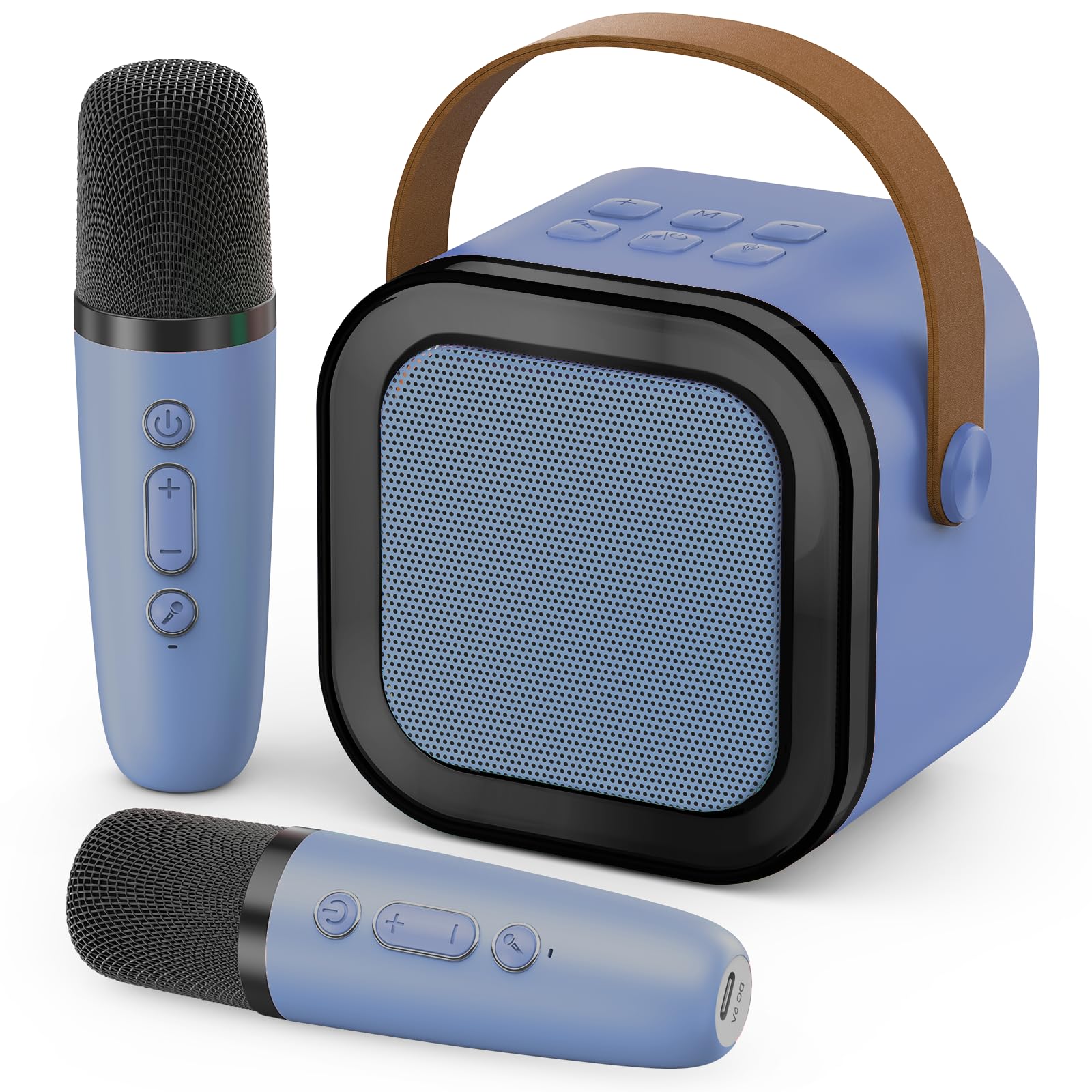
Image: The Peski K-51 Portable Bluetooth Karaoke Machine, showing the main speaker unit with colorful LED lights and two matching wireless microphones.
Speaker Controls and Ports:
- Butang Kuasa: Menghidupkan/mematikan pembesar suara.
- Butang Kelantangan (+/-): Melaraskan kelantangan pembesar suara.
- Butang Mod (M): Switches between input modes (e.g., Bluetooth, TF card, USB).
- Butang Cahaya: Mengawal kesan pencahayaan LED.
- Butang Main/Jeda: Mengawal main balik muzik.
- Butang Mikrofon: Activates/deactivates microphone input.
- Port USB: For USB drive playback and power bank functionality.
- Slot Kad TF: For TF card playback.
- Port Pengecasan USB-C: Untuk mengecas pembesar suara.
- Bicu Audio 3.5mm: For headphone output.
Microphone Controls and Ports:
- Butang Kuasa: Turns the microphone on/off.
- Volume/Echo Control: Adjusts microphone volume and echo effect.
- Port Pengecasan USB-C: Untuk mengecas mikrofon.
4. Persediaan
4.1 Mengecas Peranti
Before first use, fully charge the karaoke machine speaker and both wireless microphones. Use the provided USB cables to connect them to a compatible USB power adapter (not included).
- Sambungkan hujung USB-C kabel ke port pengecasan pada pembesar suara.
- Connect the USB-C end of the other cable to the charging port on each microphone.
- Lampu penunjuk pengecasan akan menyala semasa pengecasan dan padam atau bertukar warna apabila dicas sepenuhnya.
4.2 Menghidupkan/Mematikan
- Penceramah: Press and hold the Power button on the speaker until the indicator light turns on.
- Mikrofon: Press and hold the Power button on each microphone until the indicator light turns on.
- To power off, repeat the process by pressing and holding the Power button on each device.
4.3 Sambungan Bluetooth
To play music from your smartphone or other Bluetooth-enabled device:
- Ensure the karaoke machine speaker is powered on and in Bluetooth mode (indicated by a flashing blue light or voice prompt). If not, press the 'M' (Mode) button to switch to Bluetooth mode.
- On your smartphone or device, go to Bluetooth settings and search for available devices.
- Select "K-51" (or similar name) from the list to pair. A confirmation sound will indicate successful pairing.
- Once connected, you can play music from your device through the karaoke machine speaker.
4.4 Microphone Pairing
The microphones should automatically pair with the speaker when both are powered on. If they do not connect:
- Ensure both the speaker and microphones are powered on and fully charged.
- If a microphone is not connecting, try powering it off and on again.
- If issues persist, consult the troubleshooting section.
5. Arahan Operasi
5.1 Melaraskan Kelantangan
- Kelantangan Penceramah: Use the '+' and '-' buttons on the speaker to adjust the overall music volume.
- Kelantangan Mikrofon: Use the dedicated volume control on each microphone to adjust your singing volume.
5.2 Kesan Suara
The microphones feature built-in voice effects to enhance your performance. Press the dedicated button on the microphone to cycle through available voice effects (e.g., echo, robot voice, etc.).
5.3 Dynamic Colorful Lights
The speaker is equipped with dynamic LED lights that create a vibrant atmosphere. Press the light bulb button on the speaker to turn the lights on/off or to cycle through different lighting modes.
Video: Demonstrates the dynamic colorful light show feature of the Peski K-51 karaoke machine, showing various color changes and patterns.
5.4 Playing Music from USB/TF Card
Insert a USB drive or TF card (with music files in MP3 format) into the corresponding port on the speaker. The speaker will automatically switch to USB/TF card mode and begin playing music. Use the Play/Pause button and volume controls as needed.
6. Ciri-ciri
- Astonishing Sound: Built-in professional tuning grade speaker delivers clear, loud, and distortion-free stereo sound.
- Dwi Mikrofon Wayarles: Two microphones allow for duets and interactive singing.
- Dynamic Colorful Lights: Integrated LED lights provide a vibrant visual experience, enhancing the party atmosphere.
- Reka Bentuk Mudah Alih: Compact size with a convenient leather handle for easy transport.
- Kesan Suara: Microphones offer various voice modulation effects for added fun.
- Main Balik Berbilang Sumber: Supports Bluetooth, USB drive, and TF card for versatile music options.
- Bateri boleh dicas semula: Long-lasting internal battery for extended use.
- Fungsi Bank Kuasa: The speaker's USB port can be used to charge other devices.
7. Penyelenggaraan
- Pembersihan: Wipe the surfaces of the speaker and microphones with a soft, dry cloth. Do not use harsh chemicals or abrasive cleaners.
- Storan: Simpan peranti di tempat yang sejuk dan kering jauh dari cahaya matahari langsung dan suhu yang melampau.
- Penjagaan Bateri: Untuk memanjangkan hayat bateri, elakkan daripada menyahcas sepenuhnya bateri dengan kerap. Cas peranti dengan kerap, walaupun tidak digunakan untuk tempoh yang lama.
- Tahan Air: Peranti ini tidak kalis air. Elakkan pendedahan kepada air atau kelembapan berlebihan.
8. Penyelesaian masalah
| Masalah | Kemungkinan Punca | Penyelesaian |
|---|---|---|
| Tiada bunyi dari pembesar suara | Speaker is off or low battery. Volume is too low. Incorrect input mode. | Ensure speaker is charged and powered on. Increase speaker volume. Press 'M' button to select correct input mode (Bluetooth, USB, TF). |
| Microphone not working/pairing | Microphone is off or low battery. Not paired correctly. | Ensure microphone is charged and powered on. Power off and on the microphone to re-establish connection. Ensure it's within range of the speaker. |
| Sambungan Bluetooth tidak stabil | Device too far from speaker. Interference. | Move your device closer to the speaker. Avoid obstacles between devices. Disconnect and reconnect Bluetooth. |
| Lampu tidak berfungsi | Lampu dimatikan. | Press the light bulb button on the speaker to activate or change light modes. |
9. Spesifikasi
| Ciri | Perincian |
|---|---|
| Nombor Model | K-51 |
| Jenama | Peski |
| Berat Barang | 360 Gram (12.7 auns) |
| Dimensi Produk (L x W x H) | 2.7 x 3.5 x 3.5 inci |
| Bilangan Saluran | 1 |
| Sumber Kuasa | Dikuasakan Bateri |
| Ketersambungan | Bluetooth, USB, Kad TF |
10. Waranti dan Sokongan
For warranty information and customer support, please refer to the contact details provided on the product packaging or visit the official Peski webtapak. Simpan resit pembelian anda sebagai bukti pembelian untuk sebarang tuntutan waranti.