1. Pengenalan
This manual provides detailed instructions for the installation, setup, operation, and maintenance of the Generic TH8321R1001 Vision PRO 8000 Programmable Touchscreen Thermostat. This device is designed for residential and light commercial applications, offering 7-day programmability and compatibility with up to 3 Heat/2 Cool (3H/2C) heat pump systems or up to 2 Heat/2 Cool (2H/2C) conventional systems. It features RedLINK connectivity and Integrated Air Quality (IAQ) contacts for enhanced control.
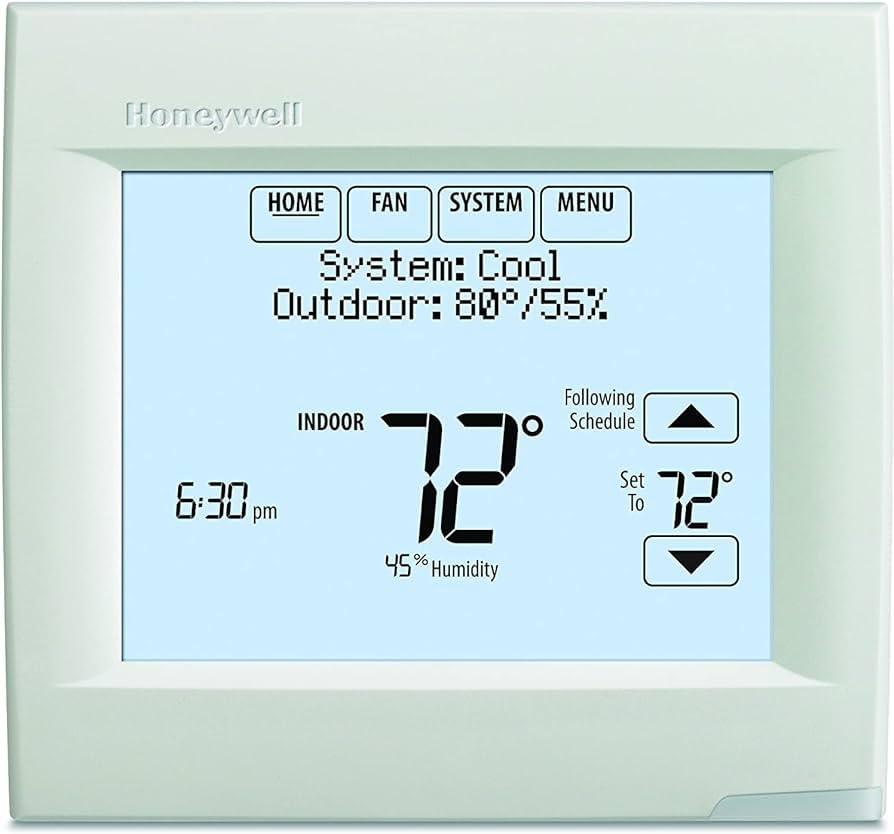
Rajah 1: Generic TH8321R1001 Vision PRO 8000 Thermostat. This image shows the front of the thermostat, highlighting its touchscreen display and sleek, white rectangular form factor.
2. Maklumat Keselamatan
AMARAN: Bahaya Elektrik
- Always disconnect power to the heating/cooling system at the main service panel before installing or servicing the thermostat to prevent electrical shock or equipment damage.
- Pemasangan hendaklah dilakukan oleh juruteknik bertauliah.
- Wear appropriate personal protective equipment, such as work gloves, during installation to prevent injury.
- Pastikan semua pendawaian mematuhi kod dan ordinan elektrik tempatan.
Before proceeding with installation, carefully read and understand all instructions. Confirm compatibility of this thermostat with your existing HVAC system.
3. Pemasangan
3.1. Compatibility and Replacement
The TH8321R1001 is a direct replacement for the YTH9421C1002 model. Note that this product does not include the Equipment Interface Module (EIM) THM5421R1021, which was part of the YTH9421C1002 package. The EIM is required for wireless capabilities and is sold separately.
3.2. Wireless Requirements
- Equipment Interface Module (EIM) THM5421R1021: Required to enable wireless functionality. Sold separately.
- RedLINK Internet Gateway (THM6000R1002): Required for remote access to the unit via Wi-Fi. Sold separately.
3.3. Pilihan Pemasangan
The thermostat offers flexible installation methods to accommodate various wiring scenarios:
- Wired Directly to Equipment: Standard wiring connection to the HVAC system.
- 2-Wire or Wireless with Equipment Interface Module (EIM): Utilizes the EIM for simplified wiring or wireless communication.
- 2-Wire or Wireless with TrueZONE: Integration with a TrueZONE system for zoned control.
Before mounting, ensure the wall plate is securely fastened and all wiring connections are correct according to the wiring diagrams provided with the EIM or TrueZONE system, if applicable.
4. Persediaan dan Konfigurasi Awal
4.1. On-Screen Setup
The TH8321R1001 features a plain language, on-screen setup process designed to minimize installation errors and reduce the need for a physical manual. Follow the prompts on the touchscreen display to configure your system settings, including:
- System type (heat pump/conventional)
- Number of heating/cooling stages
- Operasi kipas
- Tarikh dan masa
- Programming schedule
4.2. Konfigurasi Lanjutan
- Kad MicroSD: Installer settings can be copied from one thermostat to another using a microSD card, streamlining setup for multiple units.
- Maklumat Peniaga: The thermostat can display customizable dealer information and alerts, which can be configured during the setup process.
4.3. RedLINK Internet Gateway Setup (Optional)
If using the RedLINK Internet Gateway (THM6000R1002), follow its specific instructions to connect it to your home network. Once connected, you can register your thermostat with Total Connect Comfort Services. This enables remote monitoring and control of your heating and cooling system via free applications available for Apple and Android devices.
5. Arahan Operasi
5.1. Antara Muka Skrin Sentuh
The Vision PRO 8000 features an intuitive touchscreen display for all operations. Navigate through menus by touching the desired options. The main screen typically displays current temperature, setpoint, system mode, and fan status.
5.2. Mod Sistem
Common system modes include:
- haba: Mengaktifkan sistem pemanasan.
- Sejuk: Mengaktifkan sistem penyejukan.
- Auto: Automatically switches between heating and cooling as needed to maintain the set temperature.
- Mati: Turns off the heating and cooling systems.
- Emergency Heat (Heat Pump Systems): Activates auxiliary heating when the heat pump cannot meet the demand.
5.3. Mod Peminat
- Auto: Kipas hanya berfungsi apabila sistem pemanasan atau penyejukan aktif.
- pada: Fan runs continuously, regardless of heating or cooling demand.
5.4. Jadual Pengaturcaraan
The thermostat supports 7-day programmable scheduling. Access the schedule menu on the touchscreen to set different temperature setpoints for various times of the day and days of the week. This allows for energy savings by adjusting temperatures when the building is unoccupied or during sleep hours.
5.5. IAQ Contacts Control
The universal IAQ contacts allow control over humidification, dehumidification, or ventilation systems. These functions can typically be accessed and configured through the thermostat's advanced settings menu, providing integrated control over indoor air quality.
5.6. Remote Control (with RedLINK Gateway)
If a RedLINK Internet Gateway is installed and configured, you can monitor and adjust your thermostat settings remotely using the Total Connect Comfort app on your smartphone or tablet. This includes changing temperature, system mode, and viewing system status from anywhere with an internet connection.
6. Penyelenggaraan
6.1. Membersihkan Termostat
To clean the touchscreen display, gently wipe it with a soft, damp kain. Jangan gunakan pembersih yang melelas, pelarut atau semburan kimia, kerana ini boleh merosakkan skrin atau komponen dalaman.
6.2. System Filter Replacement
While the thermostat does not directly manage filter replacement, it may display reminders if configured during setup. Regularly check and replace your HVAC system's air filter as recommended by your HVAC system manufacturer to ensure optimal performance and air quality.
6.3. Battery Replacement (if applicable)
This thermostat is typically powered by the HVAC system. If your specific installation includes a battery backup, replace batteries annually or when a low battery indicator appears on the screen.
7. Penyelesaian masalah
If you experience issues with your thermostat, refer to the following common troubleshooting steps:
| Masalah | Kemungkinan Punca | Penyelesaian |
|---|---|---|
| Skrin termostat kosong. | No power to the thermostat; loose wiring; tripped circuit breaker. | Check power supply to HVAC system. Ensure circuit breaker is not tripped. Verify wiring connections are secure. |
| Sistem Pemanasan/Penyejukan tidak bertindak balas. | Incorrect system mode; wiring issue; system lockout. | Ensure thermostat is in the correct mode (Heat/Cool/Auto). Check wiring. Wait 5 minutes for system lockout to reset. |
| Bacaan suhu kelihatan tidak tepat. | Thermostat located near heat source/draft; calibration needed. | Relocate thermostat if possible. Consult advanced settings for temperature calibration options. |
| Cannot connect to Wi-Fi/Remote access not working. | RedLINK Internet Gateway not installed/configured; network issues. | Ensure RedLINK Internet Gateway (THM6000R1002) is installed and properly connected to your router. Check home Wi-Fi network status. |
For persistent issues, consult a qualified HVAC technician or contact customer support.
8. Spesifikasi
- Nama Model: TH8321R1001
- Jenama: Generik
- Jenis Pengawal: Android (refers to app compatibility)
- Ciri Khas: Boleh diprogramkan
- warna: putih
- Kegunaan Khusus: Residential, Light Commercial
- Jenis Kawalan Suhu: Boleh diprogramkan, Pintar/Jarak Jauh
- Voltage: 24 Volt
- Bahan: plastik
- bentuk: segi empat tepat
- Jenis Paparan: Skrin sentuh
- Jenis Kawalan: Sentuh
- Kaedah Kawalan: App (via RedLINK Gateway)
- Protokol Ketersambungan: Wi-Fi (via RedLINK Gateway)
- Jenis Pemasangan: Lekap di Dinding, Lekap Permukaan
- gaya: moden
- Lampu latar: ya
9. Waranti dan Sokongan
For warranty information, please refer to the documentation provided with your purchase or contact the seller directly. Warranty terms and conditions may vary. For technical support, please contact the retailer or a certified HVAC professional.
Nota: Please confirm compatibility before purchasing or installing any replacement parts or accessories.


