
ECOROAD EC6
ECOROAD EC6 Electric Scooter User Manual
Model: EC6
1. Persediaan
Membuka kotak dan Perhimpunan
Carefully remove all components from the packaging. The ECOROAD EC6 scooter comes partially assembled. You will need to attach the handlebar to the main stem using the provided screws and Allen wrench. Ensure all connections are secure before use.

Image: ECOROAD EC6 scooter components and assembly tools.
Video: Detailed assembly process for the ECOROAD EC6 Electric Scooter, including attaching the handlebar and using the provided tools.
Mengecas Bateri
Before first use, fully charge the scooter's battery. Connect the charger to the charging port located on the side of the scooter and then plug it into a standard electrical outlet. The charging time is approximately 4 hours. The LED indicator on the charger will change color when charging is complete.
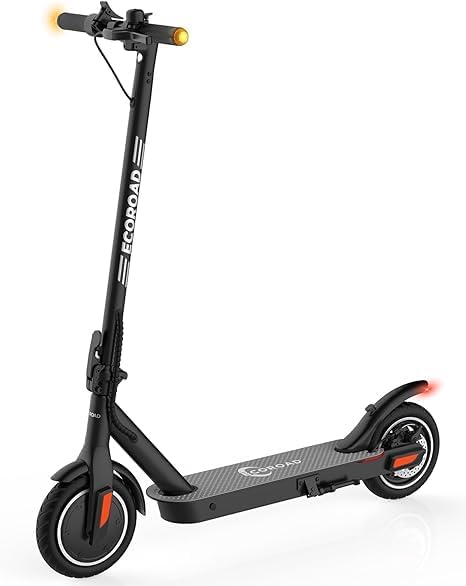
Image: The ECOROAD EC6 Electric Scooter connected to its charger.
2. Arahan Operasi
Memulakan Skuter
To start the ECOROAD EC6, first kick-start the scooter to a speed over 3 MPH. Once moving, press the throttle lever located on the right handlebar to accelerate.

Image: A person riding the ECOROAD EC6 Electric Scooter.
Mod Kelajuan
The ECOROAD EC6 offers four speed modes to suit various riding conditions:
- Mod ECO: Up to 9 MPH (for energy efficiency)
- Mod D: Up to 16 MPH (standard commuting speed)
- S S: Up to 19 MPH (maximum speed)
- Push Assist Mode: Up to 4 MPH (for walking alongside the scooter)
To switch between these modes, quickly press the power button twice.

Image: Digital display showing the different speed modes (ECO, D, S, Push Assist).
Lights and Turn Signals
For enhanced safety, especially during low-light conditions, the ECOROAD EC6 is equipped with a headlight, taillight, and turn signals.
- Lampu Depan/Lampu Belakang: Press the power button once to turn the headlight and taillight on or off.
- Isyarat Belok: Use the left or right switch on the handlebar to activate the corresponding turn signal.

Image: Visual representation of the ECOROAD EC6's lighting system.
Video: Demonstrates the ECOROAD EC6's lighting features, including the headlight, taillight, and turn signals in action.
Kawalan Pelayaran
To activate cruise control, maintain your desired speed for 8 seconds. The scooter will then hold this speed automatically. To deactivate, simply press the brake lever or the throttle.
Sistem Lipat
The EC6 features a secure 3-second folding system, making it highly portable and easy to store or carry on public transport. To fold, locate the folding mechanism on the stem, release the latch, and fold the handlebar down until it clicks into place with the rear fender.

Image: The ECOROAD EC6 Electric Scooter shown in its compact, folded position.
Video: Demonstrates the quick and effortless folding mechanism of the ECOROAD EC6 Electric Scooter.
3. Penyelenggaraan
Penyelenggaraan Tayar
The ECOROAD EC6 uses 8.5-inch pneumatic (air-filled) tires for a comfortable ride. Regularly check tire pressure to ensure optimal performance and prevent punctures. A spare inner tube is included for replacement if needed.

Imej: Jarak dekat view of the ECOROAD EC6's pneumatic tires.
Pelarasan Brek
The scooter is equipped with EABS and a rear disc brake system. Periodically inspect the brake pads and cables for wear and tear. Adjust the brake tension as necessary to ensure effective stopping power. If you are unsure how to adjust the brakes, please consult a qualified technician.

Imej: Terperinci view of the ECOROAD EC6's rear disc brake system.
4. Penyelesaian masalah
Isu dan Penyelesaian Biasa
- How to Start the ECOROAD Electric Scooters? You need to get a kick-start speed over 3 MPH, then press the throttle to accelerate.
- How to Use the Turn Signals? Switch to the left (right) to activate the left (right) turn signal.
- How to Turn on/off the Headlight? Only press the power button ONCE to turn on/off headlight.
- How to Switch Gears? Quickly press the power button TWICE to switch gears. 4 Gears: ECO, D, S and push assist mode.
- How to Turn on/off Cruise Control? Quickly press the power button FOUR TIMES to turn on/off Cruise Control.
- Skuter tidak boleh dihidupkan: Ensure the battery is fully charged. If the issue persists, try pressing the power button multiple times. If still unresponsive, contact customer support.
- Brake wire severed: This is a critical safety issue. Immediately cease use of the scooter and contact customer support for assistance. Do not attempt to repair yourself.
5. Spesifikasi
| Ciri | Perincian |
|---|---|
| Jenama | ECOROAD |
| Nama Model | EC6 |
| Kuasa Motor | 350W (Puncak 400W) |
| Kelajuan Maks | 19 MPH |
| Beban Maks | 220 Paun (100 KG) |
| Julat Jarak Maks | 15 Batu |
| Masa Mengecas | 4 Jam |
| Jenis Tayar | 8.5" Pneumatic Tires |
| Sistem Brek | EABS + Rear Disc Brake |
| Berat Barang | 25.4 LBS (11.5 Kilograms) |
| Dimensi Produk | 41.7"L x 19.3"W x 42.1"H |
| Bahan Bingkai | aluminium |
6. Waranti dan Sokongan
ECOROAD provides a 1-year or 180-day warranty for different parts of the EC6 Electric Scooter. For specific warranty details or to initiate a support request, please refer to the warranty information included in your product packaging or visit the official ECOROAD webtapak.
For US-based online service and technical assistance, please contact ECOROAD customer support. They are available to help with any questions or issues you may encounter with your scooter.
Ask a question about this manual
Ask about setup, troubleshooting, compatibility, parts, safety, or missing instructions. Manuals+ will review the question and use this page’s manual context to help answer it.