
1. Pengenalan
Thank you for choosing the Parmedu BK043 Electric Kitchen Stand Mixer. This manual provides essential information for the safe and efficient operation, maintenance, and troubleshooting of your new appliance. Please read it thoroughly before first use and keep it for future reference.
2. Arahan Keselamatan
Untuk memastikan operasi selamat, sila patuhi langkah berjaga-jaga berikut:
- Sentiasa cabut plag pengadun dari soket kuasa sebelum membersihkan, memasang atau membuka bahagian-bahagiannya.
- Jangan rendam unit motor dalam air atau sebarang cecair lain. Bersih dengan iklanamp kain sahaja.
- Jauhkan tangan, rambut, pakaian, serta spatula dan peralatan lain daripada pemukul yang bergerak semasa operasi untuk mengelakkan kecederaan dan/atau kerosakan pada pengadun.
- Awasi kanak-kanak dengan teliti semasa perkakas ini sedang digunakan. Perkakas ini tidak bertujuan untuk digunakan oleh kanak-kanak.
- Jangan kendalikan sebarang perkakas dengan kord atau palam yang rosak, atau selepas perkakas tidak berfungsi atau terjatuh atau rosak dalam apa jua cara.
- Gunakan hanya lampiran yang disyorkan atau dijual oleh pengilang.
- Avoid placing the mixer near hot surfaces or open flames.
- Ensure the mixer is placed on a stable, flat, and dry surface during operation.
3. Produk Lebihview
The Parmedu BK043 Electric Kitchen Stand Mixer is designed for versatile food preparation. It includes the main mixer unit, a 4.75-quart stainless steel mixing bowl, and three essential attachments: a dough hook, a flat beater, and an egg whisk. A transparent splash guard is also included to minimize mess during mixing.

Figure 1: Parmedu BK043 Electric Kitchen Stand Mixer with its main components and attachments.

Figure 2: Labeled components of the Parmedu BK043 Stand Mixer for easy identification.
4. Persediaan
Follow these steps to set up your mixer:
- Letakkan Pengadun: Position the mixer on a clean, dry, and stable countertop. Ensure the four anti-slip suction feet are securely attached to the surface.
- Lift the Head: Press the tilt-lock button located on the side of the mixer and gently lift the motor head until it locks into the upright position.
- Pasang Mangkuk: Place the 4.75-quart stainless steel mixing bowl onto the base. Turn the bowl clockwise until it locks securely into place.
- Select and Attach Accessory: Choose the appropriate attachment (dough hook, flat beater, or whisk) for your recipe. Insert the attachment into the accessory shaft and twist it to secure.
- Add Splash Guard (Optional): If desired, attach the transparent splash guard to the motor head. This helps prevent ingredients from splashing out during mixing.
- Lower the Head: Press the tilt-lock button again and gently lower the motor head until it clicks into the locked position.

Figure 3: Engaging the tilt-lock mechanism to raise the mixer head.

Figure 4: The anti-slip suction feet ensure stability during operation.
5. Arahan Operasi
Once assembled, you can begin mixing your ingredients:
- Tambah Bahan: Place your ingredients into the mixing bowl. If using the splash guard, you can add ingredients through its opening.
- Pasangkan: Sambungkan kord kuasa ke salur keluar elektrik yang sesuai.
- Pilih Kelajuan: Turn the speed control knob to your desired setting (1-8). The mixer also features a 'P' (Pulse) setting for short bursts of power.
- Pencampuran Monitor: Observe the mixing process. Adjust speed as needed.
- Hentikan Pengadun: When finished, turn the speed control knob to '0' and unplug the appliance.
- Keluarkan Bahan: Lift the motor head, remove the attachment, and then unlock and remove the mixing bowl to access your prepared ingredients.
Panduan Kelajuan
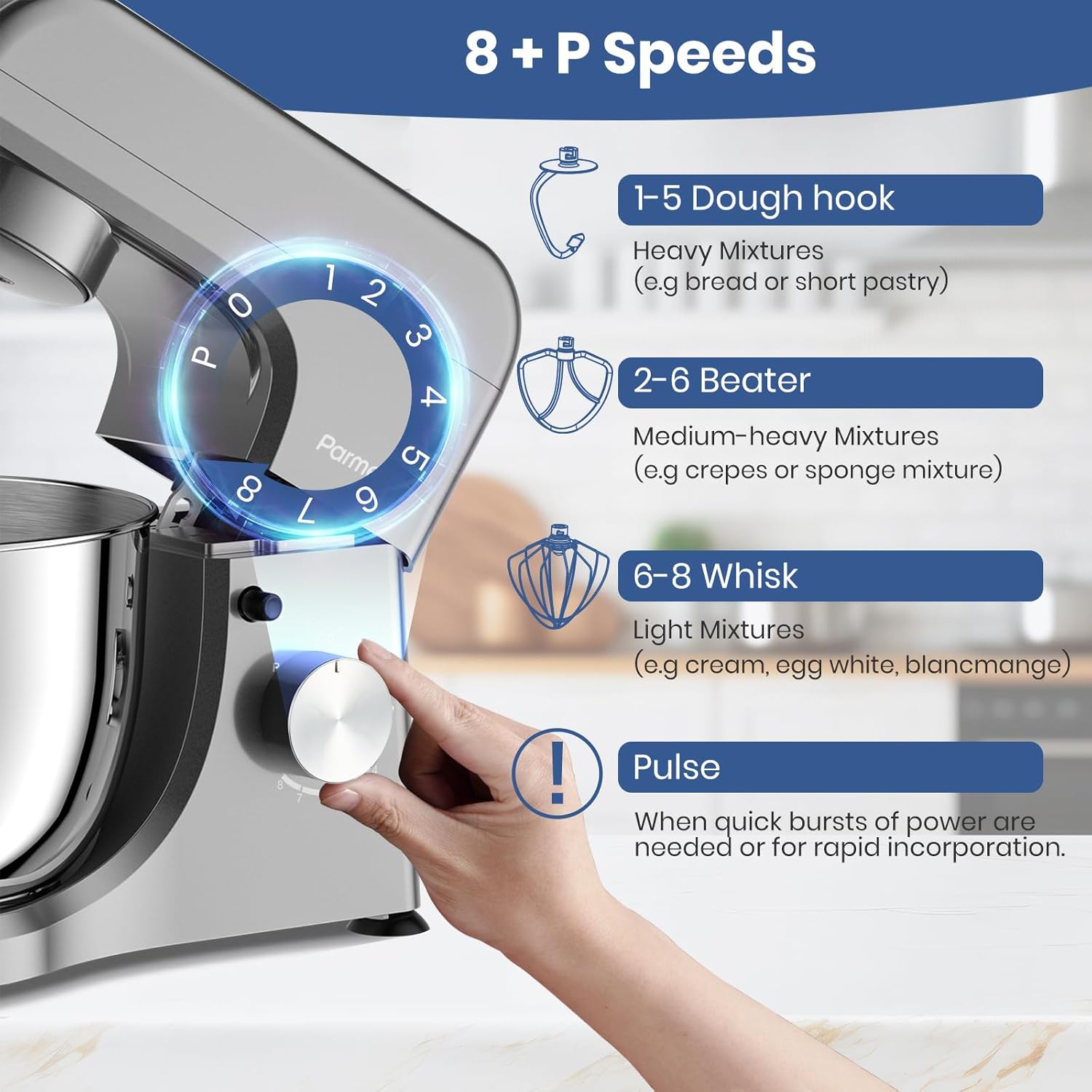
Figure 5: Speed settings and recommended uses for each attachment.
- Dough Hook (Speeds 1-5): Ideal for heavy mixtures like bread dough or short pastry.
- Flat Beater (Speeds 2-6): Suitable for medium-heavy mixtures such as crepes or sponge cake batter.
- Whisk (Speeds 6-8): Best for light mixtures like cream, egg whites, or blancmange.
- Nadi (P): Use for quick bursts of power or rapid incorporation of ingredients.
Demonstrasi Operasi
Video 1: Official product video demonstrating the features and operation of the Parmedu 380W 8-Speed Compact Tilt-Head Household Food Mixer, including attachment changes and speed settings.
Video 2: Video showcasing the Electric Stand Mixer with a 5.3 Quart Stainless Steel Bowl, demonstrating its assembly and mixing capabilities for various ingredients.
Video 3: Demonstration of the Upgraded Household Stand Mixer by Peicual-US, highlighting its features and performance for different kitchen tasks.
6. Penyelenggaraan & Pembersihan
Proper cleaning and maintenance will extend the life of your mixer:
- Cabut plag Sebelum Membersihkan: Always ensure the mixer is unplugged from the power outlet before cleaning.
- Clean Attachments and Bowl: The stainless steel mixing bowl, dough hook, flat beater, and whisk are dishwasher safe for easy cleaning. Alternatively, wash them with warm, soapy water and rinse thoroughly.
- Unit Utama Bersih: Lap bahagian luar unit motor dengan kain lembut,amp kain. Jangan gunakan pembersih yang melelas atau rendam unit di dalam air.
- Keringkan dengan teliti: Ensure all parts are completely dry before reassembling or storing the mixer.

Figure 6: Cleaning instructions for mixer attachments.
7. Penyelesaian masalah
Jika anda menghadapi masalah dengan pengadun anda, rujuk kepada masalah dan penyelesaian biasa berikut:
| Masalah | Kemungkinan Punca | Penyelesaian |
|---|---|---|
| Pengadun tidak dihidupkan. | Not plugged in; power outlet malfunction; motor head not fully lowered/locked. | Ensure power cord is securely plugged in. Test outlet with another appliance. Ensure motor head is fully lowered and locked. |
| Lampiran tidak bercampur dengan betul. | Attachment not correctly installed; too much/too little mixture. | Re-install attachment, ensuring it clicks into place. Adjust ingredient quantities according to recipe. |
| Bunyi atau getaran yang berlebihan. | Mixer overloaded; unstable surface; attachment loose. | Reduce load. Ensure mixer is on a flat, stable surface. Check if attachment is securely fastened. |
| Motor smells during first use. | Normal for new motors. | This is typically normal for new appliances and should dissipate after a few uses. Ensure proper ventilation. |
8. Spesifikasi
- Jenama: Parmedu
- Nama Model: BK043
- Kuasa: 380W
- Tetapan Kelajuan: 8 kelajuan + Fungsi nadi
- Kapasiti Mangkuk: 4.75 Kuart (4.5 Liter)
- Bahan mangkuk: 304 Keluli Tahan Karat
- Dimensi Produk: 11.8"D x 6.9"W x 10.4"H
- Berat Barang: 8.4 paun
- Tahap Bunyi: ≤75dB
- Ciri Khas: Anti-Skid suction feet, Tilt-Head design
9. Waranti & Sokongan
Parmedu offers a 12-MONTH warranty policy for this product. Our team is committed to ensuring customers' worry-free purchases. If you have any questions, concerns, or require technical assistance, please feel free to contact us anytime. Your satisfaction is our top priority.
For support, please refer to the contact information provided on your product packaging or the official Parmedu webtapak.