
pengenalan
This manual provides essential information for the safe and efficient operation of your Green Cell Duo 12V/24V to 230V 300W/600W Modified Sine Wave Power Inverter. This universal DC/AC inverter is designed to convert battery power from 12V or 24V DC sources (such as car or truck batteries) into 230V AC power, allowing you to power various electronic devices on the go. Please read this manual thoroughly before installation and use, and retain it for future reference.
Arahan Keselamatan
Always prioritize safety when operating electrical equipment. Failure to follow these instructions may result in electric shock, fire, or serious injury.
- Pengudaraan: Ensure the inverter is installed in a well-ventilated area. Do not block the ventilation openings or fan.
- Kelembapan: Do not expose the inverter to rain, moisture, or water. Operate only in dry conditions.
- Suhu: Avoid operating the inverter in direct sunlight or near heat sources. Maintain ambient temperatures within the specified range.
- Bahan mudah terbakar: Do not operate the inverter near flammable liquids, gases, or other combustible materials.
- Sambungan: Connect the inverter only to a 12V or 24V DC power source. Ensure correct polarity (+ to + and - to -). Incorrect connection can damage the inverter and battery.
- Muatkan: Do not exceed the inverter's continuous power rating of 300W. The surge power is 600W for short periods. Overloading can cause damage or trigger protection mechanisms.
- Pembumian: Pastikan inverter dibumikan dengan betul mengikut kod elektrik tempatan.
- Kanak-kanak: Jauhkan penyongsang daripada capaian kanak-kanak.
- Penyelenggaraan: Only qualified personnel should perform maintenance or repairs. Refer to the 'Maintenance' section for user-serviceable parts.

Imej: This diagram illustrates the inverter's built-in safety protections, including short-circuit protection, over-voltage protection, overload protection, high-temperature protection, reverse polarity protection, and under-voltage perlindungan.
Kandungan Pakej
Sila semak pakej untuk item berikut:
- Green Cell Duo Power Inverter (Model: INVGC1224M300DUO)
- DC Connection Cable (50 cm) with battery clamps
- 12V/24V Car Cigarette Lighter Plug
- Two (2) Spare Fuses
- Manual Pengguna

Imej: The Green Cell power inverter shown alongside its included accessories: DC connection cables with battery clamps, a cigarette lighter plug, and two spare fuses.
Produk Selesaiview
Familiarize yourself with the components and features of your Green Cell power inverter.
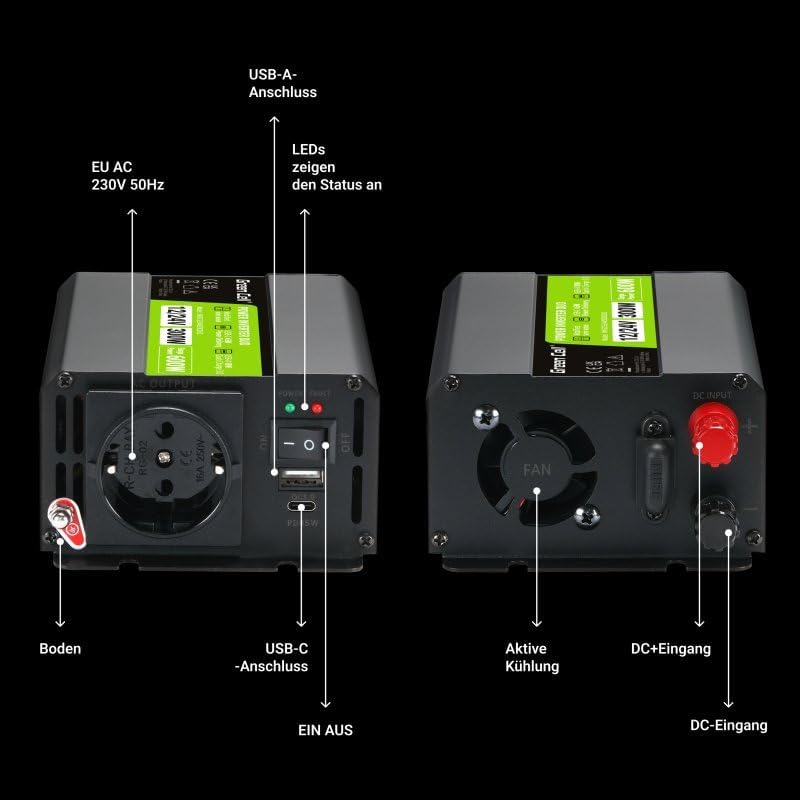
Imej: This detailed diagram highlights the various ports and features of the inverter. On the output side, it shows the EU AC 230V 50Hz outlet, USB-A port, USB-C port, ON/OFF switch, and status LEDs. On the input side, it shows the DC+ and DC- input terminals, the cooling fan, and the external fuse holder.
Ciri-ciri Utama:
- Mobile Power: Provides 300W continuous power (600W surge) for electronics in remote locations.
- Flexible Input: Supports dual input voltage of 12V and 24V DC, compatible with car and truck electrical systems.
- Pengecasan Cepat: Equipped with USB-C Power Delivery (45W) and USB-A Quick Charge 3.0 (18W) ports for efficient charging of multiple devices.
- Modified Sine Wave Output: Suitable for most common electronic devices.
- Ciri-ciri Keselamatan: Includes short-circuit, over-voltage, overload, high-temperature, reverse polarity, and under-voltage perlindungan.
- Mesra pengguna: Intuitive design with an easily accessible and replaceable fuse.
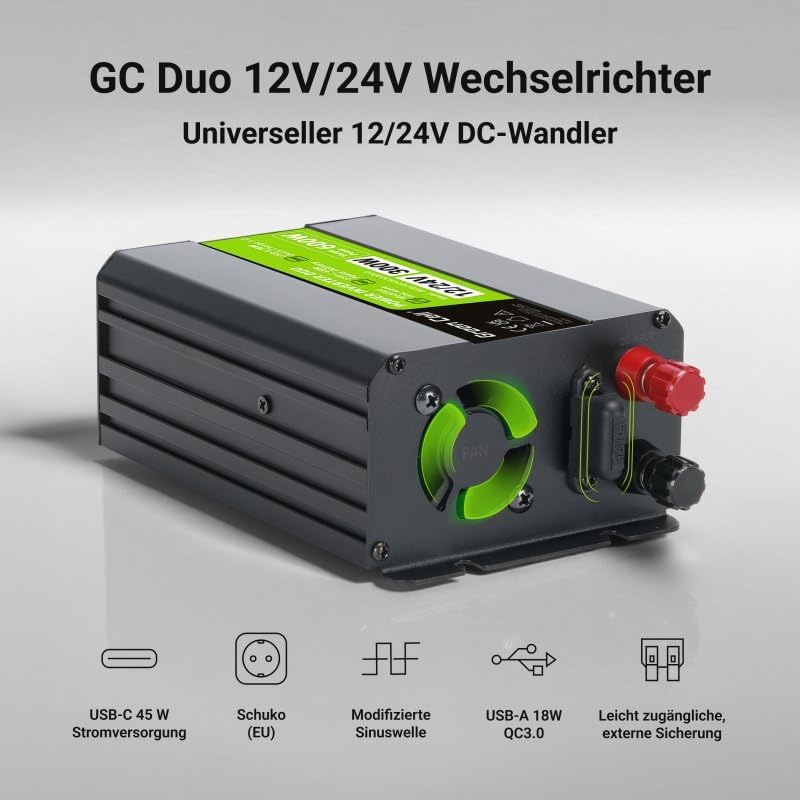
Imej: This image highlights the main features of the Green Cell Duo inverter: USB-C 45W Power Delivery, Schuko (EU) 230V socket, Modified Sine Wave output, USB-A 18W Quick Charge 3.0, and an easily accessible external fuse.
Persediaan dan Pemasangan
Follow these steps to properly set up and install your power inverter.
- Pilih Lokasi: Select a dry, well-ventilated area for installation, away from direct sunlight, heat sources, and flammable materials. Ensure adequate space around the inverter for air circulation, especially around the fan.
- Pemasangan (Pilihan): The inverter can be mounted using the integrated mounting tabs. Use appropriate screws (not included) to secure it to a stable surface.
- Connect to DC Power Source:
- For Battery Clamp Sambungan: Connect the red cable (positive +) to the positive terminal of your 12V or 24V battery and the black cable (negative -) to the negative terminal. Ensure connections are tight and secure.
- For Cigarette Lighter Plug Connection: Insert the cigarette lighter plug into your vehicle's 12V or 24V cigarette lighter socket. This method is suitable for lower power devices (typically up to 150W, check your vehicle's socket rating).
Penting: Always connect the inverter to the DC power source sebelum ini turning it on or connecting AC devices.
- Pembumian: Connect the inverter's grounding terminal to a proper earth ground (e.g., vehicle chassis) using a suitable wire.
Arahan Operasi
Once the inverter is properly installed and connected, follow these steps to operate it:
- Turn On the Inverter: Flip the ON/OFF switch on the inverter to the 'ON' position. The status LEDs should illuminate, indicating the inverter is active.
- Sambungkan Peranti AC: Plug your 230V AC device(s) into the AC outlet on the inverter. Ensure the total power consumption of your devices does not exceed 300W.
- Sambungkan Peranti USB: For charging USB devices, connect them to the USB-A Quick Charge 3.0 port or the USB-C Power Delivery port.
- Pantau Tahap Bateri: Pay attention to your vehicle's battery level, especially when using the inverter for extended periods. Prolonged use can drain the battery. The inverter has an under-voltage protection feature that will shut it down if the battery voltage jatuh terlalu rendah.
- Turn Off the Inverter: When you are finished using the inverter, first disconnect all AC and USB devices, then flip the ON/OFF switch to the 'OFF' position.
Penyelenggaraan
Penyelenggaraan berkala memastikan prestasi optimum dan jangka hayat inverter anda.
- Pembersihan: Bersihkan bahagian luar inverter secara berkala dengan kain kering dan lembut. Jangan gunakan pembersih cecair atau pelarut.
- Pengudaraan: Ensure the cooling fan and ventilation openings are free from dust and debris. Use compressed air to clear any blockages if necessary.
- Sambungan: Periksa semua sambungan elektrik (input DC, output AC, pembumian) secara berkala untuk memastikan ia ketat dan bebas daripada kakisan.
- Penggantian fius: The inverter features an easily accessible, replaceable fuse. If the inverter stops working and the status light indicates a fuse issue, disconnect the inverter from all power sources, open the fuse holder, and replace the blown fuse with a new one of the same rating (spare fuses are included).
Menyelesaikan masalah
Jika anda menghadapi masalah dengan penyongsang anda, rujuk kepada masalah dan penyelesaian biasa berikut:
| Masalah | Kemungkinan Punca | Penyelesaian |
|---|---|---|
| Inverter tidak menyala. | No DC input power; Loose connections; Blown fuse; Low battery voltage. | Check DC power source and connections. Ensure battery is charged. Replace fuse if blown. |
| Tiada output AC. | Overload; Over-temperature; Low battery voltage; Device fault. | Reduce connected load. Allow inverter to cool down. Recharge battery. Check AC device. |
| Inverter shuts down. | Overload; Over-temperature; Low battery voltage; Short circuit. | Reduce load. Allow cooling. Recharge battery. Check for short circuits in connected devices. |
| Fan is noisy or not working. | Dust/debris in fan; Fan malfunction. | Clean fan and vents. If malfunction persists, contact support. |
Spesifikasi
| Ciri | Spesifikasi |
|---|---|
| Nombor Model | INVGC1224M300DUO |
| Input Voltage | 12V / 24V DC |
| Keluaran Voltage | 230V AC |
| Kuasa Berterusan | 300 Watt |
| Kuasa Lonjakan | 600 Watt |
| Bentuk Gelombang Output | Gelombang Sinus diubah suai |
| Kekerapan Output | 50 Hz |
| Output USB-C | Penghantaran Kuasa 45W |
| Keluaran USB-A | Caj Pantas 18W 3.0 |
| Kecekapan | Sehingga 90% |
| Penggunaan yang Disyorkan | Kereta, Lori |
| warna | Hitam |
| Pengeluar | CSG S.A |
Waranti dan Sokongan
Green Cell products are designed for reliability and performance. For warranty information, technical support, or service inquiries, please refer to the contact details provided on the official Green Cell website or your purchase documentation. Please have your model number (INVGC1224M300DUO) and proof of purchase ready when contacting support.