
1. Pengenalan
Thank you for choosing the AWEI T29 Wireless Earbuds. These earbuds feature Bluetooth 5.2 technology for stable connectivity, Active Noise Cancellation (ANC) for an immersive audio experience, and IPX6 water resistance for durability. This manual provides detailed instructions on how to set up, operate, and maintain your earbuds to ensure optimal performance.
2. Kandungan Pakej
Sila sahkan bahawa semua item terdapat dalam pakej anda:
- Wireless Bluetooth Headset (Earbuds)
- Wireless Bluetooth Headset Charging Case
- Kabel Pengecas USB-C
- Arahan Pengguna (Manual Ini)
3. Produk Lebihview
The AWEI T29 earbuds are designed for comfort and high-quality audio. The compact charging case protects and recharges your earbuds on the go.

Image: AWEI T29 Wireless Earbuds and Charging Case. This image displays the two earbuds placed within their open charging case, showcasing reka bentuk anggun mereka.
4. Persediaan
4.1 Mengecas Fon telinga dan Sarung
Sebelum penggunaan pertama, cas sepenuhnya fon telinga dan bekas pengecas.
- Connect the provided USB-C charging cable to the charging port on the case and to a power source.
- Place the earbuds into the charging case. Ensure they are properly seated; indicator lights on the earbuds will confirm charging status.
- The charging case takes approximately 1 hour to fully charge.

Image: AWEI T29 Earbuds Charging Indicator. This image illustrates the charging case with earbuds inside, showing a visual representation of battery life and charging time.
4.2 Initial Pairing with a Device
Fon telinga akan memasuki mod berpasangan secara automatik apabila dialih keluar daripada bekas pengecasan.
- Open the charging case. The earbuds will power on automatically.
- Pada telefon pintar, tablet atau peranti lain yang didayakan Bluetooth anda, navigasi ke tetapan Bluetooth.
- Hidupkan Bluetooth dan cari peranti yang tersedia.
- Select "AWEI T29" from the list of devices to connect.
- Once connected, the earbuds will automatically reconnect to the last paired device when removed from the case.
5. Arahan Operasi
5.1 Hidupkan/Mati Kuasa
- Hidupkan kuasa: Buka bekas pengecasan dan fon telinga akan dihidupkan secara automatik.
- Matikan: Letakkan fon telinga kembali ke dalam bekas pengecasan dan tutup penutupnya. Mereka akan dimatikan secara automatik.
5.2 Kawalan Sentuh Pintar
The AWEI T29 earbuds feature intuitive touch controls on each earbud:
- Main/Jeda: Ketik sekali sama ada fon telinga.
- Lagu Seterusnya: Ketik dua kali pada fon telinga kanan.
- Lagu Sebelumnya: Ketik dua kali pada fon telinga kiri.
- Kelantangan: Ketik tiga kali pada fon telinga kanan.
- Perlahankan suara: Ketik tiga kali pada fon telinga kiri.
- Jawab/Tamatkan Panggilan: Single tap either earbud during an incoming call.
- Tolak Panggilan: Long press either earbud during an incoming call.
- Aktifkan Pembantu Suara: Tekan lama fon telinga kiri.
- ANC Mode Cycle (ANC On/Off/Transparency): Tekan lama fon telinga kanan.
5.3 Pembatalan Bising Aktif (ANC)
The built-in intelligent chip with ANC effectively reduces ambient noise, providing a clearer listening experience for music and calls.

Image: Person wearing AWEI T29 Earbuds with Active Noise Cancellation. This image shows a person wearing the earbuds, illustrating the noise cancellation feature in action.

Image: ANC Effectiveness Graph for AWEI T29 Earbuds. This graph visually represents the reduction of ambient noise before and after activating the Active Noise Cancellation feature.
5.4 Hi-Fi Sound Quality
The AWEI T29 earbuds are equipped with a 13mm speaker, Nano Titanium Diaphragms for clearer treble, and a Pure Copper Voice Coil for vigorous bass, delivering an immersive sound experience.
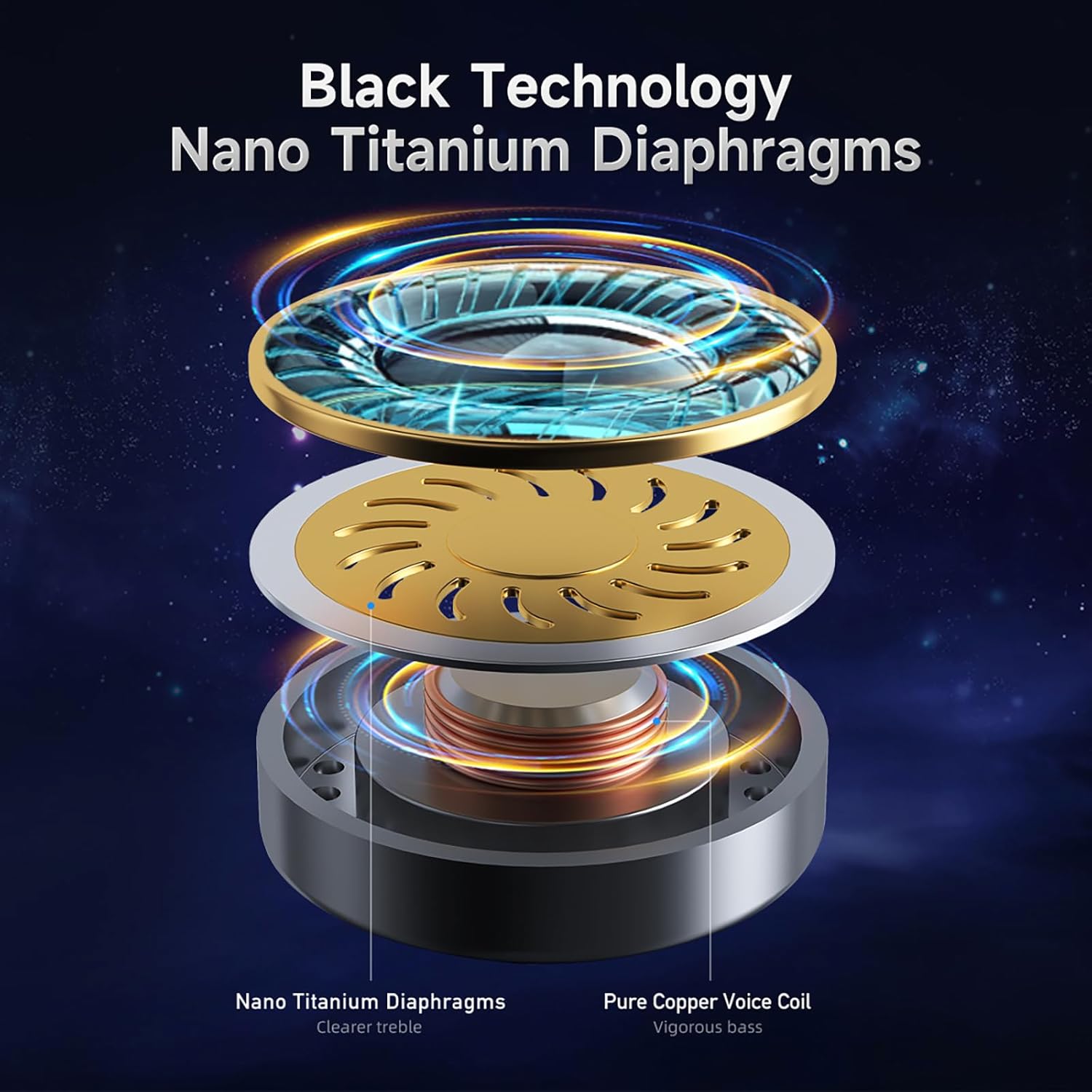
Image: AWEI T29 Earbud Internal Components Diagram. This diagram illustrates the internal structure of the earbud, highlighting the Nano Titanium Diaphragms and Pure Copper Voice Coil.

Image: AWEI T29 Earbud Sound Quality Features. This image shows a cutaway view of an earbud, emphasizing its internal design for high-definition sound quality and reduction of the stethoscope effect.
6. Penyelenggaraan
6.1 Pembersihan
Untuk mengekalkan prestasi dan kebersihan yang optimum:
- Lap perlahan fon telinga dan bekas pengecas dengan kain lembut, kering dan tidak berbulu.
- Jangan gunakan pembersih yang melelas, pelarut atau bahan kimia yang keras.
- Pastikan kenalan pengecas bersih dan bebas daripada serpihan.
6.2 Tahan Air
The AWEI T29 earbuds are rated IPX6 waterproof, meaning they are resistant to strong jets of water. This makes them suitable for workouts and light rain. However, they are not designed for submersion in water or for use during swimming.
7. Penyelesaian masalah
Jika anda menghadapi masalah dengan fon telinga AWEI T29 anda, sila rujuk penyelesaian biasa berikut:
- Fon telinga tidak berpasangan: Ensure both earbuds are charged, Bluetooth is enabled on your device, and the earbuds are in pairing mode. Try resetting the earbuds by placing them back in the case and then removing them.
- No sound from one or both earbuds: Check the volume level on your device and ensure the earbuds are properly connected. Try re-pairing the earbuds.
- Isu pengecasan: Verify that the USB-C cable is securely connected to both the charging case and the power source. Ensure the charging contacts on the earbuds and inside the case are clean.
- Kualiti bunyi yang lemah: Ensure the earbuds are properly seated in your ears for a good seal. Clean any debris from the earbud nozzles.
- Sambungan terputus-putus: Ensure your device is within the 10-meter Bluetooth range and there are no significant obstructions between the earbuds and your device.
8. Spesifikasi
Key technical specifications for the AWEI T29 Wireless Earbuds:
| Ciri | Spesifikasi |
|---|---|
| Model | T29 |
| Versi Bluetooth | 5.2 |
| Saiz Pembesar Suara | 13mm |
| Penilaian Ketahanan Air | IPX6 |
| Waktu Main Earbud (Caj Tunggal) | Sehingga 9 jam |
| Jumlah Masa Main (dengan Sarung Pengecasan) | Sehingga 30 jam (mod dwi-telinga), 60 jam (mod telinga tunggal) |
| Masa Pengecasan (Kes) | Lebih kurang 1 jam |
| Jenis Kawalan | Kawalan Sentuh |
| Kawalan Bunyi | Pembatalan Bunyi Aktif |
| Peranti Serasi | Smartphones, PCs, Tablets, Laptops, TVs |
| Berat Barang | 150 g (total package weight) |
9. Waranti dan Sokongan
For warranty information or technical assistance, please refer to the warranty card included in your package or contact Awei customer support through the retailer where you purchased the product. Please have your product model (T29) and purchase details ready when contacting support.