
1. Pengenalan
Thank you for choosing the ALONEFIRE H64 Mini LED Flashlight. This compact and powerful flashlight is designed for various lighting needs, featuring multiple modes, USB-C recharging, and a durable aluminum alloy construction. Please read this manual carefully to ensure proper use and maintenance of your device.
2. Produk Lebihview
Familiarize yourself with the components of your ALONEFIRE H64 flashlight.
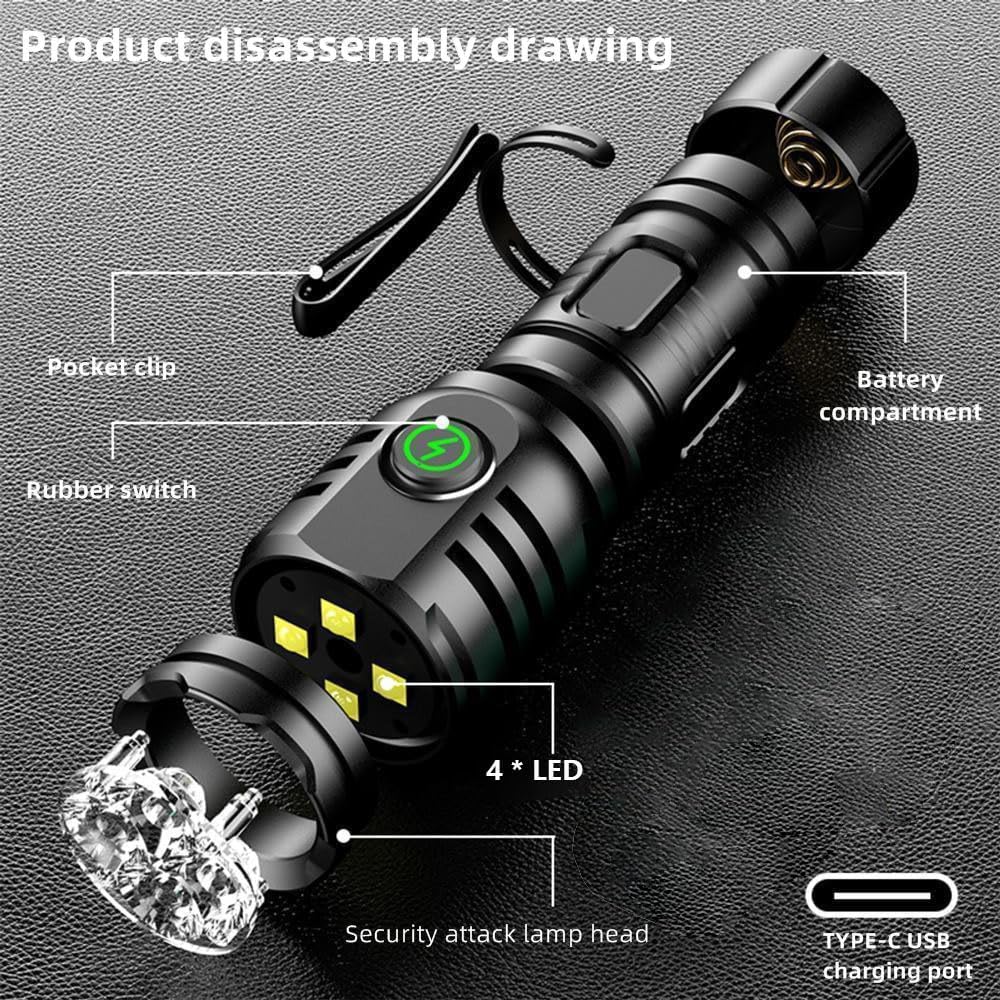
Rajah 1: Product Disassembly Drawing. This image illustrates the key components of the ALONEFIRE H64 flashlight, including the pocket clip for attachment, the rubber switch for operation, the four LED light sources, the security attack lamp head, the Type-C USB charging port, and the internal battery compartment.
- Klip poket: For attaching the flashlight to clothing, hats, or gear.
- Rubber Switch: Main control button for power and mode selection.
- 4 * LED: The primary light sources providing illumination.
- Security Attack Lamp Ketua: Designed for emergency or self-defense use.
- Port Pengecasan USB Jenis-C: Untuk pengecasan semula yang mudah dan pantas.
- Petak Bateri: Houses the internal rechargeable battery.
3. Persediaan
3.1 Pengecasan Awal
Before first use, fully charge the ALONEFIRE H64 flashlight. Use the provided USB Type-C cable to connect the flashlight to a compatible USB power source (e.g., computer, wall adapter).
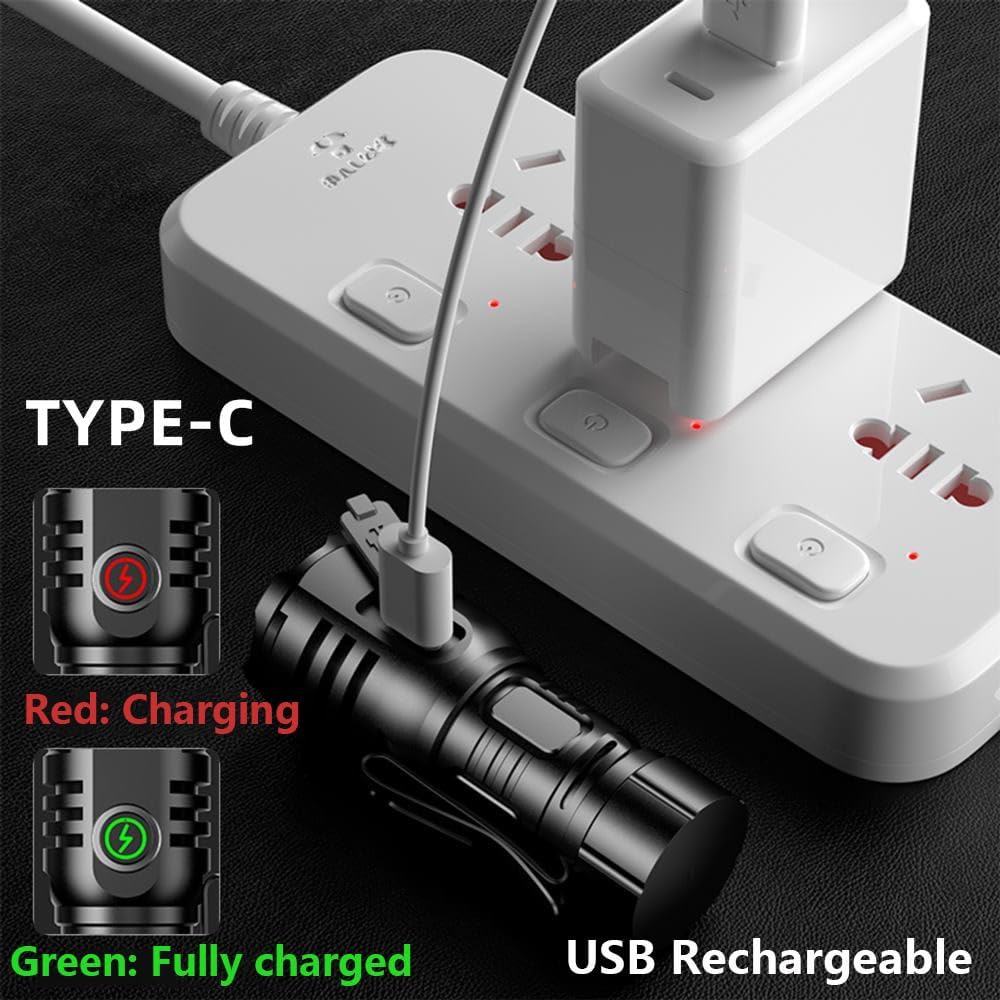
Rajah 2: USB Type-C Charging. The image displays the flashlight being charged via its Type-C port. A red indicator light signifies that the device is currently charging, while a green light indicates a full charge.
- The indicator light on the flashlight will glow merah semasa mengecas.
- The indicator light will turn hijau apabila bateri telah dicas sepenuhnya.
- Pengecasan biasanya mengambil masa 2.5 hingga 5 jam untuk cas penuh.
4. Arahan Operasi
4.1 Kuasa Hidup/Mati dan Pemilihan Mod
The ALONEFIRE H64 features 8 distinct lighting modes for various situations.
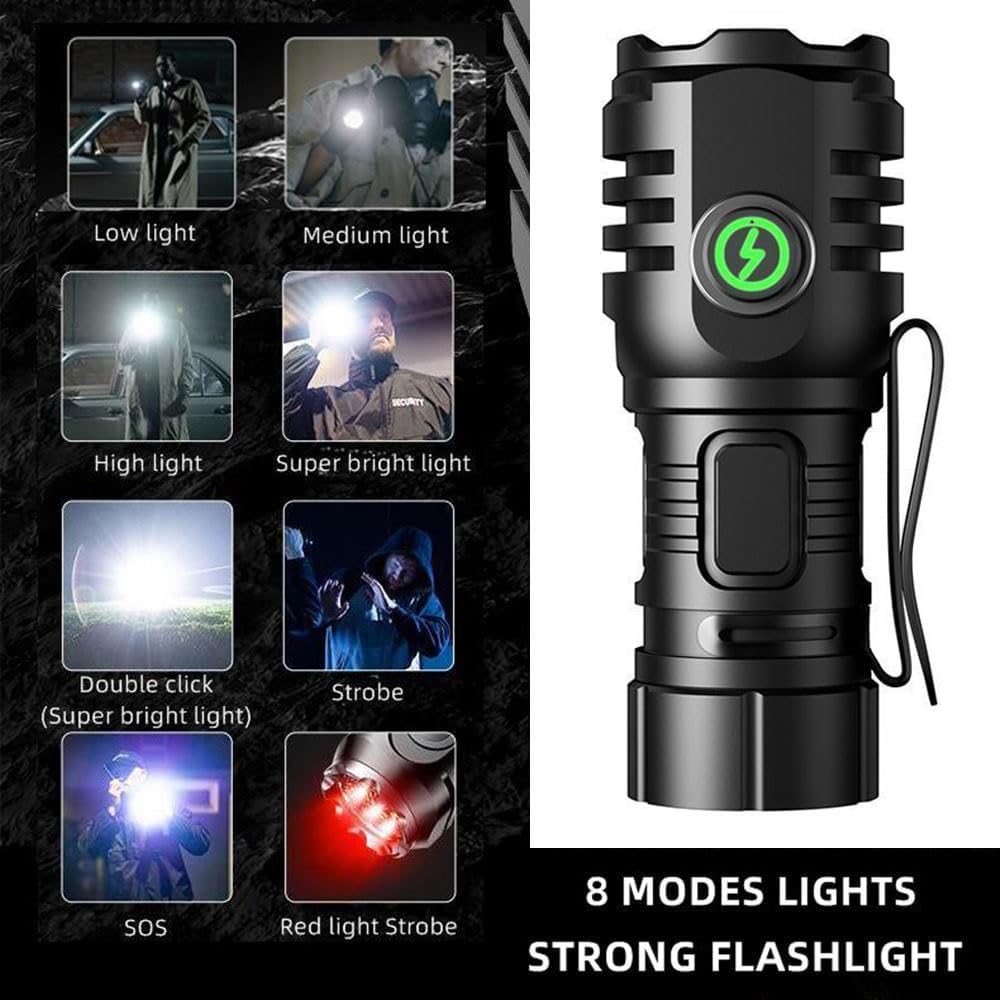
Rajah 3: 8 Lighting Modes. This visual guide illustrates the different illumination levels and special modes available, including various brightness settings, a super bright mode activated by a double click, strobe, SOS, and a red light strobe.
- Untuk Menghidupkan/Mematikan: Press the rubber switch once to turn the flashlight on. Press again to turn it off.
- Untuk Menukar Mod: While the flashlight is on, press the rubber switch repeatedly to cycle through the following modes: Low light → Medium light → High light → Super bright light → Strobe → SOS → Red light Strobe.
- Double Click for Super Bright: From any mode, quickly double-click the rubber switch to activate the Super Bright light mode instantly.
4.2 Magnetic Tail Feature
The flashlight is equipped with a strong tail magnet, allowing it to be securely attached to metal surfaces for hands-free operation.

Rajah 4: Strong Tail Magnet. This image demonstrates the powerful magnet located at the tail of the flashlight, which allows it to be adsorbed onto any iron surface, providing a secure hold and freeing your hands.
- Simply place the tail of the flashlight against any ferrous metal surface.
- The strong magnet ensures it stays in place, even with its small and lightweight body.
4.3 Klip Poket
The integrated pocket clip provides convenient carrying options.
- Attach the flashlight to your pocket, belt, hat brim, or other gear for easy access.
5. Penyelenggaraan
5.1 Pembersihan
- Lap badan lampu suluh dengan lembut, damp kain.
- Jangan gunakan pembersih atau pelarut yang melelas.
5.2 Mengecas
- Recharge the flashlight when the light output becomes dim or the indicator light signals low battery.
- Always use the Type-C USB port for charging.
5.3 Tahan Air
The ALONEFIRE H64 has an IPX5 waterproof rating.
- It is resistant to splashing water and can be used in rainy weather.
- Do not immerse the flashlight in water.
6. Penyelesaian masalah
- Lampu suluh tidak menyala:
- Ensure the battery is charged. Connect to a USB-C power source and check the charging indicator (red for charging, green for full).
- Press the rubber switch firmly. - Flashlight is dim or battery life is short:
- The battery may be low. Recharge the flashlight fully.
- Ensure the flashlight is not operating in an extremely cold environment, which can affect battery performance. - Flashlight is not charging:
- Ensure the USB-C cable is properly connected to both the flashlight and the power source.
- Try a different USB-C cable or power adapter.
- Penting: This flashlight may not charge with all fast-charging USB adapters. If charging fails, try connecting it to a standard (slower) USB charger or a computer's USB port. The indicator light should turn red when charging correctly. - Flashlight gets hot during use:
- It is normal for the flashlight to generate some heat, especially in higher brightness modes. If it becomes excessively hot, turn it off and allow it to cool down.
7. Spesifikasi

Rajah 5: Compact Design. This image emphasizes the mini size and lightweight nature of the ALONEFIRE H64, showing it comfortably fitting in the palm of a hand and stating its weight as only 39g.
| Ciri | Spesifikasi |
|---|---|
| Nombor Model | H64 |
| Jenama | SENDIRIAN |
| Jenis Sumber Cahaya | LED (4 LED) |
| Sumber Kuasa | Dikuasakan Bateri (Boleh dicas semula) |
| Port Pengecasan | USB Jenis-C |
| bahan | Aloi Aluminium |
| Penilaian Kalis Air | IPX5 (Resistant to splashing water, not submersible) |
| Hayat Bateri | Approximately 2.5 - 5 hours (depending on mode) |
| Dimensi | 8.1 x 5.79 x 2.9 cm |
| Berat badan | 18 g (product only), 39 g (as per image) |
| Ciri Khas | Rechargeable, Metal Holding Clip, Strong Tail Magnet |
8. Maklumat Waranti
ALONEFIRE products are manufactured to high-quality standards. Specific warranty details may vary by region and retailer. Please retain your proof of purchase for any warranty claims. For detailed warranty terms, refer to the documentation provided at the time of purchase or contact your retailer.
9. Sokongan
For further assistance, technical support, or inquiries regarding your ALONEFIRE H64 Mini LED Flashlight, please contact the retailer where you purchased the product. You may also visit the official ALONEFIRE website for general information and support resources.