
1. Pengenalan
Thank you for choosing the BORUIT ET28 Tactical Multi-Color Rechargeable Flashlight. This manual provides essential information for the safe and efficient operation, maintenance, and care of your new device. Please read it thoroughly before use and retain it for future reference.

Imej 1.1: Selesaiview of the BORUIT ET28 Tactical Multi-Color Rechargeable Flashlight.
2. Persediaan
2.1. Unboxing dan Pemeriksaan Awal
Upon receiving your BORUIT ET28 flashlight, carefully unbox all components and inspect for any signs of damage. The package should contain the flashlight, a USB-C charging cable, and a belt clip.
Video 2.1: An unboxing demonstration of the BORUIT ET28 flashlight, showing the contents of the package including the flashlight, charging cable, and wrist strap.
2.2. Pemasangan Bateri
The flashlight is equipped with a rechargeable Lithium Polymer battery. Before first use, ensure the battery insulator is removed.
- Tanggalkan penutup ekor lampu suluh.
- Remove the plastic battery insulator from the battery.
- Masukkan bateri dengan hujung positif (+) menghadap ke arah kepala lampu suluh.
- Skrukan penutup ekor dengan kemas semula.
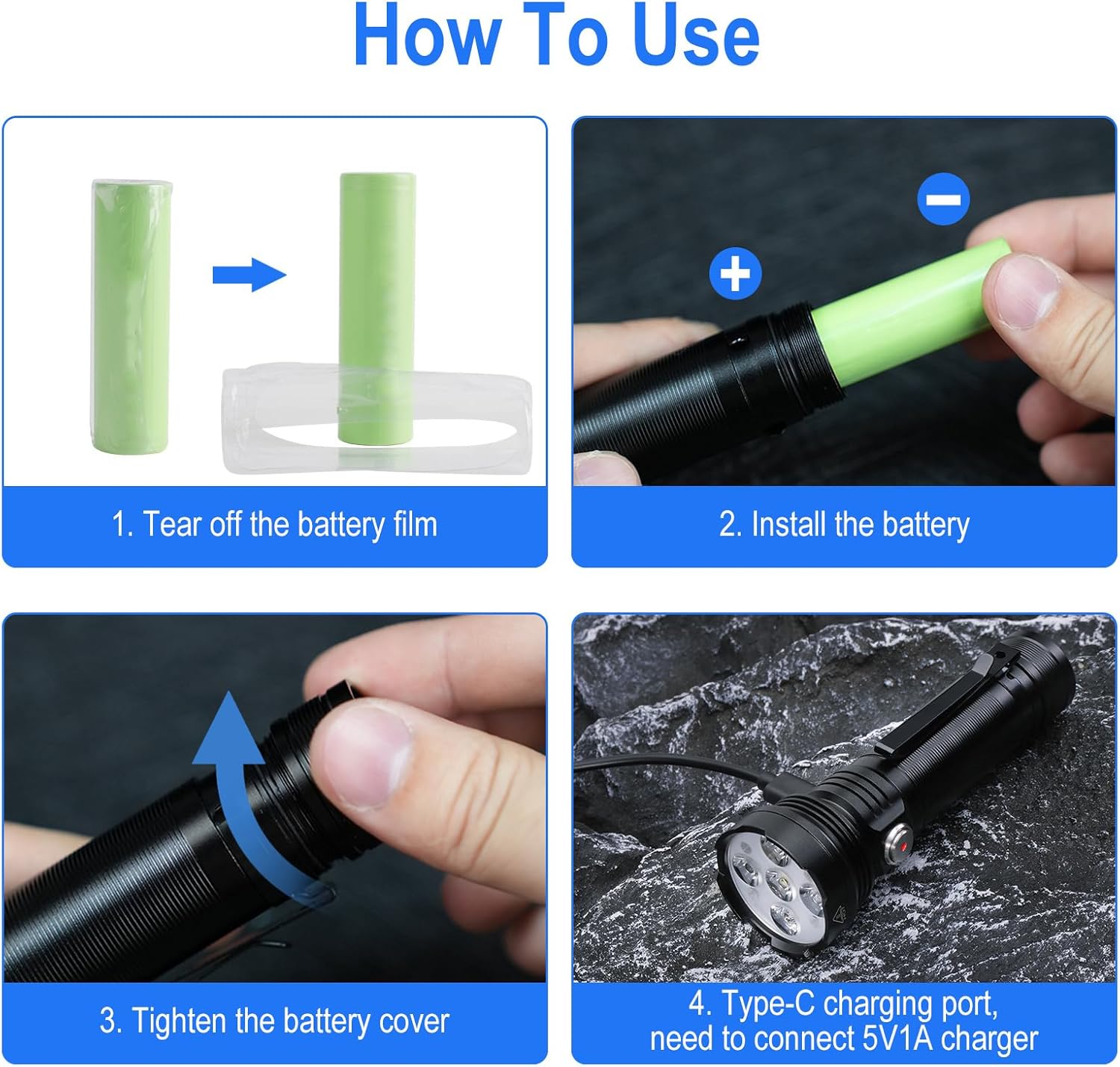
Image 2.2: Step-by-step guide for battery installation and initial charging of the flashlight.
2.3. Arahan Mengecas
The ET28 flashlight features a USB-C charging port. A full charge takes approximately 1.5 hours.
- Locate the USB-C charging port on the side of the flashlight, usually covered by a rubber tab.
- Open the rubber tab and connect the provided USB-A to USB-C charging cable to the flashlight and a 5V/1A power source.
- Lampu penunjuk akan berkelip merah semasa mengecas.
- The indicator light will turn solid green when fully charged.
- Close the rubber tab securely after charging to maintain the waterproof rating.

Image 2.3: Visual representation of the flashlight's charging status indicators (red for charging, green for full) and battery life for various modes.
3. Arahan Operasi
The BORUIT ET28 offers 10 light modes, including white light with adjustable brightness, multiple color lights, and a red and blue flashing mode.
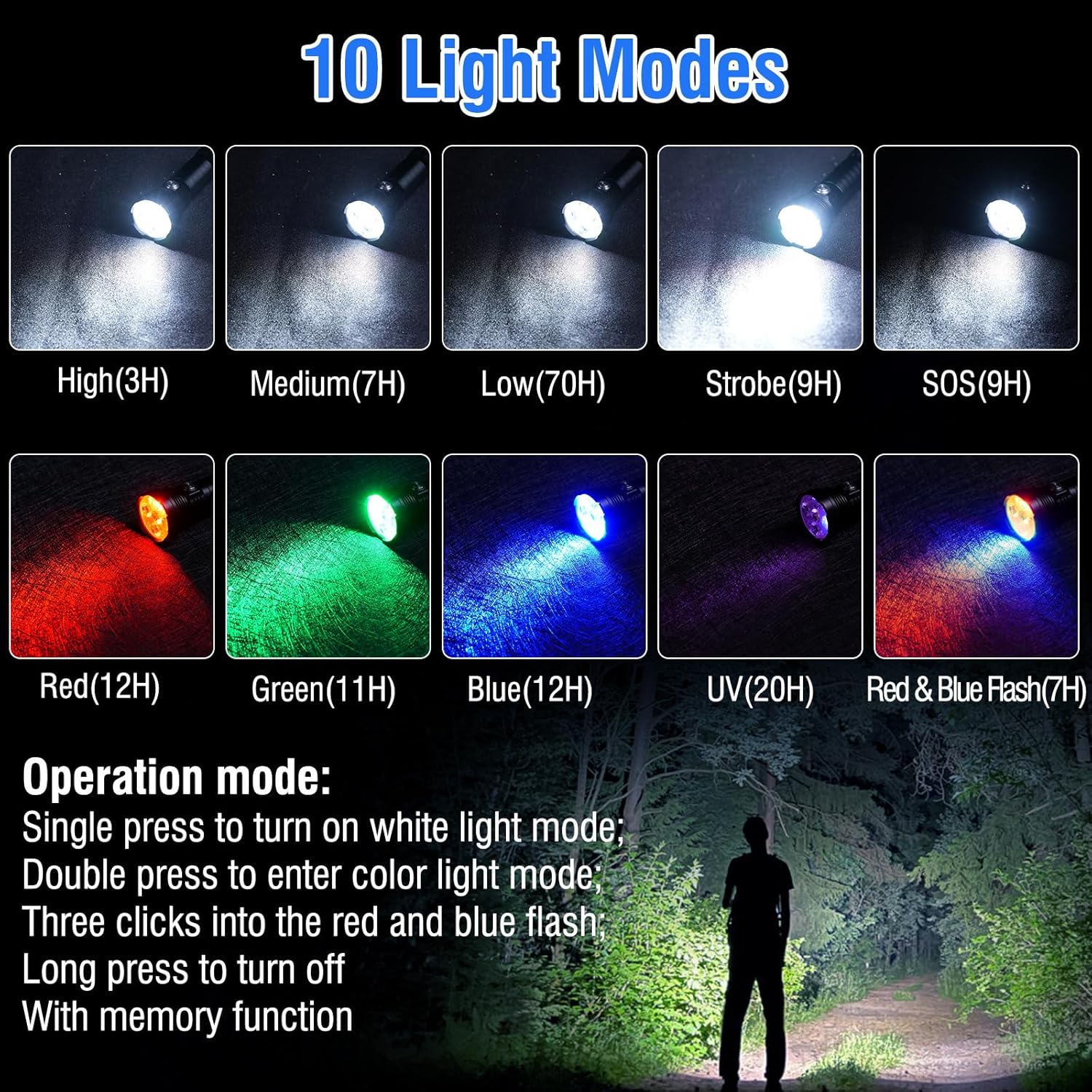
Image 3.1: Diagram illustrating the 10 light modes and basic operation of the flashlight.
3.1. Power On/Off and White Light Modes
- Untuk Menghidupkan: Single click the power button to activate the white light mode.
- To Cycle White Light Brightness: While in white light mode, single click the power button to switch between High, Medium, Low, Burst Flash, and SOS.
- Untuk Mematikan: Long press the power button for approximately 2 seconds in any mode.
Video 3.2: Demonstration of the BORUIT ET28 flashlight's white light modes, showcasing its brightness levels in an outdoor setting.
3.2. Color Light Modes
The ET28 features Red, Green, Blue, and UV light modes for various applications.
- To Enter Color Light Mode: From the OFF state, double click the power button.
- To Cycle Color Lights: While in color light mode, single click the power button to switch between Red, Green, Blue, and UV.

Imej 3.3: Cthamples of how different color lights (blue for fishing, red/green for observing animals, UV for detection, white for daily use) can be applied.
Video 3.4: A demonstration of the BORUIT ET28 flashlight's various color light modes, including red, green, blue, and UV, in an indoor setting.
Video 3.5: Tayangan video menegakasing the five color modes of the BORUIT ET28 flashlight, demonstrating each color's appearance.
3.3. Red and Blue Flashing Mode
This mode is useful for signaling or emergency situations.
- Untuk Mengaktifkan: From the OFF state, triple click the power button.
- Untuk Mematikan: Tekan lama butang kuasa.
3.4. Fungsi Memori
The flashlight has a memory function. If you use any mode for more than 10 seconds, the flashlight will remember that mode. When you turn it off and then turn it on again, it will resume the last used mode.
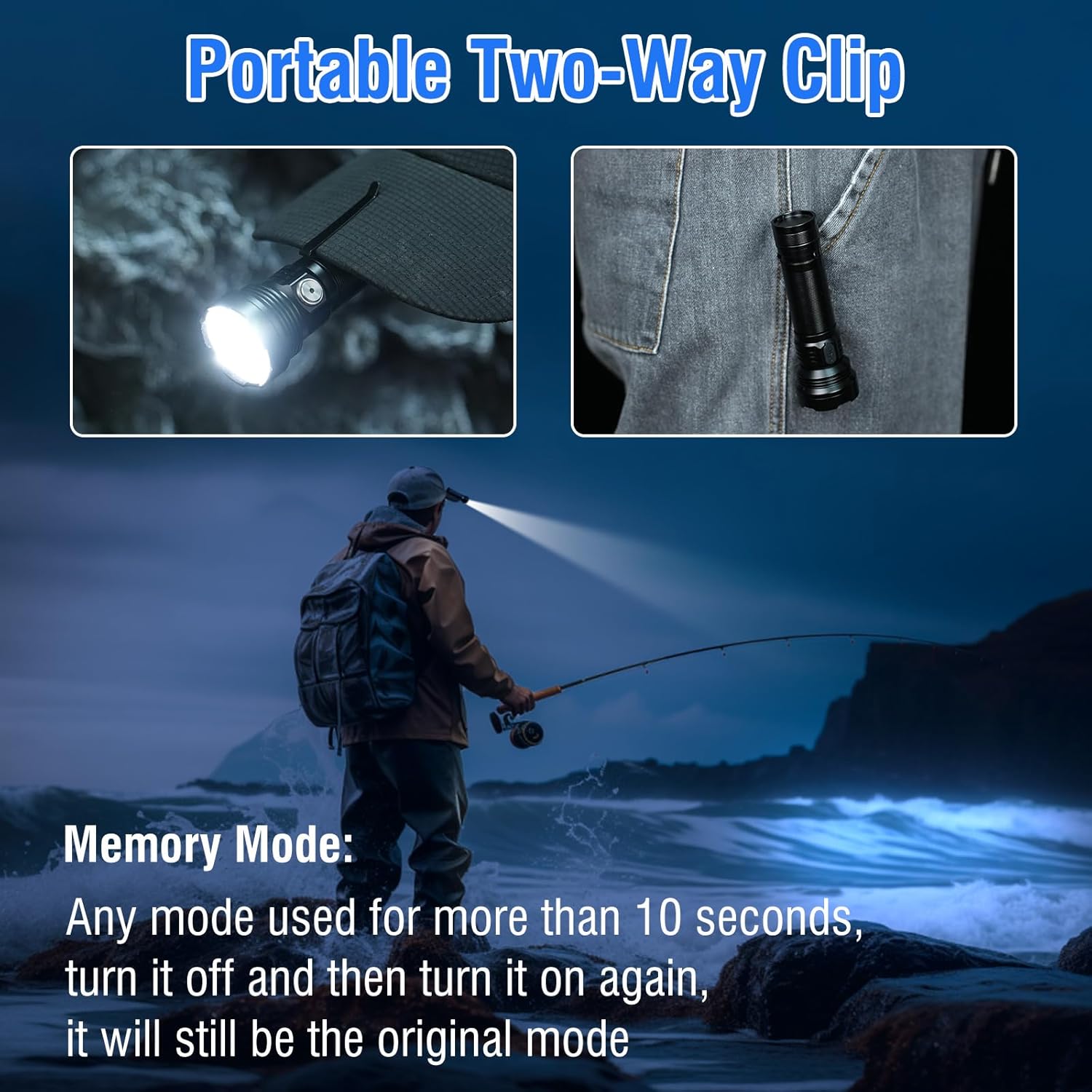
Image 3.6: The flashlight featuring a portable two-way clip for versatile attachment and illustrating the memory mode function.
4. Penyelenggaraan
4.1. Pembersihan
Lap lampu suluh dengan lembut, damp cloth. Do not use abrasive cleaners or solvents. Ensure the USB-C port cover is closed when cleaning to prevent water ingress.
4.2. Kalis air
The BORUIT ET28 is IP67 waterproof, meaning it is protected from dust and can withstand immersion in water up to 1 meter for 30 minutes. Always ensure the USB-C charging port cover is securely closed to maintain its waterproof integrity.

Image 4.1: The flashlight demonstrating its IP67 waterproof capability and highlighting its durable aluminum alloy construction.
4.3. Penjagaan Bateri
To prolong battery life, avoid fully discharging the battery frequently. Recharge the flashlight regularly, especially if it has not been used for an extended period.
5. Penyelesaian masalah
- Lampu suluh tidak dihidupkan: Ensure the battery insulator has been removed and the tail cap is securely tightened. Check if the battery is charged.
- Cahaya malap atau berkelip-kelip: Bateri mungkin lemah. Isi semula lampu suluh.
- Pengecasan tidak berfungsi: Ensure the USB-C cable is properly connected to both the flashlight and the power source. Try a different cable or power adapter.
6. Spesifikasi
| Ciri | Spesifikasi |
|---|---|
| Jenama | BORUIT |
| Nombor Model | ET28 |
| bahan | aluminium |
| Jenis Sumber Cahaya | LED |
| Kecerahan Putih | 2000 Lumen |
| Bilangan Lampu | 5 (White, Red, Green, Blue, UV) |
| Sumber Kuasa | Dikuasakan Bateri (termasuk 1 bateri Polimer Litium) |
| Kapasiti Bateri | 2000 mAh |
| Port Pengecasan | USB-C |
| Tahap Ketahanan Air | IP67 Kalis Air |
| Dimensi Produk | 4.7"D x 1.57"W x 1.57"H |
| Berat Barang | 5.3 auns |
| Ciri Khas | Adjustable Light Modes, High Power, Long Range, Multi-color, Rechargeable, Two-way Clip, Magnet |
7. Waranti dan Sokongan
For warranty information or technical support, please refer to the contact details provided with your purchase or visit the official BORUIT webtapak. Simpan bukti pembelian anda untuk tuntutan waranti.