
pengenalan
This manual provides detailed instructions for the setup, operation, and maintenance of your MageGee SKY 87 75% Mechanical Gaming Keyboard. Designed for both gaming and office use, this compact 87-key keyboard features tactile brown switches, ice blue LED backlighting, and broad compatibility.
1. Persediaan
1.1 Kandungan Pakej
- MageGee SKY 87 Mechanical Gaming Keyboard
- USB-A Cable (Wired Connection)
- Keycap Puller (for maintenance)
1.2 Menyambung Papan Kekunci
The MageGee SKY 87 keyboard uses a wired USB-A connection. To connect:
- Plug the USB-A cable into the USB port on the keyboard.
- Connect the other end of the USB-A cable to an available USB port on your computer (PC, Mac, or laptop).
- Papan kekunci ini boleh dipasang dan digunakan dan akan dikenali secara automatik oleh sistem pengendalian anda.
2. Arahan Operasi
2.1 Kawalan Pencahayaan Latar
The keyboard features ice blue LED backlighting with multiple modes and adjustable settings.
- Change Backlighting Mode: Tekan Fn + PrtSc to cycle through 20 preset ice blue backlighting modes.
- Laraskan Kecerahan: Tekan Fn + ↑ (Up Arrow) untuk meningkatkan kecerahan, dan Fn + ↓ (Down Arrow) untuk mengurangkan kecerahan.
- Laraskan Kelajuan Aliran: Tekan Fn + - to decrease flowing speed, and Fn + = to increase flowing speed (for dynamic modes).

Image: The MageGee SKY 87 keyboard showcasing its vibrant ice blue LED backlighting and customizable light effects.
2.2 Tactile Brown Switches
The keyboard is equipped with tactile brown switches, offering a balanced typing experience with a noticeable bump without a loud click, suitable for both typing and gaming.

Imej: Dari dekat view of the keyboard demonstrating the tactile brown switches and a keycap puller for easy removal.
2.3 Ergonomic Design and Side Lighting
The keyboard features stepped keycaps and a two-stage adjustable stand for ergonomic comfort. Additionally, an ice blue LED light strip on the bottom provides enhanced visual effects.

Image: The keyboard highlighting its distinctive ice blue side lighting, which enhances the aesthetic in low-light conditions.

Image: An illustration detailing the two-step adjustable keyboard feet, allowing users to set the keyboard at high or low angles for personalized comfort.
2.4 Compact TKL Layout (87 Keys)
The 75% Tenkeyless (TKL) design provides a compact footprint with 87 keys, including independent arrow keys, saving desk space while retaining essential functionality.
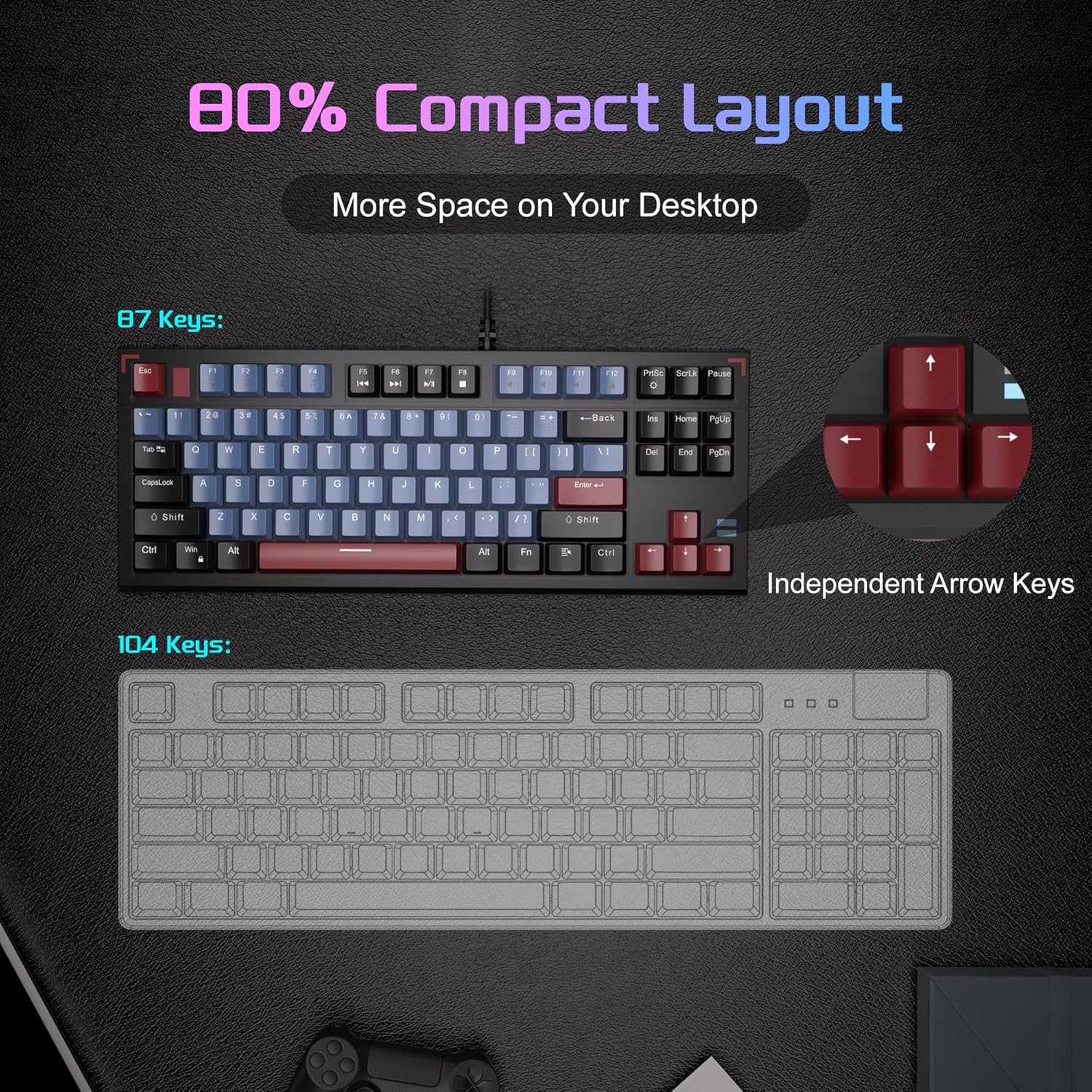
Image: A visual comparison illustrating the compact 87-key layout of the MageGee SKY 87 keyboard next to a standard 104-key keyboard, emphasizing space-saving benefits.
2.5 Penggulingan N-Key (Anti-Ghosting)
The keyboard supports 100% N-key rollover, meaning all keys can be pressed simultaneously without conflict, ensuring every keystroke is registered accurately during intense gaming or fast typing.

Image: A diagram showing how multiple key presses are registered simultaneously without ghosting, highlighting the N-key rollover feature.
2.6 Pintasan Multimedia
Access various multimedia functions using the Fn key in combination with the F-keys.
| Gabungan Kunci Fungsi | Penerangan |
|---|---|
| Fn + F1 | Komputer Saya |
| Fn + F2 | Cari |
| Fn + F3 | Kalkulator |
| Fn + F4 | Pemain Media |
| Fn + F5 | Trek Sebelumnya |
| Fn + F6 | Trek Seterusnya |
| Fn + F7 | Main/Jeda |
| Fn + F8 | Berhenti |
| Fn + F9 | bisu |
| Fn + F10 | Kelantangan Kurang |
| Fn + F11 | Kelantangan Naik |
| Fn + F12 | Kunci Skrin |

Image: The keyboard layout highlighting the F-keys and their corresponding multimedia functions when used with the Fn key.
3. Penyelenggaraan
3.1 Membersihkan Papan Kekunci
To ensure optimal performance and longevity, regular cleaning is recommended.
- Putuskan sambungan papan kekunci daripada komputer anda sebelum membersihkan.
- Gunakan berus lembut atau udara termampat untuk membuang habuk dan serpihan dari antara penutup kekunci.
- For stubborn dirt, gently wipe the keycaps and keyboard surface with a slightly damp, kain bebas bulu. Elakkan kelembapan berlebihan.
- Jangan gunakan bahan kimia atau pembersih kasar.
3.2 Penanggalan dan Penggantian Penutup Kekunci
The included keycap puller can be used to remove and replace keycaps for cleaning or customization.
- Pasangkan penarik penutup kekunci dengan lembut pada penutup kekunci yang ingin anda tanggalkan.
- Pull straight up with even pressure until the keycap detaches from the switch.
- Untuk memasangnya semula, sejajarkan penutup kekunci dengan batang suis dan tekan ke bawah dengan kuat sehingga ia klik pada tempatnya.

Image: The keyboard with some keycaps removed, illustrating the possibility of customization or deep cleaning.
4. Penyelesaian masalah
If you encounter issues with your MageGee SKY 87 keyboard, refer to the following common solutions:
- Papan Kekunci Tidak Membalas:
- Pastikan kabel USB disambungkan dengan selamat ke kedua-dua papan kekunci dan komputer.
- Cuba palamkan papan kekunci ke port USB lain pada komputer anda.
- Mulakan semula komputer anda.
- Lampu Latar Tidak Berfungsi atau Tidak Betul:
- Check if the brightness is set too low (Fn + ↑/↓).
- Cycle through lighting modes using Fn + PrtSc.
- Kunci Khusus Tidak Berfungsi:
- Remove the keycap and check for any obstructions or debris around the switch.
- Jika masalah berterusan, hubungi sokongan pelanggan.
5. Spesifikasi
| Ciri | Perincian |
|---|---|
| Jenama | MageGee |
| Nombor Model | LANGIT 87 |
| Teknologi Ketersambungan | USB-A (Berwayar) |
| Penerangan Papan Kekunci | mekanikal |
| Jenis Suis | Tactile Brown Switches |
| Bilangan Kunci | 87 |
| Susun atur papan kekunci | QWERTY |
| Pencahayaan latar | Ice Blue LED (Single Color) |
| Ciri Khas | Backlit, Ergonomic, Multimedia Keys, Portable |
| Peranti Serasi | Laptop, PC (Windows, Mac) |
| Dimensi Produk (L x W x H) | 14.37" x 5.51" x 1.69" |
| bahan | Akrilonitril Butadiena Stirena (ABS) |
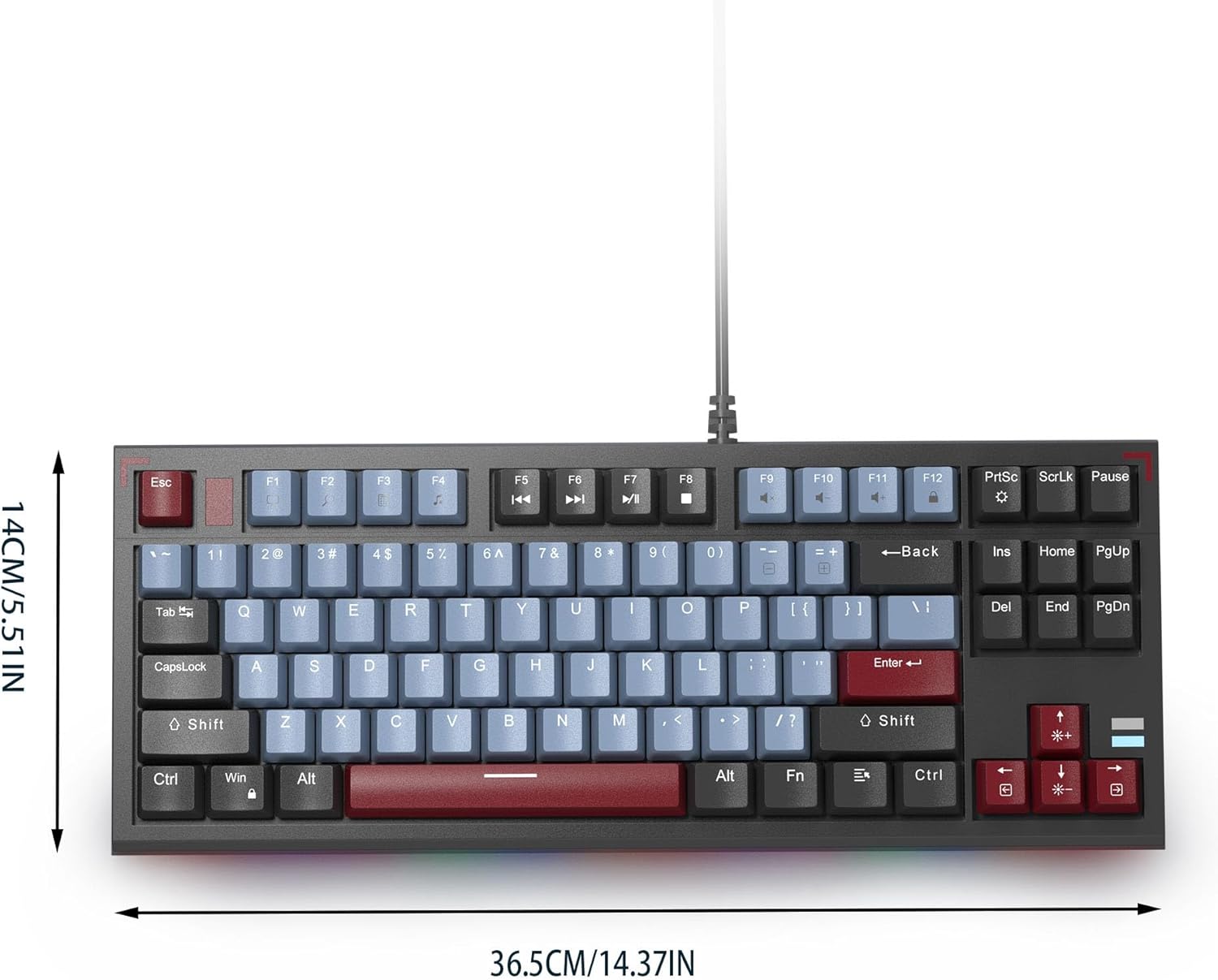
Image: The MageGee SKY 87 keyboard with its physical dimensions clearly indicated.
6. Waranti dan Sokongan
For warranty information and technical support, please refer to the official MageGee webtapak atau hubungi perkhidmatan pelanggan mereka secara langsung. Simpan resit pembelian anda untuk tuntutan waranti.