
1. Pengenalan
This manual provides detailed instructions for the installation, operation, and maintenance of your Loddery 9.7 Inch Android 13 Car Stereo Radio. This unit is specifically designed for Chevrolet Chevy Cruze models from 2009 to 2015, ensuring seamless integration with your vehicle's existing systems. Please read this manual thoroughly before installation and use to ensure proper function and safety.
2. Ciri-ciri Produk
- Keserasian Kenderaan: Designed for Chevrolet Chevy Cruze 2009, 2010, 2011, 2012, 2013, 2014, and 2015 models with a 9.7-inch touch screen radio.
- Integrated Smartphone Connectivity: Supports both wired and wireless Android Auto and Apple CarPlay for seamless integration with your smartphone.
- Paparan Definisi Tinggi: Features a 9.7-inch TFT Capacitive Touch Screen for clear visibility and easy access to all functions.
- Kefungsian Skrin Pisah: Membenarkan penggunaan serentak dua aplikasi, seperti navigasi dan main balik muzik.
- Bluetooth Stereo Music: Supports A2DP for high-quality stereo music streaming, Bluetooth Music Control (play/pause/previous/next), phonebook download and search, and call records.
- Kesambungan Internet: Supports 4G and 3G internet access.
3. Apa yang ada di dalam Kotak
Pakej termasuk komponen berikut:
- 9.7 Inch Android 13 Car Stereo Radio Unit
- Kabel Kuasa
- Kabel Input/Output RCA
- 2 Kabel USB
- Kabel Input Kamera
- Kabel Sambungan Radio
- Antena GPS
- Manual Arahan
- Penyesuai USB
- Kotak Canbus
- Wheat Head (Microphone)
- Car Compass

4. Panduan Pemasangan
Before installation, ensure your vehicle is turned off and the battery is disconnected. Refer to the detailed wiring diagram and installation videos for guidance.
4.1 Initial Setup and Wiring
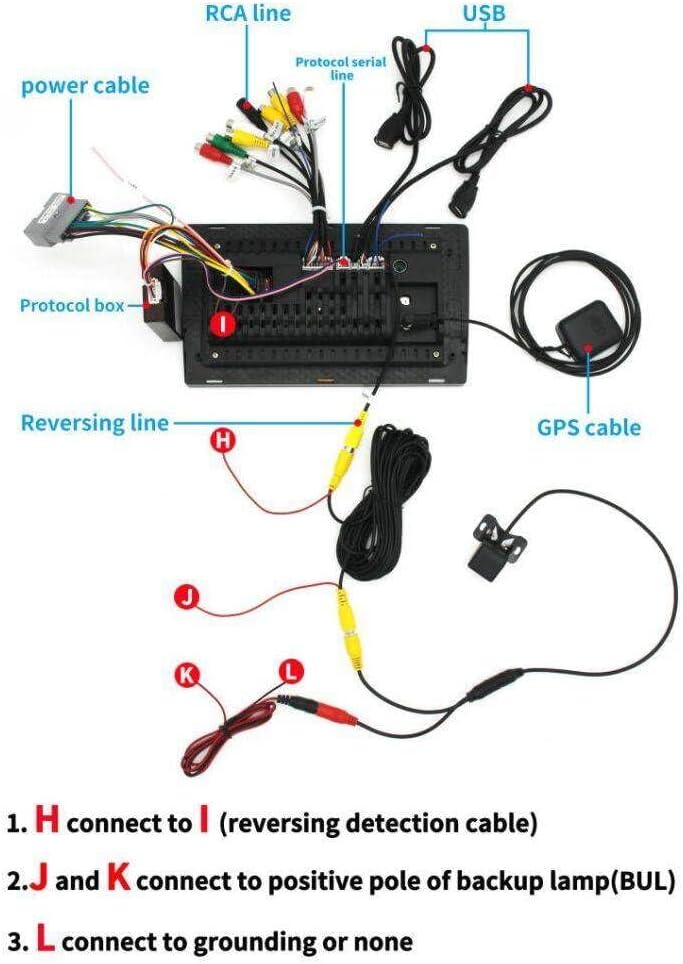
Connect the GPS antenna, 4G antenna, rear camera signal wire, USB cables, RCA cables, microphone, and power cable to the main unit as shown in the wiring diagram. Ensure the Canbus box is correctly connected to the power cable harness.
4.2 Sambungan Canbus
The Canbus box facilitates communication between the stereo and your vehicle's systems, including steering wheel controls. Connect the 8-pin connector from the Canbus box to the corresponding port on the main unit's wiring harness.
4.3 Langkah Pemasangan Umum
- Carefully remove the original car radio and trim panels.
- Connect all necessary cables from the new stereo unit to the vehicle's wiring harness, ensuring secure connections.
- Mount the new stereo unit into the dashboard opening.
- Reinstall the trim panels and secure them.
- Reconnect the vehicle battery and test the unit's functionality.

5. Operasi Asas
5.1 Navigasi Antara Muka Pengguna
The unit features an intuitive Android 13 interface. Swipe left or right on the home screen to access different application pages. Tap on app icons to launch them.
5.2 Fungsi Skrin Pisah
To activate split screen, long-press an application icon and drag it to one side of the screen. Select another application to fill the remaining space, allowing two apps to run simultaneously.
5.3 Kawalan Roda Stereng
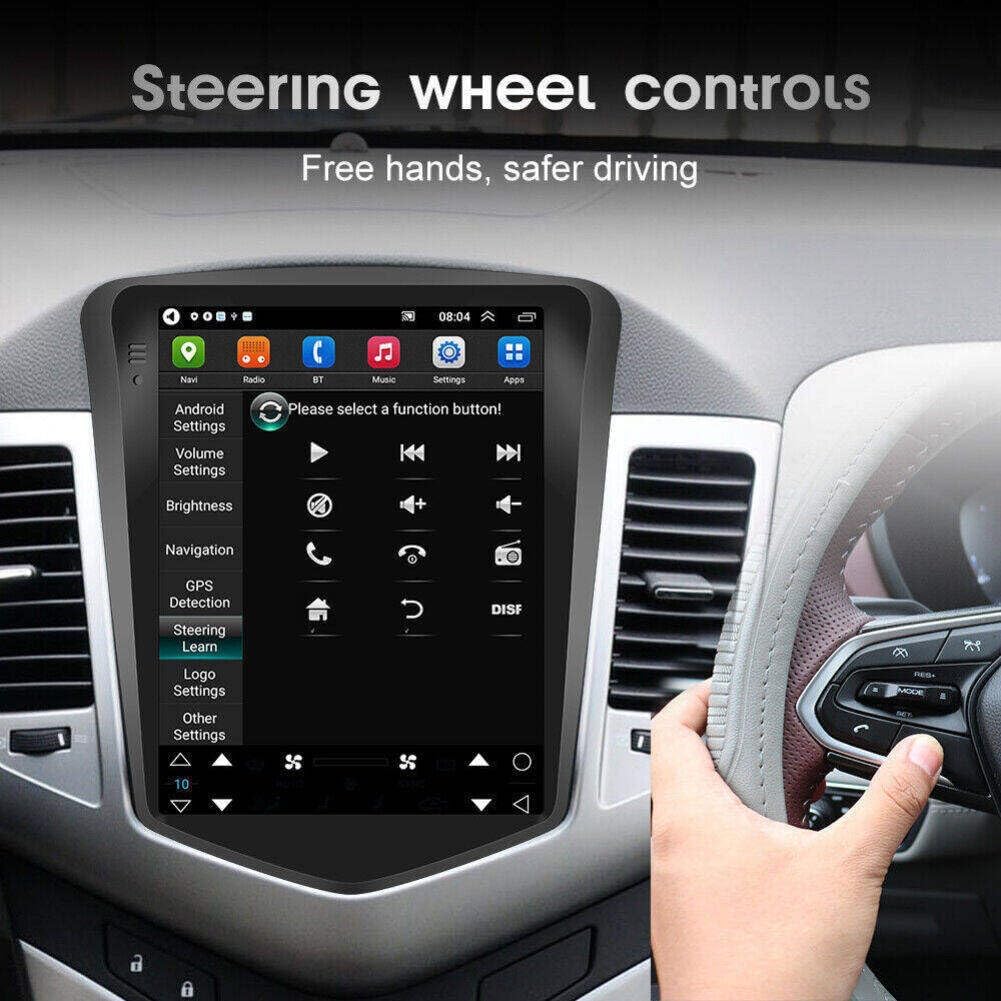
The unit supports your vehicle's factory steering wheel controls. These can be configured in the settings menu under 'Steering Learn' to customize button functions.
6. Ketersambungan
6.1 Sambungan Bluetooth
To connect your smartphone via Bluetooth, navigate to the Bluetooth settings on the stereo. Enable Bluetooth on your phone and search for the device name (e.g., 'CarBT'). Enter the pairing PIN (usually 0000) if prompted. Once connected, you can stream music and make hands-free calls.

6.2 CarPlay Wayarles / Android Auto
The unit supports both wireless Apple CarPlay and Android Auto. Ensure your phone's Bluetooth and Wi-Fi are enabled. On the stereo, open the CarPlay or Android Auto application. Follow the on-screen prompts to connect your device. This allows access to navigation, music, messages, and other apps directly from the stereo display.

6.3 Sambungan Wi-Fi
Connect the stereo to a Wi-Fi network (e.g., your phone's hotspot) to access online features, download apps, and browse the internet. Go to 'Settings' > 'Network & Internet' > 'Wi-Fi' and select your desired network.

7. Navigasi GPS
The car stereo features built-in GPS navigation. You can use pre-installed maps or download your preferred navigation applications via Wi-Fi. The large 9.7-inch screen provides a clear view of maps and directions.

8. Ciri Audio
8.1 FM/RDS Radio
The unit includes an FM/RDS radio tuner. You can scan for stations and save your favorites. RDS (Radio Data System) provides additional information like station name and song title where available.

8.2 DSP Sound
The Digital Sound Processor (DSP) allows for advanced audio customization. Adjust equalizer settings, sound field, and bass enhancement to optimize your listening experience. The unit supports JBL amppenyelamat.
9. Spesifikasi
- Berat Barang: 3.98 paun
- Dimensi Produk: 14.96 x 11.81 x 6.3 inci
- Nombor Model Item: QA1217X-5974-1403034001
- Saiz Paparan: 9.7 Inci
- Perintah Suara: Skrin sentuh
- Teknologi Ketersambungan: Bluetooth, USB, Wi-Fi
- Jenis Peta: Worldwide / Street
- Mod Output Audio: Stereo
- Jenis Pemasangan: Pemasangan Papan Pemuka
10. Penyelesaian masalah
If you encounter any issues during installation or operation, please refer to the detailed wiring diagram provided in the picture and ensure all connections are secure. Some cars may require specific wiring harnesses for installation. For further assistance, please contact customer service.
11. Waranti dan Sokongan
For any questions or support needs, please contact Loddery customer service. Detailed contact information can be found on the product packaging or the official Loddery webtapak. Sila simpan bukti pembelian anda untuk tuntutan waranti.