
Loddery QA1572X-5974-1417104221
Loddery 9.7-inch Car Radio Stereo User Manual
Model: QA1572X-5974-1417104221
For Dodge Ram 1500, 2500, 3500 (2013-2018) with Manual AC
1. Pengenalan
This manual provides comprehensive instructions for the installation, operation, and maintenance of your Loddery 9.7-inch Car Radio Stereo. Please read this manual thoroughly before using the product to ensure proper function and safety. Keep this manual for future reference.

Image 1.1: Loddery 9.7-inch Car Radio Stereo main unit.
2. Maklumat Keselamatan
- Ensure the vehicle is turned off and the battery is disconnected before installation to prevent electrical shorts or damage.
- Pemasangan profesional disyorkan untuk prestasi dan keselamatan yang optimum.
- Jangan kendalikan peranti dengan cara yang mengalih perhatian anda daripada memandu. Sentiasa mengutamakan keselamatan jalan raya.
- Elakkan daripada mendedahkan unit kepada suhu yang melampau, cahaya matahari langsung untuk tempoh yang lama, atau lembapan.
- Gunakan hanya aksesori dan pendawaian tertentu yang disediakan bersama unit ini.
3. Kandungan Pakej
Sahkan bahawa semua item yang disenaraikan di bawah terdapat dalam pakej anda:
- Main Head Unit (9.7-inch Car Radio Stereo)
- Kabel Kuasa
- Kabel Input/Output RCA
- Kabel USB (2)
- Kabel Input Kamera
- Kabel Penyesuai Radio
- Antena GPS
- Manual Arahan
- Kabel Penyesuai USB
- Microphone (Wheat head)
- Kotak Canbus

Image 3.1: Included components with the Loddery Car Radio Stereo.
4. Keserasian
This Loddery 9.7-inch Car Radio Stereo is specifically designed for the following vehicle models:
- Dodge Ram 1500 (Years: 2013, 2014, 2015, 2016, 2017, 2018)
- Dodge Ram 2500 (Years: 2013, 2014, 2015, 2016, 2017, 2018)
- Dodge Ram 3500 (Years: 2013, 2014, 2015, 2016, 2017, 2018)
Nota Penting: This unit is only compatible with vehicles equipped with Manual Air Conditioning (AC) controls. It is not compatible with vehicles that have Automatic AC controls.

Image 4.1: Visual guide for vehicle compatibility, highlighting manual AC requirement.
5. Persediaan dan Pemasangan
Installation of the Loddery Car Radio Stereo involves replacing the factory head unit. While the unit is designed for a plug-and-play experience in compatible vehicles, professional installation is highly recommended.
5.1 Langkah Pra-Pemasangan
- Putuskan Sambungan Bateri: Before beginning any electrical work, disconnect the negative terminal of your vehicle's battery to prevent electrical shorts.
- Remove Factory Unit: Carefully remove the existing factory radio and trim panels according to your vehicle's service manual.
- Periksa Pendawaian: Familiarize yourself with the vehicle's wiring harness and the provided wiring for the new unit.
5.2 Sambungan Pendawaian
Connect the provided cables to the corresponding ports:
- Kabel kuasa: Connect the main power harness to the vehicle's wiring. Ensure all connections are secure.
- Kotak Canbus: Connect the Canbus box as instructed to ensure proper communication with vehicle systems (e.g., steering wheel controls).
- Antena GPS: Pasang antena GPS di lokasi yang jelas view langit, biasanya pada papan pemuka atau di bawah cermin depan.
- Kabel USB: Connect the USB cables for external devices and Carplay/Android Auto functionality.
- Input Kamera: Jika memasang bahagian belakang view camera, connect its video output to the camera input cable.
- mikrofon: Sambungkan mikrofon luaran untuk kualiti panggilan dan arahan suara yang dipertingkatkan.
- Penyesuai Radio: Connect the radio antenna adapter.
- Kabel RCA: Sambungkan kabel input/output RCA untuk luaran amplifiers or video sources if applicable.
5.3 Selepas Pemasangan
- Unit Selamat: Carefully install the new head unit into the dashboard opening.
- Sambung semula Bateri: Sambung semula terminal negatif bateri kenderaan.
- Kuasa Awal Hidup: Turn on the vehicle's ignition and power on the stereo.
- Penentukuran Skrin Sentuh: Upon first startup, you may see a crosshair with numbers. Touch each number in sequence to calibrate the touchscreen.
- Fungsi Ujian: Verify all functions (radio, audio, touchscreen, steering wheel controls, GPS, Bluetooth, Carplay/Android Auto) are working correctly.
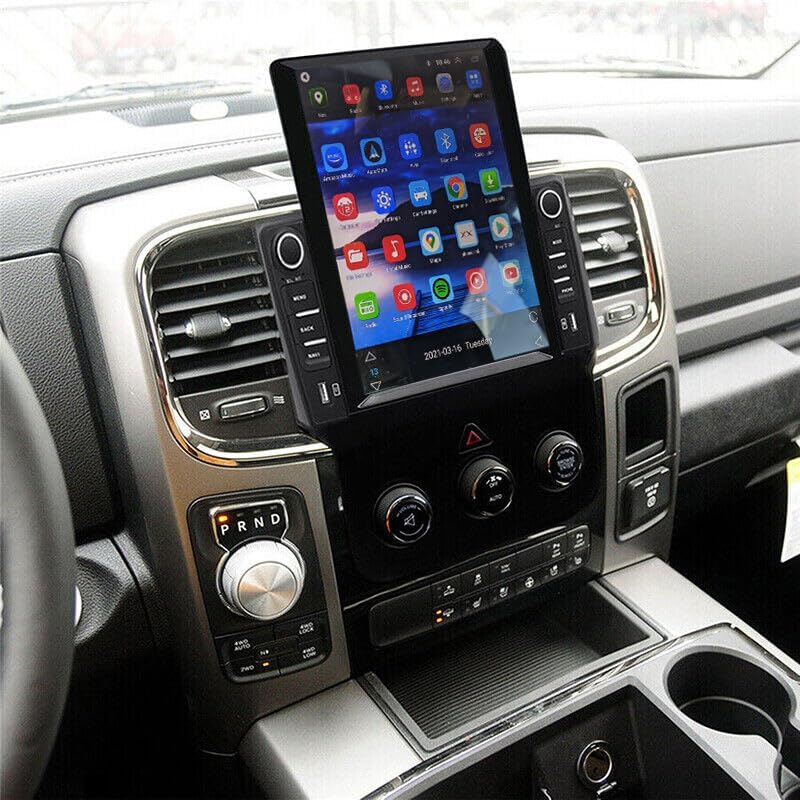
Imej 5.1: Cthample of the Loddery Car Radio Stereo installed in a compatible vehicle.
6. Arahan Operasi
6.1 Operasi Asas
- Hidupkan/Mati Kuasa: Press and hold the power button (usually a knob or dedicated button) to turn the unit on or off. A short press may mute/unmute audio.
- Kawalan Kelantangan: Putar tombol kelantangan atau gunakan kawalan skrin sentuh untuk melaraskan tahap audio.
- Antara muka skrin sentuh: Navigate through menus and applications by tapping, swiping, and dragging on the 9.7-inch display.
- Kawalan Roda Stereng: If properly connected via the Canbus, your vehicle's steering wheel controls for volume, track change, and mode selection should function.
6.2 CarPlay dan Android Auto
The unit supports both wired and wireless Apple CarPlay and Android Auto, integrating your smartphone's features directly into the stereo display.
6.2.1 Apple CarPlay (for iOS devices)
- Sambungan Wayarles: Enable Bluetooth on your iPhone and pair it with the car stereo. Once paired, open the "ZLINK" application on the stereo to initiate CarPlay.
- Sambungan Berwayar: Connect your iPhone to one of the USB ports using a certified USB cable. Open the "ZLINK" application if it doesn't launch automatically.
- ciri-ciri: Access navigation, make calls, send/receive messages, listen to music, and use Siri voice assistant.
6.2.2 Android Auto (for Android devices)
- Sambungan Wayarles: Ensure Android Auto is installed on your Android phone. Enable Bluetooth and pair your phone with the car stereo. Open the Android Auto application on the stereo.
- Sambungan Berwayar: Connect your Android phone to one of the USB ports using a certified USB cable. The Android Auto application on the stereo should launch automatically.
- ciri-ciri: Access navigation, make calls, send/receive messages, listen to music, and use Google Assistant voice commands.

Imej 6.1: Selesaiview of CarPlay and Android Auto functionality.

Image 6.2: User interfaces for Apple CarPlay and Android Auto.
6.3 GPS Navigation and WiFi
The unit features built-in GPS for navigation and WiFi connectivity for online services.
- Navigasi GPS: Access pre-installed offline maps or use online navigation applications after connecting to WiFi. The GPS antenna ensures accurate positioning.
- Sambungan WiFi: Connect the stereo to a mobile hotspot or a local WiFi network to access online maps, stream content, and download applications.

Image 6.3: GPS navigation and WiFi connectivity options.
6.4 Kefungsian Bluetooth
Bluetooth 5.0 allows for hands-free calling, music streaming, and phonebook synchronization.
- Berpasangan: Go to the Bluetooth settings on the stereo and your phone. Cari untuk available devices and select the stereo's name to pair.
- Panggilan Bebas Tangan: Once paired, you can make and receive calls directly through the stereo, utilizing the built-in or external microphone.
- Main Balik Muzik: Stream audio from your paired device to the stereo.
- Buku telefon: The stereo can automatically download your phone's contacts for easy access.

Image 6.4: Bluetooth interface for calls and music.
6.5 Ciri Tambahan
- Radio RDS FM: Tune into FM radio stations with RDS (Radio Data System) support for station information.
- 1080P HD Video Playback: Play high-definition video files daripada peranti USB yang disambungkan.
- Skrin Pisah: Utilize the split-screen function to run two applications simultaneously (e.g., navigation and music player).
- AHD Belakang View Sokongan Kamera: Connect a compatible AHD rear view camera for enhanced parking assistance. The display will automatically switch to the camera feed when reversing.
- Sokongan ADAS DVR (Pilihan): If an optional ADAS DVR is connected, the system can provide anti-collision warnings, front vehicle distance prediction, and lane departure warnings.
- Tire Pressure Detection (Optional): With an optional TPMS sensor kit, the unit can display real-time tire pressure and temperature data.
- Bluetooth OBD II (Optional): Connect an optional Bluetooth OBD II scanner to retrieve real-time vehicle data and diagnostic trouble codes.

Image 6.5: ADAS DVR functionality for driving safety.

Imej 6.6: Selesaiview of optional auxiliary systems.
7. Penyelenggaraan
- Pembersihan Skrin: Gunakan kain lembut dan tidak berbulu untuk mengelap skrin sentuh dengan lembut. Untuk calitan degil, sedikit dampen kain dengan air atau pembersih selamat skrin. Elakkan bahan kimia yang keras.
- Kemas Kini Perisian: Semak kemas kini perisian daripada pengilang secara berkala untuk memastikan prestasi optimum dan akses kepada ciri baharu.
- Penjagaan Am: Keep the unit free from dust and debris. Avoid placing heavy objects on the unit or exposing it to excessive force.
8. Penyelesaian masalah
Bahagian ini menangani isu biasa yang mungkin anda hadapi. Untuk masalah yang tidak disenaraikan di sini, sila hubungi sokongan pelanggan.
| Masalah | Kemungkinan Punca | Penyelesaian |
|---|---|---|
| Unit tidak dihidupkan. | Incorrect wiring; Blown fuse; Vehicle battery disconnected. | Check power connections and fuses. Ensure vehicle battery is connected. |
| Tiada output audio. | Volume too low; Mute function active; Speaker wiring issue. | Tingkatkan kelantangan. Periksa sama ada bisu aktif. Sahkan sambungan pembesar suara. |
| CarPlay/Android Auto not connecting or unstable. | Incorrect app (ZLINK for CarPlay); Bluetooth not paired; Faulty USB cable; Phone settings. | Ensure correct app is open (ZLINK for iOS, Android Auto for Android). Verify Bluetooth pairing. Try a different USB cable. Check phone's Carplay/Android Auto settings. Restart phone and stereo. |
| Isyarat GPS lemah atau tidak tepat. | Antena GPS terhalang atau tidak dipasang dengan betul. | Pastikan antena GPS mempunyai jernih view langit dan disambungkan dengan selamat. |
| Skrin sentuh tidak responsif atau tidak tepat. | Calibration needed; Software glitch. | Perform touchscreen calibration (if prompted on startup). Restart the unit. If a reset button is available (often a small pinhole), use it. |
| Screen washed out in bright daylight. | High ambient light conditions. | Adjust brightness/contrast settings in the display menu. Consider anti-glare screen protectors or vehicle window tinting for severe cases. |
9. Spesifikasi
| Ciri | Perincian |
|---|---|
| Jenama | Loddery |
| Nama Model | 9.7 inch Car Radio Stereo for Dodge Ram 1500 2500 3500 2013 2014 2015 2016 2017 2018 |
| Nombor Model Item | QA1572X-5974-1417104221 |
| Saiz Paparan | 9.7 Inci |
| Dimensi Produk | 14.96 x 12.2 x 6.69 inci |
| Berat Barang | 4.13 paun |
| Teknologi Ketersambungan | Bluetooth, Ethernet, USB, Wi-Fi |
| Ciri Khas | Wireless & Wired Carplay, Wireless & Wired Android Auto, Built-in GPS, WiFi, DSP, Camera Input, Microphone, Steering Wheel Control, 1080P HD Video Playback, Split Screen, Dual USB Input, FM RDS Radio |
| Mod Keluaran Audio | Stereo |
| Jenis Pemasangan | Pemasangan Papan Pemuka |
| Komponen yang Disertakan | Car compass (Note: This refers to the digital compass feature, not a physical compass) |
| Jenis Perkhidmatan Kenderaan | Car (Dodge Ram 1500/2500/3500, 2013-2018, Manual AC) |
10. Waranti dan Sokongan
For any questions or concerns regarding your Loddery Car Radio Stereo, please contact customer support. The manufacturer provides support for product inquiries.
Waranti: If you have any questions, please feel free to contact the manufacturer.
For technical assistance or warranty claims, refer to the contact information provided with your purchase documentation or visit the official Loddery support webtapak.
Ask a question about this manual
Ask about setup, troubleshooting, compatibility, parts, safety, or missing instructions. Manuals+ will review the question and use this page’s manual context to help answer it.