
1. Pengenalan
This manual provides instructions for the proper use and maintenance of your Air Choice remote control. This remote is designed for use with Air Choice portable air conditioner models NPLN11A-05C/X1E(8K) (8,000 BTU) and NPLN11A-06C/X1E(10K) (10,000 BTU).
Please read this manual thoroughly before operating the remote control to ensure correct usage and to prevent damage.
2. Produk Lebihview
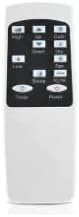
Rajah 2.1: Depan view of the Air Choice remote control. It features a digital display at the top, showing temperature and mode settings. Below the display are various control buttons for power, mode, fan speed, temperature adjustment, and timer functions.

Rajah 2.2: Seorang pro sampinganfile of the Air Choice remote control, illustrating its compact and ergonomic shape designed for comfortable handling.

Rajah 2.3: This image shows the rear section of the Air Choice remote control, likely indicating the battery compartment or a general back view.
3. Persediaan
3.1 Pemasangan Bateri
- Cari penutup petak bateri di belakang alat kawalan jauh.
- Luncurkan penutup ke bawah atau tekan selak untuk membukanya.
- Masukkan dua bateri AAA (tidak disertakan), pastikan terminal positif (+) dan negatif (-) sepadan dengan gambar rajah di dalam petak.
- Gantikan penutup petak bateri, pastikan ia terpasang dengan selamat pada tempatnya.
Nota: Sentiasa gunakan bateri baharu dan gantikan kedua-dua bateri pada masa yang sama. Jangan campurkan bateri lama dan baharu atau jenis bateri yang berbeza.
4. Arahan Operasi
Point the remote control directly at the air conditioner's receiver window. Ensure there are no obstructions between the remote and the unit.
4.1 Fungsi Butang
- Butang Kuasa: Menghidupkan atau MATI penghawa dingin.
- Butang Mod: Cycles through available operating modes (e.g., Cool, Fan, Dry, Heat - if applicable to your AC model).
- Butang Kelajuan Kipas: Melaraskan kelajuan kipas (cth, Rendah, Sederhana, Tinggi, Auto).
- Temperature Up/Down Buttons (▲/▼): Meningkatkan atau mengurangkan tetapan suhu yang dikehendaki.
- Butang Pemasa: Sets the auto-on or auto-off timer function. Press repeatedly to cycle through timer settings or to cancel.
- Butang Tidur: Activates or deactivates the sleep mode, which adjusts temperature and fan speed for comfortable sleep.
- Butang Ayun: Controls the louver swing function (if available on your AC model).
4.2 Penunjuk Paparan
The remote control's LCD screen displays current settings such as:
- Current temperature setting.
- Operating mode icon.
- Fan speed indicator.
- Timer status.
- Battery level indicator (if available).
5. Penyelenggaraan
5.1 Membersihkan Alat Kawalan Jauh
- Lap permukaan alat kawalan jauh dengan kain lembut dan kering.
- Do not use liquid cleaners, abrasive cleaners, or chemical sprays, as these may damage the remote.
5.2 Penggantian Bateri
Replace batteries when the remote control's range decreases or if the display becomes dim. Refer to Section 3.1 for battery installation instructions.
- Remove old batteries promptly to prevent leakage.
- Buang bateri terpakai mengikut peraturan tempatan.
6. Penyelesaian masalah
| Masalah | Kemungkinan Punca | Penyelesaian |
|---|---|---|
| Alat kawalan jauh tidak berfungsi. | Bateri mati atau tidak dipasang dengan betul. | Gantikan bateri, pastikan polariti yang betul. |
| Limited remote control range. | Weak batteries or obstruction. | Replace batteries. Remove any objects blocking the signal path to the AC unit. |
| Air conditioner not responding. | Remote not pointed at AC unit, or AC unit is off. | Ensure remote is aimed directly at the AC unit. Check if the AC unit is powered on. |
7. Spesifikasi
- Dimensi Produk: 4.9 x 0.98 x 1.57 inci
- Berat Barang: 1.13 auns
- Nombor Model: 06937590205826
- Sumber Kuasa: 2 x Bateri AAA (tidak termasuk)
- Peranti Serasi: Air Choice Portable Air Conditioners NPLN11A-05C/X1E(8K) and NPLN11A-06C/X1E(10K)
- Ciri Khas: Reka bentuk ergonomik
8. Sokongan dan Jaminan
Air Choice is committed to providing reliable products and customer support.
- Perkhidmatan Pelanggan: Quick replies within 24 hours for inquiries.
- Dasar Penggantian: 12-month replacement available from the date of purchase.
- Sokongan Teknikal: Lifetime after-sales service and technical assistance.
For further assistance, please contact Air Choice customer support through the retailer's platform or the official Air Choice webtapak.